


Why AWS Cost Optimization Can’t Wait
Organizations waste an average of 32% of their cloud spend — and for many teams running on Amazon Web Services, that number is climbing silently every month. According to the Flexera 2025 State of the Cloud Report, 84% of organizations cite managing cloud spend as their top challenge, while global cloud waste is projected to reach $44.5 billion in 2025 alone (Harness FinOps in Focus, 2025).
If your AWS bill feels like a black box, you are not alone — but you do not have to accept it.
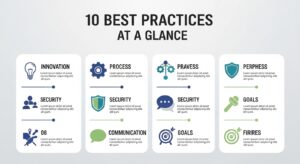
This guide delivers the most actionable AWS cost optimization best practices available in 2026, structured around 10 proven strategies used by Fortune 500 teams, high-growth startups, and FinOps practitioners across the USA, UK, and UAE. Whether you are a CTO, DevOps engineer, cloud architect, or FinOps practitioner, this guide will help you reduce your AWS bill by 30–70% using a combination of native tools, pricing model changes, and architectural improvements — all aligned with the AWS Well-Architected Framework.
Featured Snippet
AWS cost optimization best practices include right-sizing instances, leveraging Savings Plans and Reserved Instances, eliminating idle resources, using Spot Instances for fault-tolerant workloads, and implementing S3 lifecycle policies. Enabling cost allocation tags and AWS Budgets ensures full visibility. Together, these strategies can reduce AWS bills by 30–70%.
Understanding How AWS Billing Works (Before You Optimize)
Before diving into optimization tactics, it is essential to understand why AWS costs grow — often faster than teams realise.
Pay-As-You-Go Model Explained
AWS operates on a pay-as-you-go model, meaning you are billed for every resource you provision, every API call you make, every GB of data you transfer, and every second your compute instances run. While this model offers unmatched flexibility, it also creates an environment where costs scale with both your growth and your inefficiency.
The core billing dimensions include:
- Compute — EC2 instance hours, Lambda invocations, container runtime
- Storage — S3 objects, EBS volumes, RDS storage
- Data Transfer — Egress charges, cross-region transfers, CloudFront distribution
- Managed Services — RDS, ElastiCache, OpenSearch licensing and usage
- Support Plans — Developer, Business, Enterprise On-Ramp tiers
Common Cost Drivers You’re Likely Missing
The biggest cost drivers in AWS environments are rarely the obvious ones. Teams are usually aware of their large EC2 instances but frequently overlook:
- Unused Elastic IPs — charged when not attached to a running instance
- Orphaned EBS volumes — snapshots and volumes left behind after instance termination
- Uncompressed S3 data — storing unoptimised logs, images, and backups at Standard tier rates
- Cross-region data transfer — costs that compound silently with microservice architectures
- NAT Gateway charges — per-GB processing fees that spike with high-throughput applications
- Idle RDS instances — databases running 24/7 for workloads that operate 8 hours a day
- Over-provisioned Lambda memory — over-allocating memory increases cost per invocation
- Forgotten development environments — test/dev stacks left running over weekends
Understanding these hidden cost vectors is the foundation of any serious aws cost management best practices programme.
AWS Cost Optimization Best Practices — The Complete Framework
1. Achieve Full Cost Visibility with Tagging and CUR
The single most impactful first step in any AWS cost optimization journey is achieving complete visibility.
Without knowing which teams, projects, applications, or environments are generating costs, every other optimisation effort is blind. The AWS Cost and Usage Report (CUR) — the most granular billing dataset AWS provides — combined with a well-enforced cost allocation tagging strategy gives you the foundation for everything that follows.
Implementation Steps:
- Define a mandatory tagging taxonomy: Environment, Team, Project, CostCentre, Application, Owner
- Enable the AWS Cost and Usage Report in your S3 bucket with hourly granularity
- Use AWS Config to enforce tagging compliance with managed rules
- Activate AWS Cost Explorer to visualise spend by tag dimension
- Set up AWS Organizations for multi-account cost visibility and consolidated billing
- Feed CUR data into Amazon Athena or a BI tool (QuickSight, Grafana) for custom dashboards
2. Right-Size Your EC2 and RDS Instances
Right-sizing is consistently cited as one of the fastest ways to reduce AWS costs, yet it remains underutilised because most teams provision for peak load and never revisit their instance selections.
Right-sizing means matching your instance type and size to the actual CPU, memory, network I/O, and disk throughput requirements of your workload — not what you think it might need. According to INNOMIZE, teams that systematically right-size see 20–40% reductions in compute costs, with zero performance degradation.
Implementation Steps:
- Enable AWS Compute Optimizer — it analyses CloudWatch metrics and provides ML-powered right-sizing recommendations for EC2, EBS, Lambda, and ECS
- Review utilisation metrics: target CPU utilisation of 40–70% for most workloads
- Use AWS Cost Explorer’s right-sizing recommendations feature for EC2
- Evaluate instance family migrations (e.g., moving from M5 to M7g Graviton for up to 40% better price/performance)
- Right-size Amazon RDS by reviewing the DatabaseConnections, CPUUtilization, and FreeableMemory CloudWatch metrics
- Schedule non-production instances to stop outside business hours using AWS Instance Scheduler
3. Leverage Reserved Instances and Savings Plans
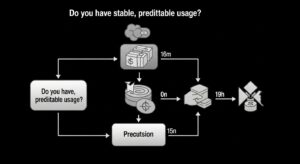
Commitment-based discounts are the highest-leverage pricing optimisation available on AWS, providing savings of up to 72% compared to On-Demand pricing for predictable, steady-state workloads.
AWS offers two primary commitment models:
Savings Plans (AWS’s recommended option):
- Compute Savings Plans — most flexible; apply to EC2, Lambda, Fargate across any region, instance family, or OS. Up to 66% savings.
- EC2 Instance Savings Plans — highest discount (up to 72%) but locked to a specific instance family and region.
- SageMaker Savings Plans — for ML workloads.
Reserved Instances (RIs):
- Standard RIs — up to 72% savings; locked to specific instance type, region, and OS
- Convertible RIs — up to 54% savings; allow instance type changes during the term
- Available for EC2, RDS, ElastiCache, Redshift, and OpenSearch
Implementation Steps:
- Use Cost Explorer’s Savings Plans recommendations and RI recommendations features
- Analyse your last 30–60 days of On-Demand usage to identify stable baseline workloads
- Start with 1-year Compute Savings Plans for maximum flexibility
- Use 3-year No-Upfront RIs for databases (RDS Reserved Instances) with predictable usage
- Monitor utilisation with AWS Budgets Savings Plans and RI utilisation/coverage reports
- Consider Savings Plans queue to stage purchases around your renewal calendar
⚠️ Trade-off
Both Reserved Instances and Savings Plans require a 1–3 year commitment. Analyse at least 60 days of usage data and factor in your organisation’s growth trajectory before committing to avoid over-purchasing.
4. Use Spot Instances for Fault-Tolerant Workloads
Spot Instances provide the deepest discount available in AWS, offering savings of up to 90% compared to On-Demand pricing by utilising spare EC2 capacity. The trade-off is that Spot Instances can be interrupted with a 2-minute warning when AWS reclaims that capacity.
This makes Spot Instances ideal for:
- Batch processing and data pipelines
- CI/CD build workers and test environments
- Big data workloads (EMR, Spark)
- Machine learning training jobs
- Containerised applications with stateless services
- Development and staging environments
Implementation Steps:
- Identify fault-tolerant workloads in your environment
- Use Auto Scaling Groups with mixed instance type and purchase option policies
- Configure Spot Instance diversification — select 5–10 instance types across multiple Availability Zones to maximise availability
- Implement Spot interruption handling via CloudWatch Events and graceful shutdown scripts
- Use EC2 Spot Fleet or EKS Managed Node Groups for container workloads
- Monitor Spot pricing history in AWS Console to identify lowest-volatility pools
5. Implement Auto Scaling to Eliminate Over-Provisioning
Over-provisioning is the single largest source of cloud waste. Teams that manually manage capacity invariably over-provision to protect against unexpected traffic spikes — a rational decision that becomes extremely expensive at scale.
AWS Auto Scaling eliminates this waste by dynamically adjusting resource capacity to match actual demand in real time, ensuring you pay only for what you use.
AWS Auto Scaling covers:
- EC2 Auto Scaling Groups — scale instances in/out based on CloudWatch metrics
- Application Auto Scaling — for ECS tasks, DynamoDB read/write capacity, Lambda concurrency, RDS Aurora replicas
- AWS Auto Scaling (unified) — predictive scaling using ML to anticipate demand
Implementation Steps:
- Replace fixed-size EC2 fleets with Auto Scaling Groups with defined min/max/desired capacity
- Configure Target Tracking Scaling policies targeting 60–70% CPU or request-based metrics
- Enable Predictive Scaling for workloads with recurring patterns (e.g., business-hours traffic)
- Use Scheduled Scaling to pre-scale for known events (product launches, batch windows)
- Rightsize your minimum capacity — most teams set minimums that are 2–3x higher than necessary
- Review scaling activity logs monthly to tune thresholds
6. Optimize S3 Storage with Lifecycle Policies
Amazon S3 is one of the most cost-optimised services AWS offers — if you use its storage classes intelligently. Most teams store all objects in S3 Standard, regardless of how often those objects are accessed, leaving significant savings on the table.
AWS S3 storage class cost comparison (approximate):
- S3 Standard — $0.023/GB/month (baseline)
- S3 Standard-IA — ~46% cheaper; for infrequently accessed data
- S3 Glacier Instant Retrieval — up to 68% cheaper; for archive data with millisecond access
- S3 Glacier Deep Archive — up to 95% cheaper; for long-term retention (7–10+ year compliance archives)
Implementation Steps:
- Enable S3 Intelligent-Tiering for data with unknown or changing access patterns — AWS automatically moves objects between tiers at no retrieval fee
- Create S3 Lifecycle policies to transition objects by age:
- After 30 days → S3 Standard-IA
- After 90 days → S3 Glacier Instant Retrieval
- After 365 days → S3 Glacier Deep Archive
- Enable S3 Lifecycle policy to delete expired objects and incomplete multipart uploads
- Enable S3 Storage Lens for organisation-wide visibility into bucket access patterns
- Compress objects before storage (gzip, Parquet for analytics data)
- Audit S3 bucket versioning — old version accumulation is a silent cost driver
💡 Pro Tip
Moving your log archive and compliance backup buckets from S3 Standard to Glacier Deep Archive cuts storage costs by up to 95% with zero impact on functionality — this is one of the highest-ROI, lowest-effort optimisations available. Learn more about how to optimize your S3 storage costs.
7. Eliminate Idle and Orphaned Resources
Cloud waste is not just about over-provisioning — it is about resources that are doing nothing at all. Idle and orphaned resources are a chronic source of unnecessary spend in AWS environments, particularly in organisations with many teams, accounts, or rapid development cycles.
Common idle/orphaned resource types and their cost impact:
- Unattached EBS volumes — still billed at full storage rate after instance termination
- Unused Elastic IP addresses — charged ~$3.65/month each when not attached
- Idle Elastic Load Balancers — billed hourly even with zero traffic
- Forgotten RDS instances — development databases left running 24/7
- Unused NAT Gateways — billed per hour and per GB processed
- Stale CloudFormation stacks — provisioning infrastructure with no active workload
- Unused Elastic Container Registry images — storage costs accumulate over months
Implementation Steps:
- Use AWS Trusted Advisor (Business/Enterprise support tier) to surface idle EC2 instances, underutilised load balancers, and unassociated Elastic IPs
- Enable AWS Compute Optimizer for idle resource identification
- Use AWS Config to maintain a continuously-updated inventory of all resources
- Create a weekly Cost Anomaly Detection alert for spend increases >10% week-over-week
- Implement a resource lifecycle policy: all non-production resources must have an ExpiryDate tag
- Automate idle resource termination with AWS Lambda scheduled functions or AWS Instance Scheduler
8. Monitor and Alert with AWS Budgets and Cost Anomaly Detection
You cannot control what you do not monitor. Even the best-architected AWS environments drift over time — a new service gets provisioned, an auto-scaling group misbehaves, or a developer forgets to terminate a test cluster. Without proactive monitoring and alerting, these events quietly inflate your AWS bill.
AWS Budgets allows you to set custom cost, usage, and reservation budgets with automated alerts when thresholds are breached. AWS Cost Anomaly Detection uses ML to identify unusual spending patterns, alerting you to anomalies before they appear on your monthly invoice.
Implementation Steps:
- Create an overall monthly cost budget with alerts at 80% and 100% of threshold
- Create service-level budgets for your top 5 cost drivers (EC2, RDS, Data Transfer, S3, Lambda)
- Create team/project budgets aligned with your cost allocation tag taxonomy
- Enable Cost Anomaly Detection at both the AWS account level and service level
- Configure SNS notifications to route budget alerts to Slack, PagerDuty, or your ticketing system
- Review the AWS Cost and Usage Report weekly — not monthly — to catch trends early
- Use Cost Explorer’s 18-month forecasting feature to project future spend against budget
9. Adopt Serverless and Managed Services
Serverless architectures fundamentally change your cost model from capacity-based to consumption-based. Instead of paying for idle compute, you pay only for the exact milliseconds your code runs and the exact invocations made.
AWS Lambda is the flagship serverless service:
- Billed per invocation (first 1 million requests/month free) and per GB-second of compute
- No idle costs — a Lambda function that is not invoked costs nothing
- Scales automatically from zero to thousands of concurrent executions
Serverless cost optimisation for Lambda:
- Right-size Lambda memory — use AWS Lambda Power Tuning (open source) to find the optimal memory/cost balance
- Enable Lambda SnapStart for Java functions to reduce cold starts without oversizing memory
- Use ARM/Graviton2 architecture for Lambda — up to 34% better price/performance
- Monitor Lambda Duration metrics — reduce function execution time to cut costs directly
Other managed services with significant cost advantages:
- Amazon Aurora Serverless v2 — scales to zero, eliminating idle RDS costs for variable workloads
- Amazon DynamoDB on-demand mode — pay-per-request pricing for unpredictable traffic
- AWS Fargate — serverless containers; no EC2 instance management or idle capacity costs
10. Build a FinOps Culture Across Teams
Technology alone will not solve your AWS cost problem. The most successful cost optimisation programmes — from startups in London to enterprises across the Gulf region — share one common trait: cost ownership is embedded into engineering culture, not delegated to a finance team.
FinOps (Cloud Financial Management) is the practice of bringing financial accountability to the variable spend model of cloud, enabling distributed teams to make cost-effective decisions in real time. The FinOps Foundation estimates that organisations with mature FinOps practices reduce cloud waste by 20–30% annually compared to those without.
Implementation Steps:
- Establish a Cloud Centre of Excellence (CCoE) or FinOps team with cross-functional representation (Engineering, Finance, Product)
- Define cost ownership: each team is responsible for the AWS costs attributed to their tags
- Implement monthly cost reviews — present cost metrics alongside performance and reliability metrics in engineering standups
- Create cost efficiency KPIs: cost per user, cost per transaction, cost per deployment
- Use AWS Organizations and Service Control Policies (SCPs) to enforce guardrails at the account level
- Train engineering teams on AWS pricing models — a 2-hour internal workshop often reduces immediate waste by 10–15%
- Celebrate cost wins publicly — recognise teams that achieve meaningful reductions
💡 Pro Tip
The FinOps Foundation’s State of FinOps 2026 report highlights that organisations are increasingly hitting the “big rocks” of waste reduction and now face a high volume of smaller optimisation opportunities — making automation and cultural embedding the next frontier of FinOps maturity.
AWS Cost Optimization Tools You Should Be Using
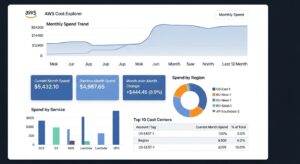
Native AWS Tools (Free)
| Tool | Purpose | Key Feature |
| AWS Cost Explorer | Visualise and analyse costs | 18-month forecasting, right-sizing recommendations |
| AWS Budgets | Set spend thresholds and alerts | Custom budgets by service, tag, RI/SP coverage |
| AWS Trusted Advisor | Best practice recommendations | Idle resource detection, security, fault tolerance |
| AWS Compute Optimizer | ML-powered right-sizing | EC2, EBS, Lambda, ECS recommendations; automation rules |
| AWS Cost and Usage Report (CUR) | Granular billing data | Hourly resource-level cost breakdown |
| Cost Anomaly Detection | ML-based spend alerts | Automatic anomaly detection with root cause |
| AWS Organizations | Multi-account governance | Consolidated billing, SCPs, tag policies |
| CloudWatch | Infrastructure monitoring | Custom metrics for scaling and alerting |
Third-Party Tools Worth Considering
Commercial platforms that extend AWS’s native capabilities:
- Apptio Cloudability / IBM Turbonomic — advanced RI/SP management and rightsizing automation
- CloudHealth by VMware — multi-cloud cost management and governance
- Harness Cloud Cost Management — developer-centric FinOps with CI/CD integration
- nOps — AI-driven Spot and commitment management for AWS
- Spot.io (NetApp) — automated Spot Instance orchestration
- Finout — virtual tag-based cost allocation for granular unit economics
- ProsperOps — autonomous Reserved Instance and Savings Plans management
For most teams under $100K/month AWS spend, native tools provide sufficient capability. Third-party tools deliver measurable ROI at $500K+/month spend levels.
AWS Well-Architected Framework: The Cost Optimization Pillar
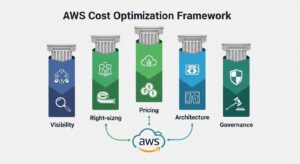
The AWS Well-Architected Framework defines five pillars of cloud architecture excellence: Operational Excellence, Security, Reliability, Performance Efficiency, and Cost Optimization. The Cost Optimization pillar provides a structured methodology for delivering business value at the lowest possible cost.
The five design principles of the Cost Optimization pillar are:
- Implement cloud financial management — dedicate time and resources to FinOps as a discipline
- Adopt a consumption model — pay only for what you use; stop over-provisioning for peak
- Measure overall efficiency — track cost efficiency metrics (cost per output) not just total spend
- Stop spending money on undifferentiated heavy lifting — use managed services to offload operational overhead
- Analyse and attribute expenditure — use tagging, CUR, and Cost Explorer for full attribution
AWS provides a free Well-Architected Tool that runs assessments against these principles and generates a prioritised remediation plan. For enterprises undergoing compliance reviews or cloud governance audits in the USA, UK, or UAE, completing a Well-Architected Review for cost is increasingly a prerequisite for cloud-at-scale programmes.
✅ Best Practice
Schedule a Well-Architected Review every 6–12 months as your architecture evolves. Many AWS Partner Network (APN) partners offer free initial reviews, with remediation engagements available for identified high-risk items. Reference: AWS Well-Architected Framework.
Cost Optimization Best Practices by AWS Service
EC2 Cost Optimization
EC2 typically represents 30–50% of total AWS spend. Key strategies:
- Instance family selection: Graviton (ARM) instances offer 20–40% better price/performance than x86 equivalents
- Mixed purchase strategy: On-Demand baseline + Savings Plans + Spot burst
- Instance scheduling: Stop dev/test instances outside business hours (saves ~70% of their compute cost)
- EBS volume optimisation: Delete unattached volumes; use gp3 over gp2 (20% cheaper, 3x performance)
- Elastic IP hygiene: Release all unattached EIPs immediately
S3 Cost Optimization
S3 costs include storage, requests, data retrieval, and replication. Key strategies:
- Enable S3 Intelligent-Tiering for buckets with unpredictable access patterns
- Implement lifecycle policies for systematic tier transitions
- Enable Requester Pays for data-sharing buckets where external parties bear retrieval costs
- Use S3 Storage Lens to identify buckets with low access rates and high storage costs
- Compress and deduplicate before storage — Parquet + Snappy compression can reduce analytics data by 60–80%
To learn more, see our guide on how to optimize your S3 storage costs using native AWS features.
RDS Cost Optimization
RDS can be one of the most expensive AWS services if left unmanaged. Key strategies:
- Purchase RDS Reserved Instances for production databases (up to 69% savings on 3-year term)
- Use Aurora Serverless v2 for variable or intermittent workloads — scales to 0.5 ACUs during low traffic
- Stop non-production RDS instances on a schedule (using AWS Instance Scheduler)
- Enable RDS Proxy to reduce connection overhead and instance sizing requirements
- Right-size using Performance Insights and Compute Optimizer RDS recommendations
- Use Aurora I/O-Optimized for I/O-intensive workloads with predictable high I/O — eliminates per-I/O charges
Lambda Cost Optimization
Lambda billing is based on number of requests + GB-seconds of compute duration. Key strategies:
- Use AWS Lambda Power Tuning to find the optimal memory configuration
- Enable Provisioned Concurrency only for latency-sensitive functions (use Savings Plans to offset cost)
- Use ARM/Graviton2 architecture — 20% cheaper per GB-second, often faster
- Minimise cold starts through efficient initialisation code and dependency bundling
- Set appropriate function timeouts — runaway Lambda functions at 15-minute max timeout are a common cost anomaly
- Use Lambda SnapStart for Java workloads to reduce cold start duration without oversizing
Common AWS Cost Optimization Mistakes to Avoid
Even experienced cloud teams make these costly mistakes:
- Buying Reserved Instances without analysing usage patterns — purchasing RIs for workloads that are being migrated or decommissioned wastes the commitment payment
- Ignoring data transfer costs — inter-AZ traffic, NAT Gateway charges, and cross-region replication fees compound rapidly and are easy to overlook in Cost Explorer
- Treating cost optimisation as a one-time project — cloud costs are dynamic; optimisation must be a continuous process, not a quarterly sprint
- Optimising compute while ignoring storage and network — EC2 is visible, but S3, EBS, and data transfer often represent 30–40% of total spend
- No tagging enforcement — without tag policies and Config rules, tagging compliance degrades to 40–60% within months, destroying cost attribution
- Over-relying on Spot Instances without interruption handling — teams that adopt Spot without graceful shutdown logic face data loss and availability incidents
- Missing the multi-account view — organisations with dozens of AWS accounts that lack AWS Organizations consolidated billing lose visibility into their largest optimisation opportunities
- Ignoring the AWS Cost and Usage Report — relying solely on the AWS Console billing dashboard misses the granular resource-level data needed for meaningful optimisation
Real-World Results: What Companies Save with These Best Practices
While individual results vary by architecture and baseline efficiency, the following savings ranges are consistently reported across enterprises and growth-stage companies:
Enterprise (USA/UK/UAE, $500K+/month AWS spend):
- Right-sizing EC2 and RDS: 20–40% reduction in compute costs
- Savings Plans and Reserved Instances: 30–72% reduction on eligible compute
- S3 lifecycle policy implementation: 40–70% reduction in storage costs
- Auto Scaling implementation: 25–45% reduction in EC2 spend
- Eliminating idle resources (quarterly audit): 5–15% total bill reduction
- Combined programme (all strategies): 40–70% total bill reduction over 12 months
Growth-Stage Startups ($10K–$100K/month AWS spend):
- Rightsize + Savings Plans: 30–50% reduction
- S3 Intelligent-Tiering: 20–35% storage reduction
- Eliminating dev/test waste: 15–25% total bill reduction
- Combined programme: 25–55% total bill reduction over 6 months
Deloitte’s 2025 TMT Predictions report estimates that companies implementing FinOps tools and practices could collectively save $21 billion in 2025 alone — a figure that underscores the commercial imperative for systematic aws cost reduction strategies.
AWS Cost Optimization Best Practices Comparison Table
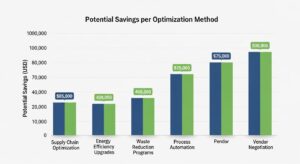
| Optimization Method | Effort Level | Potential Savings | Best For | AWS Tool |
| Right-Sizing | Medium | 20–40% on compute | All teams | Compute Optimizer, Cost Explorer |
| Reserved Instances | Low–Medium | Up to 72% on eligible services | Stable workloads, DBs | Cost Explorer RI Recommendations |
| Savings Plans | Low | Up to 72% on compute | Most teams | Cost Explorer SP Recommendations |
| Spot Instances | Medium–High | Up to 90% on compute | Batch, CI/CD, stateless | EC2 Spot Fleet, ASG |
| S3 Lifecycle Policies | Low | 40–95% on storage | All teams with S3 | S3 Lifecycle, Storage Lens |
| Auto Scaling | Medium | 25–45% on EC2 | Variable workloads | Auto Scaling Groups |
| Serverless Migration | High | 30–70% on eligible workloads | Event-driven, APIs | Lambda, Fargate, Aurora Serverless |
| Tagging & CUR | Medium | Enabler (5–15% through attribution) | All teams | Cost Explorer, AWS Config |
| Idle Resource Elimination | Low | 5–15% total bill | All teams | Trusted Advisor, Compute Optimizer |
| FinOps Culture | High | 20–30% annually (sustained) | Organisations | AWS Organizations, Budgets |
Frequently Asked Questions (FAQ)
Q: What are the most impactful AWS cost optimization best practices?
The highest-impact practices include right-sizing EC2 and RDS (20–40% savings), using Savings Plans for steady workloads (up to 72% savings), and removing idle resources (5–15% bill reduction). Cost allocation tags and the AWS Cost and Usage Report provide the visibility needed to drive all optimisations.
Q: How much can you save by following AWS cost optimization best practices?
Organisations that apply AWS cost optimization best practices consistently typically reduce their AWS spend by 30–70% within 12 months, depending on workload type, baseline efficiency, and commitment strategy.
Q: Are Reserved Instances or Savings Plans better for cost optimization?
Savings Plans are recommended for most compute workloads due to flexibility across instance types, regions, and operating systems. Reserved Instances offer similar discounts but are better suited for services like Amazon RDS, Redshift, and ElastiCache. Use Savings Plans for EC2 and RIs for databases.
Q: How do I identify idle resources in AWS?
Use AWS Trusted Advisor to find idle EC2 instances, EBS volumes, Elastic IPs, and load balancers. AWS Compute Optimizer and AWS Cost Explorer help detect over-provisioned and low-utilisation resources, often revealing 5–15% of wasted spend.
Q: What is FinOps and how does it relate to AWS cost optimization?
FinOps (Cloud Financial Management) is the practice of bringing financial accountability to cloud spending by enabling engineering, finance, and business teams to make cost-efficient decisions collaboratively. Defined by the FinOps Foundation, FinOps transforms AWS cost optimisation from a reactive finance exercise into a proactive engineering discipline. Organisations with mature FinOps practices reduce cloud waste by 20–30% annually compared to those without structured cost governance.
Conclusion — Start Saving on AWS Today
AWS cost optimisation is not a one-time project. It is a continuous discipline that, when embedded into your engineering and financial operations, delivers compounding returns year after year. The AWS cost optimization best practices covered in this guide represent a complete, proven framework:
- Visibility first: Cost allocation tags, CUR, and Cost Explorer form the non-negotiable foundation
- Right-size and remove waste: Compute Optimizer, Trusted Advisor, and quarterly idle resource audits deliver fast, low-risk savings
- Commit strategically: Savings Plans and Reserved Instances convert On-Demand waste into structured, discounted commitments
Start your AWS cost optimization journey today with GoCloud by enabling AWS Cost Explorer and setting up your first Budget alert—two simple actions that take under 30 minutes and instantly improve cost visibility across your organisation. For teams managing costs on Amazon Web Services, native optimization tools often provide everything needed to significantly reduce cloud spend before considering third-party platforms.
If your workloads rely heavily on content delivery, we also recommend reviewing our detailed guide on Amazon CloudFront pricing to understand how CDN costs fit into a broader AWS cost optimization strategy. The foundation for savings is already built—success comes from using it consistently and intelligently with GoCloud.
