


Why Businesses Are Migrating from Google Cloud to AWS
AWS operates 123 Availability Zones across 39 geographic regions — with announced plans for 7 more AZs and 2 additional regions — compared to Google Cloud’s 43 regions and approximately 130 zones. For companies with global user bases, that infrastructure depth translates directly into lower latency, finer-grained high-availability design, and more deployment options in every major market. AWS also commands 28–30% of the global cloud market (Q4 2025), significantly ahead of Google Cloud’s 12–14% — a gap that reflects decades of enterprise investment, partner ecosystem depth, and service breadth that GCP has not yet matched.
GCP to AWS migration is a strategic decision that requires careful technical and business planning. Google Cloud and AWS are not interchangeable platforms — their IAM architectures, networking models, managed service philosophies, and data analytics ecosystems have fundamental differences that demand purposeful remapping, not configuration copy-paste.
Featured Snippet: Migrating from GCP to AWS involves inventorying your Google Cloud workloads, mapping each GCP service to its AWS equivalent, using AWS tools like Application Migration Service (MGN), Database Migration Service (DMS), and DataSync to transfer workloads and data, then cutting over with minimal downtime and post-migration optimization.
“GCP to AWS migration is the process of transferring cloud workloads, applications, databases, containers, and storage from Google Cloud Platform to Amazon Web Services, leveraging AWS’s broader service portfolio and global infrastructure.”
GCP vs AWS — Core Differences That Impact Your Migration
Many engineers assume GCP and AWS are interchangeable cloud providers — but service architectures, networking models, and IAM systems have fundamental differences that require careful remapping, not just copy-paste configuration. Understanding these gaps before migration execution prevents misconfigured security postures, unexpected cost overruns, and operational surprises on cutover day.
Infrastructure Philosophy: GCP Zones vs AWS Availability Zones
GCP organizes compute within Regions → Zones. A GCP zone is an isolated deployment area within a region (e.g., us-central1-a, us-central1-b). GCP’s multi-zone deployment is roughly analogous to AWS multi-AZ deployment — but the abstraction and tooling differ significantly.
AWS Availability Zones are physically separated data centers within a region, connected by low-latency private networking. Each AWS region has a minimum of three AZs, and AWS’s AZ architecture is deeply integrated into services like RDS Multi-AZ, ECS, EKS, and ALB — making multi-AZ resilience a first-class design pattern in AWS documentation, tooling, and community patterns.
The practical implication: multi-zone GCP configurations do not automatically translate to AWS’s multi-AZ equivalent. Each AWS service has its own multi-AZ configuration requirements that must be explicitly mapped during migration.
Global Reach: AWS Regions and AZs vs GCP Regions
| Infrastructure Layer | AWS | GCP |
| Geographic Regions | 39 (+ 2 announced) | 43 |
| Availability Zones / Zones | 123 (+ 7 announced) | ~130 |
| CDN Edge Locations | 400+ (CloudFront PoPs) | 187 network edge locations |
| Dedicated Gov Regions | GovCloud US-East, US-West | Google Cloud Government |
| Compliance Certifications | 143 | ~98 |
While GCP has more regions by count, AWS’s depth within regions (more AZs per region) and edge infrastructure density give it practical latency and availability advantages for globally distributed architectures.
Service Philosophy: GCP’s Managed Approach vs AWS’s Breadth
GCP’s philosophy tends toward opinionated, tightly managed services — BigQuery is a compelling example: fully serverless, zero infrastructure management, automatic scaling. AWS tends toward more options at different levels of management abstraction: Redshift Provisioned (you manage cluster sizing), Redshift Serverless (AWS manages scaling), and Amazon Athena (pure serverless SQL on S3). This breadth gives AWS users more flexibility but requires more deliberate service selection.
Pricing: GCP Committed Use vs AWS Reserved Instances and Savings Plans
| Pricing Mechanism | GCP | AWS |
| Usage-Based Automatic Discounts | Sustained Use Discounts (up to 30%, auto-applied) | None (manual commitment required) |
| Committed Use / Reserved | Committed Use Discounts (CUDs): 1 or 3-year | Reserved Instances: up to 72% (3-yr, all upfront) |
| Flexible Commitment | N/A | AWS Savings Plans: up to 66% |
| Spot / Preemptible | Spot/Preemptible VMs: 60–91% discount | Spot Instances: up to 90% discount |
GCP’s Sustained Use Discounts (SUDs) are automatically applied when instances run more than 25% of the billing month — no commitment required. This is a genuine GCP advantage for variable workloads. However, AWS Reserved Instances deliver deeper maximum discounts (up to 72% vs GCP’s 30% SUD maximum) for predictable workloads, and AWS Savings Plans offer greater flexibility than GCP Committed Use Discounts when instance families or regions change over time.
GCP to AWS Service Mapping: Complete Side-by-Side Reference
The Google Cloud to AWS service mapping is the intellectual core of any migration plan. Understanding what replaces what — and where the architectural gaps are — determines your migration strategy, tooling choices, and timeline. Below is a section-by-section breakdown followed by the master mapping table.
Compute (GCP Compute Engine → Amazon EC2)
GCP Compute Engine maps directly to Amazon EC2. Both offer a wide range of machine types / instance types across general-purpose, compute-optimized, memory-optimized, and GPU configurations. Key EC2 differentiators you gain during migration include:
- AWS Graviton instances: ARM-based instances delivering up to 40% better price/performance for compatible workloads — GCP has no equivalent at this scale.
- Instance breadth: EC2 offers 750+ instance types across 40+ families — the widest selection in cloud computing.
- AWS Application Migration Service (MGN): Automates replication of GCP Compute Engine VMs to EC2 via continuous block-level replication, enabling near-zero-downtime VM migration.
For GCP managed instance groups (equivalent to EC2 Auto Scaling groups), use AWS Auto Scaling with EC2 or ECS.
Containers (GKE → Amazon EKS, Cloud Run → Amazon ECS / App Runner)
Google Kubernetes Engine (GKE) maps to Amazon EKS (Elastic Kubernetes Service). Both run standard Kubernetes — but with different control plane architectures, managed node group configurations, storage class defaults, and IAM integration models (GCP Workload Identity vs AWS IAM Roles for Service Accounts/IRSA).
GCP Cloud Run (fully managed serverless containers) maps to Amazon ECS with Fargate (serverless container execution) or AWS App Runner (the most direct Cloud Run equivalent — deploys containers from ECR or source code with zero cluster management).
Serverless (GCP Cloud Functions → AWS Lambda)
GCP Cloud Functions maps to AWS Lambda. Both execute event-driven code without server management. Lambda supports Node.js, Python, Java, Go, .NET, Ruby, and custom runtimes. Lambda’s SnapStart reduces Java cold-start latency by up to 90%, and Lambda function URLs provide direct HTTPS endpoints without API Gateway.
GCP Cloud Run (for longer-running containerized serverless) also maps to AWS Lambda Container Images — Lambda now supports Docker container images up to 10GB, enabling migration of larger Cloud Run services without architectural changes.
Object Storage (GCP Cloud Storage → Amazon S3)
GCP Cloud Storage maps to Amazon S3. Both standard tiers are priced at approximately $0.020/GB/month — nearly identical for active data. Key S3 advantages include:
- S3 Intelligent-Tiering: Automatically moves objects between tiers based on access patterns — GCP’s lifecycle management requires explicit rule configuration.
- S3 Glacier Deep Archive: $0.00099/GB/month — the most cost-effective cold storage tier in cloud computing, versus GCP Archive Storage at $0.0012/GB/month.
- S3 ecosystem depth: Native integration with Amazon Athena, Redshift Spectrum, EMR, Glue, and SageMaker for analytics workflows.
AWS DataSync officially supports direct GCS-to-S3 transfers with encryption in transit, data integrity validation, scheduling, and bandwidth throttling.
Relational Databases (GCP Cloud SQL → Amazon RDS)
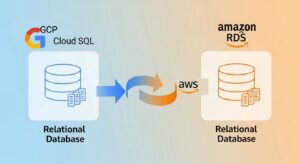
GCP Cloud SQL (managed MySQL and PostgreSQL) maps to Amazon RDS (MySQL, PostgreSQL, MariaDB, Oracle, SQL Server, and DB2). RDS offers multi-AZ deployments, read replicas, automated backups with point-in-time recovery, and support for all active database engine versions.
GCP Cloud Spanner (globally distributed relational database) maps most closely to Amazon Aurora Global Database for globally distributed relational workloads with multi-region read scaling, or Amazon DynamoDB Global Tables for teams willing to replatform to a NoSQL model.
NoSQL Databases (GCP Firestore / Bigtable → Amazon DynamoDB)
- GCP Firestore (document database) → Amazon DynamoDB (key-value and document)
- GCP Cloud Bigtable (wide-column, high-throughput analytics) → Amazon DynamoDB (with table design adjustments) or Amazon Keyspaces (managed Apache Cassandra-compatible service) for wide-column patterns
DynamoDB’s on-demand capacity mode, global tables (multi-region active-active), and DynamoDB Accelerator (DAX) for microsecond in-memory caching have equivalents for most Firestore and Bigtable use cases, though schema redesign is often required for Bigtable workloads.
Data Warehouse (Google BigQuery → Amazon Redshift)
This is the most technically complex service mapping in most GCP to AWS migrations. Google BigQuery (serverless, columnar data warehouse with per-TB query pricing) maps to Amazon Redshift — available as provisioned clusters or as Redshift Serverless (pay-per-use, no cluster management). See the BigQuery to Redshift Deep Dive section below for full migration guidance.
For serverless SQL analytics against S3 data, Amazon Athena replicates BigQuery’s external table functionality. For ETL/ELT, AWS Glue replaces GCP Dataflow and BigQuery Data Transfer Service.
Messaging (GCP Pub/Sub → Amazon SQS / Amazon SNS)
- GCP Cloud Pub/Sub → Amazon SQS (queue, point-to-point) + Amazon SNS (fan-out pub/sub)
- GCP Dataflow (stream processing) → Amazon Kinesis Data Streams (real-time streaming) + Amazon Kinesis Data Firehose (delivery to S3/Redshift)
- GCP Dataproc (managed Spark/Hadoop) → Amazon EMR (managed Hadoop/Spark/Hive)
Networking (GCP VPC → AWS VPC, GCP Cloud CDN → Amazon CloudFront)
- GCP VPC → AWS VPC (Virtual Private Cloud)
- GCP Cloud CDN → Amazon CloudFront
- GCP Cloud Load Balancing → AWS Application Load Balancer (ALB) / AWS Network Load Balancer (NLB)
- GCP Cloud Armor (DDoS + WAF) → AWS WAF + AWS Shield
- GCP Cloud DNS → Amazon Route 53
- GCP Cloud Interconnect → AWS Direct Connect
- GCP Firebase Hosting → AWS Amplify
Identity & Security (GCP Cloud IAM → AWS IAM)
GCP Cloud IAM uses a hierarchical, role-based model (Organization → Folder → Project → Resource). Permissions cascade down the hierarchy. GCP uses Service Accounts for workload identity.
AWS IAM uses a policy-based, flat model — explicit Allow or Deny statements in JSON policy documents attached to Users, Groups, and Roles. Every action is denied by default. AWS uses IAM Roles with instance profiles (EC2) or IAM Roles for Service Accounts/IRSA (EKS) for workload identity.
| GCP IAM Component | AWS Equivalent |
| GCP Organization IAM | AWS Organizations + SCPs |
| GCP Project | AWS Account |
| GCP IAM Service Account | AWS IAM Role (with instance profile or IRSA) |
| GCP IAM Roles (Basic, Predefined, Custom) | AWS IAM Managed Policies + Inline Policies |
| GCP Cloud Identity | AWS IAM Identity Center |
| GCP Firebase Authentication | Amazon Cognito |
| GCP Secret Manager | AWS Secrets Manager |
| GCP Cloud KMS | AWS Key Management Service (KMS) |
DevOps (GCP Cloud Build → AWS CodePipeline / CodeBuild)
- GCP Cloud Build → AWS CodeBuild
- GCP Cloud Deploy → AWS CodeDeploy + AWS CodePipeline
- GCP Artifact Registry → Amazon ECR (containers) + AWS CodeArtifact (packages)
- GCP Container Registry → Amazon ECR
Most teams also consider GitHub Actions with AWS-native actions as a migration path — it provides a familiar CI/CD interface with deep AWS integration.
Monitoring (GCP Cloud Monitoring → Amazon CloudWatch)
- GCP Cloud Monitoring / Stackdriver → Amazon CloudWatch (metrics, logs, dashboards, alarms)
- GCP Cloud Trace → AWS X-Ray (distributed tracing)
- GCP Cloud Logging → Amazon CloudWatch Logs
- GCP Error Reporting → AWS CloudWatch Application Insights
AI/ML (Google Vertex AI → Amazon SageMaker)
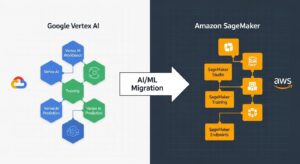
Google Vertex AI maps to Amazon SageMaker — AWS’s comprehensive managed ML platform for data preparation, model training, tuning, hosting, and MLOps workflows. For generative AI specifically, AWS Bedrock provides managed access to foundation models (Anthropic Claude, Meta Llama, Amazon Titan) that GCP’s Vertex AI Generative AI Studio competes with. SageMaker consistently ranks as the industry’s most mature managed ML platform.
Why Migrate from Google Cloud to AWS? Business Case
Reason 1 — Broader AWS Service Portfolio (200+ Services)
AWS offers over 200 services across every category of cloud computing. GCP’s portfolio is compelling for data analytics and AI/ML workloads but narrower across enterprise IaaS, DevOps tooling, networking, and industry-specific services. For organizations building diverse application architectures — IoT, edge computing, satellite connectivity (AWS Ground Station), blockchain (Amazon Managed Blockchain), or quantum computing (Amazon Braket) — AWS provides capabilities GCP does not.
Reason 2 — Larger Global Infrastructure (39 Regions, 123 AZs)
AWS’s 123 Availability Zones across 39 geographic regions provide more high-availability deployment options than any other cloud provider. Each region has a minimum of three physically separated AZs — enabling synchronous replication architectures with zero data loss. For multi-region active-active deployments, AWS’s infrastructure density is unmatched.
Step-by-Step GCP to AWS Migration Process
The following 11-step process is the industry-standard execution framework for how to migrate from Google Cloud to AWS. It incorporates AWS Well-Architected Framework principles and AWS Migration Acceleration Program (MAP) methodology.
(HowTo Schema: “How to Migrate from GCP to AWS” — 11 steps)
Step 1 — Assess and Inventory Your GCP Workloads
Before touching AWS, create a comprehensive inventory of everything running on GCP. Use GCP Asset Inventory and GCP Cloud Monitoring dashboards to export resource lists, utilization metrics, and dependency maps.
Document every project, Compute Engine VM, Cloud SQL instance, Cloud Storage bucket, GKE cluster, Cloud Functions, and third-party service. Map application dependencies: which services communicate with which, what data flows between them, and what compliance requirements govern each workload.
Critically, identify GCP-proprietary API dependencies — workloads using BigQuery’s specific SQL extensions, GCP-native Pub/Sub client libraries, or GCP-specific Cloud Run metadata APIs will require additional refactoring work before they can run natively on AWS.
Pro Tip: Run the AWS Migration Readiness Assessment (MRA) in parallel with your GCP inventory. This free evaluation assesses your organization’s cloud readiness across six dimensions — business case, planning, portfolio discovery, migration execution, operations, and governance — and identifies skill and process gaps before they become blockers.
Step 2 — Map GCP Services to AWS Equivalents
Using the inventory from Step 1 and the master mapping table above, create a migration workbook that maps every GCP resource to its AWS target:
- Each GCP VM → target EC2 instance type (use AWS Compute Optimizer recommendations for right-sizing)
- Each Cloud SQL instance → target RDS engine, instance class, and Multi-AZ configuration
- Each GCS bucket → target S3 bucket with storage class selection
- Each GKE cluster → target EKS configuration (node groups, Fargate profiles)
- Each GCP IAM service account → target AWS IAM role with equivalent permission policies
This workbook becomes your migration runbook — a living document tracking every resource’s current state, target configuration, and migration status.
Pro Tip: Define your entire VPC, subnets, security groups, IAM configuration, and EKS clusters in Terraform before provisioning anything manually. Infrastructure as code guide This prevents “ClickOps” configurations that create undocumented infrastructure and drift over time.
AWS Migration Tools for GCP to AWS — Complete Toolkit
AWS Application Migration Service (MGN)
AWS MGN is the primary tool for GCP Compute Engine to EC2 migration. It installs a lightweight replication agent on source GCP VMs, performs continuous block-level replication, enables non-disruptive test launches in AWS, and executes minimal-downtime cutovers.
2026 Update: The standalone AWS Migration Hub console is no longer accepting new customers as of November 7, 2025. It has been superseded by AWS Transform — AWS’s next-generation migration and modernization platform powered by generative AI, providing automated discovery, dependency mapping, and AI-assisted migration planning at scale.
AWS Database Migration Service (DMS)
AWS DMS supports homogeneous migrations (GCP Cloud SQL PostgreSQL → Amazon RDS PostgreSQL) and heterogeneous migrations (Google BigQuery → Amazon Redshift). DMS’s CDC mode enables continuous change replication from source to target, keeping databases synchronized during the migration window. Combine with AWS Schema Conversion Tool (SCT) for schema and SQL code conversion for heterogeneous migrations. AWS DMS
AWS DataSync
AWS DataSync provides direct, managed transfer of GCS data to Amazon S3 — handling encryption in transit, data integrity verification, scheduling, and bandwidth controls without custom scripting. Supports both full loads and incremental syncs, making it suitable for ongoing synchronization until cutover day.
AWS Snowball / Snowball Edge
For datasets exceeding 10TB on bandwidth-limited connections, AWS Snowball (80TB capacity) and Snowball Edge (100TB + on-device compute) provide physical data transfer. Load data from GCP at your location, ship the device to AWS, and AWS ingests data directly into S3 — bypassing egress fees and transfer time entirely.
AWS Direct Connect
AWS Direct Connect establishes a dedicated, private network connection from your colocation or data center to AWS — providing consistent performance, lower latency, and reduced data transfer costs compared to internet-based migration. Critical for migrations involving large datasets or latency-sensitive application testing during the migration period.
Terraform / AWS CloudFormation
Infrastructure as code guide | Terraform supports both GCP and AWS providers — allowing migration teams to export existing GCP infrastructure patterns and translate them into AWS resource configurations within the same IaC framework. AWS CloudFormation provides AWS-native IaC with deep service integration and CDK support for TypeScript/Python infrastructure development.
🛠️ GCP to AWS Migration Tools Comparison Table
| Tool | Primary Use Case | Data Volume | Migration Type | Complexity |
| AWS MGN | VM / Compute Engine migration | Any | Rehost | Low (automated) |
| AWS DMS | Database migration (Cloud SQL → RDS, BigQuery → Redshift) | Any | Rehost/Replatform | Medium |
| AWS SCT | Schema + SQL code conversion (BigQuery → Redshift) | N/A | Replatform/Refactor | Medium |
| AWS DataSync | GCS → S3 object storage transfer | Up to petabytes | Rehost | Low (managed) |
| AWS Snowball | Offline bulk data transfer | 10TB–80TB per device | Rehost | Low (physical) |
| AWS Direct Connect | Network connectivity during migration | N/A (bandwidth) | All | Medium (setup) |
| AWS KMF | GKE → EKS Kubernetes workload migration | N/A | Rehost/Replatform | Medium |
| AWS Transform | Migration planning, discovery, modernization | N/A | All (planning) | Low |
| Terraform | Target AWS infrastructure provisioning | N/A | All | Medium |
Migrating BigQuery to Amazon Redshift — Deep Dive
The BigQuery to Amazon Redshift migration is the most technically nuanced data migration in a GCP to AWS program. BigQuery’s serverless, fully-managed nature means teams moving to Redshift must make deliberate decisions about capacity management, query optimization, and cost control that BigQuery handled automatically.
BigQuery vs Amazon Redshift: Key Differences
| Feature | Google BigQuery | Amazon Redshift |
| Architecture | Serverless, disaggregated compute/storage | Provisioned clusters or Serverless (RPU-based) |
| Pricing Model | On-demand: ~$5–6.25/TB scanned (first 1TB free) | Provisioned: from $0.543/hour; Serverless: $0.36/RPU-hour |
| Storage Pricing | Active: $0.020/GB/month | Redshift Managed Storage: $0.024/GB/month |
| Auto-scaling | Fully automatic | Serverless: automatic; Provisioned: manual/elastic resize |
| Query Optimization | Automatic (no vacuuming, no ANALYZE) | Requires VACUUM + ANALYZE on provisioned; automatic on Serverless |
| SQL Dialect | BigQuery SQL (StandardSQL / LegacySQL) | Redshift SQL (PostgreSQL-based) |
| Data Types | STRUCT, ARRAY, GEOGRAPHY natively | Limited STRUCT (SUPER type); arrays need conversion |
| UDFs | JavaScript, SQL | Python, SQL (Redshift Lambda UDFs for Python) |
| Free Query Tier | 1 TB/month free | None |
| Concurrency | Unlimited (auto-queued) | 50 concurrent queries (provisioned); auto-scaled (Serverless) |
| Best For | Ad-hoc serverless analytics | High-concurrency BI workloads, steady reporting |
GCP’s BigQuery offers a truly serverless analytics experience that Redshift requires more active management to replicate. Factor in your team’s operational capacity when choosing between Redshift Serverless and provisioned clusters. For teams that want a near-BigQuery experience on AWS, Redshift Serverless (which bills per RPU-hour with no cluster management) is typically the right starting point — with the option to migrate to provisioned clusters as query patterns stabilize and RI pricing delivers savings.
Schema Conversion and SQL Compatibility
BigQuery and Redshift use different SQL dialects. Key incompatibilities to address:
- STRUCT and ARRAY types: BigQuery supports these as native column types. Redshift uses SUPER type for semi-structured data. Nested structs often need to be flattened into relational tables.
- DATE/TIME functions: BigQuery’s DATE_TRUNC, TIMESTAMP_TRUNC, EXTRACT have Redshift equivalents but with different syntax.
- JavaScript UDFs: Must be rewritten as Python Lambda UDFs or pure SQL.
- Partition and clustering: BigQuery partitioned tables map to Redshift distribution keys and sort keys — different implementation, similar performance intent.
- APPROX_COUNT_DISTINCT, APPROX_QUANTILES: BigQuery approximate aggregation functions have equivalents in Redshift (APPROXIMATE COUNT(DISTINCT …), PERCENTILE_DISC).
AWS Schema Conversion Tool (SCT) automates the majority of this translation — connecting to BigQuery as a source and generating Redshift-compatible DDL and query code. SCT produces an assessment report identifying conversion complexity: automatic (green), requiring review (yellow), or requiring manual rewrite (red).
Data Transfer Methods: DataSync, DMS, or AWS Snowball
Recommended approach for BigQuery → Redshift:
- Schema migration: Use AWS SCT to convert BigQuery schema to Redshift DDL. Review and resolve all yellow/red items.
- Initial data load: Export BigQuery tables to GCS in Parquet or CSV format (BigQuery export is free). Use AWS DataSync to transfer GCS files to S3. Run COPY command from S3 to Redshift for fast parallel bulk load.
- Incremental sync: Use AWS DMS with a BigQuery source to replicate changes from BigQuery to Redshift during the migration window. Final cutover when all consumers switch from BigQuery to Redshift endpoints.
For tables above 1TB, AWS Snowball provides faster transfer than internet-based DataSync — load BigQuery exports to Snowball locally, ship to AWS, then S3-to-Redshift COPY.
Cost Comparison: BigQuery vs Redshift Pricing
| Scenario | Google BigQuery | Amazon Redshift |
| 10TB queries/month (on-demand) | ~$50–62/month | Included in cluster cost |
| 100TB queries/month | ~$500–625/month | Included in cluster / Serverless RPU hours |
| 10TB storage | ~$200/month (active logical) | ~$240/month (RMS) |
| 100 concurrent queries | Auto-queued (no extra cost) | Need adequate concurrency scaling |
| Serverless analytics (variable load) | True serverless, per-TB | Redshift Serverless: ~$0.36/RPU-hour |
| Steady BI workload (24/7 reporting) | Flat-rate slots from ~$10,000/month | Provisioned RA3 + 3yr RI: ~$1,200/month |
For steady, high-volume BI workloads with 24/7 reporting requirements, provisioned Redshift with Reserved Instance pricing (up to 75% discount) is significantly more cost-effective than BigQuery’s per-TB on-demand model. For ad-hoc analytics with highly variable query volumes, BigQuery Serverless or Redshift Serverless are broadly comparable.
Migrating GKE to Amazon EKS — Container Migration Guide
GKE vs Amazon EKS: Architecture Differences
| Feature | GKE | Amazon EKS |
| Control Plane | Fully managed by Google | Fully managed by AWS ($0.10/hour) |
| Node Management | Standard, Autopilot modes | Managed node groups, self-managed, Fargate, Auto Mode |
| Container Registry | GCR / Artifact Registry | Amazon ECR |
| IAM for Pods | GCP Workload Identity | IAM Roles for Service Accounts (IRSA) |
| Storage Classes | GCP Persistent Disk (standard, ssd) | AWS EBS (gp3, io2), EFS, FSx |
| Load Balancers | GCP Cloud Load Balancing | AWS ALB, NLB (via AWS Load Balancer Controller) |
| Service Mesh | Anthos Service Mesh (Istio) | AWS App Mesh or Istio on EKS |
| Cluster Autoscaler | GKE Autopilot / Cluster Autoscaler | Karpenter (recommended) or Cluster Autoscaler |
| EKS Auto Mode | N/A | Full cluster lifecycle management (2025) |
GCP to AWS Cost Comparison and Optimization
GCP Committed Use Discounts vs AWS Reserved Instances
GCP’s Committed Use Discounts (CUDs) offer approximately 37–55% savings for 1-year and 3-year commitments on Compute Engine. AWS Reserved Instances offer up to 72% savings on 3-year All Upfront commitments — delivering deeper maximum discounts for high-utilization, steady-state workloads. AWS cost optimization guide
AWS Savings Plans vs GCP Sustained Use Discounts
GCP’s Sustained Use Discounts are automatic — applied when instances run more than 25% of the billing month, with a maximum 30% discount for full-month usage. No commitment required. AWS Compute Savings Plans require a $/hour spend commitment but deliver up to 66% savings across any EC2 instance family, size, region, and OS — and cover Lambda and Fargate as well. For teams post-migration that have established baseline usage patterns, AWS Savings Plans typically deliver greater absolute savings than GCP SUDs.
Spot Instances vs GCP Preemptible VMs
| Feature | AWS Spot Instances | GCP Preemptible / Spot VMs |
| Maximum Discount | Up to 90% off on-demand | Up to 80–91% off on-demand |
| Interruption Notice | 2 minutes | 30 seconds (preemptible) |
| Pricing | Dynamic (market-based) | Fixed (per-VM type) |
| Instance Diversity | 750+ instance types | Standard machine types only |
| Spot Advisor Tool | Yes (interruption frequency data) | No equivalent |
AWS Spot Instances offer a broader range of instance types for spot bidding, a 2-minute interruption notice (vs GCP’s 30-second preemptible warning), and AWS Spot Instance Advisor — a public tool showing historical interruption rates by instance type and region to guide strategy.
Real-World Example: 3-Year TCO Comparison
Sample workload: Data-heavy SaaS platform (ML training, web API, analytics)
| Component | GCP (On-Demand) | GCP (CUD 3yr) | AWS (On-Demand) | AWS (RI 3yr) |
| 4× n2-standard-8 (web/API) | ~$960/month | ~$612/month | ~$880/month (m5.2xlarge) | ~$490/month |
| 2× n2-highcpu-32 (ML workers) | ~$1,240/month | ~$790/month | ~$1,150/month (c5.8xlarge) | ~$640/month |
| Cloud SQL PG (16 vCPU, 64GB) | ~$730/month | N/A | ~$650/month (db.m5.4xl RDS) | ~$380/month |
| BigQuery (50TB queries/month) | ~$300/month | ~$300/month | Redshift RA3.4xl | ~$330/month |
| Cloud Storage 100TB | ~$2,000/month | — | S3 Standard 100TB | ~$2,300/month |
| CDN/networking | ~$400/month | — | CloudFront equivalent | ~$350/month |
| Monthly Total | ~$5,630 | ~$3,752 | ~$5,310 | ~$2,990 |
| 3-Year Total | $202,680 | $135,072 | $191,160 | $107,640 |
| 3-Year Savings vs GCP On-Demand | — | $67,608 (33%) | $11,520 (6%) | $95,040 (47%) |
This is an illustrative scenario. GCP Cloud Storage is modestly cheaper at high volumes (~10%); AWS wins significantly on compute RI pricing. Actual results vary by workload configuration, region, and commitment structure. Use the AWS Pricing Calculator for your environment.
Security and Compliance During GCP to AWS Migration
Mapping GCP IAM to AWS IAM
The GCP Cloud IAM → AWS IAM migration is one of the most architecturally significant and security-sensitive parts of the project. Key translation points:
GCP’s hierarchical model → AWS’s explicit policy model: GCP permissions flow down from Organization → Folder → Project → Resource. AWS uses explicit Allow/Deny statements in policies — nothing is permitted unless explicitly stated. Re-creating GCP IAM configurations in AWS requires re-authoring all permission policies as AWS JSON policy documents, not just translating role names.
Service Account → IAM Role: Every GCP Service Account used by an application must become an AWS IAM Role in the equivalent service context (EC2 instance profile, ECS task execution role, Lambda execution role, or EKS IRSA annotation).
GCP Resource Hierarchy → AWS Organizations: GCP’s Folder structure maps to AWS Organizations OUs (Organizational Units) with Service Control Policies (SCPs) providing the equivalent boundary controls.
GCP Cloud Armor vs AWS WAF and AWS Shield
GCP Cloud Armor (DDoS protection + WAF) maps to AWS WAF (managed application firewall rules) + AWS Shield (Standard: free DDoS protection; Advanced: enhanced DDoS with $3,000/month + 12-month commitment, plus cost protection for spikes). AWS WAF supports managed rule groups from AWS Marketplace vendors, providing equivalent or superior threat intelligence to Cloud Armor’s preconfigured WAF policies.
Compliance Certifications: GDPR, HIPAA, PCI DSS, FedRAMP on AWS
AWS’s 143 compliance certifications include:
- FedRAMP High (AWS GovCloud regions) — mandatory for US federal agency workloads
- HIPAA BAA available for 100+ AWS services — for covered healthcare entities
- PCI-DSS Level 1 — highest payment card security certification
- SOC 1, 2, 3 (Fall 2025 reports: 185 services in scope)
- GDPR — AWS processes personal data under SCCs (Standard Contractual Clauses)
- UK Cyber Essentials Plus (valid through March 2026)
- UAE-specific certifications for Middle East region data residency
For organizations migrating workloads with active compliance requirements, verify each target AWS service’s compliance scope via AWS Artifact — AWS’s self-service portal for compliance documentation.
Data Encryption in Transit and at Rest
- All AWS migration tools (MGN, DMS, DataSync) encrypt data in transit using TLS 1.2+ by default.
- Enable AWS KMS Customer Managed Keys (CMKs) for all S3 buckets, RDS instances, EBS volumes, and ElastiCache clusters from day one.
- Replace GCP Secret Manager entries with AWS Secrets Manager secrets, enabling automatic rotation for database credentials and API keys.
- Enable Amazon Macie on S3 buckets containing PII to automate sensitive data discovery and classification post-migration.
AWS Security Hub, CloudTrail, and GuardDuty Setup
Enable the security monitoring triad from day one of your AWS environment setup:
- AWS CloudTrail: Records every API call across all services and accounts — the audit log foundation for compliance.
- Amazon GuardDuty: ML-powered threat detection analyzing VPC Flow Logs, DNS logs, and CloudTrail events for suspicious patterns.
- AWS Security Hub: Aggregates findings from GuardDuty, Inspector, Macie, and third-party tools with automated CIS Benchmark scoring and compliance posture dashboards.
Common GCP to AWS Migration Challenges and Solutions
Challenge 1 — Service Compatibility Gaps (GCP-Specific APIs)
GCP-specific services — BigQuery’s INFORMATION_SCHEMA extensions, GCP Pub/Sub’s native dead-letter queue configuration, GCP-specific Kubernetes CustomResourceDefinitions (BackendConfig, ManagedCertificate) — have no direct 1:1 AWS equivalents.
Solution: During the assessment phase (Step 1), explicitly catalog all GCP-proprietary API usage. Build a remediation backlog for each gap, and don’t let 10% of complex workloads block 90% of straightforward migrations. Use the wave approach: migrate standard workloads first, address proprietary dependencies in subsequent waves.
Challenge 2 — Data Transfer Costs for Large Datasets
GCP charges data egress fees for data leaving GCP — plan for these explicitly. Additionally, AWS charges ingress (into AWS) at $0.00/GB (free), but GCP egress charges can be significant for large datasets.
Solution: Model total data volume upfront. For datasets above 10TB, evaluate AWS Snowball (eliminates internet transfer costs entirely) versus the time and cost of internet-based DataSync transfer. Factor GCP egress costs into your migration budget as a one-time line item.
GCP to AWS Migration Best Practices
Expert Recommendation: Before executing your first GCP to AWS migration wave, run the AWS Well-Architected Framework review on your target architecture design. This structured review — covering Operational Excellence, Security, Reliability, Performance Efficiency, Cost Optimization, and Sustainability — identifies architectural risks before they become production incidents. Teams that complete this review before migration consistently report fewer post-migration incidents and shorter time-to-optimization.
Real-World GCP to AWS Migration Case Studies
Data-Heavy Organization: BigQuery to Redshift Migration
A global e-commerce analytics company was processing 500TB of BigQuery queries monthly at ~$2,500–$3,100/month in on-demand query costs. As their team expanded to 50+ analysts running concurrent reports, BigQuery’s unlimited concurrency model created unpredictable billing spikes.
Migration approach: The team used AWS SCT to convert their 2,400 BigQuery SQL queries — 78% converted automatically, 18% required minor review, 4% required manual rewrite (primarily JavaScript UDFs and nested STRUCT columns). Data was exported from BigQuery to GCS in Parquet format and transferred to S3 via AWS Snowball (1.2PB total dataset). The team provisioned Redshift RA3.4xlarge clusters with 3-year Reserved Instance pricing.
Result: Reporting query costs stabilized at a predictable $1,800/month (RI pricing), down from $2,500–$3,100/month variable BigQuery billing. Concurrency scaling via Redshift’s workload management (WLM) provided predictable performance for 50+ concurrent analysts. Total 3-year TCO improvement: ~38%.
Container-First Startup: GKE to EKS
A Series B SaaS startup was running 12 microservices across two GKE clusters with 40 nodes. Their migration drivers: expanding into US Government markets requiring FedRAMP High (only available in AWS GovCloud), and hiring challenges — their engineering team wanted AWS expertise for career development.
Migration approach: AWS KMF automated export and transformation of 180 Kubernetes manifests. The primary manual work: IRSA setup (replacing GCP Workload Identity for 12 service accounts), storage class migration (GCP premium-rwo → EBS gp3), and AWS Load Balancer Controller configuration for ALB ingress. CI/CD pipelines migrated from GCP Cloud Build to GitHub Actions with ECR integration.
Result: FedRAMP High authorization achieved in AWS GovCloud within 6 months of migration. EKS migration itself completed in 5 weeks. Engineering team hired 3 AWS-experienced engineers within 60 days of announcing the migration — a hiring velocity they hadn’t achieved in the GCP talent market.
Frequently Asked Questions — GCP to AWS Migration
(FAQ Schema JSON-LD markup to be applied to this section)
Q1: What is the AWS equivalent of GCP Compute Engine?
A: Amazon EC2, offering a wide range of instance types including GPU, ARM-based, and high-memory options.
Q2: What is the AWS equivalent of Google BigQuery?
A: Amazon Redshift, with Redshift Serverless providing a BigQuery-like, pay-per-use experience.
Q3: How do I migrate Google Cloud Storage to Amazon S3?
A: Use AWS DataSync for automated, secure transfers; Snowball is used for very large datasets.
Q4: What is the AWS equivalent of Google Cloud Pub/Sub?
A: Amazon SQS + SNS for messaging, or Amazon Kinesis for real-time streaming workloads.
Q5: How long does a GCP to AWS migration take?
A: Small migrations take 2–4 weeks; large enterprise migrations usually take 3–6 months.
Conclusion — Start Your GCP to AWS Migration in 2026
GCP to AWS migration is not a routine infrastructure change—it is a strategic platform decision that enables broader service depth, stronger global coverage, and long-term architectural flexibility. While the business case in 2026 is compelling, success depends on rigorous service mapping and realistic planning. GCP and AWS differ fundamentally across IAM, networking, analytics, and Kubernetes orchestration, making BigQuery → Redshift and GKE → EKS the most complex—and highest-impact—migration components. Leveraging AWS-native tooling such as MGN, DMS, DataSync, and the Kubernetes Migration Factory significantly reduces execution risk compared to manual approaches.
Many organizations reach this stage after evaluating other cloud providers as well. If you’re exploring alternative migration paths, our OVH to AWS migration guide outlines how teams transition from European cloud platforms to AWS using a structured, low-risk methodology. At GoCloud, we help organizations navigate migrations from GCP, OVH, and beyond—delivering predictable timelines, minimal disruption, and production-ready AWS architectures.
