


What is AWS Fargate?
Managing containers shouldn’t mean managing servers. AWS Fargate eliminates the single biggest pain point of containerized workloads — infrastructure management — letting your engineering team focus entirely on building and shipping great applications. No EC2 instances to provision. No worker nodes to patch. No cluster capacity to plan.
Yet many teams running containers on AWS still spend hours each week managing underlying compute infrastructure. Choosing instance types, right-sizing node groups, handling unexpected capacity shortfalls — these are operational burdens that add zero value to your product. AWS Fargate was built to eliminate every one of them.
In this complete guide, you’ll learn exactly what AWS Fargate is and how it works, how it integrates with Amazon ECS and Amazon EKS, how pricing works in 2026, its key benefits and real limitations, and how to decide whether Fargate is the right container compute model for your workload.
How AWS Fargate Fits Into the AWS Container Ecosystem
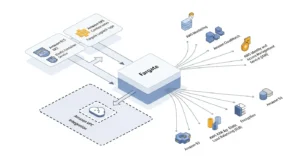
AWS offers two container orchestration services:
- Amazon ECS (Elastic Container Service) — AWS’s proprietary container orchestration platform
- Amazon EKS container orchestration — AWS’s managed Kubernetes service
Both services need compute to run your containers. That compute can be provided by:
- Amazon EC2 instances — you manage the virtual machines
- AWS Fargate — AWS manages all underlying compute for you
Fargate is not a replacement for ECS or EKS. It’s a compute engine — the serverless infrastructure layer that powers your containers, regardless of which orchestration service you use on top of it.
AWS Fargate vs. Traditional Container Management
Traditional EC2-based container clusters require your team to:
- Select and provision the right EC2 instance types for your containers
- Monitor cluster capacity and manually scale node groups
- Apply OS-level security patches and kernel updates
- Manage auto-scaling group configurations
- Pay for EC2 capacity whether containers are running or idle
With AWS Fargate, all of that disappears. You define what your container needs — CPU, memory, networking — and Fargate handles everything else. The underlying servers are completely invisible to your team.
How AWS Fargate Works: Step-by-Step
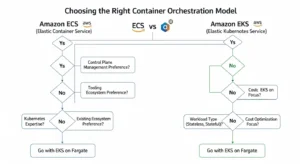
Understanding what is AWS Fargate and how does it work starts with four foundational concepts.
Key Concepts: Clusters, Tasks, Task Definitions, and Services
| Concept | Definition |
| Cluster | A logical grouping of tasks or services — the environment where your containers run |
| Task Definition | The blueprint for your container — specifies image, CPU, memory, port mappings, environment variables, and IAM role |
| Task | A running instance of a task definition — the actual executing container (or group of containers) |
| Service | Maintains a specified number of running task instances simultaneously; automatically replaces failed tasks |
When using Fargate with Amazon EKS, the unit of deployment shifts from tasks to Kubernetes pods — but Fargate still manages the underlying compute for each pod automatically.
The Lifecycle of a Fargate Task (From Launch to Termination)
- Define: Write a task definition specifying your Docker container image, CPU (0.25–16 vCPU), memory (0.5–120GB), networking, and IAM execution role
- Launch: Submit the task to ECS or EKS using the Fargate launch type — via AWS Console, AWS CLI, Terraform, or AWS CDK
- Provision: Fargate allocates a secure, isolated compute environment with the exact CPU and memory specified — in seconds
- Schedule: ECS or EKS schedules and places the container on the Fargate compute engine
- Execute: Your application runs inside a Docker container on Fargate’s managed infrastructure
- Scale: Fargate automatically provisions additional compute as new tasks are launched by auto-scaling policies
- Terminate: When the task completes or is stopped, Fargate releases the compute resources — billing stops immediately
Task and Pod Execution Roles (IAM Integration)
Every Fargate task runs with an IAM execution role — an AWS Identity and Access Management role that grants your container permission to access other AWS services. This is separate from the task role (what your application can do) and the execution role (what ECS/EKS can do on your behalf — like pulling images from Amazon ECR or writing logs to Amazon CloudWatch).
Following the principle of least privilege is critical: define a separate IAM role per task type, granting only the specific permissions each container actually requires. This limits the blast radius of any security compromise.
AWS Fargate Integration with Other AWS Services
AWS Fargate integrates natively with the full AWS service ecosystem:
| Category | AWS Service |
| Container Registry | Amazon ECR (Elastic Container Registry) |
| Networking | Amazon VPC, Security Groups, ELB, AWS PrivateLink |
| Monitoring | Amazon CloudWatch (metrics, logs, alarms) |
| Security | AWS IAM, AWS KMS, AWS Shield |
| Storage | Amazon EFS (persistent file storage), Amazon S3 |
| Database | Amazon RDS, Amazon DynamoDB, Amazon ElastiCache |
| IaC | AWS CloudFormation, Terraform, AWS CDK |
Options to Run Containers on AWS Fargate
Amazon ECS with Fargate Launch Type
Amazon ECS (Elastic Container Service) is AWS’s purpose-built container orchestration service. Using ECS with the Fargate launch type is the simplest path to running serverless containers on AWS — especially for teams not already invested in Kubernetes.
With ECS + Fargate:
- Define your application using task definitions (JSON-based container blueprints)
- Create an ECS Service to maintain desired task count
- Fargate provisions compute automatically — no node group management
- Integrates with Elastic Load Balancing for traffic distribution and CloudWatch for observability
This combination is the default recommendation for teams starting with containers on AWS who don’t require Kubernetes-specific APIs or tooling.
Amazon EKS with Fargate Launch Type
Managed Kubernetes with Amazon EKS + Fargate combines the power of Kubernetes orchestration with the operational simplicity of serverless compute. Kubernetes pods are scheduled directly onto Fargate — no EC2 worker nodes to manage.
With EKS + Fargate:
- Create a Fargate profile in your EKS cluster that maps Kubernetes namespaces and labels to Fargate compute
- Pods matching the profile are automatically scheduled on Fargate
- Use standard Kubernetes tools (kubectl, Helm, ArgoCD) without any node management
- Best for teams already running Kubernetes who want to eliminate EC2 node administration overhead
Choosing Between ECS + Fargate vs. EKS + Fargate
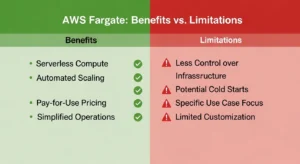
| Decision Factor | ECS + Fargate | EKS + Fargate |
| Kubernetes experience required | ❌ No | ✅ Yes |
| Multi-cloud portability | ❌ AWS-only | ✅ Yes (K8s standard) |
| Ecosystem tools (Helm, ArgoCD) | Limited | ✅ Full Kubernetes ecosystem |
| Setup simplicity | ✅ Simpler | More complex |
| Best for | AWS-native new projects | Existing K8s workloads |
Key Features of AWS Fargate
Flexible CPU and Memory Configuration
Fargate supports fine-grained resource allocation — choose from:
- CPU: 0.25 vCPU to 16 vCPU
- Memory: 0.5GB to 120GB (memory options depend on selected CPU)
This granularity means you allocate exactly what your container needs — not the nearest EC2 instance size that fits.
Auto-Scaling and Elastic Load Balancing
Fargate integrates with AWS Application Auto Scaling to dynamically adjust the number of running tasks based on demand. Scaling policies can target:
- CPU utilization
- Memory utilization
- Custom CloudWatch metrics (e.g., queue depth, request rate)
Fargate tasks register automatically with Elastic Load Balancing (ELB) — Application Load Balancer (ALB) or Network Load Balancer (NLB) — enabling zero-downtime deployments and traffic distribution across multiple task instances.
VPC Networking and Security Groups
Every Fargate task receives its own Elastic Network Interface (ENI) within your Amazon VPC — providing dedicated network isolation at the task level. This means:
- Each task has a private IP address within your VPC
- Security Groups control inbound and outbound traffic per task
- Tasks can be placed in private subnets behind a NAT gateway for outbound internet access without public IP exposure
- AWS PrivateLink enables private connectivity to other AWS services without traversing the public internet
⚠️ Important: Fargate tasks cannot be deployed in public subnets for production workloads — always use private subnets with NAT gateway access.
Fine-Grained IAM Permission Tiers
Fargate supports two distinct IAM role types per task:
- Task Execution Role — permissions for ECS/EKS to pull container images from ECR and write logs to CloudWatch
- Task Role — permissions for your application code to access AWS services (S3, DynamoDB, SQS, etc.)
This separation enforces least-privilege security at both the orchestration and application layers.
CloudWatch Logging and Observability
Fargate integrates with Amazon CloudWatch Container Insights to deliver:
- Real-time CPU and memory utilization per task
- Container-level log streaming via CloudWatch Logs
- Custom metric-based alarms for proactive alerting
- Integration with AWS X-Ray for distributed tracing across microservices
Support for Linux and Windows Containers
AWS Fargate supports both Linux and Windows container workloads via Amazon ECS — enabling teams to run .NET Framework applications, legacy Windows-based services, and Linux-native containers on the same serverless platform.
AWS Fargate Benefits and Limitations
Benefits of Using AWS Fargate
| ✅ Benefit | Description |
| Zero infrastructure management | No EC2 instances, node groups, or OS patches to manage |
| Per-second billing | Pay only for vCPU/memory consumed — no idle EC2 costs |
| Built-in high availability | Tasks automatically distributed across Availability Zones |
| Isolation by default | Each task runs in its own dedicated compute environment |
| Works with ECS and EKS | Flexibility to use either orchestration model |
| Automatic scaling | No capacity planning — scales on demand |
| Simplified security | Task-level IAM roles + VPC ENI per task |
Known Limitations of AWS Fargate
| ❌ Limitation | Impact |
| No GPU support | Cannot run CUDA workloads or GPU ML training |
| No privileged containers | Cannot run containers requiring root host access |
| No HostPort/HostNetwork | Pod networking cannot bypass task-level ENI |
| No IMDS access | Instance Metadata Service unavailable in Fargate tasks |
| No AWS Outposts/Local Zones | Fargate not available for edge/on-premises deployments |
| Higher per-unit cost vs EC2 | For steady-state workloads, Reserved EC2 instances can be cheaper |
| Private subnets required | Tasks cannot launch directly in public subnets |
AWS Fargate vs. Amazon EC2: Which Should You Choose?
Comparison Table: Fargate vs. EC2 vs. Lambda
| Feature | AWS Fargate | Amazon EC2 | AWS Lambda serverless functions |
| Server Management | None (Serverless) | Full control | None (Serverless) |
| Workload Type | Containers | VMs/Containers/Any | Functions (FaaS) |
| Pricing Model | vCPU+Memory/second | Per hour (instance) | Per request/millisecond |
| Max Execution Duration | Unlimited | Unlimited | 15 minutes |
| Kubernetes Support | ✅ EKS | ✅ EKS/Self-managed | ❌ No |
| GPU Support | ❌ Not supported | ✅ Yes | ❌ No |
| Cold Start | Minimal | ❌ None | ✅ Yes |
| Privileged Containers | ❌ Not supported | ✅ Yes | ❌ N/A |
When to Use AWS Fargate
Choose AWS Fargate when your team:
- Wants to run Docker containers without managing EC2 instances
- Has variable or unpredictable traffic that benefits from per-second billing
- Is deploying microservices where each service scales independently
- Wants to reduce DevOps overhead — no patching, no node group management
- Is building a new containerized application on AWS with no legacy infrastructure constraints
When to Use Amazon EC2 Directly
Choose Amazon EC2 virtual machines directly when your workload:
- Requires GPU instances for ML training, rendering, or HPC
- Needs privileged containers or host-level OS access
- Has sustained, predictable workloads where Reserved Instances provide 72% cost savings over Fargate
- Requires changing EC2 instance types dynamically to match workload shifts
- Uses Windows containers requiring features unavailable in Fargate’s Windows runtime
AWS Fargate vs. AWS Lambda: Key Differences
Both Fargate and Lambda are serverless — but they solve different problems. Lambda runs short-lived, event-driven functions (max 15 minutes); Fargate runs long-running Docker containers with no execution time limit. Use Lambda for event-triggered processing pipelines, API backends, and scheduled tasks. Use Fargate for containerized applications requiring persistent connections, long-running batch jobs, or complex runtime environments packaged as Docker images.
AWS Fargate Pricing (2026)
How Fargate Billing Works (vCPU + Memory per Second)
AWS Fargate pricing has two components, billed per second with a one-minute minimum:
| Resource | Price (US East — N. Virginia) |
| vCPU | $0.04048 per vCPU per hour |
| Memory | $0.004445 per GB per hour |
These rates apply from the moment your container image finishes downloading to when the task terminates — not from launch request to termination. There are no charges for stopped tasks.
Fargate Spot Pricing
Fargate Spot uses spare AWS compute capacity at up to 70% discount compared to standard Fargate pricing. Fargate Spot tasks can be interrupted with a two-minute warning when AWS reclaims capacity — making it ideal for fault-tolerant batch processing, data pipelines, and CI/CD build environments.
Cost Comparison: Fargate vs. EC2 (Real Example)
Scenario: Running a containerized web service requiring 2 vCPU and 4GB memory, 730 hours/month (24/7):
| AWS Fargate | EC2 m6i.large (On-Demand) | EC2 m6i.large (Reserved 1yr) | |
| vCPU cost | 2 × $0.04048 × 730 = $59.10 | Included | Included |
| Memory cost | 4 × $0.004445 × 730 = $12.98 | Included | Included |
| Monthly Total | $72.08 | $69.12 | $43.80 |
Key insight: For steady-state 24/7 workloads, EC2 Reserved Instances are cheaper. Fargate wins for variable workloads, short-lived tasks, or teams where operational savings outweigh the modest cost premium.
Tips to Reduce Your AWS Fargate Bill
- Right-size CPU and memory — over-allocated resources are wasted spend; monitor with CloudWatch Container Insights
- Use Fargate Spot for interruption-tolerant workloads (batch jobs, CI/CD runners)
- Scale to zero — configure auto-scaling to terminate tasks during off-peak hours
- Optimize container images — smaller images pull faster, reducing billable startup time
- Use AWS Compute Optimizer recommendations to identify over-provisioned task definitions
AWS Fargate Security Best Practices
Use VPC Private Subnets for All Fargate Tasks
Always launch Fargate tasks in private subnets with outbound internet access via a NAT gateway. This prevents direct public internet exposure to your containers and reduces the attack surface significantly.
Apply Least Privilege IAM Roles Per Task
Create dedicated task execution roles and task roles for each service. Never share a single broad IAM role across multiple task types. Regularly audit permissions with AWS IAM Access Analyzer to identify and remove excessive access.
Enable Image Vulnerability Scanning with ECR
Enable Amazon ECR enhanced vulnerability scanning (powered by Amazon Inspector) on all container repositories. Set ECR lifecycle policies to automatically remove untagged or outdated images. Use only trusted base images from verified publishers and scan them on every push.
Use CloudWatch Alarms for Anomaly Detection
Configure Amazon CloudWatch alarms on:
- Sudden CPU or memory spikes (potential compromise or resource leak)
- Unusual outbound network traffic
- Task failure rate increases
- Unauthorized IAM API calls (via CloudTrail integration)
Container Image Best Practices (Lightweight Images)
- Use minimal base images (Alpine Linux, AWS Distroless) to reduce attack surface
- Multi-stage Docker builds — separate build-time dependencies from runtime
- Remove unnecessary tools, shells, and packages from production images
- Pin dependency versions to prevent supply chain attacks via floating tags
Real-World Use Cases for AWS Fargate
Microservices Architecture
Fargate’s per-task isolation and independent scaling make it the ideal runtime for microservices. Each service runs in its own task definition with its own IAM role, CPU/memory allocation, and auto-scaling policy — fully decoupled from other services.
Batch Processing and Data Pipelines
Run large-scale data processing jobs on Fargate without provisioning dedicated compute. Trigger ECS tasks from Amazon SQS messages, AWS Step Functions workflows, or Amazon EventBridge schedules. Use Fargate Spot to process batch workloads at up to 70% cost reduction.
Web Application Backends
Deploy containerized web application backends — Node.js, Python Flask, Java Spring Boot, .NET — on Fargate behind an Application Load Balancer. Fargate handles scaling automatically as traffic grows, with no EC2 fleet management required.
Machine Learning Inference Containers
Package pre-trained ML models (scikit-learn, PyTorch, TensorFlow Serving) as Docker containers and deploy them on Fargate for real-time or batch inference. Unlike AWS Lambda serverless functions, Fargate imposes no execution time limits — ideal for inference workloads that take more than 15 minutes.
CI/CD Build Environments
Use Fargate as ephemeral compute for CI/CD build runners. Each build job spins up a fresh Fargate task, executes in a clean isolated environment, and terminates — no persistent build agents to maintain. Integrates with AWS CodePipeline, GitHub Actions (self-hosted runners), and GitLab CI.
How to Get Started with AWS Fargate
Follow these steps to deploy your first containerized application on AWS Fargate: (HowTo Schema)
- Create an AWS Account and navigate to the Amazon ECS console
- Push your container image to Amazon ECR — create a repository and push your Docker image
- Create a Task Definition — specify your container image URI, CPU, memory, port mappings, and environment variables
- Create an ECS Cluster — select the Fargate infrastructure type (no EC2 instances to manage)
- Configure VPC networking — choose private subnets and create or assign security groups
- Create an IAM execution role — grant ECS permission to pull from ECR and write to CloudWatch Logs
- Create an ECS Service — define desired task count, attach an Application Load Balancer for traffic routing
- Enable auto-scaling — configure Application Auto Scaling policies based on CPU or memory targets
- Deploy your service — click “Create Service” and monitor deployment in the ECS console
- Monitor with CloudWatch — enable Container Insights for real-time metrics and log streaming
Frequently Asked Questions About AWS Fargate
Q1: What is AWS Fargate in simple terms? AWS Fargate is a serverless compute engine for running Docker containers on AWS without managing EC2 instances. You define your container’s CPU and memory requirements, and Fargate handles provisioning, scaling, and infrastructure management automatically.
Q2: How is AWS Fargate different from Amazon EC2? EC2 gives you full control over virtual machines, including OS, networking, and storage — but you manage everything. Fargate abstracts all infrastructure, billing only for the exact CPU and memory your containers consume per second.
Q3: Does AWS Fargate support Kubernetes? Yes. Fargate works as a serverless compute backend for both Amazon ECS (Elastic Container Service) and Amazon EKS (Elastic Kubernetes Service). With EKS + Fargate, your Kubernetes pods run on fully managed infrastructure.
Q4: What are the limitations of AWS Fargate? Fargate does not support privileged containers, GPU workloads, HostPort/HostNetwork configurations, instance metadata service (IMDS), or deployments to AWS Outposts and Local Zones. Container images must run in private subnets.
Q5: How does AWS Fargate pricing work? Fargate charges per vCPU per hour and per GB of memory per hour, billed per second with a one-minute minimum. You only pay for resources your tasks actually use — no idle EC2 capacity costs.
Conclusion
AWS Fargate is the most frictionless way to run containers on AWS in 2026. By eliminating EC2 fleet management entirely, Fargate lets engineering teams ship containerized applications faster, at lower operational cost, with built-in security isolation at every layer.
GoCloud helps businesses deploy, manage, and scale containerized workloads on AWS using Fargate, enabling teams to focus on building applications instead of managing infrastructure.
Here are the essential takeaways from this guide:
- ✅ No EC2 management — Fargate handles all infrastructure provisioning, patching, and scaling
- ✅ Works with Amazon ECS and Amazon EKS — choose the orchestration model that fits your team
- ✅ Billed per vCPU/memory per second — zero idle cost, zero capacity waste
- ✅ Not suitable for GPU workloads or privileged containers — use EC2 for those scenarios
- ✅ Best for microservices, batch processing, ML inference, and scalable web backends
Ready to containerize your applications without the infrastructure overhead? Explore our complete guides on managed Kubernetes with Amazon EKS and AWS Lambda serverless functions for your full AWS serverless toolkit.
With container adoption accelerating through 2026, AWS Fargate continues to expand — adding deeper AWS Graviton (ARM) support for better price/performance, improved Windows container capabilities, and tighter EKS Autopilot integration — cementing Fargate as the default serverless compute engine for teams building scalable, cloud-native container workloads on AWS.
