


AWS threat detection is not a checkbox. It is the operational backbone that separates organizations that discover breaches in minutes from those that find out months later in a compliance audit. As cloud infrastructure grows more complex — multi-account, multi-region, serverless, containerized — the attack surface expands proportionally. GuardDuty, Security Hub, CloudTrail, Macie, and Detective are not standalone tools. They are interconnected layers of a detection architecture that, when engineered correctly, give your security team near real-time visibility across your entire AWS environment.
This guide is written for cloud architects, DevOps engineers, CTOs, and developers who want to build and operate a production-grade AWS threat detection pipeline — not just understand the concepts, but implement them at scale. We cover architecture design, service-by-service configuration, automation patterns, cost optimization, multi-account strategies, and common engineering mistakes to avoid.
1. Why Native AWS Threat Detection Outperforms Third-Party Tools
Many organizations default to third-party SIEM solutions without fully activating native AWS detection capabilities first. This is a costly architectural mistake. AWS services have several structural advantages that external tools cannot replicate:
- Zero egress cost for log ingestion from native services
- Direct API integration with IAM, EC2, S3, Lambda, and EKS control planes
- Machine learning baselines trained on AWS-specific behavioral patterns
- Sub-minute detection latency for GuardDuty findings
- No agent deployment or network tap required
This does not mean you should never use a SIEM. It means your native AWS detection layer should be fully operational before you route findings into Splunk, Elastic, or Datadog. Think of it as defense in depth: native detection catches what it is tuned for, and your SIEM provides cross-platform correlation.
1.1 The Detection Coverage Gap Most Teams Have
Audit a typical AWS account and you will find GuardDuty enabled in us-east-1 but disabled in every other region. CloudTrail enabled for management events but not data events on S3. Security Hub connected to three standards but with 40% of controls suppressed. This partial coverage creates dangerous blind spots — exactly the gaps attackers probe for after initial reconnaissance.
- Enable GuardDuty in every active region, not just your primary one
- Enable CloudTrail data events for S3 and Lambda — not just management events
- Set Security Hub as your central aggregation point from Day 1
- Use AWS Organizations to push detection config to all member accounts automatically
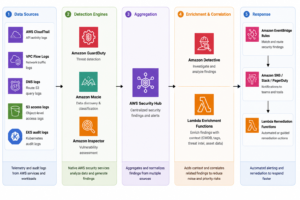
2. AWS Threat Detection Architecture: Building the Full Detection Stack
A production-ready AWS threat detection architecture has five layers. Each layer adds depth. Together they provide complete visibility across compute, storage, identity, network, and application behavior.
2.1 Layer 1: Data Sources and Log Telemetry
Threat detection quality is entirely determined by telemetry quality. The detection engine is only as good as the logs it receives. Here are the critical data sources every production environment must activate:
| Log Source | What It Captures | Threat Signal |
| AWS CloudTrail | API calls, console logins, resource changes | Privilege escalation, unauthorized access |
| VPC Flow Logs | Network traffic metadata (src/dst IP, port, protocol) | Lateral movement, data exfil, port scanning |
| DNS Query Logs | Route 53 resolver query logs | C2 beaconing, DNS tunneling, cryptomining |
| S3 Access Logs / CloudTrail Data Events | Object-level GET/PUT/DELETE operations | Data exfiltration, ransomware staging |
| EKS Audit Logs | Kubernetes API server actions | Pod escape, privilege abuse, RBAC bypass |
| Lambda Execution Logs | Function invocations, errors, duration | Injection attacks, over-privileged execution |
| RDS Activity Streams | Database query activity | SQL injection, data scraping, credential abuse |
2.2 Layer 2: Amazon GuardDuty — The Core Detection Engine
GuardDuty is your primary ML-powered detection engine. It analyzes CloudTrail event logs, VPC Flow Logs, and DNS logs continuously without any infrastructure to manage. It uses threat intelligence feeds, anomaly detection, and machine learning to identify malicious behavior patterns.
Key GuardDuty Finding Categories
- UnauthorizedAccess — credentials used from unusual geolocations or Tor exit nodes
- CryptoCurrency — EC2 or Lambda instances querying cryptomining pools
- Backdoor — EC2 instances communicating with known C2 infrastructure
- Recon — API enumeration, port scanning, password policy discovery
- Stealth — CloudTrail logging disabled, GuardDuty tampered with
- Trojan — malware indicators in DNS or network traffic
- PenTest — API calls from known pentesting tools (Pacu, Cloud Mapper)
- PrivilegeEscalation — IAM policy manipulation to gain elevated permissions
Production Configuration Checklist
- Enable GuardDuty in all regions via AWS Organizations delegated admin
- Enable EKS Protection for Kubernetes audit log analysis
- Enable S3 Protection for data event threat detection
- Enable Malware Protection for EC2 and EBS volume scanning
- Enable Lambda Protection for serverless threat detection
- Enable RDS Protection for database login anomaly detection
- Set finding export frequency to 15 minutes for near-real-time S3 export
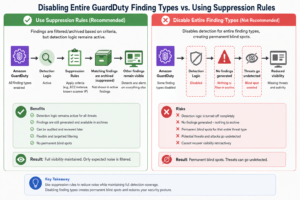
- Suppress known-good findings using suppression rules (not disabling findings)
2.3 Layer 3: AWS Security Hub — Centralized Finding Aggregation
Security Hub is the aggregation and compliance layer of your detection stack. It ingests findings from GuardDuty, Macie, Inspector, IAM Access Analyzer, Firewall Manager, and third-party integrations, normalizes them into AWS Security Finding Format (ASFF), and evaluates them against security standards.
Security Standards to Enable
- AWS Foundational Security Best Practices (FSBP) — AWS-native controls, highest signal- to-noise ratio
- CIS AWS Foundations Benchmark — audit-ready compliance controls
- PCI DSS — required for cardholder data environments
- NIST SP 800-53 — government and regulated industry requirements
Multi-Account Aggregation Pattern
In Organizations deployments, designate a dedicated Security Hub administrator account (separate from your organization management account). Use the aggregation region feature to consolidate findings from all member accounts and all regions into a single Security Hub instance. This gives your security team a single pane of glass without needing cross-account console access.
- Security Hub admin account — do NOT use the management account
- Enable aggregation region — choose your primary security operations region
- Auto-enable new accounts — ensure new accounts are enrolled automatically
- Use automation rules — trigger actions on finding state changes without Lambda
2.4 Layer 4: Amazon Detective — Forensic Investigation
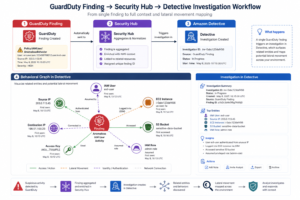
GuardDuty detects. Detective investigates. When a GuardDuty finding fires — say, an EC2 instance communicating with a C2 server — Detective gives you the behavioral graph to answer: what did that instance do before and after? Which IAM role was assumed? Which other resources did it touch?
Detective ingests CloudTrail, VPC Flow Logs, and GuardDuty findings, then builds a behavioral graph over a 12-month rolling window. This graph-based approach dramatically reduces mean-time-to-investigate (MTTI) compared to manually querying CloudTrail logs in Athena.
2.5 Layer 5: Amazon Macie — Sensitive Data Discovery and Exfiltration Detection
Macie applies ML to discover, classify, and protect sensitive data in S3. For threat detection purposes, Macie matters because data exfiltration is often the final objective of an attack chain. Knowing which S3 buckets contain PII, PCI, or credentials — and which are publicly accessible — is critical for prioritizing incident response.
- Run automated sensitive data discovery across all S3 buckets
- Alert on policy findings: public buckets, cross-account access, unencrypted buckets
- Alert on sensitive data findings: PII, credentials, financial data exposure
- Integrate Macie findings into Security Hub for unified triage
3. Real-Time Alerting: From Finding to Engineer in Under 2 Minutes
A detection that does not alert is a detection that does not exist. The alerting pipeline is where most teams have the most implementation debt. Findings sit in the Security Hub console, unacknowledged, for days. Building an automated alerting and enrichment pipeline closes this gap.
3.1 The EventBridge-Based Alert Pipeline
The recommended pattern for routing Security Hub findings to your engineering team uses EventBridge as the central routing layer. This is more scalable, more flexible, and lower-latency than polling Security Hub via Lambda on a schedule.
EventBridge Rule Pattern for Critical Findings
Configure your EventBridge rule to match Security Hub findings above a severity threshold:
- Event source: “aws.securityhub”
- Detail-type: “Security Hub Findings – Imported”
- Filter: findings[0].Severity.Label = CRITICAL or HIGH
- Filter: findings[0].Workflow.Status = NEW
- Filter: findings[0].RecordState = ACTIVE
3.2 Slack Notification with Context Enrichment
Raw GuardDuty finding payloads are not useful to an on-call engineer at 2am. A Lambda enrichment function should transform the raw finding into an actionable Slack notification that includes the affected resource, the finding type, a severity score, a direct link to Detective investigation, and recommended first-response actions.
- Resource ARN — what is affected
- Finding type and severity — how serious is it
- Region and account — where it is
- Detective investigation link — one click to context
- First response runbook link — what to do right now
- Workflow status — is someone already working it
3.3 PagerDuty and OpsGenie Integration
For CRITICAL severity findings, integrate Security Hub via EventBridge with PagerDuty or OpsGenie using SNS as the intermediary. This triggers your existing on-call rotation without creating a separate alerting system. Configure deduplication rules so multiple correlated findings from the same attack chain create a single incident, not a storm of alerts.
4. Automated Incident Response: Closing the Loop with Lambda Remediation
Detection without automated response means a human must be awake, attentive, and fast every time a finding fires. For predictable, well-understood threat patterns, automated remediation reduces MTTR from hours to seconds.
4.1 Response Automation Patterns by Finding Type
| GuardDuty Finding | Automated Response | Lambda Action |
| UnauthorizedAccess:IAMUser/ConsoleLoginSuccess.B | Quarantine IAM user | Attach explicit-deny policy, notify security team |
| CryptoCurrency:EC2/BitcoinTool.B!DNS | Isolate EC2 instance | Modify security group to block all outbound traffic |
| Trojan:EC2/BlackholeTraffic | Snapshot and isolate | Create EBS snapshot, detach from VPC, tag for forensics |
| Stealth:IAMUser/CloudTrailLoggingDisabled | Re-enable logging, alert | Enable CloudTrail trail, escalate to CRITICAL ticket |
| PrivilegeEscalation:IAMUser/AnomalousBehavior | Revoke sessions | Revoke all active IAM sessions, disable access keys |
| Policy:S3/BucketPublicAccessGranted | Block public access | Apply S3 Block Public Access settings automatically |
4.2 Safe Automation Guardrails
Automated remediation can cause outages if implemented carelessly. Every automated response Lambda should include these guardrails:
- Tag-based exclusion — add an ‘AutoRemediation: Exclude’ tag to resources that should never be auto-remediated (production databases, core networking)
- Dry-run mode — log what the function would do without executing, validate in staging first
- Dead letter queue — failed Lambda executions go to SQS DLQ for manual review
- IAM least-privilege — each remediation function has only the permissions it needs, nothing more
- Approval gate — for high-blast-radius actions (terminating instances, revoking org-wide policies), require a human approval via SNS confirmation before executing
4.3 AWS Systems Manager Automation for Response Runbooks
For complex, multi-step response workflows, use AWS Systems Manager Automation documents instead of raw Lambda. SSM Automation provides approval steps, rollback capabilities, audit trails, and built-in AWS API actions without writing custom Lambda code. Define your incident response runbooks as SSM documents and trigger them from EventBridge.
5. Multi-Account and Multi-Region AWS Threat Detection at Scale
Single-account GuardDuty is straightforward. Multi-account, multi-region detection at enterprise scale introduces architectural decisions that significantly impact coverage, operational overhead, and cost.
5.1 AWS Organizations Integration Pattern
The recommended architecture for organizations with multiple AWS accounts uses a dedicated Security account separate from the management account:
- Create a dedicated Security Tooling account in your AWS Organization
- Designate this account as GuardDuty delegated administrator
- Designate this account as Security Hub administrator
- Designate this account as Macie administrator
- Use Organizations SCPs to prevent members from disabling detection services
- Enable auto-enable so new accounts are automatically enrolled
5.2 Service Control Policies for Detection Enforcement
Without SCPs, any account admin can disable GuardDuty, delete CloudTrail trails, or turn off Security Hub. Enforce detection integrity with SCPs that deny these destructive actions for all principals except the Security account:
- Deny guardduty:DeleteDetector for all accounts except security tooling
- Deny cloudtrail:DeleteTrail and cloudtrail:StopLogging organization-wide
- Deny securityhub:DisableSecurityHub for member accounts
- Deny macie2:DisableMacie for member accounts
5.3 Cross-Region Finding Aggregation
GuardDuty findings are region-specific. A finding in ap-southeast-1 does not appear in your us-east-1 Security Hub unless you enable cross-region aggregation. Configure Security Hub aggregation with one designated aggregation region and enable finding aggregation from all active regions. This gives your security operations team a single dashboard regardless of where the activity occurs.
6. SIEM Integration: Forwarding AWS Findings to Splunk, Elastic, or Datadog
For organizations with existing SIEM investments, the goal is to forward normalized AWS security findings into the SIEM without duplicating detection logic. The SIEM adds value through cross-platform correlation — correlating AWS GuardDuty findings with on-premises firewall alerts, Okta authentication events, and endpoint telemetry.
6.1 Kinesis Firehose Integration Pattern
The most scalable, cost-effective pattern for SIEM ingestion uses Kinesis Data Firehose:
- EventBridge rule captures Security Hub findings above severity threshold
- EventBridge target sends findings to Kinesis Firehose delivery stream
- Firehose buffers and batches findings (reduce API call overhead)
- Lambda transformation function normalizes ASFF to SIEM schema
- Firehose delivers to SIEM HTTP endpoint or S3 landing bucket
This pattern handles burst finding volumes without Lambda concurrency limits, costs a fraction of direct API forwarding, and provides built-in retry and error handling.
6.2 Native SIEM Integrations
| SIEM Platform | Integration Method | Key Consideration |
| Splunk | Splunk Add-on for AWS (official) | Use SQS-based S3 input for scale; avoid direct API polling |
| Elastic | AWS integration via Elastic Agent or Filebeat | Enable Security Solution for pre-built AWS detection rules |
| Datadog | AWS integration with Security Signals | GuardDuty and CloudTrail forwarded via EventBridge → Datadog |
| Microsoft Sentinel | AWS S3 connector | Route via S3 export; Sentinel parses ASFF natively |
| Sumo Logic | CloudTrail and GuardDuty apps | Direct HTTP ingestion from EventBridge supported |
7. Cost Optimization for AWS Threat Detection at Scale
GuardDuty, Security Hub, Macie, and Detective are all usage-based services. At scale, costs can grow significantly without proactive FinOps discipline. Here is how cloud architects manage detection costs without creating coverage gaps.
7.1 GuardDuty Cost Drivers and Optimization
- CloudTrail management events — high volume, often your largest cost driver
- VPC Flow Logs — scales linearly with network throughput, can be significant in data-heavy workloads
- DNS logs — generally low cost
- EKS audit logs — scales with Kubernetes API call volume
Cost Reduction Strategies
- Use GuardDuty console Cost Explorer to identify the highest-cost data sources
- Scope EKS Protection to specific clusters rather than organization-wide if you have many dev clusters
- Use GuardDuty Malware Protection selectively — enable on internet-facing EC2, disable on internal batch instances
- Leverage the 30-day free trial on new features (S3 Protection, EKS, RDS) to assess cost before committing
- Use AWS Cost Anomaly Detection with a GuardDuty cost monitor to alert on unexpected spend spikes
7.2 Security Hub and Macie Cost Management
- Security Hub charges per finding ingested and per security check — suppress low-value findings from third-party integrations to reduce ingestion costs
- Macie charges per GB of S3 data scanned — run automated discovery on a schedule rather than continuously for lower-priority buckets
- Use Macie allow-lists to exclude known-safe data patterns from generating findings, reducing false-positive findings and their associated cost
7.3 Detective Pricing Model
Amazon Detective charges based on the volume of data ingested from GuardDuty, CloudTrail, and VPC Flow Logs over the 12-month behavioral graph window. In high-volume environments, Detective can be one of your largest security tool costs. Evaluate the investigation time savings against the cost — for organizations with active security operations teams, the MTTI reduction typically justifies the spend.
8. AWS Threat Detection for Kubernetes and Container Workloads
Container and Kubernetes workloads introduce unique threat detection challenges. Traditional network-based detection misses container-level events. Process-level threats (container escapes, privilege abuse, malicious binaries) require detection at the runtime layer.
8.1 EKS Threat Detection Stack
- GuardDuty EKS Protection — analyzes Kubernetes audit logs for anomalous API calls, privilege escalation, and policy bypass
- GuardDuty Runtime Monitoring — deploys a security agent to EKS nodes that monitors process execution, file access, and network connections at runtime
- EKS Audit Logs — sent to CloudTrail and GuardDuty for API-level detection
- Amazon Inspector — scans container images in ECR for known CVEs before deployment
8.2 Runtime Detection Finding Types for EKS
- Execution:Kubernetes/ExecInKubernetes — exec command run inside a container
- PrivilegeEscalation:Kubernetes/PrivilegedContainer — privileged container created
- Persistence:Kubernetes/ContainerWithSensitiveMount — sensitive host path mounted
- Impact:Kubernetes/MaliciousFile — malicious file detected on EKS node
- CryptoCurrency:Runtime/BitcoinTool.B — cryptomining process executing inside container
9. Measuring Detection Effectiveness: Metrics That Matter
You cannot improve what you do not measure. A mature AWS threat detection program tracks operational metrics that reflect detection coverage, response speed, and false-positive rate — not just whether the services are enabled.
9.1 Key Detection and Response Metrics
| Metric | Description | Target |
| Mean Time to Detect (MTTD) | Time from threat activity to GuardDuty finding | < 5 minutes for high-severity |
| Mean Time to Notify (MTTN) | Time from finding to engineer notification | < 2 minutes via EventBridge + PagerDuty |
| Mean Time to Respond (MTTR) | Time from notification to containment action | < 15 minutes for automated, < 1 hour for manual |
| Mean Time to Investigate (MTTI) | Time to determine scope and root cause | < 4 hours with Detective |
| False Positive Rate | % of findings that are benign | < 5% with tuned suppression rules |
| Coverage Score | % of accounts/regions with GuardDuty enabled | 100% — enforce with SCPs |
| Finding Backlog | # of active findings older than SLA threshold | 0 CRITICAL > 4hrs, 0 HIGH > 24hrs |
9.2 Security Hub Insights for Operational Visibility
Security Hub Insights are saved queries that give your security team pre-built operational dashboards. Create custom Insights for:
- Top 10 accounts by CRITICAL finding count
- Resources with repeated GuardDuty findings (persistent compromise indicators)
- Findings with Workflow.Status = NEW older than 24 hours (SLA breach tracking)
- Public S3 buckets with sensitive data (Macie + Security Hub cross-correlation)
10. Common Engineering Mistakes and How to Avoid Them
These are the most frequently observed architectural mistakes in AWS threat detection deployments, based on real-world cloud security assessments.
Mistake 1: Treating GuardDuty as Set-and-Forget
GuardDuty requires ongoing tuning. Out-of-the-box, it generates noise from legitimate behavior that looks anomalous (CI/CD pipelines calling IAM frequently, security scanners hitting your own infrastructure). Without suppression rules, your team burns out on false positives and starts ignoring alerts. Build a suppression rule review cycle into your monthly security operations cadence.
Mistake 2: Enabling Security Hub Without Standards Tuning
Enabling all Security Hub standards immediately generates thousands of FAILED findings across every account. Without a triage strategy, this is paralyzing. Start with AWS Foundational Security Best Practices, fix critical controls first, and suppress controls that do not apply to your architecture (e.g., MFA on service accounts, where your IdP handles identity). Work toward a compliance score, not control elimination.
Mistake 3: No Finding Workflow Integration
GuardDuty findings that sit in the console unclaimed are organizational waste. Integrate Security Hub finding workflow status (NEW → NOTIFIED → IN_PROGRESS → RESOLVED) with your ticketing system (Jira, ServiceNow, PagerDuty). Every CRITICAL finding should become a ticket within 5 minutes of detection. This creates accountability, SLA tracking, and an audit trail.
Mistake 4: Regional Blind Spots
If your application only runs in us-east-1, you may think enabling GuardDuty in other regions is unnecessary. Attackers actively exploit unmonitored regions — spinning up EC2 instances in ap-south-1 for cryptomining or using eu-west-2 as a staging environment for exfiltration. Enable GuardDuty in all regions. The cost is negligible when there is no legitimate traffic to analyze.
Mistake 5: Over-Relying on Perimeter Detection
VPC security groups, WAFs, and Shield Advanced are prevention layers. They stop known-bad traffic but do not detect authorized users behaving maliciously, compromised credentials operating within authorized network paths, or insider threats. GuardDuty, CloudTrail analysis, and Macie detect behavioral anomalies that perimeter tools cannot. Run both layers.
11. Implementation Roadmap: 30-60-90 Day Plan
For teams starting from zero or modernizing a fragmented detection setup, this phased roadmap delivers measurable security outcomes at each milestone.
Days 1-30: Foundation
- Enable GuardDuty organization-wide via delegated administrator
- Enable CloudTrail with S3 data events in all regions
- Enable Security Hub with AWS FSBP standard
- Configure EventBridge rule for CRITICAL findings → SNS → PagerDuty
- Create Slack alerting Lambda with basic enrichment
- Establish SCP to prevent disabling of detection services
Days 31-60: Depth
- Enable GuardDuty EKS, S3, RDS, Lambda, and Malware Protection
- Enable Macie and run initial sensitive data discovery scan
- Enable Amazon Detective and link to GuardDuty
- Build suppression rules for known-good findings
- Implement automated remediation for top 5 finding types
- Enable Security Hub cross-region aggregation
Days 61-90: Maturity
- Integrate Security Hub findings into SIEM via Kinesis Firehose
- Build Security Hub Insights for operational dashboards
- Implement QuickSight dashboard for executive security reporting
- Run tabletop exercise against simulated GuardDuty findings
- Establish monthly detection metrics review cadence
- Begin CIS Benchmark compliance remediation from Security Hub
Frequently Asked Questions: AWS Threat Detection
Q1: What is AWS threat detection and how is it different from prevention?
AWS threat detection refers to the continuous monitoring and analysis of cloud activity to identify malicious behavior, misconfigurations, and anomalies after they occur. Prevention (security groups, WAFs, IAM boundaries) stops known threats at the perimeter. Detection identifies threats that bypass prevention controls — compromised credentials, insider activity, or novel attack techniques. You need both layers operating simultaneously.
Q2: Is GuardDuty enough on its own for AWS threat detection?
GuardDuty is a powerful detection engine but is not sufficient as a standalone solution. It needs Security Hub for finding aggregation and compliance management, Detective for investigation depth, CloudTrail for complete API audit history, and Macie for data-level visibility. GuardDuty is the detection engine; the others form the investigative and operational layers around it.
Q3: How much does AWS GuardDuty cost for a mid-sized deployment?
GuardDuty pricing varies by data volume processed. For a mid-sized deployment (10-50 accounts, moderate network traffic), expect roughly $50-$300 per account per month depending on VPC Flow Log volume, CloudTrail event density, and which protection features are enabled. Run the GuardDuty 30-day free trial and use Cost Explorer during the trial to estimate your actual spend before committing.
Q4: How do I reduce false positives in GuardDuty without disabling findings?
Use GuardDuty suppression rules to archive findings that match known-good criteria without disabling the detection type. For example, suppress ‘PenTest:IAMUser/KaliLinux’ for your known pentest account by filtering on the account ID. Review suppression rules monthly to ensure they are still valid. Never suppress finding types globally — that creates blind spots.
Q5: Can AWS threat detection work for serverless and Lambda workloads?
Yes. Enable GuardDuty Lambda Protection to analyze network activity from Lambda function executions and detect cryptomining, C2 communication, and unauthorized data access from serverless functions. Combine with CloudTrail data events for Lambda API monitoring and Security Hub controls for Lambda configuration security posture. Runtime behavioral detection for Lambda is a newer capability — ensure it is explicitly enabled, as it is not on by default.
Conclusion: Building an AWS Threat Detection Program That Scales
The organizations that get this right share common patterns: they treat detection as infrastructure, enforced via Organizations and SCPs. They measure MTTD, MTTN, and MTTR as operational KPIs. They suppress false positives with surgical suppression rules rather than disabled finding types. They automate response for well-understood threats and reserve human judgment for complex investigations.
Start with the 30-60-90 day roadmap. Enable the foundation first. Add depth in phase two. Reach operational maturity in phase three. AWS threat detection at scale is achievable, cost-manageable, and delivers measurable security outcomes but it requires intentional architecture, not just service activation.
