


Choosing Between Redshift Provisioned and Serverless
The AWS Redshift vs Redshift Serverless decision represents a critical infrastructure choice for data-driven organizations in 2026, impacting everything from query performance and scalability to operational overhead and total cost of ownership. With over 60% of enterprises now leveraging cloud data warehouses for analytics, selecting the right Amazon Redshift deployment model can mean the difference between cost-effective analytics and budget overruns.
AWS Redshift vs Redshift Serverless isn’t simply about choosing between two pricing models—it’s about aligning your data warehouse architecture with workload characteristics, team capabilities, and business requirements. Amazon Redshift, the provisioned cluster model launched in 2013, offers maximum control and predictable performance for consistent workloads. Redshift Serverless, introduced in 2022, eliminates capacity planning by automatically scaling compute resources based on demand.
For CTOs, data architects, startup founders, and analytics engineers evaluating Redshift provisioned vs serverless, the decision impacts development velocity, operational costs, query concurrency, and administrative burden. Organizations with predictable, high-volume analytics workloads face different considerations than startups with intermittent reporting needs or enterprises with highly variable query patterns.
What is Amazon Redshift (Provisioned)?
Amazon Redshift is AWS‘s fully managed, petabyte-scale cloud data warehouse service that uses provisioned clusters of nodes for SQL analytics. Launched in 2013, Redshift pioneered massively parallel processing (MPP) architecture in the cloud, enabling organizations to analyze massive datasets using standard SQL and existing business intelligence tools.
Key Features of Amazon Redshift Provisioned
Provisioned Cluster Architecture
Redshift provisioned clusters offer dedicated compute and storage resources:
- Node types: RA3 (managed storage), DC2 (dense compute), DS2 (dense storage) with varying CPU, memory, and storage configurations
- Cluster sizing: Scale from single-node development clusters to multi-petabyte production deployments with hundreds of nodes
- Reserved capacity: Purchase 1-year or 3-year Reserved Instances for up to 75% cost savings compared to on-demand pricing
- Persistent clusters: Resources remain provisioned 24/7 or can be paused manually during non-use periods
- Dedicated resources: Predictable, consistent performance with guaranteed compute capacity
This architecture provides maximum control over resource allocation and cost management through long-term commitments.
Advanced Performance Optimization
Redshift provisioned clusters enable deep performance tuning:
- Distribution keys and sort keys: Optimize data distribution across nodes for query performance
- Workload management (WLM): Configure query queues with memory allocation, concurrency limits, and query timeouts
- Concurrency scaling: Automatically add transient capacity for burst query workloads without impacting main cluster
- Result caching: Frequently accessed query results cached for sub-second response times
- Materialized views: Pre-compute complex aggregations and joins for faster query execution
- AQUA (Advanced Query Accelerator): Hardware-accelerated cache for RA3 clusters delivering up to 10× better performance
Data Lake Integration
Redshift provisioned seamlessly integrates with AWS data lake services:
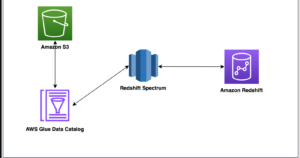
- Redshift Spectrum: Query petabytes of data in Amazon S3 without loading into Redshift
- External tables: Define schemas on S3 data and query using standard SQL
- Lake Formation integration: Unified security and governance across data warehouse and lake
- Federated queries: Join Redshift data with Amazon RDS, Aurora, and S3 in single query
- Data sharing: Share live data across Redshift clusters without copying or moving data
Enterprise Data Management
Provisioned Redshift provides comprehensive data governance:
- Automated backups: Continuous incremental backups to Amazon S3 with point-in-time recovery
- Cross-region snapshots: Disaster recovery with automated snapshot copy to different AWS region
- Fine-grained access control: Column-level and row-level security with database roles
- Encryption: At-rest encryption with AWS KMS and in-transit with SSL/TLS
- Audit logging: CloudTrail integration for comprehensive audit trails
- VPC isolation: Deploy in private subnets with security groups and network ACLs
Use Cases for Amazon Redshift Provisioned
Enterprise Data Warehousing:
- Large-scale analytics for organizations with 10TB+ data volumes
- Consistent, high-volume query workloads running 24/7
- Complex ETL/ELT pipelines requiring guaranteed throughput
- Replacing legacy on-premises data warehouses (Teradata, Oracle Exadata, Netezza)
Business Intelligence and Reporting:
- Executive dashboards with hundreds of concurrent users
- Scheduled reporting workflows running overnight
- Ad-hoc analytics by business analyst teams
- Integration with Tableau, Looker, Power BI, QuickSight
Predictable, Cost-Optimized Workloads:
- Production analytics with consistent resource utilization
- Cost savings through 1-3 year Reserved Instance commitments
- Environments where pause/resume patterns are well-defined
- Budget-conscious organizations optimizing per-query costs
Advanced Performance Requirements:
- Workloads requiring custom distribution and sort key strategies
- Complex joins across billions of rows needing optimization
- Queries benefiting from materialized views and result caching
- Applications sensitive to query latency requiring performance tuning
What is Amazon Redshift Serverless?
Amazon Redshift Serverless is a serverless deployment option that automatically provisions and scales data warehouse capacity based on workload demands. Launched in 2022, Redshift Serverless eliminates the need to manage clusters, choose node types, or plan capacity, making data warehousing accessible to organizations without specialized database administration expertise.
Key Features of Redshift Serverless
Zero-Administration Serverless Architecture
Redshift Serverless removes infrastructure management complexity:
- Automatic provisioning: No cluster configuration or node selection required—start querying immediately
- Automatic scaling: Compute capacity scales up/down in seconds based on query complexity and concurrency
- Idle scaling to zero: Pay only for actual query execution time—no charges during inactivity
- No manual tuning: System automatically handles distribution, compression, and query optimization
- Instant availability: Data warehouse ready in under 60 seconds after creation
- Namespace and workgroup: Logical separation of data (namespace) and compute (workgroup) for flexible management
This serverless model democratizes data warehousing by removing operational barriers.
Flexible Consumption-Based Pricing
Serverless pricing aligns costs directly with usage:
- Redshift Processing Units (RPUs): Compute capacity measured in RPUs (1 RPU = 16 GB memory)
- Per-second billing: Pay only for compute used during query execution, billed per second
- Base capacity: Set minimum RPUs (8-512) for predictable performance floor
- Maximum capacity: Optional cap to prevent runaway costs from unexpected workloads
- Storage pricing: Separate $0.024/GB-month charge for managed storage (identical to provisioned RA3)
- No upfront commitments: No Reserved Instances or long-term contracts required
Simplified Developer Experience
Serverless reduces time-to-value for data teams:
- Query Editor V2: Web-based SQL IDE with autocomplete, visualization, and collaboration features
- Data API: Execute SQL queries via HTTPS API without JDBC/ODBC drivers
- AWS Console integration: Create data warehouse, load data, and run queries entirely through console
- Cross-account data sharing: Share data with other AWS accounts using Redshift Data Sharing
- IAM authentication: Simplified security using AWS IAM roles instead of database users/passwords
Automatic Performance Optimization
Serverless handles optimization tasks automatically:
- Smart scaling algorithms: Machine learning predicts workload patterns and pre-scales capacity
- Adaptive concurrency: Automatically adjusts concurrent query execution based on resource availability
- Intelligent caching: Query result caching and workload-aware cache management
- Auto-pause for idle periods: Automatically stops charging when no queries running (unlike provisioned clusters)
- Workload isolation: Separate workgroups for different teams or applications with independent scaling
Use Cases for Redshift Serverless
Intermittent Analytics Workloads:
- Startups and small businesses with sporadic reporting needs
- Development and testing environments used during business hours only
- Proof-of-concepts and pilot projects exploring data warehouse capabilities
- Applications with unpredictable query patterns
Variable and Unpredictable Queries:
- Workloads with high variability in query complexity and frequency
- Ad-hoc analytics by data scientists and analysts with inconsistent usage
- Customer-facing analytics embedded in SaaS applications
- Multi-tenant applications requiring workload isolation
Rapid Deployment and Prototyping:
- Quick-start analytics without capacity planning delays
- Agile teams requiring fast iteration cycles
- Organizations lacking database administration resources
- Experimentation with data warehouse architectures
Cost-Sensitive Variable Workloads:
- Environments where compute is only needed intermittently
- Budget-conscious teams wanting to minimize idle resource costs
- Seasonal analytics with peaks and valleys in usage
- Departmental data warehouses with limited, focused usage
AWS Redshift vs Redshift Serverless: Key Differences
Understanding the architectural, operational, and economic differences between Amazon Redshift provisioned and Redshift Serverless clarifies where each deployment model excels.
Architecture and Resource Management
Provisioned Redshift:
- Fixed cluster configuration: Choose specific node types and quantities that remain allocated
- Manual scaling: Resize clusters through elastic resize (minutes) or classic resize (hours with downtime)
- Persistent compute: Resources remain running 24/7 unless manually paused
- Dedicated resources: Guaranteed compute capacity with no noisy neighbor effects
- Performance predictability: Consistent performance characteristics once properly sized
Redshift Serverless:
- Dynamic resource allocation: Compute automatically provisioned based on workload demands
- Automatic scaling: Scales seamlessly in seconds without user intervention
- On-demand compute: Only charged during active query execution
- Shared infrastructure: Resources dynamically allocated from shared pool
- Variable performance: Performance adjusts based on current capacity and scaling decisions
Key Insight: Provisioned offers control and predictability; Serverless provides flexibility and simplicity.
Pricing Models and Cost Structures
Provisioned Redshift Pricing:
Amazon Redshift provisioned uses hourly node pricing:
- On-demand pricing: $0.25-$13.04/hour per node depending on type (DC2, RA3)
- Reserved Instances: 1-year (40% savings) or 3-year (75% savings) commitments with upfront payment options
- RA3 managed storage: $0.024/GB-month beyond included storage
- Concurrency Scaling: $6.00 per compute-hour when additional capacity activated
- Pause capability: Stop billing for compute (storage charges continue) during scheduled downtime
Example Provisioned Costs:
- 2-node RA3.xlplus cluster (4TB storage each): ~$0.75/hour × 730 hours = ~$548/month
- With 3-year Reserved Instance (75% savings): ~$137/month
- Storage (5TB managed): ~$120/month
- Total: $257-668/month depending on commitment
Redshift Serverless Pricing:
Serverless uses consumption-based Redshift Processing Unit (RPU) pricing:
- RPU pricing: $0.375/hour per RPU-hour in US East (varies by region)
- Base capacity: Minimum 8 RPUs (128 GB memory) = $3.00/hour when active
- Automatic scaling: Scales between base and maximum RPU limits based on workload
- Idle periods: Zero compute charges when no queries running
- Storage pricing: $0.024/GB-month (identical to provisioned managed storage)
Example Serverless Costs:
- 100 RPU-hours/month (varied workload, average 32 RPUs for ~3.1 hours/day): ~$37.50/month
- 500 RPU-hours/month (moderate usage): ~$187.50/month
- Storage (5TB): ~$120/month
- Total: $157.50-307.50/month for variable workload
Cost Comparison Summary:
| Workload Pattern | Provisioned Cost | Serverless Cost | Winner |
| 24/7 consistent usage | $257/month (3-yr RI) | $1,000+/month | Provisioned (80% cheaper) |
| 8 hours/day, 5 days/week | $548/month (on-demand) | $300-400/month | Serverless (30-40% cheaper) |
| Sporadic (2 hours/day) | $548/month (minimum) | $100-150/month | Serverless (70% cheaper) |
| Development/test | $548/month (or manual pause) | $50-100/month | Serverless (80% cheaper) |
Winner: Provisioned for consistent 24/7 workloads with Reserved Instances; Serverless for variable/intermittent usage
Performance and Optimization
Provisioned Redshift Performance:
Provisioned clusters offer maximum performance control:
- Manual optimization: Define distribution keys, sort keys, compression encoding
- Workload Management (WLM): Configure query queues, priorities, memory allocation
- Concurrency Scaling: Add transient clusters for burst capacity (additional cost)
- Materialized views: Pre-compute aggregations for faster queries
- Vacuum and analyze: Manually optimize table storage and statistics
- Consistent latency: Predictable query response times with properly tuned cluster
Redshift Serverless Performance:
Serverless automates optimization but with less granular control:
- Automatic optimization: System handles distribution, compression, and query plans
- Dynamic scaling: Adds compute for complex queries automatically
- No manual tuning: Cannot define distribution/sort keys or custom WLM queues
- Simplified maintenance: Automatic vacuum, analyze, and storage optimization
- Variable latency: Performance depends on current scaling and workload competition
- Smart algorithms: Machine learning-based resource allocation
Performance Comparison:
For well-optimized workloads, provisioned Redshift typically delivers 10-30% better query performance than Serverless due to dedicated resources and manual tuning. However, Serverless eliminates performance degradation during idle periods and automatically handles burst workloads that would overwhelm a fixed provisioned cluster.
Winner: Provisioned for maximum, predictable performance; Serverless for adaptive performance without tuning overhead
Operational Complexity
Provisioned Operational Requirements:
Managing provisioned clusters requires technical expertise:
- Capacity planning: Analyze workload patterns, choose appropriate node types and quantities
- Cluster management: Monitor utilization, resize when needed, plan for growth
- Performance tuning: Optimize distribution keys, sort keys, vacuum schedules
- WLM configuration: Define query queues, priorities, timeout values
- Pause/resume scheduling: Automate cluster suspension during known idle periods
- Maintenance windows: Schedule cluster reboots for patches and upgrades
Estimated administrative overhead: 5-15 hours/month for experienced DBA
Redshift Serverless Operational Simplicity:
Serverless eliminates most administrative tasks:
- Zero capacity planning: System automatically determines required resources
- No tuning required: Optimization handled automatically by AWS
- Auto-pause/resume: Automatic idle detection and resource deallocation
- Automatic upgrades: Patches and updates applied transparently
- Simplified monitoring: Focus on query performance and cost, not infrastructure
Estimated administrative overhead: 1-3 hours/month for basic monitoring
Winner: Serverless decisively—reduces administrative burden by 70-90%
When to Choose Amazon Redshift Provisioned
Provisioned Redshift remains the optimal choice for organizations with predictable workloads requiring maximum performance and cost optimization.
Ideal Scenarios for Provisioned Redshift
- Consistent, High-Volume Workloads
Organizations with 24/7 analytics benefit from provisioned clusters:
- Production data warehouses supporting continuous BI dashboards
- ETL/ELT pipelines running around the clock
- Applications with predictable query patterns and volumes
- Workloads justifying Reserved Instance commitments (40-75% savings)
- Performance-Critical Applications
Workloads requiring guaranteed, optimized performance:
- Sub-second query response time requirements
- Complex analytical queries across billions of rows
- Applications sensitive to query latency variability
- Workloads benefiting from custom distribution/sort key optimization
- Large Data Volumes and Complex Transformations
Enterprises with massive datasets and sophisticated analytics:
- Multi-petabyte data warehouses (10TB+ typical)
- Complex star/snowflake schema designs requiring optimization
- Heavy use of materialized views for performance
- Advanced workload management with custom query prioritization
When to Choose Redshift Serverless
Redshift Serverless excels for organizations prioritizing simplicity, flexibility, and variable workload economics.
Ideal Scenarios for Redshift Serverless
- Variable and Unpredictable Workloads
Organizations with fluctuating analytics needs:
- Startups with rapidly changing data volumes and query patterns
- Ad-hoc analytics by data science teams with inconsistent usage
- Seasonal businesses with peaks and valleys in reporting
- Multi-tenant SaaS applications with per-customer workload isolation
- Development, Testing, and Experimentation
Non-production environments benefit from serverless economics:
- Development data warehouses used during business hours only
- Testing environments for data pipeline validation
- Proof-of-concept projects exploring Redshift capabilities
- Sandbox environments for analyst training and experimentation
- Limited Database Administration Resources
Teams lacking specialized expertise:
- Small companies without dedicated database administrators
- Agile development teams focused on applications, not infrastructure
- Organizations prioritizing time-to-value over performance optimization
- Startups wanting to defer hiring specialized DBA talent
AWS Redshift vs Redshift Serverless: Decision Matrix
| Evaluation Criteria | Choose Provisioned If… | Choose Serverless If… |
| Workload Pattern | Consistent 24/7 or 40+ hours/week | Variable, intermittent, < 40 hours/week |
| Data Volume | 10TB+ requiring enterprise scale | < 10TB or moderate data volumes |
| Performance | Predictability critical, custom tuning needed | Auto-optimization acceptable |
| Budget Model | Can commit Reserved Instances (1-3 years) | Prefer consumption-based, no commitments |
| Team Expertise | DBA available for optimization | Limited database administration skills |
| Administrative Overhead | Can dedicate 5-15 hours/month to management | Want < 3 hours/month overhead |
| Cost Priority | Lowest per-query cost with commitment | Lowest total cost for variable usage |
| Deployment Speed | Can invest time in capacity planning | Need production-ready in < 1 hour |
| Use Case | Production analytics, BI, enterprise reporting | Dev/test, ad-hoc analysis, prototyping |
Real-World Use Case Examples
Understanding how organizations deploy AWS Redshift provisioned and Serverless in production clarifies decision-making.
Case Study 1: E-Commerce Analytics Platform (Provisioned Redshift)
Organization: Mid-size e-commerce company with $200M annual revenue
Challenge: Support 24/7 business intelligence dashboards, inventory analytics, and customer segmentation
Solution: 3-node RA3.4xlarge provisioned cluster with 3-year Reserved Instances
Why Provisioned:
- Consistent query workload running continuously
- 15TB transaction history requiring enterprise-scale performance
- 200+ concurrent BI users accessing dashboards daily
- Custom distribution keys optimized for order and customer joins
- Reserved Instance commitment delivered 72% cost savings
Implementation:
- Distribution key strategy on customer_id for customer analytics
- Sort keys on order_date for time-series queries
- Materialized views for executive dashboards
- Concurrency Scaling for end-of-month reporting peaks
Results:
- Average query response time: 2.3 seconds
- Monthly cost: $2,100 (Reserved Instance) vs. $7,500 (on-demand equivalent)
- 99.9% query success rate
- Zero administrative overhead after initial optimization (maintained by DBA)
Key Insight: Provisioned Redshift’s Reserved Instance economics and custom optimization delivered optimal TCO for consistent workload.
Case Study 2: SaaS Analytics Dashboard (Redshift Serverless)
Organization: B2B SaaS startup with embedded customer analytics
Challenge: Provide analytics dashboards to 500+ customers with unpredictable usage patterns
Solution: Redshift Serverless with separate workgroups for customer tiers
Why Serverless:
- Highly variable query patterns (peak: 10AM-2PM, idle: evenings/weekends)
- Unpredictable per-customer data volumes and query complexity
- Small engineering team without database administration expertise
- Need to scale rapidly as customer base grows
Implementation:
- Base capacity: 32 RPUs for minimum performance guarantee
- Maximum capacity: 256 RPUs to prevent runaway costs
- Separate workgroups for enterprise and standard customer tiers
- Query result caching for common dashboard queries
Results:
- Average monthly RPU consumption: 450 hours
- Monthly cost: $169 (compute) + $60 (storage) = $229
- Provisioned equivalent: $548/month (2-node cluster, no pause) = 58% savings
- Zero administrative overhead—engineers focus on application development
Key Insight: Serverless economics and automatic scaling perfectly matched unpredictable multi-tenant SaaS workload.
Case Study 3: Hybrid Approach for Development and Production
Organization: Enterprise financial services firm
Challenge: Support production analytics and multiple development/testing environments
Solution: Provisioned cluster for production + Serverless for dev/test/QA
Architecture:
- Production: 6-node RA3.xlplus provisioned cluster (Reserved Instance)
- Development: Redshift Serverless (base: 16 RPUs) shared across teams
- QA/Testing: Redshift Serverless (base: 8 RPUs) for pipeline validation
- Data Science: Redshift Serverless for ad-hoc analysis and experimentation
Cost Comparison:
- Before (all provisioned): Production $3,200 + Dev $548 + QA $548 + DS $548 = $4,844/month
- After (hybrid): Production $3,200 + Serverless $400 = $3,600/month
- Savings: $1,244/month (26% reduction)
Key Insight: Hybrid strategy optimizes costs by using provisioned for consistent production and Serverless for variable non-production environments.
Frequently Asked Questions (FAQ)
Q1: What is the main difference between AWS Redshift and Redshift Serverless?
A: Provisioned Redshift uses fixed clusters you manage, while Serverless auto-scales compute based on demand. Provisioned gives control; Serverless gives simplicity and pay-per-query pricing.
Q2: Is Redshift Serverless cheaper than provisioned Redshift?
A: Serverless is cheaper for intermittent workloads due to auto-scaling. Provisioned with Reserved Instances saves more for 24/7 usage. Costs depend on your usage patterns.
Q3: Can I migrate from provisioned Redshift to Serverless (or vice versa)?
A: Yes. Use snapshots to migrate data. Serverless doesn’t support custom distribution/sort keys, so review query optimization after migration.
Q4: How does Redshift Serverless performance compare to provisioned clusters?
A: Provisioned is 10-30% faster for optimized workloads. Serverless handles bursts automatically and performs consistently for variable queries.
Q5: Can I switch between provisioned and Serverless for different workloads?
A: Yes. Use provisioned for production with consistent performance, Serverless for ad-hoc or variable workloads. This hybrid approach optimizes costs.
Conclusion: Making Your AWS Redshift vs Redshift Serverless Decision
The AWS Redshift vs Redshift Serverless decision ultimately depends on workload predictability, team capabilities, budget flexibility, and operational priorities. Neither deployment model is universally superior each excels for specific organizational profiles and usage patterns. GoCloud helps organizations evaluate these options to choose the best fit for their workloads.
