


Choosing the Right Amazon RDS Architecture
Should you deploy an RDS cluster vs instance for your application database? This fundamental architectural decision affects everything from availability and performance to cost and operational complexity. With over 65% of enterprises now running databases on AWS, understanding the distinction between Amazon RDS cluster deployments and traditional RDS instances has never been more critical for CTOs, database architects, and development teams.
The RDS cluster vs instance debate centers on two fundamentally different approaches to managed relational databases. Amazon RDS instances represent the traditional deployment model—single or Multi-AZ database servers running MySQL, PostgreSQL, Oracle, SQL Server, or MariaDB. RDS clusters, specifically Amazon Aurora clusters, introduce a cloud-native architecture with shared storage, multiple read replicas, and superior failover capabilities.
For technical decision-makers evaluating Amazon RDS deployment options, the choice impacts application resilience, read scalability, write performance, disaster recovery capabilities, and total cost of ownership. Organizations with transactional applications face different considerations than those running analytics workloads or requiring global database distribution.
What is an Amazon RDS Instance?
Amazon RDS instance is the traditional deployment model for managed relational databases on AWS, providing single-server database deployments running popular database engines. Launched in 2009, RDS instances deliver managed MySQL, PostgreSQL, MariaDB, Oracle, SQL Server, and MySQL-compatible/PostgreSQL-compatible databases with automated backups, patching, and monitoring while maintaining compatibility with existing database applications.
Key Features of RDS Instances
Traditional Database Architecture
RDS instances use familiar single-server or Multi-AZ paired-server architecture:
- Single-AZ deployment: Database runs on one server in one Availability Zone for development/testing
- Multi-AZ deployment: Primary instance in one AZ with synchronous standby replica in different AZ
- Dedicated compute and storage: Each instance has allocated CPU, memory, and attached EBS storage
- Familiar database engines: MySQL 5.7/8.0, PostgreSQL 11-15, MariaDB 10.6+, Oracle 12c-19c, SQL Server 2016-2022
- Standard database features: Native engine capabilities without cloud-specific modifications
This architecture provides predictable, engine-native behavior familiar to database administrators.
Multi-AZ High Availability
RDS Multi-AZ instances deliver availability through active-passive failover:
- Synchronous replication: Data synchronously replicated to standby instance in different AZ
- Automatic failover: DNS endpoint switches to standby within 60-120 seconds during failure
- Zero data loss: Synchronous replication ensures committed transactions preserved
- Transparent to applications: Applications reconnect using same endpoint after failover
- Maintenance flexibility: Perform maintenance on standby, then failover for minimal downtime
Multi-AZ deployments provide 99.95% availability SLA compared to 99.5% for Single-AZ.
Read Replica Scalability
RDS instances support asynchronous read replicas for read scaling:
- Up to 15 read replicas per source instance (5 for SQL Server/Oracle)
- Cross-region read replicas: Disaster recovery and geographic read distribution
- Asynchronous replication: Typically seconds behind primary (replication lag varies)
- Manual promotion: Promote read replica to standalone instance during DR scenarios
- Independent scaling: Each replica can use different instance type
Read replicas offload reporting, analytics, and read-heavy workloads from primary instance.
Instance Type Flexibility
RDS offers diverse instance families for various workload profiles:
- General Purpose (T3, T4g, M5, M6i): Burstable or baseline performance for standard workloads
- Memory Optimized (R5, R6i, X2idn): High memory-to-vCPU ratio for memory-intensive applications
- Burstable (T3, T4g): Cost-effective for variable workloads with CPU credit banking
- Graviton (T4g, M6g, R6g): ARM-based processors with 40% better price-performance
Instance types range from 2 vCPUs/1 GB RAM to 128 vCPUs/4 TB RAM.
Use Cases for RDS Instances
Traditional Enterprise Applications:
- Migrating existing on-premises databases to AWS with minimal changes
- Oracle RAC replacements using Multi-AZ for high availability
- SQL Server applications requiring specific engine versions or features
- Legacy applications requiring exact database engine compatibility
Cost-Sensitive Workloads:
- Development and testing databases using Single-AZ t3.small instances
- Small production databases with moderate availability requirements
- Workloads where Multi-AZ instance cost is lower than Aurora cluster
- Applications with predictable, non-bursty resource utilization
Specific Database Engine Requirements:
- Oracle Database with specific enterprise features
- SQL Server with Windows Authentication or Integration Services
- PostgreSQL or MySQL with specific plugins not available in Aurora
- Database engines not supported by Aurora (Oracle, SQL Server)
Compliance and Control:
- Environments requiring specific database engine versions for compliance
- Applications with database-level encryption requirements
- Workloads needing direct control over backup/restore procedures
- Scenarios where Aurora’s shared storage model creates concerns
What is an Amazon RDS Cluster?
Amazon RDS cluster refers specifically to Amazon Aurora clusters—AWS’s cloud-native, MySQL-compatible and PostgreSQL-compatible relational database built for the cloud. Launched in 2015, Aurora reimagines database architecture with distributed, fault-tolerant storage that automatically replicates data across multiple Availability Zones, delivering up to 5× MySQL performance and 3× PostgreSQL performance with commercial database reliability at one-tenth the cost.
Key Features of RDS Clusters (Amazon Aurora)
Distributed, Shared Storage Architecture
Aurora’s storage layer fundamentally differs from traditional instances:
- Shared storage volume: All cluster instances access same storage (up to 128 TB)
- Six-way replication: Data automatically replicated across 3 AZs with 2 copies per AZ
- Self-healing storage: Continuous backup to Amazon S3 with automatic error detection/repair
- Storage auto-scaling: Grows automatically in 10 GB increments without downtime
- Separation of compute and storage: Scale compute independently from storage
- Copy-on-write snapshots: Instant snapshots without performance impact
This architecture eliminates storage bottlenecks and provides extreme durability (99.999999999%).
Multiple Reader Instances
Aurora clusters support up to 15 low-latency read replicas:
- Shared storage access: All replicas read from same storage (no replication lag for storage)
- Sub-second replica lag: Typically 10-20ms behind writer for cache synchronization
- Automatic load balancing: Reader endpoint distributes connections across replicas
- Fast failover: Promote reader to writer in 30 seconds (vs. 60-120 seconds Multi-AZ)
- Read scaling: Add/remove readers based on demand without storage impact
All readers access identical data in shared storage, ensuring consistency.
Advanced High Availability
Aurora provides superior availability mechanisms:
- 99.99% availability SLA (vs. 99.95% for Multi-AZ instances)
- Automatic failover: Promotes replica to writer in under 30 seconds
- Cluster endpoint: Writer endpoint always points to current primary
- Reader endpoint: Round-robin load balancing across available readers
- Custom endpoints: Group specific readers for specialized workloads
- Zero data loss: Crash recovery without data loss from redo logs
Aurora’s architecture tolerates loss of 2 AZs without affecting write availability.
Global Database Capabilities
Aurora Global Database enables worldwide distribution:
- Cross-region replication: < 1 second replication lag to secondary regions
- Fast cross-region failover: Promote secondary region in < 1 minute
- Read scaling: Up to 16 read replicas per secondary region
- Disaster recovery: Geographic redundancy with RPO < 1 second, RTO < 1 minute
- Global applications: Low-latency reads from regions closest to users
Global Database spans up to 5 secondary regions for worldwide coverage.
Use Cases for RDS Clusters
High-Performance Transactional Applications:
- SaaS applications requiring consistent low-latency performance
- E-commerce platforms with variable traffic patterns
- Gaming backends requiring fast read/write performance
- Financial applications with strict consistency requirements
Read-Heavy Workloads:
- Analytics dashboards querying production data
- Reporting systems with complex queries
- Content management systems with high read-to-write ratios
- Applications with hundreds of concurrent read connections
Mission-Critical Applications:
- Applications requiring 99.99% availability SLA
- Systems with strict RTO/RPO requirements (< 30 seconds / < 1 second)
- Multi-region disaster recovery requirements
- Zero-downtime scaling scenarios
Modern Cloud-Native Applications:
- Microservices requiring independent scaling of read capacity
- Serverless applications with Lambda functions
- Auto-scaling applications with unpredictable database load
- Applications leveraging Aurora Serverless for variable workloads
RDS Cluster vs Instance: Key Differences
Understanding the architectural, operational, and economic differences between RDS clusters and instances clarifies where each deployment model excels.
Architecture and Storage Model
RDS Instance Architecture:
- Dedicated storage: Each instance has attached EBS volumes (gp3, io1, io2)
- Storage limits: Up to 64 TB per instance (engine-dependent)
- Replication: Asynchronous to read replicas, synchronous to Multi-AZ standby
- Storage IOPS: Provisioned or baseline IOPS based on storage type
- Scaling storage: Manual resize requiring brief I/O pause (Multi-AZ) or downtime (Single-AZ)
RDS Cluster (Aurora) Architecture:
- Shared storage: Distributed storage volume shared across all cluster instances
- Storage limits: Up to 128 TB with automatic scaling
- Replication: Built into storage layer (6 copies across 3 AZs)
- Storage performance: Consistent, high-performance regardless of instance size
- Storage scaling: Automatic in 10 GB increments with zero downtime
Key Architectural Insight: Aurora’s shared storage eliminates replication overhead and enables faster failover, but increases dependency on AWS-specific architecture.
Performance and Scalability
RDS Instance Performance:
- Write performance: Limited to primary instance capacity (vertical scaling only)
- Read performance: Scale horizontally with up to 15 read replicas
- Replication lag: Variable lag (seconds to minutes) for read replicas based on write volume
- Failover time: 60-120 seconds for Multi-AZ automatic failover
- Connection limits: Based on instance class (typically 500-5000 connections)
RDS Cluster (Aurora) Performance:
- Write performance: Up to 5× MySQL, 3× PostgreSQL throughput on same hardware
- Read performance: 15 low-latency readers sharing same storage
- Replication lag: 10-20ms average lag for readers (storage shared, cache sync delay)
- Failover time: Under 30 seconds to promote reader to writer
- Connection limits: Higher due to efficient connection handling (5000+ typical)
Performance Comparison Table:
| Performance Metric | RDS Instance (Multi-AZ) | Aurora Cluster |
| Write Throughput | Baseline (1×) | 3-5× higher |
| Read Scaling | Up to 15 async replicas | Up to 15 low-lag readers |
| Failover Speed | 60-120 seconds | < 30 seconds |
| Storage IOPS | Provisioned/baseline | Consistent high IOPS |
| Replication Lag | Seconds to minutes | 10-20 milliseconds |
| Maximum Storage | 64 TB | 128 TB (auto-scaling) |
Pricing Models and Total Cost of Ownership
RDS Instance Pricing (MySQL Multi-AZ, US East):
- db.r6i.2xlarge (8 vCPUs, 64 GB RAM): $1.488/hour ($1,085/month)
- Storage (gp3, 1TB): $0.115/GB-month = $115/month
- Provisioned IOPS (optional): Additional charges for io1/io2
- Backup storage: First backup snapshot free, additional $0.095/GB-month
- Multi-AZ standby: Included in instance price (effectively 2× single-AZ cost)
- Read replicas: Additional instance charges per replica
Total RDS Instance Cost (1TB, Multi-AZ, no replicas): ~$1,200/month
Aurora Cluster Pricing (MySQL-compatible, US East):
- db.r6i.2xlarge writer (8 vCPUs, 64 GB RAM): $0.58/hour ($423/month)
- db.r6i.2xlarge reader (per reader): $0.58/hour ($423/month)
- Storage: $0.10/GB-month = $100/month for 1TB
- I/O requests: $0.20 per 1 million I/O requests
- Backup storage: First backup free, additional $0.021/GB-month (cheaper than RDS)
- No Multi-AZ charge: High availability built into architecture
Total Aurora Cluster Cost (1TB, 1 writer + 1 reader): ~$946/month + I/O charges
Cost Comparison Example:
Scenario: Production database, 1TB storage, Multi-AZ/HA, 1 read replica
RDS MySQL Multi-AZ + Read Replica:
- Primary (Multi-AZ): $1,200/month
- Read Replica: $600/month
- Total: $1,800/month
Aurora MySQL Cluster:
- Writer instance: $423/month
- Reader instance: $423/month
- Storage: $100/month
- I/O (estimated 10M requests): $2/month
- Total: $948/month (47% cheaper)
Winner: Aurora clusters typically 30-50% cheaper for high-availability configurations with comparable performance
High Availability and Disaster Recovery
RDS Instance HA Options:
- Multi-AZ deployment: Synchronous standby in different AZ, automatic failover
- Read replica promotion: Manual promotion during DR (minutes to hours)
- Backup and restore: Automated daily backups with point-in-time recovery
- Cross-region read replicas: DR failover requires manual promotion
- Failover RTO: 60-120 seconds for Multi-AZ automatic failover
Aurora Cluster HA Options:
- Built-in HA: Storage replicated across 3 AZs automatically (no extra cost)
- Aurora Replicas: Up to 15 readers, any can become writer in 30 seconds
- Backtrack: Rewind database to previous point without restoring from backup (MySQL only)
- Aurora Global Database: < 1 second cross-region replication, < 1 minute failover
- Failover RTO: < 30 seconds to promote reader to writer
DR Comparison:
| DR Capability | RDS Instance | Aurora Cluster |
| AZ failure tolerance | 1 AZ (Multi-AZ) | 2 AZs simultaneously |
| Automatic failover | 60-120 seconds | < 30 seconds |
| Cross-region DR | Manual read replica promotion | Aurora Global Database (automated) |
| RPO (data loss) | Near-zero (synchronous Multi-AZ) | < 1 second (Global DB) |
| RTO (recovery time) | 1-2 minutes | < 30 seconds (local), < 1 minute (global) |
| Point-in-time restore | Minutes to hours | Backtrack (seconds, MySQL only) |
Winner: Aurora provides superior availability (99.99% vs 99.95%) and faster recovery
When to Choose RDS Instances
RDS instances remain the optimal choice for specific database workloads and organizational requirements.
Ideal Scenarios for RDS Instances
- Non-Aurora Database Engines
When your application requires Oracle or SQL Server:
- Oracle Database 12c, 18c, 19c Enterprise/Standard Edition
- SQL Server 2016-2022 Enterprise/Standard/Web/Express editions
- Database engines not available in Aurora (Oracle, SQL Server)
- Applications requiring specific database features unavailable in Aurora
- Cost Optimization for Small Databases
Low-resource databases where instances cost less than clusters:
- Development/testing databases (t3.micro, t3.small Single-AZ)
- Small production databases (< 100 GB, low traffic)
- Infrequent access patterns not justifying cluster overhead
- Budget constraints where Multi-AZ instance cheaper than Aurora writer + reader
Cost Example: db.t3.small MySQL Single-AZ = $30/month vs. Aurora minimum ~$75/month
- Existing Application Compatibility
Applications with tight coupling to specific database versions/features:
- Legacy applications requiring exact MySQL 5.7 or PostgreSQL 11 behavior
- Applications using database features not in Aurora (specific plugins, extensions)
- Third-party software requiring certified database versions
- Lift-and-shift migrations minimizing application changes
When to Choose RDS Clusters (Amazon Aurora)
Aurora clusters excel for high-performance, high-availability applications requiring read scalability and modern cloud architecture.
Ideal Scenarios for RDS Clusters
- High-Performance Transactional Workloads
Applications demanding maximum throughput and low latency:
- SaaS platforms with thousands of concurrent users
- E-commerce applications with peak traffic bursts
- Real-time analytics and dashboarding
- Applications requiring consistent sub-10ms query latency
- Workloads benefiting from 3-5× performance improvement
- Read-Heavy Applications
Systems with high read-to-write ratios:
- Content management systems serving millions of page views
- Reporting dashboards with complex analytical queries
- Applications with 10:1 or higher read-to-write ratios
- Microservices architectures with read-heavy services
- Multiple reader instances distributing read load
- Mission-Critical High Availability
Applications requiring maximum uptime and fast recovery:
- Systems with 99.99% SLA requirements
- Applications where downtime costs $1,000+ per minute
- Financial services requiring < 30 second RTO
- Healthcare applications with strict availability mandates
- Disaster recovery with < 1 second RPO requirements
Frequently Asked Questions (FAQ)
Q: Is Aurora cluster more expensive than RDS Multi-AZ instance?
A: Aurora clusters are typically 30-50% cheaper than RDS Multi-AZ instances with comparable read replicas. While Aurora compute is slightly more expensive per hour, you save on storage costs, eliminate Multi-AZ duplication charges, and pay for actual storage used (auto-scaling). For high-availability configurations with read scaling, Aurora delivers better price-performance.
Q: Can I migrate from RDS instance to Aurora cluster?
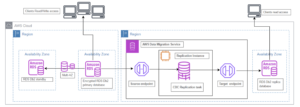
A: Yes. AWS provides multiple migration paths: create Aurora read replica from RDS instance, then promote to standalone cluster (minimal downtime); use AWS Database Migration Service (DMS) for continuous replication; or restore RDS snapshot to new Aurora cluster. Migration typically takes hours depending on database size, with downtime minimized using read replica promotion method.
Q: Does Aurora support Oracle or SQL Server?
A: No. Amazon Aurora only supports MySQL-compatible and PostgreSQL-compatible engines. For Oracle Database or SQL Server, you must use RDS instances. However, Aurora MySQL is wire-compatible with MySQL 5.7/8.0, and Aurora PostgreSQL is compatible with PostgreSQL 11-15, supporting most standard features and tools.
Q: How many read replicas can RDS instance vs Aurora cluster have?
A: RDS instances support up to 15 read replicas for MySQL/MariaDB/PostgreSQL, 5 for Oracle/SQL Server. Aurora clusters support up to 15 Aurora Replicas (readers) that share storage with the writer, providing lower replication lag (10-20ms vs seconds-minutes) and faster failover capability (< 30 seconds).
Q: What is Aurora Global Database and do RDS instances have equivalent?
A: Aurora Global Database enables cross-region replication with < 1 second lag, supporting disaster recovery with RPO < 1 second and RTO < 1 minute, plus low-latency global reads. RDS instances offer cross-region read replicas but with higher replication lag (seconds to minutes) and manual promotion process during DR events. Aurora Global Database spans up to 5 secondary regions.
Conclusion: Making Your RDS Cluster vs Instance Decision
The RDS cluster vs instance decision ultimately depends on your database engine requirements, performance needs, availability expectations, and cost considerations. Neither deployment model is universally superior—each excels for specific workload profiles and organizational priorities. At GoCloud, we help businesses assess their requirements and choose the optimal RDS deployment for reliability, scalability, and cost efficiency.
