


If you search for Amazon EC2 Auto Scaling vs AWS Elastic Beanstalk, you’ll often find shallow comparisons that treat them like interchangeable AWS services. They’re not. AWS Elastic Beanstalk is a higher-level application deployment platform that provisions and manages infrastructure for you, while Amazon EC2 Auto Scaling is a lower-level infrastructure service that keeps the right number of EC2 instances running based on your capacity settings and scaling policies. In other words, this comparison is really about convenience vs control on AWS.
For startup founders, backend developers, DevOps engineers, and cloud architects, that distinction matters a lot. If you want to deploy quickly and your app fits a standard web-app pattern, Elastic Beanstalk can save a lot of time. If you need fine-grained deployment logic, multiple workload types, custom scaling behavior, or deeper operational control, building directly with EC2 Auto Scaling and related AWS services is often the better long-term path.
The simplest way to understand this comparison is to think in layers. Elastic Beanstalk sits above services like Amazon EC2, Elastic Load Balancing, health monitoring, and EC2 Auto Scaling. You upload application code, choose a platform, and Beanstalk provisions and configures the environment for you. EC2 Auto Scaling, by contrast, focuses on scaling and maintaining fleets of instances through Auto Scaling Groups, launch templates, health checks, and scaling policies. It does not give you a full deployment platform on its own.
That’s why the real buyer question is not “Which one is better?” but “How much AWS infrastructure do I want to manage myself?” Teams that value speed, standardized workflows, and lower ops overhead usually lean toward Beanstalk. Teams that need flexibility, custom deployment pipelines, or complex runtime behavior usually lean toward direct infrastructure control.
What Is AWS Elastic Beanstalk?
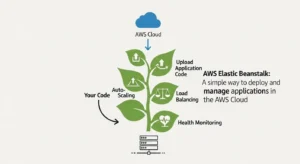
AWS Elastic Beanstalk is a managed application deployment service for web applications and supported platforms such as Node.js, Python, Java, .NET, Ruby, PHP, Go, and Docker. You provide the application bundle, and Beanstalk handles environment provisioning, EC2 instance setup, load balancing, health monitoring, and dynamic scaling. AWS also supports both web server environments and worker environments, so Beanstalk can run user-facing apps as well as asynchronous background processing patterns.
Under the hood, Beanstalk isn’t magic. It uses the same AWS building blocks you would use yourself: EC2 instances, load balancers, and Auto Scaling. AWS explicitly states that a load-balanced, scalable environment uses Elastic Load Balancing and Amazon EC2 Auto Scaling. That’s why Beanstalk is best understood as an orchestration layer: it packages several infrastructure tasks into a simpler developer experience.
Elastic Beanstalk also gives you multiple deployment policies, including all at once, rolling, rolling with an additional batch, immutable, traffic splitting, and blue/green deployment patterns via a new environment and CNAME swap. That makes it more capable than many people assume, especially for teams that want managed deployment automation without hand-building every piece of their delivery system.
Strengths and ideal use cases
Elastic Beanstalk is excellent when your application fits its operating model. If you’re launching a standard web app, REST API, or Dockerized application and you want something easier than wiring EC2, a load balancer, scaling rules, deployment policies, and monitoring by hand, Beanstalk is a strong option. Small teams, startups, and engineering groups without a dedicated platform team often benefit the most.
It is also useful when you want to move quickly but still stay on AWS primitives. Unlike a fully abstract PaaS outside AWS, Beanstalk still creates res in your own AWS account, which means you keep visibility into the underlying instances and related infrastructure. That makes it a practical middle ground between “fully manual AWS deployment” and “give me a platform that hides everything.”
Common limitations
The catch is that Beanstalk works best when your app fits the Beanstalk box. Practitioner discussions consistently point out the same pattern: if you use Beanstalk for what it does well out of the box, the experience is usually solid; if you push far beyond its model with heavy customization, the complexity often starts to outweigh the convenience. Engineers in the AWS community specifically mention problems with unusual deployment requirements, multiple worker types, special scaling rules, and hand-tuned infrastructure behavior that doesn’t map neatly to the standard Beanstalk model.
Stateful application behavior can also create friction. Since Beanstalk environments are designed around scalable EC2 instances, workloads that depend on local file storage, tight session affinity, or instance-specific state can become awkward. One Reddit example calls out WordPress-style local content storage as a common trap: scaling and instance replacement are fine for stateless compute, but local instance data requires extra architecture workarounds.
What Is Amazon EC2 Auto Scaling?
Amazon EC2 Auto Scaling is the AWS service that helps you maintain the right number of EC2 instances for your application. It works through Auto Scaling Groups (ASGs), where you define the minimum, desired, and maximum number of instances. The service then keeps the group at the desired capacity and can launch or terminate instances when scaling policies are triggered.
AWS describes three core capacity concepts clearly. Desired capacity is the number of instances the group tries to maintain. Minimum capacity is the floor below which the group should not drop. Maximum capacity is the ceiling the group should not exceed. When an instance fails health checks or terminates unexpectedly, the group launches a replacement to maintain the desired capacity.
EC2 Auto Scaling also supports important operational features such as health checks, balancing capacity across multiple Availability Zones, integration with Elastic Load Balancing, lifecycle hooks, support for multiple instance types and purchase options, Spot rebalancing, and instance refresh for rolling infrastructure updates. Instance refresh lets you push updated launch templates or AMIs through the group in a controlled way, with settings like healthy percentages, warmup behavior, and optional checkpoints.
Strengths and ideal use cases
EC2 Auto Scaling is the better fit when you want to design your own deployment model. It works well for teams using CloudFormation, Terraform, AWS CodeDeploy, custom AMIs, and application-specific health or scaling logic. If you need to manage different workload types separately, run multiple instance configurations, or apply specialized lifecycle behavior, Auto Scaling gives you the flexibility to do that.
This is especially important for teams running non-standard architectures: maybe your web tier scales on CPU, your API tier scales on request count, and a queue-driven worker fleet scales on backlog depth. That kind of separation is often much easier when you build directly on ASGs and related AWS services than when you try to bend a higher-level platform around it.
Operational responsibilities
The tradeoff is obvious: with Auto Scaling directly, you own more. You need to decide how deployments happen, how instances are configured, how CI/CD works, which health checks are authoritative, how logs and observability are handled, and what failure recovery looks like. AWS gives you the infrastructure primitives, but not the opinionated application platform experience that Beanstalk provides. Amazon EC2 Auto Scaling Docs
That’s not a disadvantage if your team already has the skills and tooling. In fact, for mature DevOps teams, that freedom is often the point. But for smaller teams, it can mean more setup time, more operational responsibility, and more chances to build inconsistent environments if standards are not in place.
Auto Scaling vs Elastic Beanstalk: Key Differences
Here’s the practical summary:
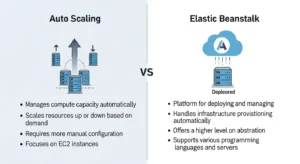
| Area | AWS Elastic Beanstalk | Amazon EC2 Auto Scaling |
| Abstraction level | Higher-level deployment platform | Lower-level scaling service |
| Uses EC2 Auto Scaling | Yes | N/A |
| Setup speed | Faster | Slower |
| Control | Moderate | High |
| Deployment workflow | Opinionated and managed | Fully customizable |
| Best for | Standard web/worker apps | Custom AWS architectures |
The biggest difference is abstraction level. Beanstalk simplifies. Auto Scaling exposes. If you want AWS to assemble the common pieces for you, Beanstalk is attractive. If you want to assemble those pieces yourself, Auto Scaling is where you operate.
The second big difference is customization. Beanstalk gives you deployment policies and some flexibility, but it still expects your application to follow a recognizable model. Auto Scaling does not assume much about your deployment beyond instance management and scaling behavior. That matters when you need multiple worker types, unusual scaling triggers, specialized routing behavior, or deep integration with IaC and custom CI/CD pipelines.
Another difference is operational overhead. Both Beanstalk and EC2 Auto Scaling have no additional major service fee beyond underlying AWS res, but they differ in engineering cost. Beanstalk reduces platform work. Direct ASG-based deployments increase flexibility, but require more design, maintenance, and operational discipline. In real teams, that labor cost can matter more than the AWS bill line item.
What Do You Lose by Choosing Elastic Beanstalk?
This is the question practitioners care about most.
You do not lose access to AWS fundamentals, because Beanstalk still uses them. What you lose is the ability to shape those fundamentals however you want. If your application needs unusual deployment sequencing, a one-off scheduler node, multiple independent worker fleets, highly specific load balancer behavior, or custom scaling triggers by component, Beanstalk can start to feel restrictive.
You may also lose architectural clarity once you begin over-customizing it. One of the strongest practitioner insights from the Reddit thread is that once you find yourself forcing Beanstalk far beyond its default behavior, you’re often better off managing the infrastructure more directly with tools like CloudFormation or other deployment tooling. In other words, Beanstalk is best when it reduces complexity, not when it becomes another abstraction you have to fight.
You also lose some comfort if your application depends on statefulness. Sticky sessions, local uploads, and per-instance storage patterns are not impossible on Beanstalk, but they are usually signals that your application architecture and your scaling model are not well aligned. Since Beanstalk environments scale via EC2 instances and Auto Scaling behavior, stateless apps tend to fit much better.
When to Choose Elastic Beanstalk
Choose Beanstalk when you need to deploy quickly, your app is mostly stateless, and your architecture fits a standard web tier plus optional worker tier model. It is a very reasonable choice for startup MVPs, internal business applications, smaller engineering teams, and products where speed matters more than deep infrastructure tuning.
It also makes sense when your team wants AWS-native hosting but does not want to invest immediately in designing a full deployment platform. If your app fits Beanstalk’s assumptions and you can live within its model, it can get you to production faster and with less operational friction.
When to Choose EC2 Auto Scaling Directly
Choose EC2 Auto Scaling directly when your application architecture is more specialized than a standard Beanstalk environment. That includes multiple workload types, advanced scaling rules, custom AMIs, dedicated deployment systems, infrastructure-as-code workflows, or teams that want total control over how instances are created, updated, and replaced.
It is also the right choice when your platform team is mature enough to own the extra responsibility. If you already use CloudFormation or Terraform, have CI/CD standards, and need clear control over rollout mechanics, direct Auto Scaling architecture usually ages better than forcing a high-level abstraction past its natural limits.
Decision Matrix
| If your priority is… | Better choice |
| Fastest path to deployment | Elastic Beanstalk |
| Lowest ops overhead for a standard app | Elastic Beanstalk |
| Custom deployment logic | EC2 Auto Scaling |
| Fine-grained scaling policies | EC2 Auto Scaling |
| Multiple worker or app types | EC2 Auto Scaling |
| Standard web app with predictable patterns | Elastic Beanstalk |
| Long-term platform flexibility | EC2 Auto Scaling |
| Minimal platform engineering at early stage | Elastic Beanstalk |
A simple rule works well here: if your app fits the Beanstalk model, use the convenience; if it doesn’t, don’t fight the model.
Best Practices and Migration Tips
If you start with Beanstalk, design as if you may outgrow it later. Keep your application stateless where possible, externalize session state, avoid local file dependencies, and separate background work cleanly into worker-style processing. Those decisions will make either Beanstalk or a later migration to direct ASGs much easier.
If you are already stretching Beanstalk with lots of special-case customization, treat that as a signal. It may be time to move toward a more explicit architecture built from Auto Scaling Groups, load balancers, deployment tooling such as CodeDeploy, and infrastructure-as-code through CloudFormation or Terraform. The goal is not to abandon convenience too early, but to avoid hiding complexity in a platform abstraction that no longer fits your app.
FAQ
Is Elastic Beanstalk the same as EC2 Auto Scaling?
No. Elastic Beanstalk is a higher-level deployment service that uses EC2 Auto Scaling and other AWS services underneath. EC2 Auto Scaling is one of the underlying infrastructure services.
Does Elastic Beanstalk use Auto Scaling?
Yes. AWS explicitly states that load-balanced, scalable Beanstalk environments use Amazon EC2 Auto Scaling and Elastic Load Balancing.
Is Elastic Beanstalk good for production?
Yes, if your app fits its model. It supports scalable environments, deployment policies, worker tiers, and blue/green-style approaches.
When should I skip Beanstalk?
Skip it when you already know you need unusual deployment logic, deep customization, multiple independently scaled workload types, or platform behavior that clearly goes beyond the standard Beanstalk model.
Is Auto Scaling harder than Beanstalk?
Yes, usually. But that extra complexity buys you flexibility and control.
Conclusion
Elastic Beanstalk is best when you want to deploy quickly and your application fits a standard AWS-hosted web or worker pattern. Amazon EC2 Auto Scaling is best when you need deeper infrastructure control, custom deployment behavior, or long-term flexibility for a more complex platform. Beanstalk is not “bad” or “limited” by default; it is simply opinionated. And like most opinionated platforms, it shines when your use case matches the opinion.
As also discussed in GoCloud’s Oracle Cloud vs AWS comparison , the right cloud decision depends on how well a platform aligns with your operational needs, not just its feature set.
So if you’re a startup team trying to ship a conventional app fast, Beanstalk is often the smart move. If you’re a growing engineering organization that needs custom rollout control, specialized scaling logic, or platform-level consistency across multiple workloads, building directly on Auto Scaling is usually the better foundation. The right answer is not about ideology. It’s about whether your team benefits more from managed convenience or infrastructure control.

