


If you’re building a serverless backend on AWS, one of the most important architectural decisions—often framed as AWS AppSync vs Amazon API Gateway—is whether to use AWS AppSync, Amazon API Gateway, or a combination of both. On the surface, the answer looks simple: AppSync is for GraphQL, and API Gateway is for REST, HTTP, and WebSocket APIs. In practice, the real choice is about client access patterns, real-time needs, auth flexibility, control, observability, and long-term maintainability.
If you’re building a serverless backend on AWS, one of the most important architectural decisions—often framed as AWS AppSync vs Amazon API Gateway—is whether to use AWS AppSync, Amazon API Gateway, or a combination of both. On the surface, the answer looks simple: AppSync is for GraphQL, and API Gateway is for REST, HTTP, and WebSocket APIs. In practice, the real choice is about client access patterns, real-time needs, auth flexibility, control, observability, and long-term maintainability.
For CTOs, backend developers, startup founders, and cloud architects in the USA, UK, UAE, or anywhere else building on AWS, the wrong choice can create unnecessary complexity early. Choose too low-level, and your team may spend months wiring up patterns that a managed service could have handled. Choose too high-level, and you may run into customization limits once your product grows. This guide will help you decide based on how these services actually behave in production.
Quick answer
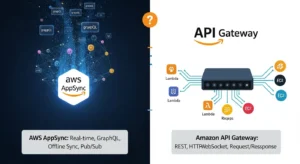
Use AWS AppSync when your app is GraphQL-first, needs real-time subscriptions, benefits from multi- aggregation, or requires offline sync for clients. Use Amazon API Gateway when you want REST, HTTP, or WebSocket APIs, more direct control over request and auth flows, and a more conventional API management model. If you have mixed client needs, using both can be the best architecture.
What is AWS AppSync?
AWS AppSync is AWS’s managed service for building GraphQL APIs and Pub/Sub-style real-time APIs. AWS describes it as a way to connect applications and services to data and events through secure, serverless, high-performing GraphQL and Pub/Sub APIs. AppSync lets you access data from one or more backends through a single GraphQL endpoint, publish real-time updates, add caching, and apply multiple auth models without managing servers.
How AppSync works
At a high level, AppSync sits between your clients and your data s. You define a GraphQL schema, then attach resolvers that translate GraphQL fields into calls against backends like Amazon DynamoDB, AWS Lambda, Aurora, OpenSearch, or HTTP endpoints. AppSync supports both classic VTL mapping templates and newer JavaScript/TypeScript resolver logic, which improves developer experience for teams that do not want to live in mapping-template syntax.
That model is especially attractive when your frontend needs data from multiple places at once. Instead of calling five REST endpoints and stitching the result together on the client, AppSync can expose a single GraphQL contract. The client asks for exactly the fields it needs, and the server resolves those fields behind the scenes. That makes AppSync a strong AWS GraphQL API service for products with complex UI composition.
Key features of AppSync
The most important AppSync capabilities are:
- GraphQL API support
- real-time subscriptions over WebSockets
- optional caching
- multi- data aggregation
- support for IAM, Cognito, API keys, OIDC, and Lambda auth
- merged APIs for federated scenarios
- offline-friendly patterns for mobile clients
AppSync is particularly good at real-time APIs. AWS explicitly supports serverless WebSockets for GraphQL subscriptions and pub/sub channels, and AppSync pricing separately accounts for query/mutation operations, real-time updates, and connection minutes. That makes it much more than “GraphQL query hosting”; it is also an opinionated real-time application platform.
Best AppSync use cases
AppSync is strongest when your product has:
- real-time collaborative features
- dashboards or feeds
- mobile clients needing offline sync
- complex UI data needs from many services
- GraphQL-native frontend teams
- knowledge or aggregation layers across microservices
That said, community feedback shows AppSync can feel restrictive if your architecture becomes highly customized, especially in multi-tenant scenarios or when you need unusual authorization or business-logic flows. Those concerns often become more pronounced when teams use AppSync indirectly through AWS Amplify and then mistake Amplify’s abstraction limits for AppSync’s core capabilities. Community discussions show this confusion is common enough that it should be addressed directly in any serious comparison.
What is Amazon API Gateway?
Amazon API Gateway is AWS’s managed front door for REST APIs, HTTP APIs, and WebSocket APIs. AWS defines it as a service for creating, publishing, maintaining, monitoring, and securing APIs at any scale. It is protocol-broader than AppSync and fits naturally into conventional service architectures where clients call explicit routes and methods such as GET /users or POST /orders.
How API Gateway works
API Gateway receives inbound HTTP or WebSocket traffic, applies routing, authentication, transformations, throttling, monitoring, and integration logic, then forwards the request to services such as AWS Lambda, HTTP backends, or other AWS services. AWS calls it the “front door” for applications to access data, business logic, or backend functionality.
This matters because API Gateway gives you more direct control over the request lifecycle than AppSync. You can define routes, authorizers, re policies, usage plans, custom domains, canary releases, logging, and WAF protections. For teams used to REST or event-driven architectures, API Gateway often feels more transparent and less opinionated than GraphQL resolver pipelines.
Key features of API Gateway
API Gateway’s standout strengths include:
- support for REST, HTTP, and WebSocket APIs
- IAM, Cognito, Lambda authorizers, and re policies
- custom domains
- CloudWatch logging and monitoring
- AWS X-Ray support
- throttling, rate limiting, and usage plans
- WAF integration
- strong fit with Lambda-driven serverless backends
Best API Gateway use cases
API Gateway is usually the better choice when you need:
- a public REST API
- an internal HTTP API
- a partner-facing API product
- WebSocket communication with more custom control
- fine-tuned auth and access control
- classic microservices exposure patterns
- direct middleware-style routing and request shaping
If your team is asking “when to use API Gateway,” the answer is often: when your API is fundamentally endpoint-driven, your consumers expect REST or WebSocket semantics, and you want control over auth, rate limiting, and request transformation without introducing GraphQL abstractions.
AWS AppSync vs Amazon API Gateway: key differences
1) GraphQL vs REST/HTTP/WebSocket on AWS
This is the biggest distinction. AppSync is designed around GraphQL and GraphQL-style subscriptions. API Gateway is designed around REST, HTTP APIs, and WebSocket APIs. If your clients need flexible queries, nested data, and a single aggregation layer, AppSync fits better. If your consumers want predictable endpoints, independent services, or protocol-level control, API Gateway fits better.
AppSync is particularly compelling for GraphQL vs REST on AWS discussions because it solves over-fetching and under-fetching elegantly. But that benefit only matters if your clients actually need flexible shapes. If they don’t, GraphQL can become extra abstraction without enough payoff. That is one reason many backend teams still prefer API Gateway for simpler APIs.
2) Developer experience
AppSync gives frontend-heavy teams a powerful schema-first workflow, but it also introduces resolver complexity. Historically, VTL has been a pain point; JavaScript resolvers improve that, but AppSync still remains a more opinionated system than API Gateway. In community discussion, some developers specifically cite lock-in concerns, opacity, and awkwardness in heavily customized platforms. Others argue those criticisms are often amplified by bad experiences with Amplify rather than AppSync itself.
API Gateway is usually easier to reason about if your team already thinks in routes, authorizers, and Lambda integrations. It does not remove complexity; it shifts complexity into explicit endpoints and backend code, which some teams prefer because they feel more in control.
3) Performance and scaling
Both services scale well because both are managed AWS services, but they optimize different workloads. AppSync improves efficiency by letting clients request only needed fields and by supporting built-in caching and real-time subscriptions. API Gateway shines when you need high-scale HTTP or WebSocket traffic management and conventional API controls.
A subtle performance tradeoff: AppSync may reduce payload size and client round trips, but a poorly designed GraphQL schema or resolver chain can create hidden backend fan-out. API Gateway may send larger or less tailored responses, but it can be easier to observe and optimize because each route is explicit.
4) Security and auth
AppSync supports API keys, Lambda authorization, IAM, OpenID Connect, and Amazon Cognito user pools. That’s strong, but there are implementation constraints, such as only one Lambda authorizer per API and specific limitations around combining auth modes. It is powerful, but not infinitely flexible.
API Gateway supports re policies, IAM roles and policies, VPC endpoint policies for private APIs, Lambda authorizers, Cognito user pools, CORS controls, WAF, and usage plans. For custom or enterprise-heavy security models, API Gateway usually offers more direct control and can feel more natural to platform teams.
5) Pricing
At the time of writing, AppSync pricing is based on query/data modification operations, real-time updates, connection minutes, and optional caching. AWS lists query and data modification operations at $4.00 per million, real-time updates at $2.00 per million, and connection-minutes at $0.08 per million, with data transfer charged separately.
API Gateway pricing is simpler conceptually: for HTTP and REST APIs, AWS charges for API calls received and data transferred out. For WebSocket APIs, cost depends on messages sent/received and connection minutes. Optional caching, PrivateLink, and downstream services can add cost.
So which is cheaper? There is no universal winner. For straightforward public REST APIs, API Gateway often feels simpler and cost-aligned. For real-time GraphQL apps, AppSync can be cost-effective because subscriptions and GraphQL aggregation are first-class. But both can become expensive if you ignore data transfer, caching, and downstream services like Lambda.
Comparison table
Can you use AppSync and API Gateway together?
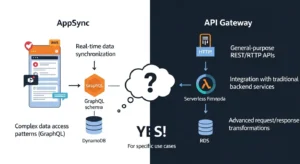
Yes — and many teams do. A hybrid model makes sense when you have different client and API needs in the same platform. For example, you might use AppSync for a rich frontend that needs GraphQL, real-time updates, and multi- aggregation, while still using API Gateway for public REST endpoints, partner integrations, or internal service routes.
A practical pattern is:
- AppSync for frontend query aggregation and subscriptions
- API Gateway for REST webhooks, external APIs, and direct service exposure
- Lambda, Step Functions, DynamoDB, and other AWS services behind both layers as needed
This hybrid model is often better than forcing everything into one tool. Still, it adds operational complexity, so it is best justified when you truly have multiple API products or client styles. Community discussion shows some teams explicitly plan to use both for different consumers rather than treating them as mutually exclusive options.
When to choose AWS AppSync
Choose AppSync when:
- your product is GraphQL-first
- your frontend needs flexible query shapes
- you need AppSync real-time APIs
- you want a single GraphQL layer over multiple s
- your mobile app benefits from offline sync
- you are building collaboration, dashboards, or event-driven UI features
Do not assume AppSync is always the best GraphQL answer. If your team prefers Apollo GraphQL or another self-managed GraphQL layer on AWS Lambda, ECS, or EKS, that can still be valid. AppSync is the managed AWS-native option, not the only possible one. That distinction matters in “AppSync vs Lambda API” discussions.
When to choose Amazon API Gateway
Choose API Gateway when:
- you need REST API, HTTP API, or WebSocket API support
- you want direct request/response control
- your auth model relies heavily on Lambda authorizers, re policies, or VPC-private APIs
- you are exposing public or partner APIs
- your team prefers explicit routes over GraphQL schemas and resolvers
If you’re asking “when to use API Gateway,” the short rule is: choose it when your consumers think in endpoints, your platform team values explicit control, and your architecture already fits a REST or event-driven service model.
Common mistakes and misconceptions
The most common mistake is confusing AppSync with Amplify. AWS itself says Amplify leverages AppSync and other AWS services, but they are not the same thing. If someone had a frustrating Amplify experience, that does not automatically mean AppSync itself is the wrong service.
Another mistake is assuming GraphQL automatically means better architecture. GraphQL is excellent for complex client-driven data access, but it is not a magic replacement for well-designed REST APIs. Likewise, assuming API Gateway cannot do real-time is also incorrect — it supports WebSocket APIs — but those are not the same thing as AppSync’s GraphQL subscriptions.
The final big mistake is choosing based on trend rather than access patterns. Start from:
- who consumes the API
- what payload shape they need
- how much auth flexibility you need
- whether real-time is subscription-oriented or custom socket-oriented
- how much operational visibility and control your team expects
That decision framework will usually reveal the right service faster than abstract debates.
Final verdict
There is no universal winner in AWS AppSync vs API Gateway. The better service depends on what you are actually building.
Use AWS AppSync if your architecture is GraphQL-first, your frontend needs multi- aggregation, or your product depends on real-time subscriptions and offline-friendly behavior. Use Amazon API Gateway if you need REST, HTTP, or WebSocket APIs, stronger control over routing and auth, and a more conventional API management surface. Use both if your platform serves different kinds of consumers and you need different API styles for each.
If you want the fastest rule of thumb:
AppSync is the better choice for product-facing GraphQL and real-time client experiences. API Gateway is the better choice for explicit API management, REST architectures, and custom protocol control.
FAQ
Is AppSync better than API Gateway?
Not generally. AppSync is better for GraphQL, subscriptions, and multi- data aggregation. API Gateway is better for REST/HTTP/WebSocket APIs and more explicit request control.
Is AppSync the same as Amplify?
No. AWS Amplify can use AppSync, but they are separate products. Amplify is a broader app-development framework; AppSync is the managed API service.
Can I use AppSync and API Gateway together?
Yes. Hybrid architectures are common when you need GraphQL for some clients and REST/WebSocket endpoints for others.
Which is better for real-time apps?
For GraphQL subscriptions, AppSync is the natural fit. For custom WebSocket behavior, API Gateway WebSocket APIs may be better.
Which is better for pricing?
It depends on workload shape. AppSync charges by operations, real-time updates, and connection minutes. API Gateway charges by API calls, data transfer, and WebSocket usage.
Conclusion
If you’re building a serverless backend on AWS, one of the most important architectural decisions—often framed as AWS AppSync vs Amazon API Gateway—is whether to use AWS AppSync, Amazon API Gateway, or a combination of both. As explained in GoCloud’s guide on Amazon S3 vs Microsoft Azure , choosing the right cloud service is less about simple feature comparisons and more about aligning architecture with your specific use case. On the surface, the answer looks simple: AppSync is for GraphQL, and API Gateway is for REST, HTTP, and WebSocket APIs. In practice, the real choice is about client access patterns, real-time needs, auth flexibility, control, observability, and long-term maintainability.

