


AWS Outposts brings the AWS cloud its APIs, services, tools, and operational model — physically into your data center, colocation facility, or edge location. It is not a VPN. It is not a software emulation. It is actual AWS-managed rack hardware that runs natively on the same infrastructure AWS operates in its regions, installed in your facility and managed entirely by AWS. For organizations with data residency requirements, ultra-low latency workloads, or regulatory constraints that prevent full public cloud migration, AWS Outposts is the architectural answer that makes hybrid cloud operationally viable rather than a compromise.
This guide is written for cloud architects, CTOs, DevOps engineers, and developers who need to evaluate, design, and implement AWS Outposts in production environments. We cover form factors, networking architecture, supported services, IaC deployment patterns, security and compliance implications, cost modeling, operational management, and real-world use cases — everything you need to make an informed architectural decision and execute it correctly.
1. When AWS Outposts Is — and Is Not — the Right Architectural Choice
AWS Outposts solves a specific problem: running AWS workloads on-premises where public cloud is not viable due to latency, data sovereignty, or regulatory requirements. It is not a cost-saving measure. It is not a stepping stone to eventual full cloud migration. Understanding when it is the right tool is the first architectural decision.
1.1 The Problems Outposts Solves
- Data residency: Regulations (GDPR, HIPAA, financial sector rules) require data to remain within a physical facility or geographic boundary that AWS public regions cannot satisfy
- Ultra-low latency: Applications requiring sub-5ms latency to on-premises systems — manufacturing floor control systems, real-time trading, hospital imaging systems — cannot tolerate public cloud round-trip latency
- Disconnected or intermittently connected operations: Remote sites (oil platforms, mining operations, naval vessels) that need AWS APIs locally even when WAN connectivity is degraded
- Legacy integration: Workloads that must communicate with on-premises systems too large, too latency-sensitive, or too regulated to move to the cloud
- Operational consistency: Organizations that want a single operational model — same APIs, same tools, same CI/CD pipelines — for both cloud and on-premises workloads
1.2 When Outposts Is NOT the Right Choice
- Cost reduction: Outposts costs significantly more than equivalent public cloud capacity — it is the wrong tool if cost is the driver
- General hybrid connectivity: If you just need secure access between on-premises and AWS, use Direct Connect or VPN — not Outposts
- Edge with limited power/space: Consider AWS Local Zones, Wavelength Zones, or Outposts Servers (1U/2U) for constrained edge locations rather than full racks
- Temporary workloads: Outposts requires a 3-year commitment minimum — unsuitable for temporary or experimental use cases
| Requirement | AWS Outposts Rack | AWS Local Zones | AWS Wavelength | Standard AWS Region |
| Data residency in your facility | Yes | No | No | No |
| Single-digit ms latency to on-prem | Yes | Partial | No | No |
| Full EC2/EKS/RDS on-premises | Yes | Partial | Limited | Yes |
| No minimum infrastructure commitment | No (3yr) | Yes | Yes | Yes |
| 5G edge / mobile carrier integration | No | No | Yes | No |
| AWS-managed hardware | Yes | Yes | Yes | Yes |
2. AWS Outposts Form Factors: Racks vs. Servers
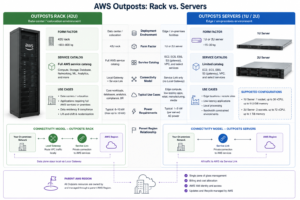
AWS Outposts comes in two distinct form factors designed for different deployment contexts. Understanding the differences is essential before ordering — the lead time, power requirements, networking architecture, and supported services differ significantly between them.
2.1 Outposts Rack: Full-Scale On-Premises AWS
Outposts Rack is the flagship form factor — a 42U AWS-managed rack containing compute, storage, and networking hardware delivered and installed by AWS. It connects to an AWS Region via Service Link and provides the broadest service catalog of any Outposts deployment.
Physical and Power Requirements
- 42U standard rack enclosure, 24 inches wide, 48 inches deep
- Power: 15 kW average, up to 20 kW peak — requires dedicated power circuits
- Cooling: Hot/cold aisle containment recommended; AWS specifies ambient temperature and humidity ranges
- Networking: 1x 10 Gbps or 40 Gbps uplink to customer network aggregation switch
- Connectivity to parent region: minimum 1 Gbps sustained, 500ms max round-trip latency for Service Link
Supported Capacity Configurations
Outposts Rack is ordered in specific capacity configurations combining EC2 instance families. Available instance types include M5, M5d, C5, C5d, R5, R5d, G4dn, I3en. You specify the mix at order time; AWS delivers hardware pre-configured to that specification. Adding capacity later requires ordering additional Outposts units.
2.2 Outposts Servers: Edge-Scale AWS
Outposts Servers are 1U or 2U form-factor servers designed for locations where a full rack is impractical — retail stores, branch offices, factory floors, and space-constrained edge sites. They support a more limited service catalog (EC2 and ECS only) and connect back to a parent AWS region.
- 1U server: C6g instance types (Graviton2), up to 64 vCPUs and 128 GiB RAM
- 2U server: C6g and M5 instance types, larger memory and compute configurations
- Power: standard 1U/2U server power draw, 110V or 220V AC
- Connectivity: customer-managed networking, requires AWS region connectivity for management plane
- Use cases: retail point-of-sale processing, smart factory edge compute, branch office workloads
3. AWS Outposts Networking Architecture: The Complete Technical Picture
Networking is where Outposts implementations most frequently go wrong. The networking model is fundamentally different from standard AWS VPC networking, and understanding every component — Local Gateway, Service Link, Link Aggregation Groups, and subnet architecture — is essential before deployment.
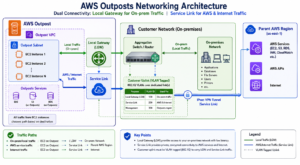
3.1 The Three Networking Planes
Outposts operates three distinct networking planes. Each has its own traffic path, latency profile, and configuration requirements:
| Networking Plane | Purpose | Traffic Path | Configuration |
| Service Link | Control plane and region connectivity | Outpost → AWS region over customer WAN/Direct Connect | AWS-managed VPN tunnel over customer uplink |
| Local Gateway (LGW) | On-premises network access for Outpost workloads | EC2 on Outpost ↔ on-premises data center network | Customer-configured route tables, VLANs |
| VPC Routing | AWS region traffic for Outpost resources | EC2 on Outpost → Region via Service Link | Standard VPC route tables extended to Outpost subnets |
3.2 Local Gateway Deep Dive
The Local Gateway (LGW) is the most operationally important networking component in an Outposts deployment. It is the gateway that allows EC2 instances running on the Outpost to communicate directly with your on-premises network without hairpinning traffic through the AWS region.
- Each Outpost has exactly one LGW, automatically created by AWS
- LGW is associated with a customer VPC and selected subnets on the Outpost
- Route tables on Outpost subnets can route traffic to the LGW for on-premises destinations
- LGW uses customer-owned IP ranges — traffic leaving via LGW uses your on-premises IP space
- VLANs configured on the customer uplink switch map to Outpost subnet routes via the LGW
Common LGW Routing Mistake
A frequent misconfiguration: teams route ALL traffic via LGW (default route 0.0.0.0/0 via LGW) instead of specific on-premises CIDR ranges. This breaks internet access and region-bound API calls for Outpost instances. Always use specific CIDR-based routes to on-premises via LGW, and route region/internet traffic via the standard VGW or internet gateway.
3.3 Service Link: Connectivity to the Parent Region
Service Link is the encrypted VPN tunnel that connects your Outpost to its parent AWS region. All control plane traffic (instance scheduling, API calls, service management) flows through Service Link. Its performance and availability directly impact the operational reliability of your Outpost.
- Service Link requires minimum 1 Gbps bandwidth, sustained (not burst)
- Maximum round-trip latency: 500ms between Outpost and parent region
- AWS recommends AWS Direct Connect for production Service Link connectivity rather than internet-based VPN
- Service Link uses port 443 (HTTPS) and can traverse NAT if required
- If Service Link is interrupted, the Outpost continues running existing workloads but loses the ability to launch new instances or perform control plane operations
4. AWS Services Available on Outposts: What Runs Where
Not all AWS services are available on Outposts. The supported service list is substantial but selective. Understanding which services run locally on the Outpost hardware versus which run in the parent region (but are accessible from the Outpost) shapes your architecture fundamentally.
4.1 Services Running Locally on Outposts Hardware
| Service | Form Factor | Key Constraint |
| Amazon EC2 | Rack + Servers | Limited to specific instance families (M5, C5, R5, G4dn, I3en, C6g) |
| Amazon EBS | Rack only | gp2 volumes only on Outposts; no io1/io2; snapshots stored in parent region S3 |
| Amazon S3 on Outposts | Rack only | Separate S3 Outposts endpoints; no public internet access; capacity pre-provisioned |
| Amazon ECS | Rack + Servers | Task definitions and clusters work identically to region ECS |
| Amazon EKS | Rack only | Control plane in parent region; worker nodes and pods run on Outpost |
| Amazon RDS | Rack only | MySQL, PostgreSQL, MariaDB, SQL Server; Multi-AZ across Outposts requires two units |
| Amazon ElastiCache | Rack only | Redis clusters running locally on Outpost hardware |
| Amazon EMR | Rack only | Spark and Hadoop clusters for local data processing |
| AWS App Mesh | Rack only | Service mesh for microservices running on Outpost |
| Amazon SageMaker Edge | Rack only | ML inference at the edge; training in parent region |
4.2 Services That Run in the Parent Region (But Are Accessible from Outposts)
Many AWS services are not available on Outposts hardware but can be used by workloads running on the Outpost via Service Link connectivity to the parent region. These services have region-level latency from the Outpost workload’s perspective:
- IAM — all identity and access management in the parent region
- CloudWatch — metrics, logs, and alarms forwarded to the parent region
- AWS Systems Manager — SSM Agent on Outpost instances communicates with region
- CloudFormation — stack management runs in the region, deploys resources to Outpost
- Amazon SNS, SQS — messaging services; use with awareness of Service Link latency
- AWS Lambda — not available on Outposts (as of 2025); run container workloads on ECS/EKS instead
5. Deploying AWS Outposts with Infrastructure as Code
Once the physical Outpost is installed and connected, provisioning resources on it should follow the same IaC-first approach you use for standard AWS infrastructure. Outposts integrates with CloudFormation and Terraform natively — the key difference is specifying the Outpost ARN and subnet as placement targets.
5.1 CloudFormation Deployment Pattern
In CloudFormation, launching an EC2 instance on an Outpost requires specifying the Outpost-specific subnet ARN in the subnet placement. The instance type must match the capacity ordered for that Outpost. Everything else — security groups, IAM instance profiles, user data — works identically to region deployments.
Key CloudFormation Parameters for Outposts
- SubnetId: the ID of the Outpost subnet (created in the parent VPC, associated to Outpost)
- Placement.Tenancy: default (no dedicated tenancy on Outposts)
- ImageId: standard AMI compatible with the Outpost instance type (x86 or Graviton)
- Instance type: must match ordered Outpost capacity (e.g., m5.xlarge, c5.2xlarge)
- EBS VolumeType: gp2 only on Outposts — do not specify gp3, io1, or io2
5.2 Terraform Deployment Pattern
The Terraform AWS provider supports Outposts through the aws_outposts_outpost data source and standard resource placement. Reference the Outpost ARN to discover available instance types and capacity, then deploy resources into Outpost subnets.
Terraform Outposts Resource Discovery Pattern
- Use data.aws_outposts_outpost to retrieve the Outpost ARN and site ID
- Use data.aws_outposts_outpost_instance_types to discover available capacity
- Use data.aws_subnet with Outpost ARN filter to target the correct subnet
- aws_instance resource with subnet_id pointing to Outpost subnet deploys locally
- aws_ebs_volume with outpost_arn attribute places EBS on the Outpost
5.3 EKS on Outposts: Local Cluster vs. Extended Cluster
EKS on Outposts supports two deployment modes with different control plane architectures and availability characteristics:
| EKS Mode | Control Plane Location | Worker Node Location | Availability if Service Link Fails | Use Case |
| Extended Cluster | AWS Region | Outpost | Workloads continue; no new scheduling | Low-latency workloads tolerant of disconnected risk |
| Local Cluster | Outpost (on dedicated EC2 instances) | Outpost | Full cluster availability maintained | Disconnected-tolerant applications requiring HA |
For production workloads where Service Link availability is not guaranteed (remote sites, intermittent WAN), use EKS Local Clusters. The control plane runs on dedicated EC2 instances on the Outpost itself, maintaining full scheduling and API server availability even during complete region disconnection.
6. Security Architecture and Compliance on AWS Outposts
Outposts introduces a unique security model where AWS-managed hardware sits in a customer-controlled physical facility. This dual-ownership model has security implications at every layer — physical, network, data, and identity — that must be explicitly designed for.
6.1 Shared Responsibility Model on Outposts
The AWS Shared Responsibility Model shifts on Outposts compared to standard regions. AWS takes on additional physical security responsibility for the Outpost hardware itself, while the customer retains full responsibility for the facility in which it resides.
| Security Domain | AWS Responsible | Customer Responsible |
| Outpost hardware security | Hardware tamper protection, AWS-managed encryption of hardware | Physical facility access controls, CCTV, badging |
| Hypervisor and hardware firmware | All hypervisor security, firmware updates | N/A |
| Network encryption | Service Link TLS encryption, data-in-transit encryption | On-premises network segment security, VLAN isolation |
| Data at rest | EBS encryption available (KMS keys in parent region) | Enabling EBS encryption, key management policy |
| OS and application security | N/A | OS patching, application security, container image security |
| IAM and access control | IAM service availability | IAM policy design, least-privilege, MFA enforcement |
| Physical decommission | AWS performs secure hardware sanitization on return | Ensuring no customer data outside Outpost volumes |
6.2 Data Residency and Compliance Implications
Outposts is specifically designed for data residency compliance scenarios. Understanding what data actually stays on the Outpost versus what flows to the parent region is critical for compliance attestation.
Data That Stays on the Outpost
- EC2 instance memory and compute operations
- EBS volumes (data-at-rest on Outpost hardware)
- S3 on Outposts objects (in the pre-provisioned local storage capacity)
- RDS database data files (when RDS is deployed on Outpost)
Data That Flows to the Parent Region
- EBS snapshots (stored in parent region S3 — critical for data residency)
- CloudWatch logs and metrics
- CloudTrail audit events
- VPC Flow Logs (if enabled)
- AMI storage (AMIs stored in parent region; only running instance data is local)
6.3 Network Security Architecture
- Use dedicated VLANs on the customer uplink for Outpost traffic — isolate from general data center traffic
- Apply security groups to Outpost EC2 instances identically to region deployments
- Do not route Outpost management traffic through shared corporate firewalls — use dedicated paths
- Enable VPC Flow Logs on Outpost subnets for network forensics (logs flow to parent region CloudWatch)
- Use AWS Network Firewall or customer-managed firewalls for traffic inspection between Outpost and on-premises segments
7. AWS Outposts Cost Model: What You Actually Pay
Outposts pricing is fundamentally different from standard EC2 pricing. You pay for physical infrastructure capacity delivered to your facility on a 3-year reservation model, not for individual instance-hours. Understanding this pricing model prevents budgeting surprises.
7.1 Pricing Components
| Cost Component | What It Covers | Pricing Model |
| Outpost capacity (compute + memory) | EC2 instance capacity on the physical hardware | 3-year reservation; hourly rate applied to full capacity |
| EBS storage capacity | gp2 storage provisioned on Outpost hardware | Per GB-month; pre-provisioned in fixed increments |
| S3 on Outposts storage | Object storage capacity on Outpost | Per GB-month for provisioned storage (10 TB, 26 TB, or 48 TB tiers) |
| Data transfer (LGW) | Outbound traffic from Outpost to on-premises via LGW | Free — no data transfer charges for LGW traffic |
| Data transfer (Service Link to region) | Traffic between Outpost and parent AWS region | Standard AWS inter-region/Direct Connect data transfer rates |
| AWS services in parent region | IAM, CloudWatch, CloudFormation, SSM, etc. | Standard AWS service pricing in the parent region |
7.2 Cost Modeling for a Production Outposts Rack
An Outposts Rack with a mixed M5/C5 configuration for a mid-sized production workload typically carries a 3-year total cost of ownership in the range of $150,000 to $500,000 depending on capacity configuration. This covers hardware delivery, installation, ongoing AWS management, and support. It does not include facility costs (power, cooling, space) or networking infrastructure (switches, Direct Connect).
Cost Optimization Strategies
- Right-size at order time: Outposts capacity cannot be dynamically scaled down — over-provisioning wastes money on a 3-year commitment
- Use Graviton-based Outposts Servers (C6g) for compute-optimized workloads — Graviton pricing is 20% lower than x86 equivalents
- Maximize utilization: unlike EC2 reserved instances, you pay for Outpost capacity whether or not you use it — run at high density
- Evaluate Outposts Servers vs. Rack: for lower-density edge sites, Outposts Servers have significantly lower cost and physical requirements
- Use S3 on Outposts selectively: general cloud storage should remain in S3 in the region; only use S3 on Outposts for data that must physically stay on-premises
8. Real-World AWS Outposts Architecture Patterns
Abstract service descriptions only go so far. Here are the concrete architecture patterns used in production Outposts deployments across different industries and use cases.
8.1 Healthcare: PACS and Medical Imaging
Hospital PACS (Picture Archiving and Communication Systems) generate multi-gigabyte DICOM image files that must remain within the hospital’s physical boundary under HIPAA. Processing on public cloud introduces unacceptable latency for radiologist workflows and data sovereignty challenges.
- Architecture: Outposts Rack in hospital data center; EC2 instances run DICOM processing and AI inference (SageMaker Edge); RDS on Outpost stores patient study metadata; S3 on Outposts stores DICOM images locally
- Local Gateway: routes imaging traffic from radiology workstations directly to Outpost EC2 without leaving the facility
- Region connectivity: CloudWatch metrics, system management via SSM, and audit logs via CloudTrail flow to parent region; patient imaging data remains local
- Compliance: HIPAA data residency satisfied; encryption at rest via EBS with KMS CMKs; VPC Flow Logs for network audit
8.2 Manufacturing: Industrial IoT and Factory Automation
Smart factory deployments require sub-10ms latency to programmable logic controllers (PLCs) and industrial equipment. Public cloud latency is incompatible with real-time process control; Outposts enables AWS APIs locally for data processing, anomaly detection, and equipment orchestration.
- Architecture: Outposts Rack in factory IT room or Outposts Servers on factory floor; EC2 runs IoT data ingestion, Kinesis Data Streams for sensor telemetry, SageMaker Edge for real-time anomaly detection
- Local Gateway: factory equipment network isolated on dedicated VLAN; LGW routes equipment traffic to Outpost subnets
- Resilience: EKS Local Cluster on Outpost maintains factory automation availability if WAN to parent region is lost
8.3 Financial Services: Trading and Market Data
Algorithmic trading platforms require co-location in proximity to exchanges combined with cloud-native tooling for strategy development, backtesting, and risk management. Outposts enables AWS infrastructure in colocation facilities near exchange matching engines.
- Architecture: Outposts Rack in colocation facility (e.g., Equinix NY4/NY5); Direct Connect private virtual interface for Service Link; EC2 C5n instances for high-throughput market data processing; RDS on Outpost for trade blotter and position data
- Latency: C5n instances on Outpost provide 100 Gbps instance networking for high-frequency data ingest; LGW provides direct connectivity to exchange cross-connects
- Compliance: MiFID II and SEC trade data residency requirements satisfied with data remaining in the colocation facility
8.4 Retail: Edge Processing at Store Level
Large retail chains running hundreds or thousands of stores cannot economically deploy Outposts Racks at every location. Outposts Servers (1U/2U) enable AWS compute at individual store level for inventory management, loss prevention (video analytics), and point-of-sale processing.
- Architecture: Outposts Servers (C6g) at each store location; ECS tasks for containerized store applications; centralized management via SSM Fleet Manager; CloudWatch Container Insights for monitoring
- Connectivity: each store server connects to AWS parent region via store internet WAN; SSM and control plane traffic tolerates higher latency
- Scale management: AWS Systems Manager handles OS patching, software deployment, and health monitoring across all store servers from a single operations console
9. Operational Management: Running Outposts in Production
Unlike standard EC2 deployments where hardware management is entirely invisible, Outposts requires operational awareness of the physical hardware state, connectivity health, and capacity utilization. AWS manages the hardware but you manage the operational response.
9.1 Monitoring the Outpost
- AWS Health Dashboard: alerts for Outpost hardware degradation, planned maintenance, and connectivity issues — subscribe via EventBridge for automated alerting
- Service Link health: monitor the Service Link tunnel state via CloudWatch metrics; alarm on packet loss or latency threshold breaches
- Capacity utilization: track EC2 capacity utilization on the Outpost via CloudWatch — unlike region EC2, you cannot scale out with more hardware on-demand
- EC2 instance health: standard EC2 health check metrics apply; failed instances on Outpost can be rescheduled within remaining Outpost capacity
- Local Gateway metrics: monitor LGW throughput and packet drops for on-premises traffic
9.2 Capacity Planning and Instance Scheduling
Outposts capacity is fixed at the hardware level. There is no auto-scaling to additional hardware — only horizontal scaling within the existing Outpost capacity. This fundamentally changes capacity planning compared to cloud-native deployments.
- Track reserved capacity vs. running capacity continuously — when you reach physical limits, you cannot burst
- Use EC2 Capacity Reservations on the Outpost to guarantee capacity for critical workloads
- Plan for N+1 capacity in the initial order — you need headroom for instance failures and rescheduling
- Model workload growth over the 3-year commitment period at order time — expanding requires ordering additional Outposts
9.3 Patch Management and Updates
AWS manages all hardware firmware updates, hypervisor patches, and infrastructure-level software on the Outpost. These updates are applied by AWS during maintenance windows with advance notification via AWS Health. Customer OS patching on EC2 instances remains the customer’s responsibility, identical to region EC2.
- Subscribe to AWS Health events via EventBridge for advance notification of Outpost maintenance
- Use AWS Systems Manager Patch Manager for automated OS patching on Outpost instances
- Test critical workloads for resilience to brief instance interruptions during AWS maintenance events
10. Disaster Recovery and Business Continuity on AWS Outposts
Outposts introduces DR complexity that does not exist in pure cloud deployments. The Outpost is a physical object in a physical facility — it can be damaged, lose power, or become unreachable. A DR strategy for Outposts workloads must explicitly address the scenario where the Outpost hardware itself is unavailable.
10.1 DR Architecture Patterns
| DR Scenario | Strategy | RTO/RPO Target | Key Implementation |
| Service Link failure (WAN outage) | EKS Local Cluster for continuity; existing instances continue | RTO: 0 (no failover needed); RPO: 0 | EKS Local Cluster; ECS tasks continue running |
| Outpost capacity failure (hardware degradation) | Cross-Outpost EC2 HA (requires 2 Outpost units) | RTO: minutes; RPO: depends on replication | Multi-Outpost subnet placement; RDS Multi-AZ across Outposts |
| Outpost complete failure (facility loss) | Failover to parent AWS region | RTO: hours; RPO: last snapshot | EBS snapshots to region S3; AMI rebuild in region; runbook-driven failover |
| Application-level failure | Standard HA patterns (ELB, Auto Scaling within Outpost) | RTO: seconds; RPO: 0 | Application Load Balancer on Outpost; ECS service restart policies |
10.2 EBS Snapshot Strategy for Outposts DR
EBS snapshots from Outpost volumes are stored in the parent region’s S3 — this is both the DR mechanism and a potential compliance concern. For DR purposes, schedule regular EBS snapshots of all critical Outpost volumes using AWS Backup or Data Lifecycle Manager (DLM). In a complete Outpost failure scenario, these snapshots enable recreation of instances in the parent region.
- Use AWS Backup for centralized backup policy management across Outpost and region resources
- Set snapshot frequency based on RPO requirements — hourly for critical data, daily for development
- Test restore from snapshot into the parent region quarterly to validate your DR runbook
- Document the full rebuild time for your Outpost workloads in the parent region — this is your realistic RTO
11. Migration Patterns: Moving Workloads to AWS Outposts
For workloads currently running on bare-metal servers, VMware, or other on-premises infrastructure, migrating to Outposts requires a structured approach. The Outpost is not a lift-and-shift target from arbitrary infrastructure — it runs standard EC2 AMIs, so workloads must be containerized, converted to AMIs, or rebuilt cloud-natively.
11.1 Migration Readiness Assessment
- Identify workloads requiring on-premises placement: data residency, latency, integration dependencies
- Assess instance type compatibility: map current server specs to Outpost instance families
- Evaluate service dependencies: identify which dependencies can run on Outpost vs. must stay in region
- Network dependency mapping: document all on-premises IP ranges the workload communicates with (LGW routing)
- Compliance review: confirm which data can flow to parent region vs. must stay local (CloudWatch, snapshots)
- Capacity sizing: translate current workload resource requirements to Outpost instance types and count
11.2 Migration Tooling
- AWS Application Migration Service (MGN): replicate on-premises servers to AMIs; launch in parent region first, validate, then redeploy to Outpost subnets
- AWS Database Migration Service (DMS): migrate on-premises databases to RDS on Outpost
- AWS DataSync: migrate file data to S3 on Outposts
- AWS Systems Manager: post-migration agent deployment, patch baseline establishment, inventory collection
Frequently Asked Questions:
Q1: What is AWS Outposts and how does it differ from a private cloud?
AWS Outposts is AWS-managed physical infrastructure delivered to your facility that runs the same AWS services, APIs, and tools as the public AWS cloud. A private cloud is customer-owned and managed infrastructure running cloud software. With Outposts, AWS owns, manages, and updates the hardware and hypervisor — you consume AWS services on-premises rather than managing the infrastructure stack.
Q2: What is the minimum connectivity requirement for AWS Outposts?
AWS Outposts requires a minimum of 1 Gbps sustained connectivity between the Outpost and its parent AWS region for Service Link. Maximum round-trip latency must be below 500ms. AWS recommends Direct Connect for production deployments rather than internet-based VPN, as Service Link reliability directly impacts Outpost operational capability.
Q3: What happens to AWS Outposts workloads if the internet connection to AWS goes down?
Existing workloads (running EC2 instances, ECS tasks, RDS databases) continue operating without interruption during a Service Link outage. However, you lose the ability to launch new instances, make API calls for new resource provisioning, or access the AWS console for the Outpost. EKS Local Clusters maintain full Kubernetes control plane availability even during complete region disconnection.
Q4: How much does AWS Outposts cost?
Outposts pricing is based on a 3-year commitment for specific capacity configurations, billed hourly. A mid-range Outposts Rack deployment typically runs between $150,000 and $500,000 over 3 years depending on instance family mix and capacity. Outposts Servers (1U/2U) have significantly lower cost and no rack-level infrastructure requirements. AWS provides a pricing calculator at aws.amazon.com/outposts/pricing.
Q5: Can I run AWS Lambda on AWS Outposts?
As of 2025, AWS Lambda is not available on Outposts hardware. For serverless-style workloads on Outposts, use Amazon ECS with containerized functions or AWS Lambda Anywhere (Outposts is not yet supported as a Lambda Anywhere target). ECS Fargate is also not available on Outposts — you must use ECS with EC2 launch type on Outpost instances.
Conclusion: Engineering with AWS Outposts as a Strategic Infrastructure Decision
AWS Outposts is one of the most significant architectural tools available to cloud engineers working in regulated, latency-sensitive, or operationally constrained environments. When data residency requirements, sub-millisecond latency demands, or regulatory constraints make public cloud alone insufficient, AWS Outposts enables the same AWS operational model — same APIs, same tools, same CI/CD pipelines — to extend on-premises.
The key architectural discipline is intentionality. Outposts is not a default choice. It is a 3-year capital commitment that suits specific problems: healthcare data sovereignty, industrial IoT real-time control, financial co-location trading infrastructure, and large-scale retail edge deployments. At GoCloud, we help organizations evaluate whether Outposts aligns with their operational and business requirements before moving into deployment. Before ordering, map your workloads against the networking architecture, capacity model, compliance implications, and cost structure documented in this guide.
Done correctly — with right-sized capacity, proper LGW routing, Service Link redundancy, compliant snapshot strategy, and IaC-driven deployment AWS Outposts gives you the full power of AWS where public cloud alone cannot reach. That is its unique value, and for the organizations that need it, there is no equivalent alternative.
