

Azure auto scaling is one of the most misunderstood reliability features in the platform. Teams often treat it like a simple on/off setting, but in practice it is a control system that affects latency, availability, and cloud spend all at once. If the signals are noisy, the thresholds are too tight, or the downstream services cannot keep up, autoscaling does not protect the application. It can make incidents more expensive and harder to diagnose.
For cloud architects, SREs, DevOps teams, and FinOps practitioners, the goal is not simply “scale when CPU is high.” The goal is to design scaling policies that absorb demand safely, minimize waste, protect dependencies, and remain observable when automation misbehaves. That requires understanding how Azure Monitor evaluates rules, where service-specific scaling controllers take over, and why cooldowns and max limits are as important as scale-out triggers.
Why Azure Auto Scaling Fails When Policy Design Is Weak:
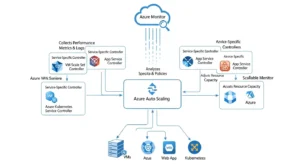
Autoscaling is a feedback loop. Demand increases, telemetry rises, rules evaluate, capacity changes, metrics stabilize, and the system decides what to do next. That sounds straightforward, but every part of that loop has delay: telemetry aggregation, evaluation windows, instance startup time, application warm-up, cache hydration, and load balancer registration. If you ignore those delays, the platform can react too slowly for latency-sensitive traffic or too aggressively for bursty workloads.
The most common design mistake is choosing an infrastructure metric before defining an application objective. Teams scale on CPU because it is easy, but many Azure workloads fail first on queue backlog, request latency, database connection limits, thread pool saturation, or external API throttling. If the metric does not reflect the true bottleneck, the autoscaler will optimize the wrong layer.
A better approach is to define three things first:
- The business SLO: such as p95 latency or maximum queue age
- The economic guardrail: such as a max burst size or resource-group budget
- The dependency ceiling: such as database throughput or rate-limited partner APIs
From there, autoscaling becomes a design exercise instead of a portal checklist.
How Azure Monitor And Service-Specific Controllers Drive Azure Auto Scaling:
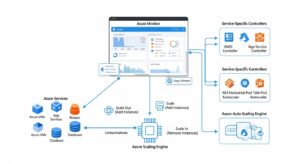
At the platform level, Azure autoscale is built around autoscale settings, which contain one or more profiles. Each profile contains capacity boundaries, rules, and schedules. Profiles are evaluated in order: fixed-date profiles first, recurring profiles next, and the default profile last. That evaluation order matters when teams combine business-hour schedules with reactive thresholds.
Each rule defines a metric trigger and a scale action. The trigger includes the metric name, aggregation type, time window, operator, and threshold. The action defines whether to increase or decrease capacity, by how much, and with what cooldown period. This is where real policy quality is created. Short evaluation windows and large step sizes make the system jumpy. Overly long windows make it slow to respond.
The most important rule behavior for architects is this:
- scale-out: uses OR logic
- scale-in: uses AND logic
That means if any scale-out rule fires, Azure will add capacity. But scale-in only happens when all scale-in rules are satisfied. This is conservative by design and is one reason safe scale-in rules are harder to write than scale-out rules.
Cooldown is the second critical concept. After a scale event, autoscale waits for the cooldown duration before considering another action. This gives metrics time to settle after new instances are added or removed. Without enough cooldown, the system can react to temporary conditions and create oscillation. With too much cooldown, it can lag behind demand and under-scale.
Not every Azure service uses Azure Monitor autoscale in the same way. VM Scale Sets commonly rely on Azure Monitor rules and can also use predictive autoscale. Azure Functions uses its own scale controller. AKS combines Kubernetes-native and Azure-managed autoscaling layers. App Service has service-specific automatic scaling behavior in supported plans. Treating these as one identical system is a design error.
Horizontal Vs. Vertical Scaling: The Trade-Offs Most Teams Skip:
Horizontal scaling is the natural fit for cloud elasticity. It adds instances, spreads load, and improves failure isolation. It also aligns with autoscale’s default operating model and with Azure services built for elastic compute, such as VMSS, App Service, and Functions.
Vertical scaling still matters, but mostly as a tactical move. It can provide immediate headroom when you are constrained by per-instance throughput, licensing, or application architecture. The downside is that vertical scaling is bounded by SKU ceilings, often involves restarts, and does not improve resilience the way horizontal scaling does. In many environments, it is best treated as a migration bridge while the workload becomes more horizontally scalable.
The right question is not “which is better?” It is “which bottleneck am I solving?” If the workload is stateless, horizontally distributed, and fronted by a load balancer, horizontal scaling is usually the right answer. If the workload is stateful, license-constrained, or tightly coupled to local memory, vertical scaling may still be necessary. Many mature Azure estates use both: scale up to create a safer baseline, then scale out around that baseline.
Azure Auto Scaling By Service: One Name, Very Different Behavior:
Virtual Machine Scale Sets:
VM Scale Sets are the most classic form of Azure autoscaling. They can scale manually, on schedules, based on metrics, or with predictive autoscale. Metrics can come from host-based telemetry, diagnostics extensions, Service Bus, or Application Insights. That flexibility makes VMSS powerful, but it also increases the chance of bad signal design.
For latency-sensitive workloads, VMSS policies should consider instance provisioning time, application startup, configuration loading, and load balancer registration. For batch or queue-driven systems, queue length or backlog age is often a better trigger than CPU. For cyclical workloads, predictive autoscale can scale out in advance, but only for VMSS and only based on CPU patterns. It is a complement to standard autoscale rules, not a replacement.
App Service:
App Service automatic scaling is more service-aware than many teams realize. In supported plans, the platform watches HTTP load and worker health, adding instances as requests increase and scaling in once demand falls. App Service also gives architects useful controls such as always ready instances, prewarmed buffers, and per-app maximum scale limits to prevent downstream overload.
This is especially important for web apps with slow startup or strict response-time targets. Always-ready and prewarmed instances reduce cold capacity shortages, but they also increase cost. The right setting depends on whether the workload is spiky and interactive or steady and background-oriented. Another operational detail many teams miss: when using App Service automatic scaling, ARR Affinity should be reviewed carefully because sticky routing can undermine horizontal distribution.
Azure Functions:
Azure Functions does not behave like a VM-based autoscale target. It uses a scale controller that watches event rates and applies trigger-specific heuristics. HTTP triggers can add new instances as frequently as once per second, while non-HTTP triggers can scale more slowly. On some plans, apps can scale to zero and cold start on the next invocation. On others, always-ready or prewarmed instances reduce or remove that startup penalty.
The hosting plan matters as much as the function code. Flex Consumption offers high elasticity and per-function scaling behavior. Premium adds stronger performance characteristics and warm-instance controls. Dedicated plans use App Service-style scaling and can be appropriate when you already run app workloads on the same estate. For latency-sensitive HTTP APIs, cold-start tolerance should drive the plan choice. For queue-driven or event-driven workloads, the cost/performance balance often favors elastic consumption models.
AKS:
AKS splits scaling across layers:
- HPA: scales pods based on metrics
- Cluster Autoscaler: scales nodes based on unschedulable pods
- KEDA: scales from event sources such as queues and streams
That layered model is powerful, but it also means there are multiple control loops acting at different speeds. HPA can decide it needs more pods before the Cluster Autoscaler has finished adding nodes. During sharp bursts, pods may sit pending while infrastructure catches up.
AKS also has important safety behaviors. Cluster Autoscaler should own node scaling for managed node pools; teams should not separately edit VMSS autoscaling. Scale-down settings such as unneeded-time, graceful termination, and local-storage protection matter for stability. Aggressive scale-down improves cost but can increase reprovisioning delay and workload churn.
Data Services: Azure SQL Database Serverless:
Azure SQL Database serverless is relevant because it shows that autoscaling for data services follows different physics. Compute can auto-scale within configured vCore bounds, auto-pause when idle, and auto-resume on demand. But load balancing or resume can take time, and some connection interruptions can occur during reallocation. That makes serverless attractive for intermittent usage and cost control, but less ideal for consistently low-latency workloads.
Metric-Based, Scheduled, And Predictive Scaling: When Each Wins:
Metric-based scaling is the default for unpredictable demand. It works best when the chosen signal correlates closely with user pain or resource saturation. CPU can work for compute-bound services, but queue length, request rate, response time, or custom application metrics are often better. Aggregated windows matter; scaling on raw spikes usually creates noise.
Scheduled scaling is underrated. If your demand pattern is known business hours, month-end processing, campaign launches, or school-day traffic scheduled scale-out is safer than waiting for users to hit the system hard enough to trigger reactive rules. The point of a schedule is to remove provisioning lag from predictable peaks.
Predictive autoscale is more specialized. It belongs to VM Scale Sets, relies on historical CPU patterns, requires at least seven days of data, and supports scale-out only. It is valuable when daily or weekly cycles are strong and consistent, but it still needs reactive rules for unexpected spikes and fallback behavior. Architects should start in forecast-only mode before trusting it operationally.
The strongest designs usually combine modes:
- scheduled minimum capacity for known peaks
- reactive metrics for unexpected load
- predictive autoscale where VMSS patterns justify it
That combination provides safety, responsiveness, and cost discipline without assuming one control mode is perfect.
Designing Thresholds, Cooldowns, And Anti-Thrashing Rules:
The hardest part of azure auto scaling is not turning it on. It is deciding when not to scale. If you scale out and in around the same threshold, the system will oscillate. Microsoft calls this flapping, and it often happens when thresholds have little separation, when rules change capacity by more than one instance at a time, or when different metrics are used for opposing actions.
A practical pattern is to separate thresholds with meaningful margin. For example:
- scale out when average CPU > 70%
- scale in when average CPU < 45% or 50%
The exact numbers depend on the workload, but the principle is consistent: the system should need a real drop in pressure before it removes capacity. This is even more important when a single scale action changes the denominator of the metric significantly.
Cooldown needs the same design discipline. A short cooldown is useful when startup is fast and demand moves quickly. A longer cooldown fits services that need time to warm caches, load application state, or register behind a load balancer. If you cannot explain why the cooldown is what it is, it is probably wrong.
Step size matters too. Scaling by one instance is usually easier to tune and safer to observe. Larger jumps can make sense in very large fleets or steep traffic ramps, but they also increase the odds of overshoot. The best designs often begin conservatively, then widen step size only after the team understands startup time, metric lag, and cost impact.
Designing For Latency-Sensitive Vs. Batch Workloads:
Latency-sensitive applications need capacity before the user notices degradation. APIs, checkout flows, authentication endpoints, and interactive backends rarely tolerate scale-to-zero or long startup cycles. These workloads benefit from:
- scheduled pre-scaling
- always-ready or prewarmed capacity
- conservative scale-in
- metrics tied to request latency or queueing, not only CPU
Batch and asynchronous workloads behave differently. They often tolerate queue growth, variable throughput, and slower warm-up, provided backlog stays within SLA. For these systems, queue length, message age, or event rate is usually the correct signal. Cost optimization can be more aggressive because the business value is in completing work within a window, not necessarily responding in milliseconds.
One useful architecture principle is to combine autoscaling with backpressure. If instances cannot start fast enough, queueing and throttling patterns help absorb the burst while capacity catches up. Autoscaling alone is not a substitute for admission control.
Load Balancers, Dependencies, And The Scaling Chain:
Scaling the compute tier without planning the rest of the chain is one of the fastest ways to create self-inflicted outages. A VMSS or App Service fleet can scale correctly and still fail if the database cannot absorb connection growth, the cache cannot keep hit rates stable, or an external API enforces hard rate limits.
For load-balanced workloads, startup time includes more than VM creation. The instance must become healthy, warm application code or containers, and pass health checks before it carries useful traffic. If your autoscale rule fires at the exact moment the latency SLO is already broken, the load balancer is not the problem. The policy fired too late.
This is where per-app max scale limits, queue smoothing, and downstream throughput limits become essential. For example, App Service lets you cap a single app’s maximum scale if a backend database cannot safely handle unlimited burst fan-out. That is not a weakness in autoscaling; it is good architecture.
Cost Optimization And Budget Protection:
Autoscaling does not automatically equal cost optimization. Bad autoscaling can create more spend than a well-sized static baseline, especially when thresholds are noisy, cooldowns are short, or max limits are effectively unlimited. The first cost guardrail is simple: set realistic minimum, default, and maximum capacity. Those are reliability settings and financial settings at the same time. Many teams follow structured approaches like those outlined in GoCloud’s aws cost optimization strategies to ensure scaling policies stay efficient and predictable.
The second guardrail is budgeting. Azure Cost Management supports actual-cost and forecast-cost alerts, and those alerts can trigger action groups. For autoscaled environments, this means you can warn operators early when spend is trending above expectation, and in some cases trigger automation to protect non-critical environments or review policies before a month-end surprise.
The third guardrail is tagging. Autoscaled resources should carry tags for environment, owner, cost center, and service identity so finance and platform teams can attribute scaling-related spend correctly. Azure resource tags are plain text and should not contain secrets, but they are invaluable for cost allocation and reporting.
A strong FinOps operating model for autoscaling includes:
- max instance caps by environment
- budget alerts at resource-group or app boundary
- mandatory tags for ownership and cost attribution
- monthly review of scale history versus business outcomes
- rightsizing before adding more automation
Observability, Testing, And Rollback:
If you cannot explain why the platform scaled, you do not control autoscaling. Azure provides better visibility than many teams use. Autoscale diagnostics include Autoscale Evaluations logs, Autoscale Scale Actions logs, and activity log entries such as scale-up initiated, scale-down completed, metric failure, predictive metric failure, and flapping events.
That observability matters because scale problems are often silent. A rule may not fire because a profile is inactive, a cooldown is still running, a metric is missing, or autoscale detects that a scale-in action would trigger an immediate scale-out. Those are not obvious from application logs alone.
Notification design is also underrated. Azure autoscale can send email or webhook notifications on scale events, and the webhook payload includes old capacity, new capacity, resource type, region, and event details. That makes it easy to push scaling events into incident timelines, runbooks, ChatOps systems, or rollback workflows.
Testing should be deliberate. The best teams run load tests and game days against autoscaling policies, not just applications. They validate:
- how long scale-out really takes
- which metrics move first
- whether cooldown is too short or too long
- whether scale-in is too aggressive
- whether dependencies fail before compute saturates
Rollback should be just as deliberate. If a new rule set misbehaves, revert to a safer baseline profile, raise minimum capacity temporarily, and disable only the problematic rule set rather than turning off all automation blindly.
Common Failure Modes In Azure Auto Scaling:
1. Noisy Metrics:
CPU spikes that last seconds, bursty request patterns, and irregular queue arrivals can trigger frequent but unhelpful actions. Use aggregation windows and metrics that reflect sustained pressure, not random bursts.
2. Thresholds With No Margin:
If scale-out and scale-in thresholds are effectively adjacent, the system will flap. Maintain meaningful distance between them.
3. Scaling The Wrong Layer:
Adding app instances does not fix a saturated database, slow external API, or starved node pool. Scale design must follow the bottleneck.
4. Slow Provisioning And Cold Capacity:
Some workloads need warm instances or scheduled headroom because the platform cannot spin up useful capacity fast enough after the spike begins. This is especially visible with web traffic and synchronous functions.
5. Over-Scaling Due To Loose Limits:
Without max instance caps and budget alerts, autoscaling can become a cost amplifier.
6. Aggressive Scale-In:
Saving money faster is not always worth the churn. In AKS and VM fleets, aggressive scale-down can increase reprovisioning latency and workload disruption.
FAQs:
What Is Azure Auto Scaling?:
Azure auto scaling is the platform capability that adjusts capacity automatically based on metrics, schedules, or service-specific demand signals. In Azure, that may come from Azure Monitor autoscale or from service-native controllers such as those used by Azure Functions or AKS.
Which Azure Services Should I Autoscale First?:
Start with elastic compute layers where demand clearly varies: VM Scale Sets, App Service, Functions, and AKS. Then evaluate whether supporting services such as SQL serverless or queue consumers need their own scaling strategy.
Is CPU The Best Autoscaling Metric?:
Sometimes, but not always. CPU is useful for compute-bound workloads, while queue length, request latency, response time, or custom application metrics may better reflect user impact and bottlenecks.
What Is A Good Cooldown Period?:
There is no universal value. A good cooldown is long enough for new capacity to become useful and metrics to stabilize, but short enough to react to sustained demand without excessive lag.
When Does Predictive Autoscale Make Sense?:
Use it for VM Scale Sets with strong cyclical CPU demand, such as weekday traffic or regular business-hour peaks. Keep reactive autoscale enabled because predictive autoscale only handles scale-out and does not protect against unexpected surges alone.
Conclusion:
The best azure auto scaling design is not the one with the most rules. It is the one that matches the workload’s real bottleneck, uses safe threshold margins, protects downstream systems, and stays inside explicit cost boundaries. In Azure, that means understanding when Azure Monitor is in control, when service-native scaling controllers take over, and how cooldowns, max limits, budgets, and diagnostics work together. Teams that treat autoscaling as an architecture discipline get better performance and lower waste. Teams that treat it as a checkbox usually get both incidents and surprise spend.