


If you are designing azure data lake architecture for a real enterprise, the question is no longer whether Azure can store massive volumes of structured and unstructured data. The real question is how to turn that storage foundation into a platform that is secure, discoverable, resilient, and cost-efficient under production pressure. That requires more than spinning up a storage account. It requires deliberate decisions across Azure Data Lake Storage Gen2, ingestion services, compute engines, governance controls, network isolation, and domain ownership.
Most articles about the topic stop at a diagram and a service list. Enterprise teams need more. They need to know where raw data lands, how curated datasets are promoted, why Delta Lake often becomes the contract between engineering and analytics, how Microsoft Purview fits into governance, and why a secure lake often fails because of DNS or endpoint design rather than storage itself. This guide takes that architecture-first view.
Designing Azure Data Lake Architecture Around Azure Data Lake Storage Gen2:
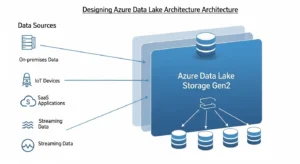
At the center of modern Azure lake design is ADLS Gen2, which combines Blob Storage economics with analytics-oriented capabilities such as hierarchical namespace, directory semantics, file-level security, and Hadoop-compatible access through ABFS. That combination matters because enterprise lakes need both scale and control: petabyte-class storage, but also permission boundaries and efficient metadata operations like directory rename and delete.
Architecturally, that means storage is not “just a bucket.” It becomes the persistent system of record for raw landing, refined datasets, and analytical serving assets. Because ADLS Gen2 sits on Blob Storage, you also inherit access tiers, lifecycle management, and redundancy options. Those capabilities drive core trade-offs in cost, resilience, and operating model.
A useful design principle is this: treat ADLS Gen2 as the durable data substrate, not the entire platform. Storage holds the truth, but orchestration, governance, and compute must remain clearly separated. The strongest architectures are explicit about which layer owns ingestion, which layer owns transformation, and which layer exposes consumer-ready data.
Designing Azure Data Lake Architecture By Data Quality Zones:
The most effective azure data lake architecture patterns are organized by data quality and consumer intent, not just by tool or source system. A zone model makes access control, lifecycle policy, and incident response much easier to operate.
Raw / Bronze Zone:
The raw zone is where data lands in its native or near-native form. It should favor immutability, replayability, and lineage over convenience. In Databricks lakehouse guidance, this is the bronze layer: append-heavy, minimally validated, and preserved as the source of truth for reprocessing and audit.
Best practices for the raw zone:
- Keep transformations minimal.
- Preserve ingestion metadata such as source, load timestamp, and file origin.
- Restrict access mainly to service principals or managed identities.
- Avoid direct end-user querying unless there is a strong audit use case.
Microsoft’s cloud-scale analytics guidance, although deprecated as a packaged scenario, still offers a useful security pattern: raw access should generally be limited to application identities rather than broad user access.
Curated / Silver Zone:
The curated zone is where engineering discipline shows up. This is where you validate schema, remove duplicates, normalize structures, handle late data, and apply domain rules. Databricks describes the silver layer as the place for cleansing, data quality enforcement, type casting, joins, and a validated non-aggregated representation of business events.
This is also the right layer for:
- Standardized conformed entities
- CDC merge logic
- Data quality tests
- Quarantine patterns for bad records
- Contract-ready datasets for downstream teams
A common mistake is skipping this layer and writing directly from ingestion into analyst-facing tables. That looks faster early on, but it usually creates brittle pipelines, schema drift pain, and inconsistent metrics later.
Serving / Gold Zone:
The serving zone is optimized for consumption. It contains business-aligned, performance-tuned datasets for dashboards, applications, data science, and decision-making. In medallion terms, gold tables are aggregated, filtered, and shaped to business logic.
This zone should answer questions like:
- What is the trusted sales fact table?
- Which customer entity is certified?
- Which data product is approved for finance reporting?
- Which tables are designed for direct BI usage?
A good rule is simple: raw is for ingestion, curated is for engineering confidence, serving is for consumers.
Ingestion Patterns With Azure Data Factory, Azure Event Hubs, And Azure Databricks:
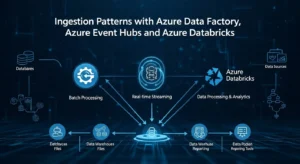
No single ingestion pattern fits every workload. The right architecture separates movement, buffering, and transformation.
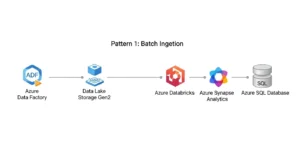
For batch integration from SaaS systems, operational databases, and enterprise applications, Azure Data Factory is usually the orchestration layer. Microsoft explicitly positions ADF as a connector-rich platform for source-aligned movement, secure connectivity, and managed orchestration across Azure, on-premises, and third-party sources.
For high-velocity telemetry, logs, IoT, or clickstream, use Azure Event Hubs or IoT-native patterns. Event Hubs Capture can automatically land streaming data into Blob Storage or ADLS, using size- or time-based capture windows, which is useful when you want the same stream to support both near-real-time and batch downstream processing.
For transformation-heavy ingestion, Azure Databricks becomes the engineering runtime. Databricks supports Delta-native loading patterns such as Auto Loader, COPY INTO, streaming tables, and incremental conversion from Parquet or Iceberg. The key architectural decision is whether data lands raw first and is promoted, or whether some sources write directly to Delta-managed structures. In most enterprises, landing raw first is safer for replay, compliance, and debugging.
Service Selection Rule Of Thumb:
| Requirement | Best-fit service |
|---|---|
| Connector-based movement and pipeline orchestration | Azure Data Factory |
| High-throughput event buffering and capture | Azure Event Hubs |
| Heavy transformation, streaming engineering, Delta pipelines | Azure Databricks |
| Lightweight SQL access over lake files | Azure Synapse serverless SQL |
That division prevents a common anti-pattern: forcing one tool to do all jobs poorly.
Storage Layout, File Strategy, And Namespace Design:
A surprising amount of lake performance has nothing to do with Spark cluster size. It depends on how you lay out files and directories.
Microsoft recommends pre-planning directory layout for organization, security, and downstream efficiency. One critical nuance: time structures like year/month/day often belong deeper in the path rather than at the top, because date-first trees can multiply ACL administration and fragment security boundaries.
For example, a better pattern is often:
/domain/dataset/region/yyyy/mm/dd/
Instead of:
/yyyy/mm/dd/domain/dataset/
That structure helps with both discoverability and access control.
File format matters just as much. For analytics workloads, prefer Parquet or Delta Lake over raw CSV whenever possible. Delta adds a transaction log and ACID semantics on top of Parquet, which makes it especially strong for curated and serving zones.
File size is the other big lever. Microsoft’s ADLS guidance recommends organizing data into larger files, typically in the 256 MB to 100 GB range, because too many tiny files increase transaction charges and degrade performance. Competitor content often mentions small-file issues but rarely turns that into a concrete architectural rule. In practice, you should define compaction jobs, partition pruning standards, and ingestion guardrails early.
Common Storage Mistakes:
- Partitioning by every possible column
- Using CSV long-term in curated zones
- Allowing uncontrolled small-file growth
- Designing folder paths with no domain or lifecycle logic
- Mixing raw, curated, and consumer-ready data in the same path tree
Governance And Security In Azure Data Lake Architecture:
If storage is the substrate, governance is the operating system. Governance and security in Azure Data Lake Architecture should be designed from day one, not bolted on after users start querying data.
Microsoft Purview As The Governance Fabric:
Purview can register ADLS Gen2 sources, scan folders or subfolders, assign assets into collections, and extract technical metadata such as storage accounts, file systems, folders, files, and resource sets. That makes it central to cataloging, lineage, and ownership.
For enterprise teams, the most important governance design choices are:
- Create a collection hierarchy that mirrors domains or product areas
- Assign ownership and stewardship responsibilities early
- Use managed identity where possible, especially when firewalls are enabled
- Scope scans intentionally rather than scanning the entire lake indiscriminately
Purview becomes far more useful when it is tied to an operating model: domain owners certify assets, platform teams manage scanning patterns, and access workflows are linked to named data products instead of ad hoc folder requests.
Azure RBAC Plus ACLs:
ADLS Gen2 security is layered. Azure RBAC works well for account- and container-level roles, while POSIX-style ACLs provide finer-grained directory and file access. Microsoft explicitly recommends using both together for hierarchical file systems.
A strong pattern looks like this:
- RBAC for broad administrative and platform access
- ACLs for dataset- and zone-level permissions
- Managed identities for pipelines and jobs
- Curated/serving access for users; raw access mainly for services
This is how you avoid the two most common failures: over-privileged user access and brittle manual permission management.
Security Architecture With Azure Private Link:
Network design is one of the least glamorous parts of a data lake and one of the most failure-prone. Microsoft recommends using private endpoints for storage connectivity and turning off public access where possible. Traffic then stays on the Microsoft backbone instead of traversing the public internet.
The non-obvious detail is this: ADLS Gen2 often needs both a DFS private endpoint and a Blob private endpoint. Some data lake operations redirect between the two. If you only configure one, operations like ACL management or directory creation can fail. That is exactly the kind of production issue generic articles rarely mention.
DNS is just as important as the endpoint itself. Private endpoint designs rely on privatelink DNS resolution. In hybrid environments or custom DNS estates, you need explicit planning for name resolution, forwarding, and testing. Otherwise, teams think storage is broken when the real issue is DNS.
Security Best Practices:
- Disable public access unless there is a justified exception
- Prefer managed identities over secrets
- Use firewalls with private endpoint access paths
- Separate network ownership from data ownership, but coordinate both
- Validate endpoint and DNS behavior in CI/CD and pre-prod tests
Choosing Compute And Query Engines:
Azure Databricks is strong when the workload requires scalable transformation, Delta operations, structured streaming, schema enforcement, and multi-hop data engineering. It is especially aligned with bronze/silver/gold design because Delta tables provide versioning, transactional consistency, and performance features like data skipping and file-layout optimization.
Azure Synapse serverless SQL is strong when consumers need SQL access directly over lake files. It can query Parquet, CSV, and Delta using OPENROWSET, supports schema inference or explicit schema definitions, and works well for serving or consumption zones where teams want in-place analytics without running a persistent cluster.
The architecture implication is important: do not force every user persona onto the same engine. Engineers may build pipelines in Databricks, analysts may query serving assets through serverless SQL, and orchestration may stay in ADF. That separation is healthy and helps maintain long-term scalability. Many enterprises partner with GoCloud for expert cloud architecture planning and implementation, leveraging services such as cloud-Security to build flexible, secure, and high-performance analytics environments. This approach keeps the lake adaptable without becoming chaotic.
Disaster Recovery And Business Continuity:
Too many lake designs talk about “high availability” without defining failure scenarios. A proper DR conversation starts with storage redundancy.
Microsoft recommends ZRS in the primary region for Azure Data Lake Storage workloads, and GZRS when you need stronger resilience that combines zonal redundancy with geo-replication to a secondary region. Read-access variants add the ability to read from the secondary copy during outage scenarios.
But redundancy choice is only step one. You also need:
- Platform runbooks for regional outage scenarios
- Validation of private endpoint and DNS recovery paths
- Access-control revalidation after failover exercises
- Recovery expectations for downstream engines and metadata services
- Soft delete and storage locks for accidental deletion protection
Microsoft also recommends enabling container soft delete and blob soft delete, while warning that storage account deletion itself is not reversible without broader protection such as resource locks.
That is the key architectural mindset: storage redundancy improves durability, but business continuity depends on the whole platform, not storage alone.
Cost Optimization And Lifecycle Management:
Cheap storage can still become an expensive platform if you ignore file counts, unnecessary compute refreshes, and indiscriminate hot-tier retention.
Azure offers hot, cool, cold, and archive access tiers, and Microsoft advises choosing tiers based on access patterns rather than assuming “colder is always better.” In analytics estates, moving user-facing data too aggressively into colder tiers can damage performance or create retrieval friction.
The best cost levers are usually:
- Fewer, larger files
- Smarter ingestion cadence
- Delta compaction and pruning
- Clear storage lifecycle rules by zone
- Separation of persistent storage cost from transient compute cost
Databricks guidance adds another useful perspective: the more continuous and low-latency your ingestion, the higher the operational cost. Triggered or scheduled incremental patterns can dramatically reduce spend when the workload does not need constant freshness.
A platform team should track:
- Cost per TB stored by zone
- Transaction cost trends from file growth
- Job cost by domain and product
- Percentage of datasets with lifecycle policy coverage
- Percentage of serving assets with a named owner
That is where architecture meets FinOps.
Multi-Domain Ownership And The Operating Model:
One of the biggest reasons data lakes fail is not technical. It is organizational. Teams launch a single central lake, but nobody defines who owns datasets, who approves access, who certifies semantic quality, or who pays for badly designed pipelines.
A better operating model separates responsibilities:
- Central platform team:
- Builds landing zones, networking, base security, templates, monitoring
- Defines standards for RBAC, ACLs, naming, lifecycle, and IaC
- Operates Purview and shared controls
- Domain teams:
- Own source ingestion contracts
- Curate domain datasets
- Publish serving-ready data products
- Define quality rules and business semantics
This mirrors how Purview collections, zone controls, and lakehouse layers naturally map to real enterprise ownership. It also reduces the “data swamp” problem because every important dataset has a path, an owner, and a quality state.
If you want autonomy without chaos, standardize these five things:
- Folder and object naming
- Identity model
- Zone promotion rules
- CI/CD for pipelines and storage changes
- Certification process for serving datasets
Common Architecture Mistakes:
The same mistakes show up again and again:
- 1. Building one giant lake with weak boundaries: This makes permissions, lifecycle, and accountability harder over time.
- 2. Letting analysts work directly in raw: That bypasses data quality enforcement and creates shadow logic.
- 3. Ignoring small-file management: A lake can look cheap while quietly becoming operationally expensive.
- 4. Treating governance as documentation: Governance is not a wiki. It needs scanning, metadata, policies, and ownership workflows.
- 5. Securing the storage account but forgetting network paths: Private endpoints without correct DNS are a classic hidden failure mode.
- 6. Assuming redundancy equals DR completion: Storage durability does not automatically restore pipelines, compute access, or consumer trust.
If you audit these six areas before go-live, you eliminate most self-inflicted lake instability.
The strongest azure data lake architecture is not the one with the most Azure services attached to it. It is the one with the clearest decisions: where raw data lands, how it is validated, who owns it, how it is secured, how it survives failure, and how consumers trust what they read. If you design around those decisions first, the lake becomes a governed data platform instead of an oversized storage account.
Frequently Asked Questions:
What Is The Difference Between ADLS Gen2 And A Full Azure Data Lake Architecture?
ADLS Gen2 is the storage foundation. Azure data lake architecture is the complete design around that foundation, including ingestion, governance, security, compute, query patterns, cost controls, and operating model.
Should Every Enterprise Lake Use Bronze, Silver, And Gold Zones?
Not every team needs those exact labels, but nearly every enterprise benefits from separating raw, validated, and consumer-ready data. The names can vary; the quality progression should not.
Is Azure Data Factory Enough For A Modern Lake Platform?
ADF is excellent for orchestration and movement, but it is not the whole platform. Most mature estates combine ADF with Databricks, Event Hubs, Purview, and ADLS Gen2 depending on workload needs.
Why Do Many Teams Choose Delta Lake In Curated And Serving Zones?
Because Delta Lake adds ACID transactions, scalable metadata handling, versioning, and streaming/batch compatibility on top of Parquet. That makes it a strong contract format for reliable lakehouse pipelines.
Why Can Private Endpoint Setups Fail Even When The Storage Account Is Healthy?
Because ADLS Gen2 may require both Blob and DFS private endpoints, plus correct private DNS resolution. If either piece is wrong, directory and ACL operations may fail despite storage being available.
Conclusion:
Building effective Azure Data Lake Architecture is not about deploying every Azure service available it is about designing a structured, secure, and scalable ecosystem that supports enterprise data operations long term. The most successful architectures establish clear boundaries between ingestion, transformation, and consumption while enforcing governance, security, and ownership across every layer of the platform. By combining ADLS Gen2, structured zone-based design, robust ingestion pipelines, strong access controls, and resilient disaster recovery planning, organizations can transform raw storage into a trusted analytics foundation. Ultimately, a well-designed Azure data lake should do more than store data it should enable governed innovation, accelerate analytics, and provide the operational confidence needed to support business-critical decision-making at scale.
