


Why Businesses Are Moving from Azure to AWS
AWS now spans 123 Availability Zones across 39 geographic regions — with plans for 7 more AZs and 2 more regions announced — compared to Azure’s 40+ regions and 120+ Availability Zones. For globally distributed enterprises, that infrastructure depth translates into measurable latency advantages, broader compliance coverage, and more granular high-availability architecture options.
Azure to AWS migration is not a niche project. It is one of the most strategically significant cloud decisions an organization can make in 2026. The cloud migration market is projected to grow from $232.51 billion in 2024 to $806.41 billion by 2029 — a 28.24% compound annual growth rate — and a significant share of that movement involves teams re-evaluating their primary cloud vendor.
Teams that migrated to Azure for its enterprise Active Directory integration or Microsoft licensing benefits are now re-examining that decision as AWS expands its compliance portfolio (now supporting 143 security standards and certifications, including HIPAA, PCI DSS, FedRAMP, and SOC 2), deepens its AI/ML service catalog, and refines its flexible pricing models.
Featured Snippet: Migrating from Azure to AWS involves mapping your existing Azure services to AWS equivalents, selecting a migration strategy (rehost, replatform, or refactor), using AWS tools like AWS Application Migration Service (MGN), AWS Database Migration Service (DMS), and AWS DataSync, and following a structured cutover plan to minimize downtime.
“Azure to AWS migration is the process of transferring cloud workloads, applications, databases, and infrastructure from Microsoft Azure to Amazon Web Services.”

The Case for Migrating to AWS in 2026
AWS commands 29–30% of the global cloud infrastructure market (Q3 2025), ahead of Azure at 20–22%. That leadership position is not accidental — it reflects decades of service depth, ecosystem maturity, and developer trust.
Key drivers businesses cite when planning to migrate from Azure to AWS include:
- Broader service catalog: AWS offers 200+ services, from purpose-built machine learning platforms (SageMaker) to edge computing (AWS Wavelength), IoT (AWS IoT Greengrass), and quantum computing (Amazon Braket).
- Superior pricing flexibility: AWS Reserved Instances offer up to 72% savings on 3-year commitments; Spot Instances deliver up to 90% savings on interruptible workloads — often undercutting equivalent Azure pricing at scale.
- Compliance depth: AWS’s 143 compliance certifications cover more regulatory frameworks globally than any other cloud provider, critical for financial services, healthcare, and government sectors in the UK, USA, and UAE.
- Developer ecosystem: AWS’s community, partner network, and third-party tooling integrations are unmatched. The AWS Marketplace alone hosts thousands of pre-validated software solutions.
- Multi-cloud and hybrid cloud agility: AWS Direct Connect, AWS Outposts, and the AWS Well-Architected Framework give enterprises the tools to build resilient hybrid cloud and multi-cloud architectures without vendor lock-in.
Azure vs AWS — Key Differences to Understand Before You Migrate
Before executing any Azure to AWS cloud migration, you need to understand the fundamental architectural and operational differences between the two platforms. Attempting to lift-and-shift without this foundation leads to misconfigured networking, identity errors, and unexpected cost overruns.
Architectural Philosophy: Azure Subscriptions vs AWS Accounts
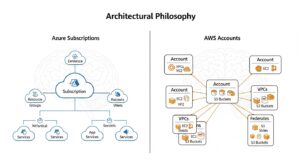
Azure organizes workloads through a hierarchy of Management Groups → Subscriptions → Resource Groups → Resources. Subscriptions are the primary billing and access-control boundary. Azure’s tight integration with Microsoft Entra ID (formerly Azure Active Directory) means RBAC is identity-centric by default.
AWS uses a flatter model: AWS Organizations → Accounts → Resources. Each AWS Account is an isolated boundary for billing, security, and resources. AWS IAM (Identity and Access Management) governs all access through policies, roles, and permission boundaries. The AWS equivalent of Azure’s Subscription-level isolation is an individual AWS Account — not a sub-resource within a single account.
Pro Tip: Before migrating any workloads, use AWS Control Tower to set up a multi-account Landing Zone. It automates account vending, applies Service Control Policies (SCPs), and enforces governance guardrails across your entire AWS organization — saving weeks of manual configuration.
The practical implication: if your Azure architecture uses multiple Subscriptions for environment isolation (dev/staging/prod), replicate that with separate AWS Accounts under AWS Organizations. Do not consolidate all environments into a single AWS Account.
Global Infrastructure: Regions, Availability Zones, and Edge Locations
| Infrastructure Layer | AWS | Azure |
| Geographic Regions | 39 (+ 2 announced) | 40+ |
| Availability Zones | 123 (+ 7 announced) | 120+ |
| Edge/CDN Locations | 400+ (CloudFront PoPs) | 190+ (Azure CDN PoPs) |
| Dedicated Gov Regions | GovCloud (US-East, US-West) | Azure Government |
AWS Availability Zones are physically separated by meaningful distances within a region (often 10–100km apart), with independent power, cooling, and network. This design supports synchronous replication for zero-data-loss architectures that Azure’s zone model mirrors — but AWS’s longer track record in AZ-aware application design means better tooling, documentation, and community patterns.
AWS also offers Local Zones (for ultra-low-latency workloads near major metro areas) and Wavelength Zones (for 5G edge workloads) — capabilities without a direct Azure equivalent at the same scale.
Pricing Models: Reserved Instances, Savings Plans, and Spot Instances
Understanding AWS’s pricing levers is essential before migrating — because the pricing model itself is a key reason teams switch.
AWS Reserved Instances (RIs): 1-year or 3-year commitments to specific instance types in specific regions. Offer up to 72% savings versus On-Demand pricing on a 3-year All Upfront basis.
AWS Savings Plans: More flexible than RIs — you commit to a spend level ($/hour) rather than a specific instance type. Compute Savings Plans cover any EC2 instance family, size, region, OS, or tenancy. EC2 Instance Savings Plans provide deeper discounts (up to 72%) for specific instance families. Finout
AWS Spot Instances: Leverage AWS’s spare EC2 capacity at discounts of 60–90% versus On-Demand pricing. Ideal for batch processing, CI/CD pipelines, stateless microservices, and fault-tolerant workloads. AWS can reclaim Spot capacity with a 2-minute warning, so proper interruption handling is required.
Azure comparison: Azure Reserved VM Instances and Azure Savings Plans offer similar 40–70% discounts for 1- or 3-year commitments. Azure Spot VMs mirror the interrupted-workload pricing model. Neither platform has a decisive cost advantage across all workload types — but AWS’s pricing tooling (AWS Cost Explorer, AWS Trusted Advisor, AWS Compute Optimizer) provides more granular optimization recommendations post-migration.
Azure to AWS Service Mapping: Side-by-Side Comparison
The Azure AWS service mapping is the intellectual core of any migration. Understanding what replaces what — and where the gaps are — determines your migration strategy, your tooling choices, and your timeline. Below is a comprehensive reference covering all major service categories, followed by a master mapping table.
Compute Services (Azure VMs → Amazon EC2)

Azure Virtual Machines map directly to Amazon EC2 (Elastic Compute Cloud). Both offer a wide range of instance types across general-purpose, compute-optimized, memory-optimized, storage-optimized, and GPU configurations.
Key EC2 differentiators you gain during migration:
- AWS Graviton instances (ARM-based): Up to 40% better price/performance for compatible workloads versus equivalent x86 instances — no Azure equivalent at this scale.
- Instance flexibility: EC2 offers more than 750 instance types across 40+ instance families — the widest selection in cloud computing.
- EC2 Auto Scaling: Direct equivalent to Azure Virtual Machine Scale Sets, with richer integration with AWS Application Load Balancer and target tracking policies.
For Azure VM to Amazon EC2 migration, AWS Application Migration Service (MGN) automates the replication and conversion of VMs from Azure to EC2, handling block-level replication without requiring OS-level agents in most cases.
Storage Services (Azure Blob Storage → Amazon S3)
Amazon S3 (Simple Storage Service) is the direct equivalent of Azure Blob Storage. Both provide durable, scalable object storage — but S3 adds capabilities worth knowing:
- S3 Intelligent-Tiering: Automatically moves objects between access tiers based on usage patterns — Azure’s equivalent lifecycle management requires explicit rule configuration.
- S3 Glacier and S3 Glacier Deep Archive: Long-term archival at ~$0.00099/GB/month — the most cost-effective cold storage tier in cloud computing.
- S3 Object Lambda: Transform and process data inline as it is retrieved — a serverless data transformation capability without a direct Azure equivalent.
Azure Files maps to Amazon EFS (Elastic File System) for Linux NFS workloads or Amazon FSx for Windows File Server for SMB/Windows environments. Azure Disk Storage maps to Amazon EBS (Elastic Block Store). AWS DataSync can migrate data directly from Azure Files and Azure Blob Storage to S3, EFS, or FSx.
Database Services (Azure SQL → Amazon RDS, Cosmos DB → DynamoDB)
Azure SQL Database maps to Amazon RDS for SQL Server (managed SQL Server) or Amazon Aurora (AWS-native relational engine offering MySQL/PostgreSQL compatibility at up to 5x MySQL performance). For teams willing to replatform, migrating Azure SQL to Amazon Aurora PostgreSQL delivers significant cost and performance improvements.
Azure Cosmos DB maps to Amazon DynamoDB for key-value and document workloads. DynamoDB’s on-demand capacity mode and global tables (multi-region active-active replication) are direct competitors to Cosmos DB’s multi-model, multi-region capabilities.
Other key database mappings:
- Azure Database for MySQL → Amazon RDS for MySQL or Amazon Aurora MySQL
- Azure Database for PostgreSQL → Amazon RDS for PostgreSQL or Amazon Aurora PostgreSQL
- Azure Cache for Redis → Amazon ElastiCache for Redis
- Azure Synapse Analytics → Amazon Redshift (data warehousing) + AWS Glue (ETL)
AWS Database Migration Service (DMS) handles the heavy lifting for Azure SQL to Amazon RDS migration, supporting both one-time full loads and continuous replication (CDC — Change Data Capture) for near-zero-downtime database migrations.
Networking (Azure VNet → AWS VPC, Azure Front Door → CloudFront)
Azure Virtual Network (VNet) maps to AWS VPC (Virtual Private Cloud). Both provide private, isolated network environments with subnets, route tables, security groups (AWS) / NSGs (Azure), and VPN/peering capabilities.
Key networking translation points:
- Azure VNet Peering → AWS VPC Peering or AWS Transit Gateway (hub-and-spoke for large-scale multi-VPC architectures)
- Azure ExpressRoute → AWS Direct Connect (dedicated private network connection from your data center to AWS)
- Azure VPN Gateway → AWS Site-to-Site VPN
- Azure Load Balancer → AWS Network Load Balancer (NLB) or AWS Application Load Balancer (ALB)
- Azure Front Door → Amazon CloudFront (CDN + DDoS protection) + AWS Global Accelerator (anycast routing for performance)
- Azure DNS → Amazon Route 53
- Azure Firewall → AWS Network Firewall or AWS WAF
Identity & Security (Azure Active Directory → AWS IAM)
This is one of the most nuanced mappings in any Azure Active Directory to AWS IAM migration. Azure’s identity model is built on a single, unified directory service; AWS uses composable identity components.
| Azure Component | AWS Equivalent |
| Azure Active Directory (Entra ID) | AWS IAM + AWS IAM Identity Center |
| Azure AD SSO | AWS IAM Identity Center (SSO) |
| Azure AD B2C (customer identity) | Amazon Cognito |
| Azure AD Domain Services | AWS Directory Service (Managed AD) |
| Azure RBAC | AWS IAM Roles and Permission Boundaries |
| Azure Managed Identity | AWS IAM Roles for EC2/Lambda/ECS |
| Azure Key Vault | AWS Key Management Service (KMS) + AWS Secrets Manager |
| Azure AD Conditional Access | AWS IAM Identity Center MFA + AWS Verified Access |
AWS IAM follows a deny-by-default model — all actions require explicit allow policies. Azure IAM evaluates role assignments with implicit inheritance. This fundamental difference means your RBAC policies cannot be directly translated and must be re-authored as AWS IAM policies.
Pro Tip: Use AWS IAM Identity Center (formerly AWS SSO) with SAML federation to your existing Azure AD (or Entra ID) during the transition period. This lets your workforce continue authenticating with their existing Microsoft credentials while you progressively migrate identity management to AWS-native controls.
DevOps & CI/CD (Azure DevOps → AWS CodePipeline)

Azure DevOps encompasses Boards, Repos, Pipelines, Test Plans, and Artifacts. AWS has purpose-built equivalents for each component:
- Azure Repos → AWS CodeCommit (or GitHub, which has deep AWS integration)
- Azure Pipelines → AWS CodePipeline (orchestration) + AWS CodeBuild (build) + AWS CodeDeploy (deployment)
- Azure Artifacts → AWS CodeArtifact
- Azure Test Plans → AWS Device Farm (mobile testing) or third-party tools
- Azure Boards → AWS systems don’t include native project management — teams typically use Jira or Linear alongside AWS developer tools
Many teams migrating from Azure DevOps choose to adopt GitHub Actions with AWS-native actions (since GitHub is deeply integrated with AWS) rather than migrating to AWS Code* services — this is a valid replatforming choice.
Serverless (Azure Functions → AWS Lambda)
Azure Functions map directly to AWS Lambda — both execute event-driven code without server management. Lambda supports Node.js, Python, Java, Go, .NET, Ruby, and custom runtimes. Lambda’s SnapStart feature (for Java) reduces cold-start latency by up to 90% — addressing one of the most common complaints about serverless. Lambda’s function URLs provide direct HTTPS endpoints without API Gateway.
For event streaming, Azure Event Hubs maps to Amazon Kinesis Data Streams, and Azure Service Bus maps to Amazon SQS (queue) and Amazon SNS (pub/sub notification).
Containers (AKS → Amazon EKS, ACI → Amazon ECS)
- Azure Kubernetes Service (AKS) → Amazon EKS (Elastic Kubernetes Service). EKS supports fully managed control planes, EKS Anywhere (on-premises), and deep integration with AWS Fargate for serverless Kubernetes node management.
- Azure Container Instances (ACI) → Amazon ECS with Fargate (serverless container execution without cluster management)
- Azure Container Registry (ACR) → Amazon ECR (Elastic Container Registry)
Monitoring (Azure Monitor → Amazon CloudWatch)
Azure Monitor (which includes Application Insights, Log Analytics, and Azure Metrics) maps to Amazon CloudWatch (metrics, logs, dashboards, alarms). For distributed tracing, Azure Application Insights maps to AWS X-Ray. For infrastructure-level inventory and configuration compliance, Azure Monitor also maps to AWS Config and AWS Systems Manager.
Azure to AWS Migration Strategies: Choose Your Path
There is no universal Azure to AWS migration approach. The right strategy depends on your timeline, budget, technical debt, and long-term cloud-native ambitions. AWS defines six migration strategies (the “6 Rs”), but for Azure migrations, three dominate in practice.
Rehost (Lift-and-Shift) — Fastest Route
Rehosting moves your workloads from Azure to AWS as-is, with minimal or no changes to the application architecture. Azure VMs become EC2 instances, Azure Blob Storage becomes S3, Azure SQL becomes RDS — without refactoring application code or redesigning data layers.
When to choose rehost:
- Time pressure: need to exit Azure by a specific date
- Limited budget or migration team capacity
- Workloads that will be retired within 12–18 months anyway
- Complex legacy applications where re-architecture risk is high
Tools: AWS Application Migration Service (MGN) is purpose-built for rehost migrations, handling continuous block-level replication from Azure VMs to EC2.
Contrary to popular belief, you don’t have to re-architect everything. Lift-and-shift (rehosting) is a valid and often faster first step that gets you off Azure quickly, after which you can optimize incrementally using AWS-native services.
Realistic timeline: 2–8 weeks for a well-scoped rehost migration of a small-to-medium application stack.
Replatform (Lift-and-Reshape) — Optimize as You Move
Replatforming makes targeted optimizations during migration without changing core architecture. Examples include:
- Migrating Azure SQL Database to Amazon Aurora PostgreSQL (same relational model, AWS-native engine, lower cost)
- Moving Azure App Service to AWS Elastic Beanstalk or AWS App Runner (PaaS-to-PaaS with minimal code changes)
- Containerizing existing Azure VMs into Amazon ECS Fargate tasks
- Switching from Azure Blob Storage to S3 with Intelligent-Tiering for automatic cost optimization
Replatforming typically delivers 20–40% cost reductions versus a straight lift-and-shift, with moderate additional effort.
Realistic timeline: 4–12 weeks per application cluster.
Refactor (Re-architect) — Full AWS-Native Modernization
Refactoring fully re-architects applications to leverage AWS-native, cloud-native services: breaking monoliths into microservices on Amazon EKS, migrating relational databases to Amazon DynamoDB, replacing Azure Functions with AWS Lambda + Amazon EventBridge, and adopting event-driven architectures with Amazon SQS/SNS/Kinesis.
Refactoring delivers the maximum long-term value — lower operational overhead, better scalability, deeper AWS feature integration — but requires the most investment. It is not appropriate as a first step for most organizations.
Realistic timeline: 3–12 months per major application, depending on complexity.
When to Use Each Strategy: Decision Framework
| Factor | Rehost | Replatform | Refactor |
| Timeline | Immediate (weeks) | Short (months) | Long (6–12+ months) |
| Budget | Low | Medium | High |
| Technical Debt | Any | Moderate | High (worth fixing) |
| Team AWS Skills | Basic | Intermediate | Advanced |
| Long-term Cloud-Native Goals | Secondary | Primary | Core objective |
| Application Complexity | Any | Moderate | High |
| Expected Cost Savings | Modest | Good | Best |
Most enterprise Azure to AWS cloud migration programs combine all three strategies: rehost short-lived or low-value workloads, replatform core services, and refactor strategic applications.
Step-by-Step Azure to AWS Migration Process
The following nine-step process represents the industry-standard execution framework for how to migrate from Azure to AWS. It incorporates the AWS Well-Architected Framework principles and the AWS Migration Acceleration Program (MAP) methodology.
(HowTo Schema: “Steps to Migrate from Azure to AWS” — 9 steps)
Step 1 — Assess and Inventory Your Azure Environment
Before a single resource moves, conduct a comprehensive discovery of your Azure footprint. Document every subscription, resource group, virtual machine, database, storage account, virtual network, and application dependency.
Use Azure Migrate (Azure’s built-in assessment tool) to generate a workload inventory and identify dependencies. Export this inventory to a structured format (CSV or JSON) for mapping to AWS equivalents.
Key questions to answer during assessment:
- What are all running Azure services and their resource consumption?
- What are the application interdependencies (which services communicate with which)?
- What compliance requirements apply to each workload (HIPAA, PCI DSS, SOC 2, FedRAMP)?
- What are the SLAs and RTO/RPO requirements for each application?
- Which workloads can be deprecated rather than migrated?
Pro Tip: Use the AWS Migration Readiness Assessment (MRA) — a free AWS tool that evaluates your organization’s cloud readiness across six dimensions: business case, planning and mobilization, portfolio discovery, migration execution, operations, and governance. It identifies gaps before they become blockers.
Step 2 — Set Up AWS Account, Landing Zone, and Control Tower
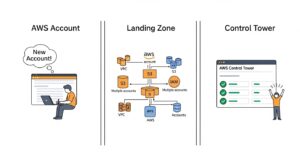
Do not begin migrating workloads into a bare AWS account. Establish governance foundations first:
- Create an AWS Organization with the management account.
- Deploy AWS Control Tower to set up your Landing Zone — a pre-configured, multi-account AWS environment with SCPs, guardrails, logging (via AWS CloudTrail), and centralized security monitoring (via AWS Security Hub and AWS Config).
- Create dedicated accounts for each environment: dev, staging, production, shared-services, logging, security.
- Set up AWS IAM Identity Center for centralized user access management across all accounts.
- Configure AWS Direct Connect or AWS Site-to-Site VPN for secure connectivity between your Azure environment and AWS during the migration.
This foundational setup typically takes 1–2 weeks but prevents months of rework later. AWS Control Tower Docs
Step 3 — Map Azure Services to AWS Equivalents
Using the inventory from Step 1 and the service mapping table above, create a migration workbook that maps each Azure resource to its AWS target:
- Each Azure VM → target EC2 instance type (use AWS Compute Optimizer for right-sizing recommendations)
- Each Azure database → target RDS engine, instance class, and storage configuration
- Each Azure VNet subnet → AWS VPC CIDR block, subnet, and routing configuration
- Each Azure NSG rule → AWS Security Group rule
- Each Azure IAM role → AWS IAM role with equivalent permission policies
This workbook becomes your migration runbook — the living document that tracks every resource’s current state, target state, and migration status.
Step 4 — Choose and Configure Migration Tools
Based on your migration strategy and workload types, select tools from the AWS migration toolkit:
- AWS Application Migration Service (MGN): For server/VM migrations (rehost strategy)
- AWS Database Migration Service (DMS): For all database migrations
- AWS DataSync: For file and object storage data transfer (Azure Blob Storage → S3, Azure Files → EFS/FSx)
- AWS Snowball / Snowball Edge: For large-scale offline data transfer (typically >10TB or low-bandwidth scenarios)
- AWS Direct Connect: For high-bandwidth, low-latency network connectivity during migration
- Terraform or AWS CloudFormation: For infrastructure-as-code provisioning of target AWS resources
Install and configure each tool in your AWS account before beginning any data movement.
Step 5 — Migrate Data (DataSync, DMS, Snowball, Direct Connect)
Data migration is typically the most time-consuming phase. Execute in order:
- Object storage: Use AWS DataSync to copy Azure Blob Storage to Amazon S3. DataSync transfers data over the internet or via Direct Connect, with automatic encryption, data integrity verification, and incremental sync for ongoing changes.
- File storage: Use AWS DataSync to copy Azure Files (SMB) to Amazon EFS or Amazon FSx for Windows File Server. AWS officially supports direct Azure Files → AWS DataSync transfers.
- Databases: Use AWS DMS to perform a full load followed by ongoing Change Data Capture (CDC) replication. The source (Azure SQL/MySQL/PostgreSQL) remains live while DMS keeps the target RDS instance synchronized in near-real-time.
- Large datasets: For datasets above 10TB on low-bandwidth connections, order AWS Snowball physical devices, load data locally, ship to AWS, and AWS ingests data into S3 — bypassing internet transfer costs and timelines entirely.
Pro Tip: Data transfer into AWS is typically free (ingress). Data transfer out of Azure (egress) is where the costs appear — plan your migration window to minimize Azure egress fees by batching large transfers during off-peak periods.
Step 6 — Migrate Applications and Workloads (AWS MGN)
With data synchronized, use AWS Application Migration Service (MGN) to migrate application servers:
- Install the MGN replication agent on Azure VMs (or use the agentless connector for compatible scenarios).
- MGN performs continuous, block-level replication from Azure VM disks to EBS volumes in AWS.
- Launch test instances in AWS from the replicated data — validate application functionality without impacting the live Azure workload.
- Once validated, schedule the cutover window: stop the Azure VM, allow final replication sync, and launch the production EC2 instance in AWS.
MGN’s continuous replication model means the final cutover window is typically minutes, not hours — making zero-downtime migration achievable for most application workloads. AWS MGN Official Docs
Azure to AWS Migration Tools — Complete Toolkit
AWS Application Migration Service (MGN)
AWS MGN is the primary recommended tool for Azure VM to AWS EC2 migration. It performs continuous block-level replication from source servers (including Azure VMs) to AWS, enabling non-disruptive cutover with minimal downtime. Key features include: agentless connectors, test launch validation, automated server conversion (Azure VM disk format → EBS), and integration with AWS Migration Hub Orchestrator.
2026 Update: As of November 2025, the standalone AWS Migration Hub console is no longer accepting new customers and is being succeeded by AWS Transform — AWS’s next-generation migration and modernization platform powered by generative AI. AWS Transform automates discovery, dependency mapping, and migration planning at scale.
AWS Database Migration Service (DMS)
AWS DMS migrates databases to AWS with minimal downtime. Supports homogeneous migrations (Azure SQL Server → Amazon RDS for SQL Server) and heterogeneous migrations (Azure SQL → Amazon Aurora PostgreSQL). DMS’s continuous CDC replication keeps source and target databases synchronized during the migration window, enabling near-zero-downtime database cutovers.
AWS DataSync
AWS DataSync is the go-to tool for migrating file and object storage from Azure to AWS. It directly supports transfers from Microsoft Azure Blob Storage and Azure Files (SMB) to Amazon S3, EFS, and FSx. DataSync automates data transfer scheduling, handles encryption in transit, performs integrity verification, and scales to petabyte-level transfers.
AWS Snowball and Snowball Edge

For datasets too large to transfer efficiently over the internet — typically above 10TB, or in environments with limited bandwidth — AWS Snowball (80TB capacity) and Snowball Edge (100TB with on-device compute) enable physical data transfer. You load data at your Azure data center location, ship the device to AWS, and AWS ingests data directly into S3. Snowball Edge also supports edge computing workloads during the migration window.
🛠️ Migration Tools Comparison Table
| Tool | Primary Use Case | Data Volume | Migration Type | Speed |
| AWS MGN | VM / Server migration | Any | Rehost (lift-and-shift) | Fast (continuous replication) |
| AWS DMS | Database migration | Any | Rehost / Replatform | Fast (CDC for near-zero downtime) |
| AWS DataSync | File / Object storage | Up to petabytes | Rehost | Fast (parallel transfer) |
| AWS Snowball | Large offline data transfer | 10TB–80TB per device | Rehost | Days (physical shipping) |
| AWS Snowball Edge | Large offline + edge compute | Up to 100TB | Rehost | Days (physical shipping) |
| AWS Direct Connect | Network connectivity | N/A (bandwidth) | All strategies | Consistent 1–10 Gbps |
| AWS Transform | Discovery, planning, modernization | N/A | All strategies | N/A (planning tool) |
| Terraform | Infrastructure provisioning | N/A | Replatform / Refactor | Fast (declarative) |
| AWS CloudFormation | AWS-native IaC provisioning | N/A | Replatform / Refactor | Fast (declarative) |
Azure to AWS Cost Comparison and Savings
Cost is one of the top three reasons teams execute an Azure to AWS migration. The savings are real — but they are workload-dependent and require active FinOps management to sustain.
Azure Reserved Instances vs AWS Reserved Instances
Both Azure Reserved VM Instances and AWS EC2 Reserved Instances offer 40–70% discounts for 1- or 3-year commitments. AWS RI advantages include:
- Convertible RIs: AWS allows you to change instance type, family, OS, or tenancy within a convertible RI — Azure’s equivalent flexibility is more limited.
- Regional vs Zonal scope: AWS RIs can be scoped to a region (capacity reservation applies to any AZ in that region) or a specific AZ.
- Marketplace resale: AWS Reserved Instance Marketplace allows selling unused RIs — Azure has no equivalent secondary market.
AWS Savings Plans vs Azure Cost Management
AWS Savings Plans are often the preferred commitment vehicle for teams migrating from Azure because they offer flexibility that RIs do not. Compute Savings Plans cover any EC2 instance family, size, OS, and region — ideal when your post-migration architecture is still evolving.
Azure’s equivalent — Azure Savings Plan for compute — was introduced in 2022 and covers Azure VMs, Dedicated Hosts, Container Instances, Functions Premium, and App Services. Coverage is narrower than AWS Compute Savings Plans.
Spot Instances vs Azure Spot VMs
AWS Spot Instances and Azure Spot VMs both offer 60–90% discounts on spare capacity. AWS Spot’s key advantage is Spot Instance Advisor — a publicly available tool showing historical interruption rates and average savings by instance type and region, enabling smarter Spot strategy. AWS also offers EC2 Fleet and Spot Fleet for diversified capacity across multiple instance types, reducing interruption risk.
Real-World Cost Savings Example
Consider a mid-size SaaS company running the following Azure workload (US East):
| Workload | Azure Configuration | Azure Monthly Cost | AWS Equivalent | AWS Monthly Cost (RI) |
| Web app servers | 4× D4s v3 (16 vCPU, 64 GB) | ~$840 | 4× m6i.2xlarge (8 vCPU, 32 GB) | ~$390 (3yr RI) |
| Database | Azure SQL Business Critical (8 vCores) | ~$2,200 | Amazon Aurora PostgreSQL (db.r6g.2xlarge) | ~$640 (3yr RI) |
| Object storage | 10TB Blob Storage (Hot) | ~$200 | 10TB Amazon S3 (Standard) | ~$230 |
| CDN/Traffic | Azure Front Door + 5TB egress | ~$450 | CloudFront + 5TB egress | ~$170 |
| Total | ~$3,690/month | ~$1,430/month |
In this illustrative scenario, the AWS configuration with 3-year RIs and Aurora PostgreSQL delivers approximately 61% cost reduction. Actual savings vary by workload, region, and commitment structure. Use the AWS Pricing Calculator for your specific environment.
Pro Tip: Use nOps, CloudHealth, or AWS Cost Explorer immediately post-migration to identify idle resources, unattached EBS volumes, and oversized RDS instances. Most organizations discover an additional 15–25% optimization opportunity within the first 90 days post-migration.
Security and Compliance During Azure to AWS Migration
Security cannot be an afterthought in Azure to AWS migration. AWS’s shared responsibility model — AWS secures the cloud infrastructure, you secure what you deploy in the cloud — is similar to Azure’s model but has distinct implementation details that require deliberate attention.
Mapping Azure Security Controls to AWS
| Azure Security Control | AWS Equivalent |
| Azure Security Center (Defender for Cloud) | AWS Security Hub + Amazon GuardDuty |
| Azure Policy | AWS Config + AWS Organizations SCPs |
| Azure Monitor Logs | Amazon CloudWatch Logs + AWS CloudTrail |
| Azure DDoS Protection | AWS Shield Standard (free) + AWS Shield Advanced |
| Microsoft Defender for Endpoint | AWS Systems Manager + Amazon Inspector |
| Azure Information Protection | AWS Macie (for S3 sensitive data discovery) |
Identity Migration: Azure AD to AWS IAM
The Azure Active Directory to AWS IAM migration is typically the most politically sensitive part of the project because it affects every user, every application, and every automated process.
Recommended migration approach:
- Federate first: Configure AWS IAM Identity Center with Azure AD as the SAML identity provider. This gives AWS console and CLI access to your entire Azure AD user base without requiring a separate AWS user directory.
- Migrate service identities: Convert Azure Managed Identities to AWS IAM Roles with instance profiles (for EC2) or execution roles (for Lambda).
- Migrate user groups: Use SCIM provisioning to sync Azure AD groups to AWS IAM Identity Center, maintaining existing group memberships and access patterns.
- Decommission federation: Once fully migrated, optionally migrate the authoritative identity source to AWS Managed Microsoft AD or adopt a pure AWS-native identity model with IAM Identity Center as the directory.
Compliance Certifications: FedRAMP, HIPAA, PCI DSS, SOC 2
AWS supports 143 security standards and compliance certifications globally, including: AWS Compliance
- FedRAMP High (US federal government workloads) — AWS GovCloud (US-East and US-West)
- HIPAA — Business Associate Agreement (BAA) available for 100+ AWS services
- PCI DSS Level 1 — the highest level of payment card security certification
- SOC 1, SOC 2, and SOC 3 — Fall 2025 reports cover 185 AWS services in scope
- ISO 27001, 27017, 27018, 27701, 22301 — comprehensive information security management
- UK Cyber Essentials Plus — valid through March 2026, relevant for UK government workloads
- UAE Cloud Security Standards and region-specific certifications for Middle East workloads
Data Encryption and Key Management (Azure Key Vault → AWS KMS)
Azure Key Vault stores secrets, encryption keys, and certificates. The AWS equivalent ecosystem is:
- AWS Key Management Service (KMS): Managed encryption key creation, rotation, and usage auditing. Integrates natively with S3, RDS, EBS, Lambda, and 100+ other AWS services for envelope encryption.
- AWS Secrets Manager: Stores application secrets (database passwords, API keys) with automatic rotation support — directly equivalent to Azure Key Vault secrets.
- AWS Certificate Manager (ACM): Manages SSL/TLS certificates — equivalent to Azure Key Vault certificates.
All data transferred during migration should be encrypted in transit using TLS 1.2+ (enforced by all AWS migration tools by default). Encrypt at rest using AWS KMS CMKs (Customer Managed Keys) from day one, before migrating any sensitive data.
Azure to AWS Migration Best Practices
The following best practices are distilled from enterprise migrations across financial services, healthcare, government, and SaaS verticals:
- Start with governance, not workloads. Deploy AWS Control Tower and your Landing Zone before moving a single resource. The governance foundation determines the security and compliance posture of everything that follows.
- Right-size from day one. Do not lift-and-shift at Azure’s resource levels without validation. Azure and AWS instance types do not map 1:1 in CPU/memory/network. Use AWS Compute Optimizer recommendations during planning
Expert Recommendation: Run the AWS Well-Architected Framework review on your first migrated workload before migrating subsequent waves. This review identifies architectural risks (security gaps, single points of failure, cost optimization opportunities) early — while your team is most engaged and the patterns are easiest to correct.
Real-World Azure to AWS Migration Case Studies
Enterprise Use Case — Financial Services
A regional bank operating across the UK and UAE was running core banking middleware on Azure (Standard_D16s_v3 VMs, Azure SQL Business Critical, Azure Active Directory, Azure Monitor). Their drivers for migration: AWS GovCloud’s FedRAMP High authorization for a US subsidiary, AWS’s broader PCI DSS Level 1 service footprint, and dissatisfaction with Azure’s support response times.
Approach: Replatform strategy. Azure VMs migrated to EC2 (M6i family) using AWS MGN. Azure SQL migrated to Amazon Aurora PostgreSQL using AWS DMS (CDC mode, 8 hours to full sync on 2TB database). Azure AD federated to AWS IAM Identity Center for a 6-month transition period.
Result: 52% total compute and database cost reduction after 3-year RI purchase. Full PCI DSS recertification completed within the AWS environment in 90 days. Zero data loss during migration. RTO achieved: < 15 minutes.
Startup Use Case — SaaS Application
A Series B SaaS startup had built on Azure for its Microsoft startup credits but was facing Azure’s enterprise-oriented pricing at scale. Their stack: Azure Kubernetes Service, Azure Functions, Azure SQL, Azure Blob Storage.
Approach: Replatform + partial refactor. AKS → Amazon EKS (Fargate managed nodes). Azure Functions → AWS Lambda (direct code migration, < 5% code changes). Azure SQL → Amazon Aurora Serverless v2 (significant cost reduction at variable load). Azure Blob → S3 with Intelligent-Tiering.
Result: 44% infrastructure cost reduction month-over-month. Lambda cold-start improvements with SnapStart improved p99 API response times by 35%. The entire migration was executed in 11 weeks by a 4-person engineering team.
When to Choose AWS Over Azure
AWS Advantages for Global Reach
AWS’s 39 geographic regions and 123 Availability Zones provide more deployment options in more locations than any other cloud provider. For businesses expanding into Southeast Asia (Singapore, Jakarta, Osaka), the Middle East (Bahrain, UAE), or South America (São Paulo, Santiago), AWS’s infrastructure density is a competitive advantage. AWS’s 400+ CloudFront Points of Presence deliver content with industry-leading latency globally.
AWS Advantages for Developer Ecosystem
AWS commands the largest cloud developer community in the world. The AWS Marketplace hosts 15,000+ pre-built software solutions. The depth of Stack Overflow answers, GitHub Actions workflows, Terraform modules, and third-party integrations is unmatched. For organizations hiring cloud engineers, AWS Certified professionals represent the largest certified workforce pool globally.
AWS Advantages for Enterprise Scale
AWS’s service breadth — 200+ services spanning compute, storage, networking, AI/ML, IoT, quantum computing, edge computing, satellite ground stations (AWS Ground Station), and more — provides the deepest toolkit for enterprise-scale innovation. AWS’s AI/ML platform (Amazon SageMaker) consistently ranks as the industry’s most mature managed ML platform, and AWS Bedrock for generative AI gives enterprises governed access to foundation models from Anthropic, Meta, Mistral, and Amazon.
Frequently Asked Questions (FAQ)
(FAQ Schema Markup — apply JSON-LD structured data to this section)
Q1: How long does an Azure to AWS migration take?
A: Simple apps: 2–4 weeks; medium apps: 6–12 weeks; large/complex apps: 3–6 months.
Q2: Can I migrate from Azure to AWS without downtime?
A: Yes, use AWS MGN for servers and DMS with CDC for databases; DNS switching enables near-zero downtime.
Q3: What is the AWS equivalent of Azure Blob Storage?
A: Amazon S3 — scalable object storage with features like Glacier, Intelligent-Tiering, and analytics integration.
Q4: How much does Azure to AWS migration cost?
A: Costs range from ~$5,000 for small apps to $100,000+ for large programs; Azure egress fees are often the biggest unexpected cost.
Q5: What is the difference between rehost, replatform, and refactor?
A: Rehost: lift-and-shift; Replatform: minor optimization (e.g., DB change); Refactor: full AWS-native redesign.
Conclusion — Your Azure to AWS Migration Journey Starts Now
Azure to AWS migration is a strategic move that goes beyond infrastructure—it’s about long-term scalability, cost control, and global readiness. Organizations planning cloud modernization often benefit from evaluating multiple migration paths. If you’re also considering alternative providers, our OVH to AWS migration guide explains how businesses transition from European cloud environments to AWS efficiently. At GoCloud, we help organizations design the right migration strategy—whether from Azure, OVH, or any other platform—ensuring performance, compliance, and cost optimization at every stage.
The path forward is structured and achievable. Service mapping is your first intellectual task — know your Azure equivalents in AWS cold. Choose your strategy based on timeline and ambition: rehost for speed, replatform for near-term optimization, refactor for long-term cloud-native transformation. Leverage purpose-built AWS migration tools — MGN, DMS, DataSync, and AWS Transform — to automate the heavy lifting. And never underestimate post-migration optimization: the real savings compound over 12–24 months as you right-size, reserve, and rationalize your AWS footprint.
