

The real benefits of serverless computing are not “no servers” or “infinite scale.” They are more specific than that. Serverless wins when you need event-driven execution, rapid delivery, scale-to-zero economics, and small independently deployable units of logic. It loses when your workload is steady, highly stateful, latency-sensitive at cold-start boundaries, or cheaper to run on always-on infrastructure. If you are evaluating AWS Lambda, Azure Functions, Google Cloud Functions, or Cloudflare Workers, the right question is not whether serverless is modern. It is whether the operational and economic shape of your workload matches the execution model.
For engineering leaders, the most useful way to think about serverless is not as a replacement for every container or VM. It is a deployment and billing model optimized for bursty, event-driven systems. The value comes from reducing idle infrastructure, compressing platform work, and scaling execution per event. The cost comes from more distributed failure modes, stricter limits, weaker local reproducibility, and a need for better observability, security boundaries, and state externalization.
When The Benefits Of Serverless Computing Are Real:
Serverless is strongest when traffic is unpredictable, highly variable, or idle for large portions of the day. That is why webhook handlers, internal automation, sporadic APIs, cron-style jobs, and event consumers map so well to FaaS. Cloudflare explicitly notes that serverless reduces wasted capacity for inconsistent traffic patterns, and Google Cloud emphasizes billing only during execution while scaling from zero. AWS Lambda and Azure Functions both use request-plus-execution style billing that reinforces the same model.
Implementation guidance
- Start with event sources that already exist: webhooks, queue messages, object storage events, Pub/Sub events, cron jobs.
- Keep each function narrow in responsibility.
- Push retries and backpressure into queues where possible.
- Prefer idempotent handlers so retries are safe.
Best practices
- Design for replay.
- Use correlation IDs across async hops.
- Keep payloads small and versioned.
- Separate ingestion from heavy processing.
Common mistakes
- Putting too much business logic in one function.
- Using synchronous chains where asynchronous queues would isolate failures.
- Treating retries as free.
Optimization tips
- Tune memory and runtime together.
- Benchmark with realistic concurrency, not only single-request tests.
- Model request amplification from retries and fan-out.
When not to use serverless
- If the workload is always hot and predictably busy, a container or VM often costs less per unit of work.
Small Teams And Fast-moving Product Roadmaps Benefit Disproportionately :
One of the underappreciated benefits of serverless is organizational, not just technical. Azure Functions explicitly markets less infrastructure maintenance, while Cloudflare and Akamai both frame serverless as a way to free developers from server management. That matters most when your platform team is small and your product roadmap is not.
You get leverage from:
- fewer patching and scaling duties
- smaller deployment units
- faster releases
- easier experimentation
- lower operational drag for internal tools and automations
This does not mean “no DevOps.” It means the DevOps effort shifts from server lifecycle to IAM, CI/CD, event contracts, observability, and failure handling.
When not to use serverless
- If your engineering model depends on deep control of the runtime, kernel tuning, sidecars, or long-lived processes, containers are the better primitive.
Edge And Low-latency Personalization Are Special Cases Where Serverless Can Be Better Than Regional Comput :
Not all serverless behaves the same. Cloudflare Workers runs in 330+ cities and positions itself as “minimal cold starts” with smart request placement near users, data, or APIs. That makes edge serverless very different from regional function platforms where cold-start and network path length may dominate p99 latency.
For use cases like:
- request auth at the edge
- header rewriting
- geographic personalization
- lightweight API composition
- A/B routing
- bot filtering
- cache-aware transformations
edge serverless can outperform centralized infrastructure because it avoids a full round trip to a distant origin.
Common mistake
- Assuming all serverless platforms have the same latency profile.
Optimization tip
- Distinguish edge execution from regional compute when evaluating “cold start” claims.
When The Benefits Of Serverless Computing Break Down :
Serverless pricing is attractive because you pay for invocations and execution time. But that same pricing becomes less attractive when your service is always busy. AWS Lambda charges on requests, duration, and optional add-ons such as Provisioned Concurrency, ephemeral storage, and SnapStart-related restoration. Azure Functions has Consumption and Flex Consumption plans for event-driven workloads, but its Premium plan keeps instances allocated at all times. Google Cloud Functions bills for execution time and scales to zero, but again, the scale-to-zero advantage disappears if you never scale to zero.
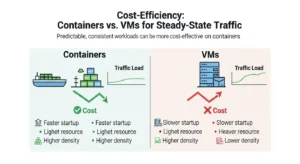
That means your break-even logic should be:
Serverless monthly cost ≈
(requests × request fee) + (execution time × memory/CPU rate) + cold-start mitigation costs + orchestration costs + downstream service costs
Always-on monthly cost ≈
(instance or container cost) + baseline autoscaling headroom + ops overhead + observability/security tooling
If utilization is low and burstiness is high, serverless usually wins. If utilization is high and steady, always-on infrastructure often wins.
When not to use serverless
- Long-lived APIs with stable throughput
- continuously processing consumers
- large background workers that rarely idle
- traffic patterns that require Provisioned Concurrency 24/7
Cold Starts Are Not Theoretical If Your Slos Are Tight :
AWS’s official cold-start explanation is useful because it frames the problem correctly: cold starts happen because of resource efficiency, security isolation, and scale-out. Idle environments are shut down, new execution environments must initialize, and new instances are created during scale spikes. Those are core characteristics of the model, not bugs.
AWS also outlines the main mitigation levers:
- choose faster-initializing runtimes
- reduce package size
- allocate enough memory to increase CPU
- avoid VPC attachment unless required
- use Provisioned Concurrency for latency-sensitive traffic
- use SnapStart for supported runtimes such as Java, Python, and .
Technical explanation
Cold starts matter most at the tail, not the average. A function that is fine at p50 may still violate p99 latency objectives when concurrency ramps or traffic is intermittent.
Implementation guidance
- Put latency-sensitive work behind warm paths or preinitialized capacity.
- Use async acceptance patterns where possible.
- Split user-facing request handling from slow downstream work.
Common mistakes
- Measuring only average latency
- attaching every function to a VPC by default
- shipping huge dependency trees
- keeping monolithic function handlers
Optimization tips
- Use lazy initialization.
- Remove unused libraries.
- Right-size memory for faster startup, not just lower raw memory cost.
- Move startup-heavy logic behind queues.
When not to use serverless
- p99-sensitive low-latency APIs with no tolerance for occasional startup jitter.
Stateful And Long-running Workflows Need Orchestration, Not Clever Hacks :
Serverless functions are typically short-lived and stateless. AWS Lambda’s own quotas highlight the constraint directly: it is designed for short-lived compute tasks, with a maximum timeout of 15 minutes and no retained state between invocations.
That does not mean serverless cannot power stateful systems. It means state must live elsewhere:
- databases for durable state
- object stores for artifacts
- caches for transient state
- queues for decoupling
- streams for ordered event flows
- orchestration engines for workflow state
AWS Step Functions exists precisely because “Lambda orchestration by hand” becomes brittle. AWS describes Step Functions as serverless workflow orchestration with built-in error handling, state management, debugging visibility, and support for long-running ETL, approvals, and distributed applications.
Use Queues, Streams, And Orchestration Deliberately :
Queues
Use queues when you need:
- load leveling
- retries with backoff
- failure isolation
- async user-facing APIs
Streams
Use streams when you need:
- ordered processing
- event fan-out
- telemetry ingestion
- near-real-time pipelines
Orchestration tools like AWS Step Functions :
Use orchestration when you need:
- state transitions
- branching logic
- retries with visibility
- compensating actions
- human approval steps
- audit-friendly execution paths
Best practice
- Prefer orchestration for multi-step workflows with explicit state.
- Prefer choreography only when team boundaries and event contracts are mature.
Common mistake
- Chaining functions directly and burying workflow state inside ad hoc code.
When not to use serverless
- extremely long-running jobs
- high-memory data processing better suited to serverless batch or container platforms
- workloads requiring sticky in-process state
Serverless Vs Containers Vs Always-on Infrastructure :
| Dimension | Serverless FaaS | Serverless containers / managed container runtime | Always-on containers / VMs |
| Best for | event handlers, webhooks, bursty APIs, automation | HTTP services, jobs, mixed microservices | steady APIs, custom runtimes, long-lived workers |
| Scaling model | per invocation | scales by request or workload | scales by autoscaler or manual policy |
| Idle cost | often zero or near-zero | low to none if scale-to-zero supported | always paying baseline |
| Cold starts | can be significant | usually smaller but still present | none if always running |
| Runtime control | lowest | medium | highest |
| State handling | externalized | externalized | can hold in memory, but durability still external |
| Portability | mixed; platform-specific triggers common | better if based on containers/Knative | highest operational portability |
| Ops burden | lowest infra burden | moderate | highest |
Architect guidance
- Use FaaS for fine-grained event response.
- Use serverless containers for HTTP-heavy services needing better runtime control.
- Use always-on infrastructure when utilization is high, startup cost matters, or you need custom background behavior.
Azure itself hints at this distinction by noting that Functions on Container Apps fits centralized microservices environments with consistent network, observability, and billing configurations—an approach many teams further refine with cloud architecture and microservices optimization support from GoCloud to ensure scalability and operational consistency. Google similarly emphasizes open technology and multi-environment portability via its functions framework and Knative-compatible environments.
Cost Model Guidance For Bursty Vs Predictable Traffic :
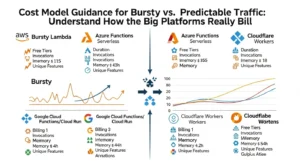
AWS Lambda
Key dimensions:
- requests
- execution duration
- memory allocation
- Provisioned Concurrency
- ephemeral storage
Azure Functions
Key dimensions:
- executions
- GB-seconds of resource consumption
- Flex Consumption modes
- Always Ready instances
- Premium plans with always-on allocation Microsoft Azure
Google Cloud Functions / Cloud Run Functions
Key dimensions:
- invocations
- execution time
- provisioned resources
- outbound data
- scale-to-zero billing model Google Cloud.
Cloudflare Workers
Key dimensions:
- requests
- CPU time
- account plan fee
- integrated platform service consumption
- notably, no duration charge and no egress billing on the Workers plan page.
A useful break-even Rule
Serverless tends to win when:
- utilization is spiky
- idle time is high
- operational overhead matters more than raw compute efficiency
- the code unit is small and event-driven
Containers or VMs tend to win when:
- traffic is stable
- you must hold warm capacity anyway
- Provisioned Concurrency or Premium plans become permanent
- you need high sustained CPU usage
- you can amortize instance cost across many requests
Optimization tips
- Model cost per million events, not just monthly spend.
- Include retries, queue polling, orchestration steps, logs, and outbound calls.
- Compare “pay for execution” against “pay for readiness.”
Common mistakes
- ignoring observability spend
- forgetting request fan-out
- assuming cold-start mitigation is free
- comparing Lambda to EC2 but forgetting ops labor
Real-World Use Cases Where Serverless is Usually The Right Fit
APIs And lightweight Backends :
Good fit for:
- low to medium traffic APIs
- internal tools
- BFFs
- auth callbacks
- lightweight CRUD
Use API Gateway-style front doors, keep handlers small, and offload long work to queues.
When not to use
- ultra-low-latency APIs with strict tail latency SLOs
- massive always-hot APIs with predictable load
Automation, cron jobs, and internal Operations :
This is one of the cleanest wins:
- nightly cleanups
- compliance checks
- account provisioning
- report generation
- incident response automations
Step Functions-style orchestration is often ideal when a cron trigger launches a multi-step workflow with retries and approval points.
ETL and File Processing :
Google Cloud explicitly highlights file processing, real-time stream processing, and webhook-style integration as strong serverless use cases. That is also where event-driven systems pay off operationally. Process on upload, transform on stream, validate on event.
Best practice
- Break ETL into stages.
- Store checkpoints externally.
- Use dead-letter queues for poison messages.
When not to use
- heavyweight jobs that consistently run near timeout ceilings
- memory-intensive transforms better suited to dataflow, Spark, or containerized batch
Webhooks And Third-party Integrations :
This is probably the highest-confidence serverless use case:
- Stripe callbacks
- Slack slash commands
- Twilio events
- GitHub webhooks
- CRM sync hooks
Serverless is ideal because the workload is naturally event-driven, idle most of the time, and easy to isolate per integration.
Edge Computing And Request-Time Logic :
Cloudflare Workers is especially strong for:
- geolocation-aware responses
- auth and header enforcement
- cookie logic
- request routing
- lightweight content transformation
Because the code runs near users, this use case should be evaluated separately from centralized FaaS economics.
Monitoring, Tracing, And Debugging Strategy For Serverless Systems :
Observability is where many serverless projects become painful. The platform reduces server work, but it increases distributed system complexity.
What Good Serverless Observability Requires :
Logs
- structured JSON logs
- correlation IDs
- explicit event metadata
- retry and dedupe markers
Metrics
- invocation count
- error rate
- duration percentiles
- concurrency
- queue age
- downstream dependency latency
- cold-start indicators when available
Traces
- end-to-end traces across gateway, function, queue, database, and downstream APIs
- async trace stitching where possible
- workflow-level visibility for orchestrated paths
Google emphasizes integrated monitoring and diagnosability with Cloud Trace, and Azure emphasizes local development and debugging workflows. AWS Step Functions adds workflow-level debugging value for multi-step processes.
Best practices
- instrument before production, not after incident one
- trace every async boundary
- alert on queue lag and replay volume, not only 5xx rates
Common mistakes
- relying only on function logs
- ignoring event source latency
- missing idempotency signals
- not sampling traces intelligently
When not to use serverless
- if your team cannot yet operate async distributed systems with proper observability discipline
Security And IAM Boundary Design :
Serverless reduces some patching burden, but it does not remove security design. In fact, function-per-task architectures often increase the number of identities, event sources, and permission edges you must manage.
AWS’s cold-start documentation is useful again here because it points out that isolation is part of why execution environments initialize the way they do. Cloudflare also highlights multitenancy and sandboxing concerns as part of the model.
Design Serverless Security Around These Boundaries :
Per-function IAM
- least privilege by default
- separate roles per function or service domain
- no shared “god roles”
Event source permissions
- explicitly control which queues, topics, buckets, or APIs may invoke which functions
- validate event provenance
Secret management
- never bake secrets into package artifacts
- use managed secret stores and short-lived credentials
Network boundaries
- only attach to private networks when required
- understand the latency tradeoff of VPC/private networking
Tenant isolation
- partition data and auth context explicitly
- avoid tenant-mixing inside shared workflow state
Common mistakes
- reusing one execution role across many handlers
- treating async triggers as trusted by default
- using environment variables as a security boundary
Optimization tip
- Build permission maps from event source to function to downstream dependency.
Portability And Vendor Lock-in: Where The Pain Actually Comes From :
Lock-in in serverless rarely comes from the function code alone. It usually comes from:
- trigger semantics
- managed event buses
- workflow engines
- IAM models
- observability integrations
- queue and stream contracts
- deployment pipelines
Cloudflare notes vendor lock-in as a structural risk. Google explicitly positions its functions framework and Knative-based portability as a way to reduce it.
Reduce lock-in Where it Matters :
- keep business logic separate from platform glue
- standardize event schemas
- use adapters around provider SDKs
- avoid burying workflow state in vendor-specific constructs unless the value is worth it
- isolate orchestration definitions from domain logic where possible
Best practice
- Embrace platform-native services where they create material leverage.
- Keep contracts portable even when implementation is not.
When not to over-optimize portability
- when speed-to-market and operating simplicity matter more than hypothetical future migration
Suggested Visual Elements :
- Serverless workflow diagram
Show API Gateway → function → queue → worker function → database/object storage → notification path. Include retries and dead-letter handling. - Cost curve comparison chart
Plot serverless, serverless containers, and always-on containers/VMs across low, medium, and high utilization. - Cold start mitigation flow
Decision tree: latency-sensitive? yes/no → runtime choice → package trimming → memory tuning → provisioned concurrency/SnapStart → edge alternative. - Architecture comparison table
Compare AWS Lambda, Azure Functions, Google Cloud Functions, and Cloudflare Workers on billing model, idle behavior, limits, cold-start posture, and best-fit workloads. - Observability stack diagram
Show logs, metrics, traces, async correlation IDs, queue lag metrics, and workflow-level instrumentation across an event-driven system.
FAQs :
1. What are the biggest benefits of serverless computing?
The main benefits are scale-to-zero economics, reduced infrastructure management, fast deployment, and strong fit for event-driven workloads. Those benefits are most real for bursty, asynchronous, or intermittently used systems, not for every backend service.
2. When is serverless cheaper than containers?
Serverless is usually cheaper when traffic is uneven and idle time is high, because you are billed for execution rather than reserved uptime. Containers often become cheaper when workloads are steady enough that always-on capacity is well utilized.
3. Are cold starts still a real problem?
Yes, especially for latency-sensitive endpoints and sporadic traffic. AWS explicitly describes cold starts as a core consequence of scale-out, isolation, and shutting down idle environments, though there are mitigation options like Provisioned Concurrency and SnapStart.
4. Is serverless good for APIs?
Yes, for many lightweight or moderate-traffic APIs, webhook endpoints, and internal services. It is less ideal for APIs with extremely tight p99 latency SLOs or stable high-volume traffic that justifies always-on infrastructure.
5. How do you handle state in serverless applications?
You externalize it. Use databases, caches, queues, object storage, and workflow orchestration instead of in-memory process state, because functions are short-lived and scale independently.
Conclusion :
The real benefits of serverless computing show up when architecture and workload shape are aligned. Serverless is excellent for bursty APIs, event-driven automation, ETL triggers, webhooks, and edge logic where scale-to-zero, rapid delivery, and managed operations create real leverage. It is far less compelling when you need steady high-throughput compute, tight p99 latency, long-lived processes, or rich in-process state. The best architectural decision is rarely “serverless everywhere.” It is knowing where serverless gives you a better cost and ops profile than containers or VMs, and where it simply moves complexity into colder starts, harder observability, and more fragmented system design.