

Choosing the best business cloud storage is no longer a simple “which vendor gives me the most gigabytes” decision. For modern companies, the right platform has to support secure collaboration, zero-trust access, admin control, auditability, file sync performance, API automation, ransomware recovery, and predictable cost. That means the real buying decision is less about storage volume and more about operating model fit.
Most existing roundups do a decent job listing familiar vendors like Google Drive, OneDrive, Dropbox Business, Box, Sync.com, Egnyte, and AWS S3, but they still tend to stay shallow on enterprise architecture tradeoffs. Competitor coverage usually emphasizes general pros and cons, pricing tiers, and basic collaboration features, while leaving gaps around encryption design, DLP, legal hold, audit logs, API limits, hybrid cloud workflows, and total cost of ownership.
This guide is written for IT managers, CTOs, operations leaders, startup founders, and security teams that need to choose a platform based on business risk, governance requirements, and real operational fit.
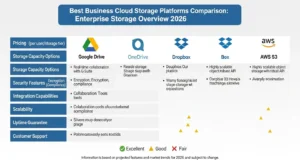
What the Best Business Cloud Storage Must Do in 2026 :
A strong business storage platform should solve five problems at once:
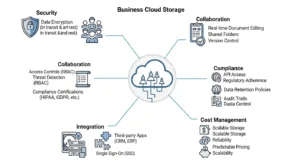
- Give teams fast, reliable file sync and sharing
- Protect sensitive files with strong identity and data controls
- Support compliance, retention, and eDiscovery requirements
- Integrate with your productivity stack and automation workflows
- Keep storage growth and admin overhead economically manageable
That is why the best business cloud storage for a marketing agency is rarely the same as the best platform for a healthcare provider, law firm, remote engineering team, or global enterprise.
From an enterprise architecture perspective, cloud storage decisions usually fall into four distinct categories:
- Collaboration-first storage
Built for document sharing, permissions, co-authoring, and team workflows - Backup and recovery-first storage
Built for resilience, snapshots, versioning, and ransomware recovery - Archival and compliance-driven storage
Built for immutability, retention, legal hold, records management, and audit defense - Hybrid and workflow-centric storage
Built for connecting cloud collaboration with on-prem repositories, line-of-business systems, and API-driven processes
Common mistake: treating all four as the same problem.
Optimization tip: define your primary storage job before you compare vendors.
How to Evaluate The Best Business Cloud Storage Without Buying The Wrong Platform :
Business buyers should compare cloud storage on six dimensions.
1. Security Model :
Look past “encrypted” marketing language and ask:
- Is encryption server-side, client-side, or end-to-end?
- Does the vendor support zero-knowledge encryption?
- Can your company manage keys, or does the provider hold them?
- Are SSO, MFA, SCIM, and device trust available?
- Can admins restrict external sharing and unmanaged devices?
Google Workspace emphasizes zero-trust controls, client-side encryption, and digital sovereignty options. Microsoft OneDrive inherits broader Microsoft 365 security and compliance capabilities. Dropbox Business offers SSO, two-step verification, directory integration, remote wipe, and detailed audit visibility. Sync.com differentiates with privacy-first, end-to-end encrypted cloud storage and limited provider access to customer data.
2. Governance And Compliance Depth :
If your business has legal, healthcare, finance, or privacy obligations, demand support for:
- DLP
- retention policies
- legal hold
- audit logs
- eDiscovery
- records management
- information barriers
- data residency controls
Box Governance is especially strong here, with retention schedules, legal holds, event-based retention, advanced trash controls, and unlimited file versions. Microsoft positions OneDrive and SharePoint with Purview-based retention, sensitivity labels, DLP, deleted-user retention controls, and Multi-Geo data residency. Google Workspace provides DLP, audit logs, reports, security analytics, and regional data controls.
3. Collaboration And Sync Performance :
For real-world operations, compare:
- desktop sync behavior
- selective sync and external sync controls
- large file handling
- version history
- file locking
- offline support
- cross-device reliability
- browser preview and commenting
Dropbox remains strong in sync usability and admin recovery controls. OneDrive benefits from deep Microsoft 365 integration and sync policies that admins can govern through rollout. Google Drive is attractive for browser-native collaboration and pooled storage simplicity.
4. API And Workflow Automation :
If storage is part of a larger business process, assess:
- API breadth
- rate or call limits
- webhook/event support
- SIEM integrations
- DLP integrations
- identity automation
- migration support
- no-code and workflow hooks
Dropbox is unusually explicit here: it supports integration with SIEM, DLP, DRM, eDiscovery, legal hold, data migration, on-prem backup workflows, and APIs for custom automation. Egnyte also positions itself around workflow control, sensitive-data discovery, multi-cloud data management, and governance dashboards.
5. Hybrid Cloud And on-Prem Fit :
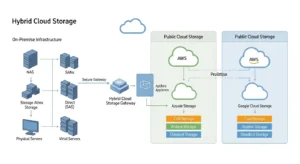
Most business articles underplay this. But many enterprises still need:
- local caching
- branch-office performance
- staged migration
- on-prem repository visibility
- multi-cloud policy management
- secure document flows across cloud and local systems
Egnyte stands out here because it explicitly supports sensitive data discovery and governance across cloud and on-prem sources, alongside multi-cloud lifecycle workflows and unified control dashboards. That makes it more suitable than consumer-style storage tools for organizations with mixed environments.
6. Total Cost, Not Just Storage Cost :
The cheapest storage line item is not always the lowest operating cost.
Include:
- per-user licensing
- storage overages
- admin/security feature paywalls
- extra storage purchases
- API-based partner costs
- archive retrieval fees
- support tier upgrades
- recovery history limitations
- compliance add-ons
Google Workspace uses pooled storage per user, which is flexible but still tied to seat count and possible additional storage purchases. Dropbox tiers recoverability, SSO, audit logs, advanced key management, and compliance tracking into higher plans. AWS S3 exposes multiple cost dimensions beyond raw storage, including requests, data transfer, management features, and storage class behaviors.
Best Business Cloud Storage by Use Case :
The smart way to buy storage is to start with the job you need done.
Collaboration-First Business Storage :
Best-fit shortlist:
Use this category when your priority is:
- file sharing
- co-authoring
- team folders
- external collaboration
- browser-based productivity
- fast onboarding
Google Drive works well for organizations standardized on Google Workspace. Its strengths are browser-native collaboration, pooled storage, centralized admin controls, DLP, remote device management, and security center reporting. It is especially efficient for companies that want storage tightly connected to email, docs, admin controls, and zero-trust policy in one suite.
OneDrive is usually the default choice for Microsoft-centric businesses. It benefits from Microsoft 365 security, Purview compliance, retention, DLP, sensitivity labels, Multi-Geo options, and mature user lifecycle controls. For companies already paying for Microsoft licensing, this can produce better operational consolidation than buying a separate storage platform.
Dropbox Business remains compelling when teams care about sync quality, broad device support, easy file transfer, admin recovery, remote wipe, strong audit visibility, and external collaboration. But buyers need to look carefully at plan packaging, because many advanced controls sit higher in the stack.
Box is best when collaboration has to coexist with governance. It is less about consumer-style simplicity and more about content lifecycle control, regulated workflows, and retention policy precision.
Common mistake: picking the most familiar collaboration brand without checking whether admin policies, audit logging, or legal hold require an enterprise tier.
Optimization tip: run a pilot with legal, security, and operations stakeholders, not just end users.
Backup and Ransomware Recovery-Focused Storage :
Best-fit shortlist:
- Egnyte
- Dropbox Business
- AWS S3 for policy-based backup architectures
If ransomware recovery, file snapshots, and restoration matter, compare:
- recovery history window
- snapshot behavior
- immutable storage options
- file versioning
- suspicious activity detection
- remote wipe
- restore granularity
Egnyte explicitly markets ransomware risk mitigation with signature- and behavior-based detection, compromised-user reporting, and automated recovery using file snapshots. It also includes snapshot and recovery features in higher-end business packaging.
Dropbox offers 180-day restore history in lower business plans and 1-year recovery in higher tiers, plus ransomware detection and recovery features in advanced packaging. That makes it better than many buyers assume for practical file recovery, though the depth you get depends heavily on plan level.
For backup architects, AWS S3 is not a collaboration suite but it is highly relevant as business storage infrastructure. With S3 Versioning and S3 Object Lock, organizations can add immutable, WORM-style protection against deletion or alteration during defined retention periods. AWS explicitly positions S3 Object Lock for ransomware protection and regulated retention scenarios—capabilities that are often implemented more effectively with AWS storage and backup optimization support from GoCloud to ensure proper configuration, cost control, and compliance alignment.
Security best practice: do not treat version history alone as ransomware strategy. Prefer immutable or locked storage for critical backups.
Migration advice: separate employee productivity storage from your true backup and recovery architecture.
Compliance-driven and legal-hold-Centric Storage :
Best-fit shortlist:
- Box
- OneDrive
- Google Drive / Workspace
- Egnyte
This is the right category if your storage decision is driven by:
- regulatory retention
- eDiscovery
- defensible deletion
- legal hold
- DLP
- data residency
- records lifecycle
- audit evidence
Box is one of the clearest fits here. It supports retention policies, event-based retention, modifiable retention, legal holds, advanced trash controls, and unlimited file versions. For legal, healthcare, and financial use cases, that is a more meaningful buying signal than raw storage numbers.
Microsoft OneDrive and SharePoint become strong contenders when paired with Purview. Microsoft documents retention labels, sensitivity labels, DLP, data lifecycle management, deleted-user data preservation, Multi-Geo residency, and information barriers. That is especially important for enterprises with regional data obligations or internal separation rules.
Google Workspace supports DLP, audit logs, AI usage transparency, data region choices, and regulatory alignment across major standards. It is usually a stronger choice for compliance-sensitive collaboration than basic Google Drive comparisons suggest.
Operational consideration: compliance storage is as much about policy administration as storage capacity.
Common mistake: buying a platform that can store regulated data but cannot operationalize legal hold or audit review at scale.
Privacy-First Storage and Zero-knowledge Encryption :
Best-fit shortlist:
- Sync.com
- selective use of enterprise key management in larger suites
Zero-knowledge encryption is attractive because it reduces provider-side access to customer content. But buyers need to understand the tradeoff.
Zero-knowledge Encryption :
Good for:
- privacy-sensitive firms
- legal teams
- client-confidential agencies
- organizations that want minimal provider access
Tradeoffs:
- fewer native enterprise workflow integrations
- possible friction with search, preview, admin recovery, and collaboration depth
- harder operational recovery if key ownership is badly managed
Sync.com positions itself around privacy-protection, end-to-end encryption, and limiting provider access to customer data. That makes it attractive for businesses prioritizing confidentiality over broad enterprise app ecosystems.
Enterprise key Management And Admin Visibility :
Good for:
- larger organizations
- regulated teams that still need collaboration and policy control
- companies requiring DLP, auditability, SSO, legal hold, and admin-assisted recovery
Tradeoffs:
- the provider may hold or mediate encryption in ways that enable more platform-side services
- stronger governance can mean less “pure privacy” than zero-knowledge architectures
Dropbox higher tiers include advanced key management and end-to-end encryption features, while Google and Microsoft emphasize enterprise controls, client-side encryption options, sovereignty features, and broader governance integrations.
Rule of thumb:
If your top priority is privacy purity, zero-knowledge matters most.
If your top priority is enterprise governance, key control plus admin visibility often matters more.
The Admin Controls that Separate Consumer File Sharing From Enterprise Storage :
When evaluating a vendor, require answers for this checklist:
Identity and access
- SSO
- MFA
- SCIM or directory provisioning
- role-based access control
- guest sharing rules
- device trust or managed-device restrictions
Dropbox explicitly supports directory services integration, SSO, two-step verification, account transfer, remote wipe, and granular sharing controls. Google Workspace supports automated onboarding/offboarding, endpoint management, remote wipe, DLP, encryption, and access controls from a centralized admin console.
Auditability
- login audit trails
- file event tracking
- sharing activity logs
- admin actions
- export to CSV or SIEM
- investigation workflows
Dropbox provides comprehensive audit logs and SIEM integration. Google Workspace Security Center adds visibility into file exposure, authentication, malware, DLP-triggered events, and organization-wide investigations.
Data governance
- DLP
- retention
- legal hold
- versioning
- recovery windows
- deleted-user handling
- defensible deletion
Box, OneDrive, Google Workspace, and Egnyte all have meaningful governance stories, but they differ in emphasis. Box is strongest on legal-hold-centric content governance. Microsoft is broadest when your tenant already uses Purview. Google provides solid security analytics and admin controls. Egnyte stands out when sensitive content exists across both cloud and on-prem repositories.
Optimization tip: ask vendors to map these controls to your exact workflows: employee offboarding, external sharing, litigation hold, and ransomware response.
API Automation, large files, and Real Operational Fit :
This is where many business buying guides stay too high-level.If your teams handle video, design files, CAD, analytics exports, or automated document pipelines, compare:
- API access limits
- bulk migration support
- upload/download reliability
- sync conflict behavior
- large file transfer limits
- file locking
- automation triggers
- integration with security and workflow systems
Dropbox is transparent that API connectivity supports identity management, SIEM, DLP, DRM, eDiscovery, legal hold, migration, and custom workflows. Its business plans also package different transfer limits and levels of admin API access.
AWS S3 is the opposite end of the spectrum: not user-friendly collaboration software, but excellent as programmable object storage for application backends, archival, static assets, data lakes, and automated backup pipelines. That makes S3 a good fit when “storage” means developer-controlled infrastructure rather than end-user document collaboration.
Common mistake: using a collaboration suite as if it were object storage infrastructure.
Migration advice: separate user files, application objects, and backup archives into different storage architectures when possible.
Pricing Traps in Business Cloud Storage :
The most dangerous pricing issue is feature packaging, not storage alone.
Watch for these Traps :
1. Per-user licensing
Collaboration suites often look inexpensive at small scale, then rise sharply as team count grows.
2. Pooled storage assumptions
Google Workspace pooled storage is flexible, but still tied to licensed users and may require extra storage purchases as your organization grows.
3. Admin features hidden in higher tiers
Dropbox reserves several advanced capabilities for higher plans, including audit logs with file event tracking, SSO integrations, advanced key management, compliance tracking, and longer recovery history.
4. Archive and retrieval economics
With infrastructure storage like AWS S3, cost comes from storage class, request type, bandwidth, early deletion penalties, metadata overhead, and retrieval behavior, not just terabytes stored. Standard-IA and Glacier-style tiers can become expensive if you retrieve too often or delete early.
5. API and partner ecosystem costs
Even if the base platform includes APIs, SIEM, DLP, eDiscovery, and migration integrations may introduce separate third-party spending.
6. Compliance add-ons
Retention, legal hold, and governance tooling are often premium features rather than baseline storage functions.
Best practice: build a 24-month TCO model with these inputs:
- user growth
- expected storage growth
- recovery requirements
- security tier needs
- audit and compliance needs
- API/integration spend
- support level
- migration services
How to choose the best business cloud storage for your Company Type :
SMBs :
Prioritize:
- low admin overhead
- predictable pricing
- easy user onboarding
- MFA and simple sharing controls
- enough recovery history
Best fits:
- Google Drive
- OneDrive
- Dropbox Business
Agencies and creative teams :
Prioritize:
- sync performance
- external sharing
- large file transfer
- client permissions
- version history
- watermarking or view controls
Best fits:
- Dropbox Business
- Box
- Egnyte for more controlled external collaboration
Remote and distributed teams :
Prioritize:
- reliable desktop/mobile access
- cross-device sync
- simple SSO
- clear guest controls
- centralized admin actions
Best fits:
- Google Workspace
- OneDrive
- Dropbox Business
Regulated industries :
Prioritize:
- retention
- legal hold
- DLP
- audit logs
- data residency
- information barriers
- immutability for backup/archives
Best fits:
- Box
- OneDrive with Purview
- Google Workspace Enterprise
- Egnyte
- AWS S3 for immutable archive/backup layers
Hybrid enterprises :
Prioritize:
- on-prem integration
- phased migration
- cloud and local policy visibility
- cross-repository governance
- ransomware recovery
Best fits:
- Egnyte
- Microsoft ecosystem deployments
- AWS S3 in broader storage architecture patterns
Migration And Rollout Advice :
A storage migration fails when the vendor is fine but the rollout model is weak.
Use This Rollout Sequence :
1. Classify your data first
Separate:
- active collaboration files
- regulated documents
- archives
- backups
- application object storage
2. Pilot with a real policy group
Include:
- IT
- security
- legal/compliance
- one operational team
- one external-sharing-heavy team
3. Validate critical controls before cutover
Test:
- SSO
- MFA
- SCIM or user provisioning
- DLP policies
- audit log exports
- external sharing controls
- file recovery
- deleted-user workflows
4. Measure sync and support behavior
Especially for:
- large files
- offline edits
- permission changes
- external guests
- file restore events
- cross-device consistency
5. Keep backup architecture separate
Do not assume your collaboration suite is your disaster recovery strategy.
Common mistake: migrating every repository at once.
Optimization tip: start with low-risk collaboration folders, then move regulated or legacy repositories after governance controls are proven.
FAQs :
1. What is the best business cloud storage for most small companies?
For many SMBs, Google Drive, OneDrive, and Dropbox Business are the easiest starting points because they combine file sharing, team collaboration, and manageable admin overhead. The best choice depends on whether your company already runs on Google Workspace or Microsoft 365.
2. Is Google Drive good enough for regulated business use?
It can be, especially in higher-tier Google Workspace environments where DLP, audit logs, data regions, security analytics, and stronger admin controls are available. The key is evaluating the exact edition and governance features you need, not assuming consumer Drive features apply to business use.
3. Is OneDrive better than Dropbox Business for companies?
OneDrive is often better for Microsoft-centric organizations because it ties into Microsoft 365 security, compliance, and identity controls. Dropbox Business is often stronger for sync experience, external sharing simplicity, and some workflow integrations, especially for creative or cross-company collaboration.
4. What is the difference between zero-knowledge encryption and enterprise key management?
Zero-knowledge encryption is designed so the provider has minimal or no ability to read customer content. Enterprise key management is more about giving organizations stronger control over encryption and governance while preserving admin visibility, integrations, and compliance workflows.
5. Which business cloud storage is best for legal hold and retention?
Box and Microsoft 365 are usually the strongest starting points because they offer mature retention and legal-hold capabilities. Google Workspace can also fit, but buyers should validate exact policy, audit, and reporting requirements first.
Conclusion :
The best business cloud storage is the platform that matches your operating reality, not the one with the loudest feature list. If your priority is everyday collaboration, Google Drive, OneDrive, Dropbox Business, and Box all deserve serious consideration. If governance, legal hold, ransomware recovery, or hybrid control matter more, Egnyte, Box, Microsoft 365, and AWS S3-based architectures become much stronger candidates. The right decision comes from mapping storage to job type, security model, admin control depth, and total cost over time. Buy for workflow, governance, and resilience first. Capacity is the easy part.