


Understanding EC2 instance costs feels like reading a foreign language when you’re just getting started with AWS. You launch a simple web server, expect a few dollars on your bill, and suddenly you’re staring at charges for “EC2-Other,” data transfer, and mysterious Elastic IP fees you didn’t know existed.
Amazon EC2 (Elastic Compute Cloud) powers millions of workloads globally, but its pricing complexity catches even experienced developers off guard. The good news? Once you understand the five EC2 pricing models, recognize hidden cost components, and apply basic optimization strategies, you can predictably control your AWS bill while running the infrastructure your applications need.
Why EC2 Billing Is More Complex Than It Looks
When you think “EC2 costs,” you probably picture the hourly rate for the virtual machine itself—$0.0116/hour for a t3.micro, $0.096/hour for an m5.large. But Amazon EC2 billing extends far beyond the compute instance, encompassing storage volumes, network traffic, static IP addresses, load balancers, and a dozen other components that appear as separate line items on your bill.
AWS‘s pay-as-you-go model means you’re charged for every resource consumed, metered down to the second. This granularity provides unprecedented cost control compared to traditional infrastructure, but it also means dozens of pricing variables interact to produce your final monthly charge. A “simple” web application running on a single EC2 instance might actually incur charges across six different categories:
- EC2 compute hours for the instance itself
- EBS storage for the attached disk volume
- EBS snapshots if you’ve created backups
- Data transfer when users access your application
- Elastic IP if you’ve assigned a static public address
- Elastic Load Balancer if you’re distributing traffic across instances
The complexity multiplies when you factor in regional pricing variations (us-east-1 is typically cheapest), operating system licensing (Windows costs more than Linux), and the five different pricing models that each offer different tradeoffs between flexibility and cost.
The EC2-Other Cost Mystery — What’s Hiding in Your Bill?
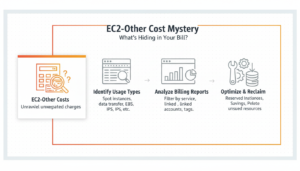
One of the most confusing elements when navigating EC2 costs is the EC2-Other line item that appears in AWS Cost Explorer and billing reports. Unlike “EC2-Instances(Elastic Compute Cloud – Compute)” which clearly represents your virtual machine costs, EC2-Other is a catch-all category for associated services.
EC2-Other typically includes:
Data transfer charges: Egress (outbound) traffic from EC2 to the internet costs $0.09 per GB after the first gigabyte free each month. Cross-region data transfer costs $0.02 per GB. These charges appear under EC2-Other rather than a dedicated data transfer category.
Elastic IP addresses: AWS charges $0.005 per hour (~$3.60/month) for each Elastic IP that’s allocated but not associated with a running instance. If your Elastic IP is attached to an active EC2 instance, there’s no charge—but the moment you stop that instance while keeping the IP reserved, charges begin.
EBS-optimized instance fees: Some older instance types charge additional hourly fees for EBS optimization, which provides dedicated bandwidth between EC2 and storage volumes.
NAT Gateway: Network Address Translation gateways that enable private subnet instances to access the internet cost $0.045/hour plus $0.045 per GB processed—often the largest component of EC2-Other costs.
Load Balancer costs: Application Load Balancers (ALB) and Network Load Balancers (NLB) charge hourly fees plus data processing charges, appearing under EC2-Other.
EC2-Other cost breakdown example for a typical small application:
- NAT Gateway: $32.40/month (720 hours × $0.045)
- NAT Gateway data processing: $45/month (1 TB × $0.045)
- Application Load Balancer: $16.20/month (720 hours × $0.0225)
- ALB LCU charges: $18/month (moderate traffic)
- Elastic IP (unattached): $3.60/month
- Total EC2-Other: $115.20/month
For a single m5.large instance costing ~$70/month, EC2-Other can exceed the actual compute cost—which is why understanding these hidden components is critical for accurate budgeting.
Per-Second vs. Per-Hour Billing Explained
AWS revolutionized cloud pricing in 2017 by introducing per-second billing for most EC2 instance types, replacing the previous per-hour model that rounded up any partial hour to a full hour charge.
How per-second billing works:
You’re charged for each second your instance runs, with a 60-second minimum. Launch an instance, run it for 2 minutes 30 seconds, and you’re billed for exactly 150 seconds of usage.
For an m5.large instance at $0.096/hour:
- Per-hour billing (old model): 2.5 minutes = 1 full hour = $0.096
- Per-second billing (current): 150 seconds = (150/3600) × $0.096 = $0.004
The savings might seem trivial in this example, but they compound significantly for:
- Auto-scaling workloads that spin instances up and down throughout the day
- CI/CD pipelines that launch test instances for minutes at a time
- Batch processing jobs that run for unpredictable durations
- Development and testing where instances are started and stopped frequently
Exceptions that still use per-hour billing:
- Windows instances running certain older versions
- Commercial Linux distributions with hourly licensing (RHEL, SUSE)
- Instances launched from specific marketplace AMIs
For the vast majority of Linux instances running Amazon Linux, Ubuntu, or modern distributions, you benefit from per-second granularity. This means stopping instances during off-hours (nights, weekends) delivers proportional savings without rounding penalties.
EC2 Pricing Models Comparison Table
| Pricing Model | Discount vs. On-Demand | Commitment | Flexibility | Interruption Risk | Best For |
| On-Demand | 0% (baseline) | None | Full flexibility | None | Variable workloads, testing, peaks |
| Savings Plans | 40–72% | 1 or 3 years hourly spend | High – auto-applies across types | None | Predictable baseline usage |
| Reserved Instances | 40–72% | 1 or 3 years specific config | Low to medium | None | Capacity-critical workloads |
| Spot Instances | 70–90% | None | High | 2-minute warning | Fault-tolerant batch processing |
| Dedicated Hosts | Variable (BYOL savings) | On-Demand or Reserved | Low | None | Licensing, compliance, isolation |
Understanding EC2 Instance Types and Their Costs
AWS offers 600+ EC2 instance types grouped into families optimized for different workload characteristics. Choosing the right instance type dramatically impacts both performance and cost—an oversized instance wastes money, while an undersized instance delivers poor user experience.
General Purpose (t3, m5, m6i)
General purpose instances balance compute, memory, and networking, suitable for most common workloads without specialized requirements.
T3 instances (burstable performance):
- t3.micro: 2 vCPU, 1 GB RAM, $0.0104/hour (~$7.49/month)
- t3.small: 2 vCPU, 2 GB RAM, $0.0208/hour (~$14.98/month)
- t3.medium: 2 vCPU, 4 GB RAM, $0.0416/hour (~$30.00/month)
- t3.large: 2 vCPU, 8 GB RAM, $0.0832/hour (~$59.90/month)
T3 instances use a CPU credit system: you accumulate credits when CPU usage is below baseline (20–40% depending on size) and spend credits during bursts above baseline. Excellent for web servers, development environments, and applications with variable CPU usage.
M5 instances (steady-state performance):
- m5.large: 2 vCPU, 8 GB RAM, $0.096/hour (~$69.12/month)
- m5.xlarge: 4 vCPU, 16 GB RAM, $0.192/hour (~$138.24/month)
- m5.2xlarge: 8 vCPU, 32 GB RAM, $0.384/hour (~$276.48/month)
M5 provides consistent CPU performance without bursting limitations, ideal for production applications requiring predictable compute.
M6i instances (latest generation Intel):
- m6i.large: 2 vCPU, 8 GB RAM, $0.096/hour (same pricing as M5)
- 15% better price-performance than M5 generation
When to choose general purpose:
- Web and application servers
- Microservices and containerized applications
- Development and test environments
- Small to medium databases
- Code repositories and build servers
Compute Optimized (c5, c6g)
Compute-optimized instances provide higher vCPU-to-memory ratios, delivering maximum processing power for CPU-intensive workloads.
C5 instances (Intel Xeon):
- c5.large: 2 vCPU, 4 GB RAM, $0.085/hour (~$61.20/month)
- c5.xlarge: 4 vCPU, 8 GB RAM, $0.17/hour (~$122.40/month)
- c5.2xlarge: 8 vCPU, 16 GB RAM, $0.34/hour (~$244.80/month)
C6g instances (ARM-based AWS Graviton2):
- c6g.large: 2 vCPU, 4 GB RAM, $0.068/hour (~$48.96/month)
- 20% cost reduction compared to C5 with equivalent or better performance
When to choose compute-optimized:
- Batch processing and analytics
- High-performance web servers handling high traffic
- Video encoding and transcoding
- Scientific modeling and simulations
- Machine learning inference (non-GPU)
- Ad serving and gaming servers
Memory Optimized (r5, x2)
Memory-optimized instances provide high memory-to-vCPU ratios, designed for workloads that process large datasets in memory.
R5 instances:
- r5.large: 2 vCPU, 16 GB RAM, $0.126/hour (~$90.72/month)
- r5.xlarge: 4 vCPU, 32 GB RAM, $0.252/hour (~$181.44/month)
- r5.2xlarge: 8 vCPU, 64 GB RAM, $0.504/hour (~$362.88/month)
X2 instances (extreme memory):
- x2iedn.xlarge: 4 vCPU, 128 GB RAM, $1.668/hour (~$1,200/month)
- Up to 4 TB RAM per instance for largest sizes
When to choose memory-optimized:
- In-memory databases (Redis, Memcached)
- Real-time big data analytics (Spark, Presto)
- High-performance databases (MySQL, PostgreSQL with large datasets)
- SAP HANA and enterprise applications
- Genome assembly and analysis
Storage and GPU Instances
Storage-optimized instances (I3, D2, H1) provide high-speed local NVMe SSD or HDD storage for data-intensive workloads:
- i3.large: 2 vCPU, 15.25 GB RAM, 475 GB NVMe SSD, $0.156/hour
GPU instances (P3, G4, Inf1) provide specialized hardware for machine learning training, inference, and graphics:
- p3.2xlarge: 8 vCPU, 61 GB RAM, 1 × NVIDIA V100 GPU, $3.06/hour (~$2,203/month)
- g4dn.xlarge: 4 vCPU, 16 GB RAM, 1 × NVIDIA T4 GPU, $0.526/hour (~$378/month)
GPU instances are expensive but deliver 10–100× performance for deep learning compared to CPU instances, making them cost-effective per training iteration.
How to Choose the Right Instance Type for Your Budget
Selecting the optimal instance type requires balancing performance needs with cost constraints:
Step 1 – Profile your workload:
- Measure actual CPU, memory, disk, and network utilization
- Identify bottlenecks: CPU-bound, memory-bound, or I/O-bound
- Test representative load patterns
Step 2 – Start with general purpose:
- t3.medium for low-traffic applications and development
- m5.large or m6i.large for production web applications
- Scale vertically (larger sizes) if performance is insufficient
Step 3 – Specialize based on bottlenecks:
- Shift to compute-optimized (c5, c6g) if CPU consistently maxed
- Shift to memory-optimized (r5) if memory pressure causes swapping
- Consider burstable (t3) for variable workloads to reduce costs
Step 4 – Test ARM-based Graviton instances:
- c6g, m6g, r6g offer 20% lower costs than equivalent Intel/AMD
- Ensure application compatibility (most Linux workloads work seamlessly)
Step 5 – Right-size continuously:
- Monitor utilization monthly using AWS Cost Explorer and Compute Optimizer
- Downsize over-provisioned instances
- Combine smaller instances rather than one large instance for resilience
Example optimization journey:
- Week 1: Launch m5.2xlarge for new application ($276/month On-Demand)
- Week 4: Monitoring shows 30% CPU, 40% memory utilization
- Week 5: Downsize to m5.large ($69/month) with equivalent performance
- Month 2: Switch to m6i.large with 3-year Savings Plan ($19/month)
- Total savings: 93% reduction ($257/month → $19/month)
The Hidden Components of Your EC2 Bill
Beyond the visible hourly compute charges, several hidden components can double or triple your actual EC2 instance costs. Understanding these charges is essential for accurate budgeting and cost control.
EBS Storage Costs
Every EC2 instance requires at least one Amazon EBS (Elastic Block Store) volume for the operating system and applications. EBS charges separately from compute, continuing even when instances are stopped.
EBS volume types and pricing (us-east-1):
- gp3 (General Purpose SSD): $0.08/GB-month + $0.005/provisioned IOPS over 3,000
- gp2 (Previous generation): $0.10/GB-month with burstable IOPS
- io2 (Provisioned IOPS SSD): $0.125/GB-month + $0.065/provisioned IOPS
- st1 (Throughput Optimized HDD): $0.045/GB-month (minimum 125 GB)
- sc1 (Cold HDD): $0.015/GB-month (minimum 125 GB)
Example costs:
- 30 GB gp3 root volume: $2.40/month
- 100 GB gp3 data volume: $8.00/month
- 500 GB gp2 database volume: $50/month
EBS snapshots (backups) add additional charges:
- $0.05/GB-month for stored snapshot data
- 200 GB snapshot: $10/month
Critical insight: EBS charges continue for stopped instances. A stopped m5.large costs $0 for compute but still incurs $8/month for its attached 100 GB volume. If you don’t need data persistence, terminate rather than stop instances and recreate from AMIs to eliminate storage charges.
Optimization tip: Migrate from gp2 to gp3 volumes for immediate 20% savings ($0.10 → $0.08 per GB) with better baseline performance.
Data Transfer and Egress Fees
Data transfer charges represent one of the most unpredictable EC2 cost components, especially for applications serving public traffic.
AWS data transfer pricing (us-east-1):
- Inbound to EC2 from internet: Free
- Outbound to internet:
- First 100 GB/month: Free
- Next 9.999 TB: $0.09/GB
- 10 TB to 50 TB: $0.085/GB
- Over 150 TB: $0.05/GB
- Cross-region transfer: $0.02/GB between regions
- Same-region between availability zones: $0.01/GB in and out
Example scenarios:
Scenario 1 – Small web application:
- 500 GB monthly traffic to users
- (500 GB – 100 GB free) × $0.09 = $36/month data transfer
Scenario 2 – Video streaming service:
- 10 TB monthly video delivery
- (10,000 GB – 100 GB) × $0.09 = $891/month
Scenario 3 – Multi-region deployment:
- 2 TB cross-region replication us-east-1 → eu-west-1
- 2,000 GB × $0.02 = $40/month
Data transfer to AWS CloudFront (CDN) from EC2 is free within the same region, and CloudFront egress costs are lower ($0.085/GB vs. direct EC2 $0.09/GB), making CDN integration a cost optimization for high-traffic applications.
Elastic IP Address Charges
Elastic IP addresses provide static public IPv4 addresses that persist across instance restarts. AWS charges when Elastic IPs are allocated but not actively associated with running instances.
Elastic IP pricing:
- Associated with running instance: Free
- Allocated but unattached: $0.005/hour (~$3.60/month)
- Additional Elastic IPs beyond the first per instance: $0.005/hour each
Common mistake: Teams allocate Elastic IPs for development, stop instances overnight to save compute costs, but continue paying $3.60/month per IP. Over 10 development instances, this wastes $36/month unnecessarily.
Optimization: Release Elastic IPs when instances are stopped long-term. For short stops (minutes to hours), the small charge is acceptable to maintain the same IP. For overnight or weekend stops, release and reallocate as needed, or use DNS with TTL to handle IP changes.
NAT Gateway Costs
NAT Gateways enable private subnet instances to access the internet for software updates and external API calls without exposing them to inbound internet traffic. They’re essential for secure VPC architectures but surprisingly expensive.
NAT Gateway pricing:
- Hourly charge: $0.045/hour (~$32.40/month) per availability zone
- Data processing: $0.045/GB processed
Example costs:
- NAT Gateway in one AZ: $32.40/month base
- 1 TB data processed: 1,000 GB × $0.045 = $45/month
- Total: $77.40/month for a single NAT Gateway
High-availability architectures deploy NAT Gateways in multiple availability zones for redundancy, multiplying costs (3 AZs = $97.20/month + data processing).
Optimization alternatives:
- NAT instances: Self-managed EC2 instances providing NAT functionality at lower cost (t3.micro ~ $7.50/month) but requiring management
- VPC endpoints: Free gateway endpoints for S3 and DynamoDB eliminate NAT Gateway data processing for those services
- Consolidate traffic: Route all egress through a single NAT Gateway (sacrificing multi-AZ redundancy) to minimize costs
For budget-conscious startups, NAT Gateway costs often exceed EC2 compute costs, making this a prime optimization target.
Elastic Load Balancer Fees
Elastic Load Balancers distribute traffic across multiple EC2 instances, providing high availability and automatic scaling. They charge hourly plus data processing fees.
Load Balancer pricing (us-east-1):
Application Load Balancer (ALB):
- $0.0225/hour (~$16.20/month)
- $0.008/LCU-hour (Load Balancer Capacity Unit, based on traffic)
- Average: $35–50/month for moderate traffic
Network Load Balancer (NLB):
- $0.0225/hour (~$16.20/month)
- $0.006/NLCU-hour (Network Load Balancer Capacity Unit)
- Average: $30–45/month for moderate traffic
Classic Load Balancer (deprecated):
- $0.025/hour (~$18/month)
- $0.008/GB processed
LCU charges are complex, based on the maximum of four metrics: new connections per second, active connections, processed bytes, and rule evaluations. Most applications see $20–30/month in LCU charges for moderate traffic.
When you need load balancers:
- Running 2+ instances requiring traffic distribution
- Implementing health checks and automatic failover
- SSL/TLS termination at the load balancer layer
- Path-based or host-based routing for microservices
When you don’t:
- Single instance applications (use Elastic IP directly)
- Very low traffic (<100 requests/hour) where load balancer cost exceeds instance cost
EC2 Pricing Calculator: Step-by-Step Walkthrough
How to estimate EC2 costs before launching infrastructure using the AWS Pricing Calculator—essential for accurate project budgeting.
How to Use the AWS Pricing Calculator for EC2
Access the calculator: Navigate to https://calculator.aws/#/
Step 1 – Select EC2 service:
- Click “Create estimate”
- Search for “EC2” in service catalog
- Click “Configure”
Step 2 – Choose region:
- Select target AWS region (us-east-1, eu-west-1, etc.)
- Note: Pricing varies by region
Step 3 – Configure instance details:
- Operating system: Linux, Windows, RHEL, SUSE
- Instance type: m5.large, c5.xlarge, etc.
- Pricing model: On-Demand, Savings Plan, Reserved Instance, or Spot
- Number of instances: Quantity to estimate
Step 4 – Specify utilization:
- Workload type: Constant usage (24/7) or variable
- For constant: 100% utilization = 730 hours/month
- For variable: Specify average hours per day/week
Step 5 – Configure storage:
- EBS volume type: gp3, gp2, io2, etc.
- Volume size per instance (GB)
- Snapshot storage (if applicable)
Step 6 – Add data transfer:
- Outbound data transfer to internet (GB/month)
- Cross-region transfer (if applicable)
Step 7 – Add load balancer (optional):
- Select ALB or NLB
- Estimate processed data volume
Step 8 – Review estimate:
- View monthly and annual cost projections
- Download PDF or share link with stakeholders
- Adjust parameters and recalculate
Estimating Monthly EC2 Costs Before You Launch
Example estimation (small web application):
Requirements:
- 2 × m5.large instances (high availability)
- Linux operating system
- 100 GB gp3 EBS per instance
- Application Load Balancer
- 1 TB monthly outbound traffic
- us-east-1 region
Calculator results:
Compute (On-Demand):
- 2 × m5.large × $0.096/hour × 730 hours = $140.16/month
Storage:
- 2 × 100 GB × $0.08/GB = $16.00/month
Load Balancer:
- ALB base: $16.20/month
- LCU charges: ~$25/month (estimated)
- Subtotal: $41.20/month
Data Transfer:
- (1,000 GB – 100 GB free) × $0.09 = $81.00/month
Total monthly cost: $278.36
With Savings Plan optimization:
- 3-year Compute Savings Plan (66% discount on compute)
- Compute: $140.16 × 0.34 = $47.65/month
- Storage: $16.00 (unchanged)
- Load Balancer: $41.20 (unchanged)
- Data Transfer: $81.00 (unchanged)
- Optimized total: $185.85/month
- Annual savings: $1,110 (33% reduction)
The calculator helps compare pricing models and architect cost-effective solutions before committing infrastructure spend.
Frequently Asked Questions (FAQ)
1. How can I lower my EC2 monthly bill?
Reduce costs by combining Savings Plans, right-sizing instances, scheduling non-production instances to stop when idle, using Spot Instances for fault-tolerant workloads, migrating to Graviton (ARM) instances, and optimizing storage and network usage.
2. What is EC2 right-sizing and why is it important?
Right-sizing matches instance type and size to actual workload usage. Over-provisioned instances waste money. Tools like AWS Compute Optimizer recommend downsizing or switching families to save 30–50% while maintaining performance.
3. Do I pay for stopped EC2 instances?
Stopped instances do not incur compute charges, but attached EBS volumes, Elastic IPs, and snapshots still cost money. For long-term savings, terminate unused instances and recreate them from AMIs if needed.
4. How do Graviton instances save money?
AWS Graviton (ARM-based) instances are 20–25% cheaper than equivalent Intel/AMD instances and often provide better performance. They are compatible with most modern workloads and compound savings when combined with Savings Plans.
5. When should I use Dedicated Hosts?
Use Dedicated Hosts for BYOL (Bring Your Own License), compliance requirements, or software licensed per physical core. For standard workloads without licensing constraints, On-Demand or Savings Plans are usually far more cost-effective.
Conclusion
Navigating your EC2 instance costs requires understanding the multi-dimensional pricing model that extends far beyond simple hourly compute rates. Your actual monthly bill reflects the intersection of instance types, pricing models (On-Demand, Savings Plans, Reserved, Spot, Dedicated), storage volumes, data transfer, load balancers, and dozens of other components that collectively determine total cost. At GoCloud, we guide organizations through this complexity to optimize their cloud spending efficiently.
The journey to EC2 cost optimization follows a clear path: start with On-Demand instances while establishing baseline usage patterns, analyze workload requirements using AWS Compute Optimizer and Cost Explorer, implement right-sizing to eliminate over-provisioning, commit to Savings Plans for predictable baseline workloads earning 40–72% discounts, integrate Spot Instances for fault-tolerant processing, and schedule non-production instances to run only during active development hours—all with insights and best practices from GoCloud
