EC2 Savings Plans are flexible AWS pricing commitments that reduce compute costs by up to 72% compared to On-Demand pricing—but most organizations leave money on the table by misunderstanding how they work.
Unlike traditional Reserved Instances that lock you into specific instance types and regions, Savings Plans commit to a dollar-per-hour spend, automatically applying discounts across instance families, sizes, operating systems, and even regions. Yet the flexibility comes with complexity: choosing between Compute and EC2 Instance Savings Plans, calculating the right commitment level, and avoiding over-commitment requires strategic planning.
This comprehensive guide walks cloud engineers, FinOps practitioners, and DevOps teams through everything needed to maximize AWS Savings Plans ROI—from understanding the four plan types to calculating commitments, avoiding common mistakes, and monitoring utilization effectively. Whether you’re managing a startup’s first AWS bill or optimizing enterprise-scale infrastructure, you’ll discover actionable strategies to reduce EC2 costs without sacrificing operational flexibility.

What Are EC2 Savings Plans? (And Why They Matter)
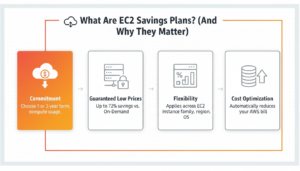
Amazon EC2 costs represent the largest line item in most AWS bills, often consuming 40–60% of total cloud spend. On-Demand instances offer maximum flexibility but come with premium pricing. EC2 Savings Plans solve this problem by offering substantial discounts in exchange for committing to a consistent hourly spend over one or three years—no instance-level commitments required.
Launched in 2019 as a more flexible alternative to Reserved Instances, Savings Plans transformed AWS cost optimization by shifting from capacity-based commitments (specific instance types) to spend-based commitments (dollar amounts per hour). This fundamental change means your commitment automatically follows your workload, whether you resize instances, change families, migrate regions, or switch between EC2 and Fargate.
The value proposition is compelling: organizations can achieve 40–72% savings compared to On-Demand pricing while maintaining the operational flexibility to adapt infrastructure as business needs evolve. For a company spending $100,000 monthly on EC2, this translates to $40,000–$72,000 in monthly savings—up to $864,000 annually—simply by committing to predictable baseline usage.
How the Hourly Commitment Model Works
Unlike Reserved Instances that reserve specific capacity, EC2 Savings Plans commit to spending a fixed dollar amount per hour on compute resources. You might commit to $10/hour, meaning AWS expects $10 in eligible compute spend every hour for the contract duration.
Here’s how it works in practice:
Hour 1: Your workload consumes $15 worth of On-Demand EC2 instances. The first $10 receives Savings Plan discounts (potentially saving $4–$7), while the remaining $5 is billed at On-Demand rates.
Hour 2: Your workload uses only $8 worth of compute. Your full $8 receives the discount, but you still pay for the committed $10—essentially “losing” $2 of unused commitment that hour.
Hour 3: Usage returns to $10 exactly. You receive maximum value from your commitment with zero waste.
This hourly calculation continues 24/7 for the entire term. The key to maximizing ROI is committing to your baseline usage—the compute spend that’s consistent hour-to-hour, day-to-day—rather than peak or variable loads. Over-committing means paying for unused capacity; under-committing means leaving savings on the table by paying On-Demand rates for usage above your commitment.
EC2 Savings Plans vs Reserved Instances: Key Differences
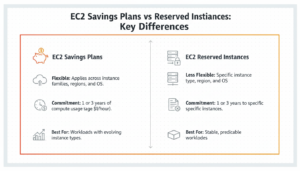
The EC2 Savings Plans vs Reserved Instances debate centers on flexibility versus discount depth and capacity guarantees.
Reserved Instances (RIs) require specifying instance family, size, region, and operating system upfront. A Standard RI for m5.2xlarge in us-east-1 running Linux provides discounts only for that exact configuration. Convertible RIs allow modifications but offer smaller discounts. RIs provide capacity reservation—AWS guarantees capacity availability even during peak demand—critical for mission-critical workloads in constrained availability zones.
Savings Plans commit only to hourly spend, automatically applying discounts to any eligible compute usage that fits your plan type. An EC2 Instance Savings Plan for the M5 family applies to m5.large, m5.xlarge, m5.2xlarge, or any M5 size, across all regions, with any operating system. Compute Savings Plans extend even further, covering EC2, Fargate, and Lambda across all instance families. The tradeoff: no capacity reservation.
For most modern cloud architectures built on elastic, multi-region, or containerized workloads, Savings Plans offer superior flexibility. Reserved Instances remain relevant for workloads requiring guaranteed capacity or those locked into specific configurations for regulatory reasons.
The billing application order matters: AWS applies Reserved Instance discounts first, then EC2 Instance Savings Plans, then Compute Savings Plans, and finally On-Demand rates. This hierarchy allows sophisticated optimization strategies layering multiple commitment types.
The 4 Types of AWS Savings Plans Explained
AWS offers four distinct Savings Plan types, each optimized for different workload characteristics and flexibility requirements. Understanding these differences is critical to maximizing AWS cost commitment value.
Compute Savings Plans — Maximum Flexibility (Up to 66% Off)
Compute Savings Plans are the most flexible commitment type, applying discounts to:
- Amazon EC2 across all instance families, sizes, regions, operating systems, and tenancy
- AWS Fargate for containerized workloads
- AWS Lambda for serverless compute
Maximum discount: 66% compared to On-Demand pricing
The universal applicability makes Compute Savings Plans ideal for dynamic environments where instance families change frequently, workloads migrate between regions, or architectures mix EC2, containers, and serverless. A startup scaling rapidly might shift from compute-optimized C6i instances to memory-optimized R6i instances without losing commitment value—the Savings Plan automatically applies to the new configuration.
The flexibility comes with a tradeoff: smaller discounts than EC2 Instance Savings Plans. Organizations with stable, predictable EC2 workloads can achieve deeper savings with more specific commitments, but those with evolving architectures benefit from the adaptability.
EC2 Instance Savings Plans — Maximum Savings (Up to 72% Off)
EC2 Instance Savings Plans commit to a specific instance family within a region but provide flexibility across:
- Instance sizes (large, xlarge, 2xlarge, etc.)
- Operating systems (Linux, Windows, RHEL, SUSE)
- Tenancy (shared or dedicated)
Maximum discount: 72% compared to On-Demand pricing
For example, an EC2 Instance Savings Plan for the M5 family in us-east-1 applies to m5.large, m5.4xlarge, m5.metal, or any M5 size variation, with any OS, earning maximum discounts. But if you migrate to M6i instances or deploy in eu-west-1, the commitment no longer applies—those workloads revert to On-Demand pricing.
This plan type delivers the deepest discounts for workloads with predictable instance family requirements. Enterprises with standardized infrastructure—”we run all application servers on C6i instances in us-east-1″—maximize savings here. The constraint is acceptable when operational requirements naturally limit instance family changes.
SageMaker AI Savings Plans — For ML Workloads (Up to 64% Off)
SageMaker AI Savings Plans apply exclusively to Amazon SageMaker usage, including:
- SageMaker notebook instances
- SageMaker training jobs
- SageMaker inference endpoints
- SageMaker Studio
Maximum discount: 64% compared to On-Demand pricing
Machine learning workloads often consume substantial compute resources for training and inference. Organizations running continuous ML pipelines can reduce costs significantly with SageMaker-specific commitments. The plans apply across all SageMaker instance types and regions, providing flexibility within the ML service boundary.
Use SageMaker Savings Plans when ML workloads represent a substantial, predictable portion of AWS spend—typically 20%+ of total compute costs. For organizations just beginning ML experimentation, the commitment may be premature; for ML-native companies, these plans are essential cost optimization tools.
Database Savings Plans — The Newest Option (Up to 35% Off)
Database Savings Plans are AWS’s newest commitment type, covering:
- Amazon RDS (all database engines)
- Amazon Aurora
- Amazon Redshift
- Amazon DynamoDB
Maximum discount: 35% compared to On-Demand pricing
While the discount percentage is smaller than compute commitments, database workloads often run continuously with highly predictable resource consumption. A production database running 24/7 achieves full utilization of its commitment, maximizing ROI despite the smaller discount percentage.
Database Savings Plans are particularly valuable for organizations with significant database spend but variable compute requirements. Rather than locking compute and database together in a Compute Savings Plan (earning 66% discount on compute but only partial database coverage), separating commitments allows independent optimization of each workload type.
AWS Savings Plans Types Comparison Table
| Savings Plan Type | Max Discount | Flexibility | Eligible Services | Best For |
| Compute Savings Plans | 66% | Highest – all instance families, regions, Fargate, Lambda | EC2, Fargate, Lambda | Dynamic workloads, multi-region architectures, mixed compute types |
| EC2 Instance Savings Plans | 72% | Medium – one instance family per region, all sizes/OS | EC2 only (specific family + region) | Stable workloads, standardized infrastructure, maximum savings priority |
| SageMaker Savings Plans | 64% | Medium – all SageMaker instance types, all regions | SageMaker only | ML-heavy workloads, continuous training/inference pipelines |
| Database Savings Plans | 35% | Medium – all database services, all regions | RDS, Aurora, Redshift, DynamoDB | Database-heavy architectures, always-on data infrastructure |
EC2 Instance Savings Plans vs Compute Savings Plans: Which Is Right for You?
The Compute Savings Plans vs EC2 Instance Savings Plans decision fundamentally balances discount depth against operational flexibility. Most organizations benefit from a hybrid approach, but understanding the tradeoffs guides strategic allocation.
When to Choose EC2 Instance Savings Plans
Select EC2 Instance Savings Plans when:
- Workload stability is high: Your infrastructure has been running the same instance family for 6+ months with no planned changes. Enterprise applications on standardized C5 or M5 families fit this profile.
- Maximum savings are priority: The 6-percentage-point difference (72% vs. 66%) translates to significant dollars at scale. For $500,000 annual EC2 spend, EC2 Instance plans save an additional $30,000 annually compared to Compute plans.
- Architectural standards exist: Organizations with infrastructure-as-code templates standardized on specific instance families can confidently commit without risking obsolescence.
- Regional concentration is permanent: If 80%+ of workloads run in a single region due to data residency requirements or customer geography, the regional limitation is inconsequential.
Example scenario: A financial services company runs regulatory compliance workloads on m5.4xlarge instances in us-east-1 due to data sovereignty requirements. The workload has been stable for two years and will continue unchanged for the foreseeable future. EC2 Instance Savings Plans for M5 in us-east-1 maximize savings without practical flexibility constraints.
When to Choose Compute Savings Plans
Select Compute Savings Plans when:
- Architecture is evolving: Startups scaling rapidly, companies migrating to containers, or organizations adopting serverless benefit from commitment portability across compute types.
- Multi-region deployment is strategic: Global applications distributing workloads across multiple AWS regions for latency optimization need commitments that follow traffic patterns geographically.
- Instance family optimization is ongoing: Right-sizing initiatives that test different instance families (comparing C6i vs. C6a vs. C7g for price-performance) require flexibility to change families without losing commitment value.
- Mixed compute types exist: Architectures combining EC2 batch processing, Fargate microservices, and Lambda functions benefit from a single commitment covering all three.
Example scenario: A SaaS startup runs primarily on EC2 but is migrating microservices to Fargate while introducing Lambda for event processing. Their instance families change quarterly as they optimize price-performance. Compute Savings Plans provide discounts across all compute types without requiring reconfiguration during architectural transitions.
Layering Both Plans for Maximum Coverage
Sophisticated FinOps strategies layer multiple Savings Plan types to optimize the flexibility-discount tradeoff:
Layer 1 – Core baseline with EC2 Instance Savings Plans: Identify the absolute stable baseline—workloads guaranteed to run on specific instance families. Commit 50–60% of baseline spend using EC2 Instance plans earning 72% discounts.
Layer 2 – Variable load with Compute Savings Plans: Cover an additional 20–30% of usage with Compute plans, providing flexibility for growth and architectural changes while maintaining 66% discounts.
Layer 3 – On-Demand for peaks and experimentation: Reserve 10–20% capacity as On-Demand to handle traffic spikes, testing, and experimental workloads without commitment constraints.
This three-tier approach balances maximum savings on predictable workloads with operational flexibility for everything else.
Decision Matrix
| Scenario | Recommended Plan Type | Rationale |
| Stable, single-region EC2 workload | EC2 Instance Savings Plans | Maximum discount (72%), flexibility constraints irrelevant |
| Multi-region, dynamic architecture | Compute Savings Plans | Flexibility across regions and instance families essential |
| Mixed EC2 + Fargate + Lambda | Compute Savings Plans | Single commitment covers all compute types |
| Rapid growth startup | Compute Savings Plans | Architecture evolving, need maximum adaptability |
| Enterprise with standardized infrastructure | EC2 Instance Savings Plans | Infrastructure stability justifies deeper discounts |
| ML-heavy workload (SageMaker) | SageMaker Savings Plans + Compute | Separate ML commitment, Compute for general infrastructure |
| Database-heavy architecture | Database Savings Plans + Compute | Independent optimization of database and compute spend |
EC2 Savings Plans vs Reserved Instances: Head-to-Head Comparison
The EC2 Savings Plans vs Reserved Instances comparison has evolved since Savings Plans launched in 2019. While both offer cost savings through commitment, fundamental differences in flexibility, application, and use cases determine which fits specific requirements.
Full Side-by-Side Comparison Table
| Feature | Savings Plans | Reserved Instances |
| Max Discount | 72% (EC2 Instance), 66% (Compute) | 72% (Standard), 54% (Convertible) |
| Commitment Type | Hourly dollar spend | Specific instance capacity |
| Flexibility | Automatic across sizes/OS/regions (depending on type) | Limited – locked to configuration (Standard) or exchangeable (Convertible) |
| Capacity Reservation | No | Yes (Standard and Convertible) |
| Applies To | EC2, Fargate, Lambda (Compute); EC2 only (Instance) | EC2 only |
| Modification | Not needed – automatic | Standard: None; Convertible: Exchange only |
| Payment Options | All Upfront, Partial Upfront, No Upfront | All Upfront, Partial Upfront, No Upfront |
| Term Length | 1 year or 3 years | 1 year or 3 years |
| Billing Granularity | Hourly spend commitment | Instance-hour commitment |
| Management Overhead | Low – automatic application | High – requires modification or exchange as needs change |
| Best For | Modern, flexible, cloud-native architectures | Capacity-critical or highly stable workloads |
| Return Policy | 7-day full refund window | No return or modification for Standard; exchange only for Convertible |
How to Calculate Your EC2 Savings Plans Commitment
The most common EC2 Savings Plans mistake is committing incorrectly either over-committing and paying for unused capacity or under-committing and leaving savings on the table. Calculating the optimal AWS EC2 cost reduction with Savings Plans requires analyzing historical usage patterns, projecting future needs, and applying the 70–80% rule.
Step 1 — Identify Baseline Usage vs. Peak Usage
Begin by analyzing 60–90 days of historical EC2 spending to distinguish baseline (consistent hourly spend) from peak and variable loads.
Use AWS Cost Explorer to visualize hourly EC2 spending:
- Navigate to AWS Cost Explorer → Cost and Usage Reports
- Set granularity to “Hourly” and time range to “Last 3 Months”
- Filter by Service: “EC2 – Compute”
- Group by: Usage Type and Instance Type
Look for the usage floor—the minimum hourly spend that occurs consistently, even during off-peak hours (nights, weekends). This baseline represents workloads that run 24/7: production applications, databases, monitoring systems, and continuous services.
Example output:
- Peak hourly spend: $50 during business hours
- Average hourly spend: $35 across all hours
- Baseline hourly spend: $25 consistently present even at 3 AM on weekends
Your Savings Plan commitment should target the baseline, not the average or peak. Committing to $50/hour means paying for unused capacity during off-peak times; committing to $25/hour leaves only On-Demand exposure on peaks while maximizing utilization.
Step 2 — Use AWS Cost Explorer Recommendations
AWS provides algorithmic recommendations based on your usage patterns through Cost Explorer’s Savings Plans Recommendations feature.
To access:
- Navigate to AWS Cost Explorer → Savings Plans → Recommendations
- Select recommendation type: “EC2 Instance Savings Plans” or “Compute Savings Plans”
- Choose term length: 1-year or 3-year
- Select payment option: No Upfront, Partial Upfront, or All Upfront
- Review recommended hourly commitment and estimated savings
AWS analyzes your past 7, 30, or 60 days of usage (configurable) and recommends a commitment that maximizes savings while maintaining high utilization. The algorithm targets 80–90% utilization to balance savings with flexibility.
Critical insight: AWS recommendations optimize for their perspective (maximizing commitment revenue), not necessarily your operational flexibility. Treat recommendations as a starting point, not gospel. Adjust downward if you anticipate architectural changes, rightsizing initiatives, or seasonal variability.
Step 3 — Validate with the Purchase Analyzer
Before committing, use the Savings Plans Purchase Analyzer to model different commitment levels and compare outcomes.
Access the analyzer through:
- AWS Cost Explorer → Savings Plans → Purchase Analyzer
- Input potential commitment amounts ($20/hour, $25/hour, $30/hour)
- Compare estimated savings, utilization rates, and coverage across scenarios
The analyzer shows:
- Estimated monthly savings for each commitment level
- Utilization rate (percentage of commitment actually used)
- Coverage rate (percentage of total eligible usage covered by commitment)
Target 80–95% utilization with 70–80% coverage. Higher utilization means you’re maximizing the commitment you purchased; higher coverage means more of your total spend receives discounts.
Warning: 100% utilization sounds ideal but leaves zero buffer for usage fluctuations. Seasonal businesses, rapidly growing startups, or architectures undergoing optimization often see usage swings that make 100% utilization unsustainable without overcommitment.
Step 4 — Right-Size Your Hourly Commitment
After gathering data, calculate your optimal commitment using the 70–80% rule:
Commitment amount = Baseline usage × 0.75
For baseline usage of $30/hour:
- Conservative commitment (70%): $21/hour
- Moderate commitment (75%): $22.50/hour
- Aggressive commitment (80%): $24/hour
Conservative commitments prioritize operational flexibility, accepting slightly less total savings to minimize overcommitment risk. Aggressive commitments maximize savings but require confidence in usage stability.
Adjust based on business factors:
- Growth stage: Startups in hypergrowth should commit conservatively (60–70%) to avoid overcommitment as architecture evolves
- Maturity: Established enterprises with stable infrastructure can commit aggressively (75–85%)
- Seasonality: Retailers with holiday traffic spikes should base commitments on off-season baseline, using On-Demand for peaks
- Cost optimization initiatives: If rightsizing or containerization projects are planned, commit conservatively until changes stabilize
The 70–80% Rule Explained
The 70–80% rule emerged from FinOps best practices as the sweet spot balancing maximum savings with acceptable overcommitment risk.
Why not 100%? Committing to 100% of baseline usage assumes perfect usage stability, which rarely exists. Workloads are decommissioned, traffic patterns shift, and optimization initiatives reduce resource requirements. Over-committing by even 10% means thousands of dollars in unutilized commitment hourly.
Why not 50%? Under-committing leaves too much usage at On-Demand rates, forfeiting available savings. The 70–80% range captures the majority of savings opportunity while maintaining operational buffer.
Real-world validation: Organizations applying the 70–80% rule typically achieve:
- 92–97% utilization rates (most of commitment is actually used)
- 65–75% coverage rates (most usage receives discounts)
- Minimal wasted spend (less than 5% unutilized commitment)
These metrics indicate balanced optimization—strong savings without overcommitment waste.
Frequently Asked Questions (FAQ)
1. Who should choose Compute Savings Plans?
Amazon EC2 Compute Savings Plans are best for teams with changing workloads. They work across instance families, regions, and even services like Fargate and Lambda, making them ideal for fast-growing or evolving architectures.
2. When are EC2 Instance Savings Plans a better choice?
EC2 Instance Savings Plans are ideal for predictable workloads running on the same instance family and region. They offer higher discounts when infrastructure requirements are stable.
3. How long is an EC2 Savings Plan commitment?
Savings Plans require a 1-year or 3-year commitment. Longer terms provide higher discounts but reduce flexibility.
4. What happens if my EC2 usage drops after buying a Savings Plan?
If usage drops, you still pay the committed hourly amount. Unused commitment does not roll over, so accurate baseline planning is critical.
5. Are Savings Plans better than Reserved Instances?
Savings Plans offer more flexibility than Standard Reserved Instances, but less than Convertible RIs. They are simpler to manage and work automatically without capacity reservations.
Conclusion
EC2 Savings Plans represent the most flexible and effective mechanism for reducing EC2 costs through commitment-based pricing in 2026. By committing to consistent hourly spend rather than specific instance configurations, Savings Plans provide 40–72% discounts while accommodating modern cloud architectures that change instance families, migrate regions, and mix EC2 with containers and serverless. At GoCloud, we recommend leveraging these plans to optimize cloud spending efficiently.
The key to maximizing ROI lies in understanding the three pillars of how EC2 Savings Plans work: selecting the appropriate plan type (Compute vs. EC2 Instance), calculating commitment based on baseline usage rather than peaks, and continuously monitoring utilization and coverage to inform renewals. Organizations that implement lifecycle management—quarterly reviews, expiration tracking, and renewal planning—achieve sustained cost optimization as infrastructure evolves with guidance from GoCloud.