
Governance at Scale with AWS Config & Control Towe
DevOps & Solution Architecture
Amazon S3
AWS CloudTrail
AWS Config
AWS Control Tower
CloudWatch
Executive Summary
Luxia, an AI-driven no-code automation platform, wanted to scale its GenAI-powered services globally with better governance, security, and efficiency on AWS.
GoCloud implemented AWS Control Tower to modernize Luxia’s infrastructure, enabling secure multi-account management, compliance guardrails, and rapid provisioning of environments. To strengthen compliance and visibility, GoCloud also deployed AWS Config across all accounts and regions, providing continuous monitoring of resource configurations, centralized tracking of changes, and automated detection of security risks.
About the Customer
Luxia provides an all-in-one AI platform that automates workflows, analyzes data, and improves customer interactions—without requiring technical expertise.
- Integrates with CRMs & ERPs
- Modular apps: Workflow, Data Assistant, Document Analyst, Virtual Agent
- Focus on Generative AI, automation, and data security
Customer Challenges
Luxia faced major issues with their single AWS account setup:
No separation between Dev, Stage, and Prod → conflicts & risks
Lack of billing visibility → difficult cost allocation
No environment-specific compliance policies
Shared resources → operational bottlenecks
Broad IAM permissions → security risks
Migration risks → separating workloads could disrupt services
Limited visibility into configuration changes → hard to track resource drift and enforce compliance
Why AWS
- Resiliency, scalability, and agility unmatched by competitors
- Faster time-to-market using AWS native tools & automation
Why Luxia Chose GoCloud
- AWS Advanced Consulting Partner
- Expertise in Landing Zone & multi-account architecture
- Delivered secure, automated SSO-based access management
- Ability to build resilient, high-performing, and compliant infrastructure
GoCloud’s Solution
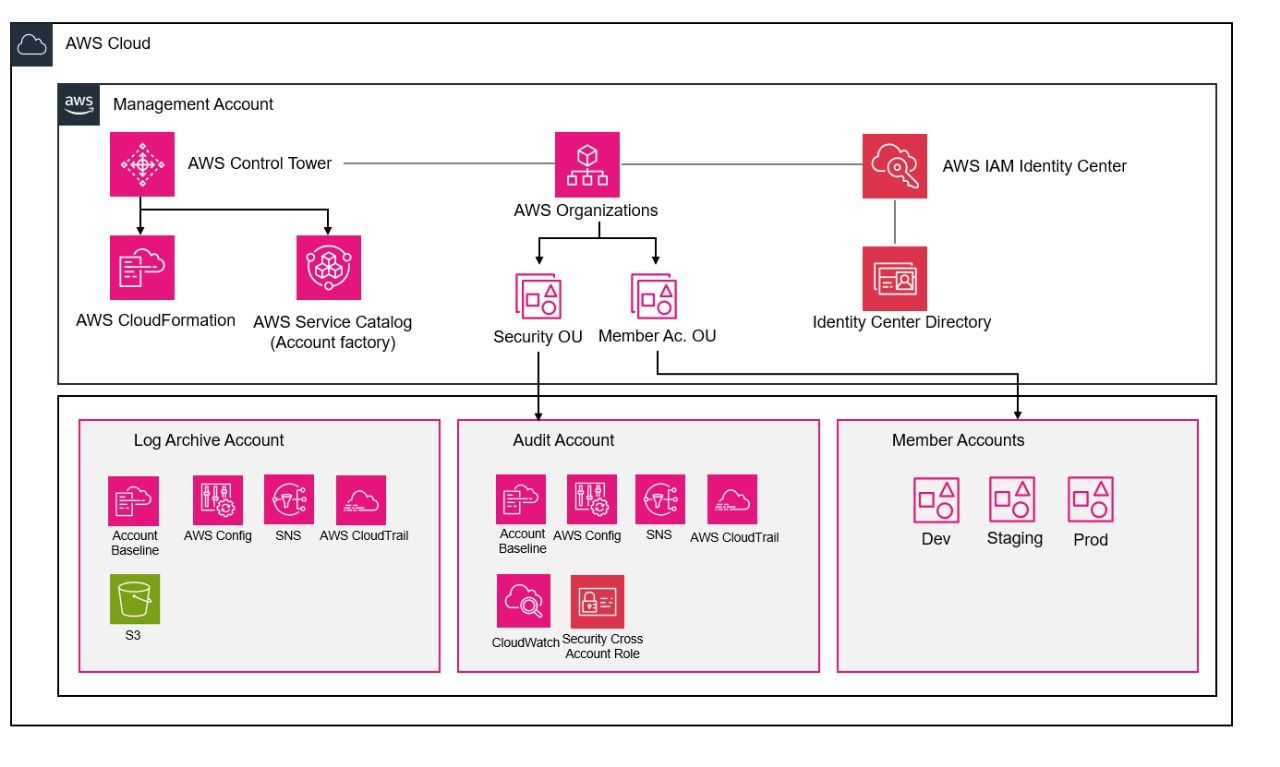
GoCloud transitioned Luxia from a single-account setup to a secure, scalable, and compliant multi-account environment using AWS Control Tower.
Key Services Used
- AWS Control Tower → Multi-account governance with guardrails
- Amazon VPC (per environment) → Strong network isolation
- AWS Config & Security Hub → Compliance & security monitoring
- Elastic Load Balancer (ALB) → Secure, scalable traffic distribution
- AWS ECS Fargate → Serverless container workloads
- AWS Cloud Map → Service discovery for microservices
- Amazon RDS Aurora (Multi-AZ) → Scalable, resilient database
- Amazon S3 + CloudFront → Secure & fast content delivery
- AWS CodePipeline → Automated CI/CD deployments
- ChromaDB on EC2 → AI-powered vector search
- CloudWatch → Monitoring & alerting
Architecture Highlights
- Multi-Account Setup via Control Tower
- OUs: Members (Dev, Stage, Prod) + Security (Audit, Log Archive)
- Shared Accounts: Management, Audit, Log Archive
- 20 preventive & 2 detective guardrails for governance
- AWS SSO for centralized identity and access
- Workloads & Applications
- Dev/Stage: ECS Fargate + CodePipeline (CI/CD)
- Prod: ECS Fargate + Aurora PostgreSQL (Multi-AZ) + ChromaDB
- Frontend: AWS Amplify for web hosting
- Service discovery with AWS Cloud Map
- Monitoring & Security
- Centralized logs via CloudTrail + Config
- GuardDuty + Security Hub for threat detection
- Role-based access (Dev → QA → Prod separation)
AWS Config Integration:
- Enable AWS Config in All Accounts and Regions
Luxia turns on AWS Config in every account and every AWS region. This gives complete visibility and supports compliance checks across the environment. - Record All Resource Types
AWS Config records changes for all resource types in Luxia. This includes EC2, RDS, IAM, and other supported services. Nothing is left out. - Record Global Resources in One Region
For Luxia, global resources like IAM are recorded in only one region. This prevents duplicate entries and keeps reporting simple. - Use Secure S3 Bucket in Log Archive Account
The Log Archive account has a secure S3 bucket for Luxia. It stores AWS Config history files and snapshots. The bucket is encrypted, access controlled, and logging is enabled for extra security.
Send Data to Central S3 Bucket Across Accounts
Dev, Staging, and Production accounts of Luxia send their AWS Config history and snapshots to the Log Archive S3 bucket. This creates one central place for all configuration data, making it easy to manage and ready for audits.
Results & Benefits
⚖️ Consistent Control Across Accounts
AWS Config deployed in all Luxia accounts and regions
Every resource change tracked centrally → no more confusion in multi-account setup
Keeps environments aligned and reduces mistakes during operations
🚨 Early Detection of Security Risks
AWS Config rules trigger alerts for misconfigurations (e.g., open security groups, unencrypted databases, misconfigured S3)
Security issues detected and fixed early before becoming real threats
Stronger account security and compliance
👁️ Clear Visibility Into Resource State
Full history and snapshots of AWS resources available in one place
Teams can easily see how resources are set, what changed, and when
Faster troubleshooting, simpler audits, and improved compliance posture
Outcome
Luxia now runs a secure, scalable, and compliant AWS environment that supports its AI-driven growth and enterprise adoption worldwide.