


The more serious problem is data. When employees use ChatGPT for work, they paste meeting notes, customer data, source code, legal documents, and financial projections into a third-party system. OpenAI’s enterprise tier promises data privacy, but your data still leaves your infrastructure. For regulated industries — healthcare, finance, legal, government — this is a compliance failure waiting to happen.
Building a private ChatGPT on AWS with Amazon Bedrock solves all of these simultaneously. Your data stays within your AWS VPC. Model queries are never used for training. User access is controlled through your existing IAM and Cognito setup. Costs scale with usage rather than headcount. And the AI can actually know your business — your internal documents, your policies, your codebases — through a properly built RAG pipeline.
What You Will Have After This Guide
- A fully private AI chat interface accessible only to authenticated users in your organization
- Claude (or Llama, Titan, or your model of choice) running through Amazon Bedrock — no model infrastructure to manage
- A RAG pipeline grounding responses in your internal knowledge base stored in Amazon OpenSearch
- IAM roles with least-privilege access so no component has broader permissions than required
- Bedrock Guardrails preventing harmful outputs and enforcing content policies
- CloudWatch monitoring for latency, token usage, cost, and error rates
- A production-ready architecture that passes security review for HIPAA, GDPR, and SOC 2 requirements
Architecture Overview: How a Private ChatGPT on AWS Actually Works
Before writing a single line of code, understand the complete architecture. Building a private AI chat system on AWS involves five distinct layers that must be designed cohesively getting one wrong undermines the others.
Layer 1: Foundation Model Access Amazon Bedrock
Amazon Bedrock is the managed foundation model service that replaces the need to host, scale, or maintain any AI model infrastructure. It provides API access to frontier models — Anthropic Claude (Opus, Sonnet, Haiku), Meta Llama, Amazon Titan, Cohere, and others — through a single unified API endpoint within your AWS account.
Key architectural properties of Bedrock that matter for a private system:
- Data processed through Bedrock is not used to train any underlying model by default
- All API calls stay within your AWS VPC when using VPC endpoints — data never traverses the public internet
- Bedrock supports HIPAA, SOC 2, ISO 27001, and is FedRAMP authorized for government workloads
- Model access is controlled through IAM the same identity system governing your entire AWS account
Layer 2: Knowledge Base — RAG with Amazon OpenSearch
A private ChatGPT that only knows what the foundation model was trained on is only marginally better than public ChatGPT. The architectural differentiator is Retrieval Augmented Generation (RAG): your internal documents, wikis, policies, and codebases are indexed and searched at query time, with relevant content injected into the model context before generating a response.
Amazon OpenSearch Serverless is the recommended vector store for most organizations. OpenSearch indexes your document embeddings, performs semantic similarity search at query time, and returns the most relevant document chunks to include in the Bedrock context window. Alternatives include Aurora PostgreSQL with pgvector for teams with existing RDS infrastructure, or Amazon Kendra for document-heavy knowledge bases that require enterprise search features.
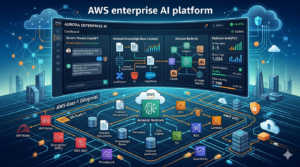
Layer 3: Orchestration AWS Lambda and Bedrock Agents
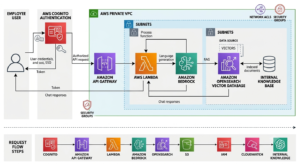
Lambda functions serve as the orchestration layer between your frontend, your knowledge base, and Bedrock. A typical request flow:
- User sends a message through the frontend
- API Gateway routes the request to an orchestration Lambda function
- Lambda generates an embedding of the user’s query using Bedrock’s embedding model
- Lambda queries OpenSearch for the most semantically similar document chunks
- Lambda constructs the full prompt: system context + retrieved documents + conversation history + user message
- Lambda calls the Bedrock InvokeModel API with the constructed prompt
- Bedrock returns the model response through the Lambda, which streams it back to the frontend
Layer 4: Security and Identity — IAM, Cognito, VPC
Security is not a feature you add after the system works — it is an architectural constraint that shapes every component decision. Three AWS services form the security backbone:
- Amazon Cognito: User authentication and authorization. Cognito User Pools manage your employee identities, and Cognito Identity Pools exchange authenticated tokens for temporary IAM credentials with scoped permissions
- IAM Roles: Each component (Lambda, EC2, ECS task) has its own IAM role with only the permissions it needs. The Lambda orchestrator has bedrock:InvokeModel and opensearch:ESHttpPost. Nothing has broader access
- VPC and Private Endpoints: Bedrock and OpenSearch are accessed through VPC interface endpoints, keeping all traffic on AWS’s private network. No traffic exits to the public internet
Layer 5: Frontend and API — Amplify, API Gateway, CloudFront
The frontend layer serves your chat interface to authenticated users. AWS Amplify provides the simplest deployment path for a React or Next.js chat UI with built-in Cognito authentication integration. API Gateway manages the REST or WebSocket API that connects the frontend to your Lambda orchestrator. CloudFront sits in front for caching static assets and enforcing HTTPS.
How to Build a Private ChatGPT on AWS: Step-by-Step Implementation
Step 1: Enable Amazon Bedrock and Request Model Access
Bedrock does not grant access to all models automatically. You must explicitly request access for each model in each AWS region you plan to use.
- Open the Amazon Bedrock console in your target AWS region (us-east-1 and us-west-2 have the broadest model availability in 2026)
- Navigate to Model Access in the left navigation
- Request access to: Anthropic Claude Sonnet (for production chat — optimal cost/quality balance), Claude Haiku (for intent classification and routing), and Amazon Titan Embeddings V2 (for generating document and query embeddings)
- Access approval is typically instant for Titan and within minutes for Claude — no human review required for standard tiers
Step 2: Configure IAM Roles with Least Privilege
Create dedicated IAM roles for each component before writing any application code. Retrofitting IAM permissions after deployment is error-prone and creates security gaps.
Required IAM roles and their permissions:
| IAM Role: private-chatgpt-lambda-role
# Permissions required for the orchestration Lambda { “Version”: “2012-10-17”, “Statement”: [ { “Effect”: “Allow”, “Action”: [ “bedrock:InvokeModel”, “bedrock:InvokeModelWithResponseStream” ], “Resource”: “arn:aws:bedrock:us-east-1::foundation-model/anthropic.claude-*” }, { “Effect”: “Allow”, “Action”: [“es:ESHttpPost”, “es:ESHttpGet”], “Resource”: “arn:aws:es:us-east-1:ACCOUNT:domain/private-chatgpt-kb/*” }, { “Effect”: “Allow”, “Action”: [“logs:CreateLogGroup”, “logs:CreateLogStream”, “logs:PutLogEvents”], “Resource”: “arn:aws:logs:*:*:*” } ] } |
Step 3: Build the Document Ingestion Pipeline
Your knowledge base is only as good as your document ingestion pipeline. This pipeline processes raw documents — PDFs, Word files, Confluence pages, Notion exports, Markdown files, code repositories — into searchable vector embeddings stored in OpenSearch.
Document ingestion architecture:
- Source documents stored in an S3 bucket with versioning enabled
- S3 event notifications trigger an ingestion Lambda on new document uploads
- The ingestion Lambda extracts text from each document format (using Textract for PDFs, direct parsing for Markdown/HTML)
- Text is chunked into overlapping segments of 512-1024 tokens (overlap of 10-20% improves retrieval quality at chunk boundaries)
- Each chunk is embedded using Bedrock’s Titan Embeddings V2 model to produce a 1536-dimensional vector
- Chunk text, metadata (source document, section, timestamp, author), and embedding vector are indexed in OpenSearch
| Python — Document Chunking and Embedding
import boto3, json from opensearchpy import OpenSearch, RequestsHttpConnection
bedrock = boto3.client(‘bedrock-runtime’, region_name=’us-east-1′)
def embed_text(text: str) -> list[float]: response = bedrock.invoke_model( modelId=’amazon.titan-embed-text-v2:0′, body=json.dumps({‘inputText’: text}) ) return json.loads(response[‘body’].read())[’embedding’]
def chunk_text(text: str, chunk_size=800, overlap=100) -> list[str]: words = text.split() chunks = [] for i in range(0, len(words), chunk_size – overlap): chunks.append(‘ ‘.join(words[i:i+chunk_size])) return chunks
def index_document(doc_text: str, metadata: dict, os_client): for i, chunk in enumerate(chunk_text(doc_text)): os_client.index( index=’private-chatgpt-kb’, body={ ‘text’: chunk, ’embedding’: embed_text(chunk), ‘metadata’: metadata, ‘chunk_id’: i } ) |
Step 4: Build the Query Orchestration Lambda
The orchestration Lambda is the brain of your private ChatGPT. It receives user messages, retrieves relevant context, constructs the prompt, calls Bedrock, and returns responses. This is where most of the engineering effort concentrates.
Key design decisions in the orchestration Lambda:
- Conversation history management: Store conversation history in DynamoDB keyed by session ID. Include the last 5-10 turns in every Bedrock call — more than 10 turns risks exceeding context limits and increases cost without proportional quality improvement
- Context window budgeting: Reserve approximately 30% of the context window for the model’s response. Allocate the remainder across: system prompt (10%), conversation history (30%), and retrieved documents (30%). Adjust based on average document chunk size
- Prompt construction: System prompt defines the assistant’s identity and behavioral constraints. Retrieved document chunks are injected with their source metadata so the model can cite sources in responses
- Streaming responses: Use InvokeModelWithResponseStream for chat interfaces — users see text appear progressively rather than waiting for the full response, dramatically improving perceived performance
| Python — Orchestration Lambda Core Logic
import boto3, json from opensearchpy import OpenSearch
def handler(event, context): user_message = event[‘message’] session_id = event[‘session_id’] user_id = event[‘user_id’] # 1. Retrieve conversation history from DynamoDB history = get_conversation_history(session_id) # 2. Embed the user query query_embedding = embed_text(user_message) # 3. Retrieve relevant documents from OpenSearch docs = semantic_search(query_embedding, top_k=5) # 4. Build the prompt prompt = build_prompt( system=SYSTEM_PROMPT, history=history, context_docs=docs, user_message=user_message ) # 5. Call Bedrock with streaming response = invoke_bedrock_stream( model_id=’anthropic.claude-sonnet-4-6′, prompt=prompt ) # 6. Store conversation turn in DynamoDB save_conversation_turn(session_id, user_message, response) return {‘response’: response, ‘sources’: [d[‘source’] for d in docs]} |
Step 5: Set Up Bedrock Guardrails
Bedrock Guardrails are a managed safety layer that intercepts model inputs and outputs before and after inference. They are not optional for production deployments they protect against prompt injection attacks, enforce content policies, and prevent data leakage.
Guardrails to configure for a private ChatGPT:
- Denied topics: Define topics the model should never discuss. For an internal tool, this might include competitor analysis, personal advice, or topics outside the system’s intended scope
- Content filters: Enable AWS Managed Content Filters for hate speech, violence, and sexual content at the highest sensitivity threshold for internal tools
- PII detection: Enable PII redaction for SSN, credit card numbers, and other sensitive data types — both in user inputs and model outputs. This prevents accidental data leakage through the chat interface
- Prompt attack detection: Guardrails detect common prompt injection patterns designed to override your system prompt or extract model instructions
- Grounding check: Bedrock can verify that model responses are grounded in the provided source documents, flagging hallucinated responses that cite non-existent sources
Security Hardening: What Competitors Miss
Most guides for building a private ChatGPT on AWS cover the happy path — getting it working. Security hardening is what separates a prototype from a production system that passes your security team’s review.
VPC Endpoint Configuration
By default, Bedrock API calls route through the public internet, even from within a VPC. Configure VPC interface endpoints for Bedrock, OpenSearch, and DynamoDB to keep all traffic on AWS’s private network:
- Create a VPC interface endpoint for com.amazonaws.{region}.bedrock-runtime
- Create a VPC interface endpoint for com.amazonaws.{region}.bedrock
- Attach endpoint policies that restrict access to only your Lambda execution role ARNs
- Disable public access on the endpoint — interface endpoints with public access enabled undermine the isolation
Secrets Management
Never hardcode API keys, database connection strings, or other secrets in Lambda environment variables or application code. Use AWS Secrets Manager for all credentials, with automatic rotation enabled:
- OpenSearch master user credentials in Secrets Manager
- Any external service API keys (Slack webhooks for notifications, etc.) in Secrets Manager
- Lambda environment variables should contain only non-sensitive configuration (region names, resource ARNs, model IDs)
Audit Logging and Compliance Evidence
For HIPAA, SOC 2, and GDPR compliance, you need complete audit trails for all AI interactions. Configure:
- AWS CloudTrail logging for all Bedrock API calls — who called which model with what parameters, when
- DynamoDB conversation storage with user ID, timestamp, message hash, and session ID — enabling reconstruction of any conversation for audit
- CloudWatch Logs for all Lambda executions with structured JSON logging including user_id, session_id, model_id, token_count, and latency
- Bedrock model invocation logging — Bedrock can log all inference requests and responses to S3 for compliance archive, with configurable retention
Token and Rate Limiting
Without token limits, a single user can generate hundreds of thousands of Bedrock tokens per hour — driving unexpected costs and potentially consuming your Bedrock service quota and impacting other users.
- Implement per-user token budgets tracked in DynamoDB — increment on each Bedrock call and reject requests when the daily budget is exceeded
- Configure API Gateway usage plans with rate limits (requests per second) and quotas (requests per day) per Cognito user pool group
- Set Bedrock service quotas via AWS Service Quotas to cap maximum tokens per minute at the account level
Making Your Private ChatGPT Actually Useful: RAG Quality Optimization

A private ChatGPT with a poorly implemented RAG pipeline produces confident, fluent, wrong answers — worse than no AI at all because users trust it. RAG quality optimization is the difference between a tool your team adopts and a tool that erodes trust in AI.
Chunking Strategy
Fixed-size chunking (splitting documents every N tokens) is the fastest to implement and the worst for quality. Use semantic chunking instead: split at natural boundaries — paragraph breaks, section headers, list endings — and preserve structural context in each chunk’s metadata.
- Preserve section hierarchy in metadata: chapter, section, subsection. Include this in the OpenSearch document so it can be returned with search results and cited in model responses
- Include 1-2 sentences of context before each chunk (the sentences that precede the chunk in the original document). This ‘context window’ dramatically improves retrieval relevance for queries that reference concepts introduced before the retrieved section
- Store both a dense vector embedding (for semantic search) and a BM25 sparse embedding (for keyword search) for each chunk. Hybrid search combining both consistently outperforms pure vector search for knowledge base retrieval
Re-ranking Retrieved Results
OpenSearch returns the top-K most similar chunks by embedding distance. But embedding similarity is not the same as relevance for a specific query. Implement a re-ranking step:
- Retrieve top-20 candidates from OpenSearch
- Pass the query and all 20 candidates to a re-ranking model (Amazon Bedrock Reranking with Amazon Rerank, or a lightweight cross-encoder model hosted on Lambda)
- Select the top-5 candidates after re-ranking for inclusion in the Bedrock context window
This two-stage retrieval approach (retrieve many, re-rank, select few) consistently improves answer quality at marginal additional cost.
Evaluating RAG Quality
You cannot improve what you do not measure. Build an evaluation pipeline before deploying to users:
- Create a golden dataset: 50-100 question-answer pairs based on your actual knowledge base content, with known correct answers
- Run your RAG pipeline against the golden dataset and measure: retrieval recall (did the correct document appear in the top-5?), answer accuracy (did the model produce the correct answer?), and citation accuracy (did cited sources actually support the answer?)
- Re-evaluate monthly or after any significant knowledge base update
Cost Architecture: Running a Private ChatGPT on AWS Without Surprises
The cost of a private ChatGPT on AWS is real and variable — it scales with usage. Understanding the cost model before deployment prevents the budget shock that kills internal AI initiatives.
Cost Components and Estimates
| Component | AWS Service | Pricing Model | Estimate (100 users, 50 msgs/day) |
| Foundation Model Inference | Amazon Bedrock (Claude Sonnet) | Per input/output token | ~$150-400/month depending on message length |
| Document Embeddings | Bedrock Titan Embeddings V2 | Per token (one-time per doc) | ~$5-20/month for ongoing ingestion |
| Vector Search | OpenSearch Serverless | OCU-hours | ~$200-400/month (2 OCU minimum) |
| Conversation Storage | DynamoDB On-Demand | Per read/write unit | ~$5-15/month |
| Orchestration Compute | AWS Lambda | Per GB-second | ~$1-5/month (Lambda is near-free at this scale) |
| API Management | API Gateway | Per API call | ~$5-15/month |
| Authentication | Amazon Cognito | Per MAU above free tier | ~$0-50/month (free tier: 50K MAU) |
| Monitoring | CloudWatch | Per metric/log GB | ~$10-30/month |
| Secrets Storage | Secrets Manager | Per secret per month | ~$1-5/month |
| Total Estimate | ~$380-940/month for 100 active users |
For comparison: ChatGPT Enterprise at $30/user/month for 100 users = $3,000/month. The AWS build is 4-8x cheaper at 100 users, with no per-user pricing ceiling as the organization scales.
Cost Optimization Strategies
- Model selection: Use Claude Haiku for simple, high-frequency queries (FAQ-style responses) and Claude Sonnet only for complex queries requiring deeper reasoning. A routing Lambda that classifies query complexity before model selection can reduce Bedrock costs by 40-60%
- Context window management: Every token in the Bedrock context window costs money. Implement aggressive conversation summarization — after 10 turns, summarize the conversation history to 200-300 tokens rather than passing all 10 turns verbatim
- OpenSearch sizing: OpenSearch Serverless has a minimum of 2 OCUs ($0.24/OCU-hour = ~$350/month base). For small deployments, Aurora PostgreSQL with pgvector on a t3.medium instance ($30-50/month) may be significantly cheaper if your knowledge base fits in a relational database
- Caching repeated queries: Common queries (‘What is our vacation policy?’, ‘How do I submit an expense?’) generate identical or near-identical Bedrock calls. Implement semantic caching in ElastiCache or DynamoDB — cache responses for 24-48 hours for queries whose embedding distance to a cached query is below a similarity threshold
Production Readiness: The Checklist Before Going Live
Most internal AI tools fail not because the AI is bad, but because the surrounding infrastructure is not production-ready. Work through this checklist before enabling access for your organization.
Reliability and Availability
- Multi-AZ Lambda deployment (default — Lambda runs across multiple AZs automatically)
- OpenSearch Serverless with multi-AZ configuration enabled
- DynamoDB global tables if you require cross-region read access for conversation history
- API Gateway with throttling configured at both the account and per-user plan level
- Dead letter queues on all Lambda functions to capture and alert on failed invocations
Observability Stack
- CloudWatch dashboard with: Bedrock token usage per model per day, Lambda p50/p95/p99 latency, API Gateway 4xx/5xx error rates, OpenSearch query latency, and DynamoDB consumed capacity
- CloudWatch alarms on: Bedrock token usage approaching daily budget, Lambda error rate above 1%, and API Gateway 5xx rate above 0.1%
- Structured logging in all Lambda functions with consistent fields: user_id, session_id, request_id, model_id, input_tokens, output_tokens, latency_ms, retrieved_docs_count
User Onboarding and Adoption
- SAML or OIDC federation with your existing identity provider (Okta, Azure AD, Google Workspace) through Cognito — employees use their existing SSO credentials
- Role-based access control: different Cognito user groups get access to different knowledge bases (e.g., Engineering group accesses code documentation, HR group accesses policies and benefits)
- System prompt customization per user group — Engineering users get a system prompt optimized for technical queries, HR users get one optimized for policy questions
Private ChatGPT on AWS: Comparing Your Build Approaches
Not all private ChatGPT builds on AWS are equal. The approach you choose depends on your engineering capability, timeline, and customization requirements.
| Approach | Components | Time to Deploy | Customization | Best For |
| Amazon Q Business (Managed) | Fully managed by AWS — no custom code | 1-2 weeks config | Limited — AWS console only | Teams needing fast deployment with minimal engineering |
| Bedrock + Lambda (Custom) | Bedrock, Lambda, OpenSearch, API GW, Cognito | 4-8 weeks build | Full — every component configurable | Teams needing full control and custom workflows |
| Bedrock Knowledge Bases (Hybrid) | Managed RAG via Bedrock KB + custom Lambda | 2-4 weeks | Partial — RAG managed, prompting custom | Teams wanting managed RAG with custom application logic |
| Open Source + Bedrock (AnythingLLM, Flowise) | Self-hosted UI + Bedrock as model backend | 1-2 weeks setup | High — open source UI customizable | Teams wanting open-source UX with AWS model backend |
For most organizations building a production-grade private ChatGPT on AWS, the Bedrock Knowledge Bases hybrid approach offers the best balance: managed RAG infrastructure reduces engineering complexity, while custom Lambda orchestration maintains the flexibility to implement custom routing, authentication, cost controls, and business logic.
Conclusion: Your Private ChatGPT on AWS Roadmap
Building a private ChatGPT on AWS is one of the highest-ROI internal infrastructure investments an organization can make in 2026. The combination of Amazon Bedrock for managed model access, OpenSearch for knowledge retrieval, Lambda for orchestration, and Cognito for authentication creates a system that matches ChatGPT Enterprise on user experience while surpassing it on data privacy, customization, and long-term cost.
Key implementation takeaways:
- Start with Bedrock Knowledge Bases for the RAG layer if you want faster time-to-value — switch to custom OpenSearch only when you need retrieval customization that managed RAG cannot provide
- IAM least privilege and VPC endpoints are not optional — they are required for any organization with a security review process
- Bedrock Guardrails should be configured before the first user request — retroactive safety configuration is harder than proactive configuration
- Cost controls — per-user token budgets, query routing by complexity, and response caching — need to be designed into the architecture from day one, not added when your AWS bill surprises you
- RAG quality evaluation with a golden dataset is the only reliable way to know whether your private ChatGPT is actually helping users or producing confident wrong answers
The organizations that build private AI on AWS successfully are not those with the largest ML teams. They are the ones that design the system for production from the start: secure by default, observable, cost-controlled, and grounded in real organizational knowledge. Build it right once and it compounds in value as your knowledge base grows and your users develop AI-native workflows.
