

Most organizations today don’t live entirely in one cloud. They have legacy workloads anchored on-premises, regulated data that cannot leave a private environment, and new applications demanding the elastic scale of a public cloud. The infrastructure strategy that holds all of this together — deliberately, securely, and manageably — is hybrid cloud architecture.
This guide is a practical reference for CTOs, platform engineers, DevOps leads, and IT managers who need to understand hybrid cloud architecture explained from first principles: what it is, how it works, the real design patterns used in production, how to secure it, and the honest trade-offs involved in adopting it.
What Is Hybrid Cloud Architecture?
At its core, hybrid cloud computing is the practice of running workloads across two or more distinct infrastructure environments — typically a combination of private (on-premises or private cloud) and public cloud — while connecting them so that data and applications can move fluidly between them.
The word “hybrid” is doing important work here. A company that uses AWS for some workloads and keeps other workloads on-premises, but where those environments are completely isolated from each other, is not running hybrid cloud. For it to be hybrid, the environments must be integrated: sharing data, connected over a network, and managed with a unified control plane.
Hybrid Cloud vs Hybrid Cloud Computing (Clear Distinction)
These terms are frequently conflated. Hybrid cloud refers to the infrastructure model — the combination of public, private, and on-premises environments. Hybrid cloud computing refers to the operational practice of running workloads, processing data, and delivering services across that combined infrastructure. You architect a hybrid cloud; you do hybrid cloud computing.
Hybrid Cloud vs Multicloud
Hybrid cloud vs multicloud is one of the most misunderstood distinctions in cloud strategy. They are related but not interchangeable:
| Dimension | Single Cloud | Hybrid Cloud | Multicloud |
| Definition | One public cloud provider | Private/on-prem + public cloud, integrated | 2+ public cloud providers |
| Data sharing | Within one provider | Across private and public | Across multiple public providers |
| Primary driver | Simplicity | Control + compliance + modernization | Vendor independence + best-of-breed |
| Complexity | Low | Medium–High | High |
| Relationship | Subset | Can overlap with multicloud | Can include hybrid |
A hybrid cloud can also be multicloud (e.g., private cloud + AWS + Google Cloud). But a multicloud setup using only public providers is not hybrid.
Core Building Blocks of Hybrid Cloud Architecture
A hybrid cloud architecture diagram typically shows four environments connected by a common management and networking layer. Understanding each environment is essential before choosing how to connect them.
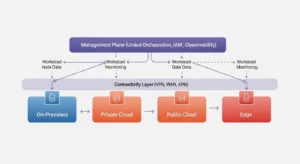
On-Premises (What It Is, Why It Remains)
On-premises infrastructure is hardware — compute servers, storage arrays, networking equipment — physically located in your own data center or co-location facility. Many organizations assume “cloud transformation” means eliminating on-premises infrastructure entirely. In practice, this is rarely the goal and rarely achievable on any near-term timeline.
On-premises remains relevant for workloads with strict data residency requirements, mainframe-based systems that are too complex to migrate, ultra-low latency processing that cannot tolerate a network hop to a cloud region, or capital-heavy equipment with depreciation schedules that don’t support early retirement.
Private Cloud
A private cloud is cloud infrastructure — virtualized compute, software-defined storage, self-service provisioning — dedicated exclusively to one organization. It may be hosted on-premises, in a co-location facility, or operated by a managed service provider. Private clouds deliver cloud-like agility (API-driven provisioning, elastic resource allocation) while maintaining the control and isolation of dedicated hardware.
Private clouds are the right answer for regulated industries (financial services, healthcare, government) where shared multi-tenant infrastructure is prohibited, or for organizations with predictable, high-utilization workloads where dedicated capacity is more cost-effective than public cloud pricing.
Public Cloud
The public cloud — AWS, Azure, Google Cloud, and others — provides on-demand, pay-per-use infrastructure at global scale, operated entirely by the cloud provider. Public cloud is the right environment for variable or unpredictable workloads, development and test environments, globally distributed applications, and anything benefiting from managed services (databases, ML platforms, CDN) that would be prohibitively expensive to self-operate.
Edge Locations (When It Matters)
Edge computing extends hybrid cloud architecture beyond data centers to locations physically close to end users or data sources — retail kiosks, manufacturing floors, telecom base stations, remote field sites. When latency requirements cannot be satisfied by even the nearest cloud region, edge locations run compute workloads locally. In a hybrid cloud reference architecture that includes edge, the edge nodes form a fourth environment tier: they process data locally, synchronize results to the private or public cloud, and receive policy and software updates from the central management plane.
How Does Hybrid Cloud Architecture Work?
Regardless of the specific combination of environments, all hybrid cloud architecture deployments share three traits in common — and getting each one right is the difference between a coherent hybrid cloud and a collection of disconnected infrastructure silos.
Data Integration (What “Sync” Really Means)
Data integration in a hybrid cloud doesn’t mean copying all your data everywhere. It means ensuring that the data an application needs is available, consistent, and current in the environment where that application runs. In practice, this involves event-driven synchronization (changes propagated in near real-time), ETL/ELT pipelines for batch workloads, data fabric architectures for unified access across environments, and careful decisions about which environment holds the system of record for each data domain. Synchronization failures — stale data, replication lag, conflicting writes — are the most common operational failure mode in hybrid deployments.
Network Connectivity (Latency, Routing, Reliability)
Hybrid cloud networking is the physical and logical foundation on which everything else depends. If the network between your on-premises environment and your public cloud is unreliable, slow, or insecure, every hybrid workload suffers. Design for redundant paths, measure round-trip latency between environments before placing latency-sensitive workloads, and enforce encryption in transit (TLS 1.2 minimum, TLS 1.3 preferred) on every cross-environment connection.
VPN vs WAN vs APIs
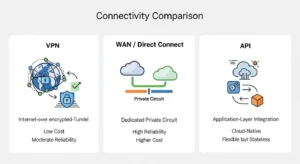
VPN (Virtual Private Network)
- Low cost; uses existing internet connection
- Encrypted by default; easy to provision
- Subject to public internet congestion and variability
- Not suitable for high-throughput, latency-sensitive workloads
WAN / Direct Connect (Dedicated Circuit)
- Consistent, low-latency, high-bandwidth connection
- Traffic bypasses public internet entirely
- Significantly higher cost; longer provisioning time
- Single provider dependency unless redundant circuits are procured
APIs (Application Programming Interfaces)
- Cloud-native; decoupled; no physical circuit required
- Works over any network; highly portable
- Stateless — not suitable for bulk data transfer
- Requires robust API gateway management and versioning discipline
Unified Management & Orchestration
The third trait — and the one most often underinvested — is a single management plane across all environments. Without it, you are operating multiple clouds in parallel, not a hybrid cloud. Unified hybrid cloud management tools include container orchestration platforms (Kubernetes is the de-facto standard for workload portability), policy-as-code frameworks for consistent governance, centralized identity and access management (IAM) federating across environments, and cloud management platforms like Red Hat OpenShift, AWS Outposts, or Google Anthos that extend a consistent API surface to on-premises and edge nodes.
Hybrid Cloud Architecture Patterns (Practical Reference Architectures)
How hybrid cloud architecture works in practice varies by workload type. These are the four most operationally realistic patterns — with honest notes about when each one is appropriate.
Lift-and-Shift + Modernize Gradually
The most common entry point: move existing workloads to a public cloud (or private cloud) without significant refactoring, then incrementally modernize them toward cloud-native patterns. The hybrid phase is the transition state, not the destination. This pattern is appropriate for organizations with large application estates and limited migration budgets who need to reduce data center footprint without a multi-year refactoring program.
Cloud Bursting
Cloud bursting provisions baseline capacity on-premises or in a private cloud, then automatically spills overflow demand to a public cloud when utilization exceeds a threshold. In theory, it combines the cost efficiency of owned infrastructure for baseline load with the elasticity of public cloud for peaks. In practice, it requires extremely tight workload portability (containers + Kubernetes are near-mandatory), low-latency connectivity, and stateless application design to avoid data consistency issues during burst events. This pattern is often more appealing on paper than in practice for stateful applications.
Data Gravity + Split-Tier Apps
When large data volumes make it impractical to move data to the cloud, the pattern inverts: keep data on-premises or in a private cloud, and run compute (application logic, analytics, ML inference) in the public cloud, pulling data as needed. This “split-tier” approach is common in financial services and manufacturing, where petabyte-scale operational data can’t be economically moved to a cloud region but cloud-native analytics services are genuinely superior to on-premises alternatives.
Active-Active Across Environments
Active-active deploys the same workload simultaneously in two or more environments, with traffic load-balanced across them. This pattern maximizes resilience: if one environment fails, the other serves 100% of traffic. It is realistic for stateless microservices and read-heavy workloads. It is extremely challenging (sometimes prohibitively so) for stateful, write-heavy applications due to distributed transaction complexity, consensus overhead, and data consistency guarantees. Evaluate this pattern with engineering rigor, not architectural aspiration.
Security, Governance, and Compliance in Hybrid Environments
Hybrid cloud architecture security requires a consistent framework applied across environments that have fundamentally different security models, APIs, and audit mechanisms.
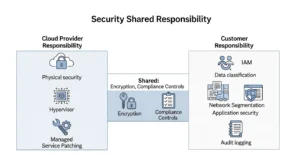
Identity and Access (IAM, Least Privilege)
Federate identity across all environments using a single identity provider (IdP) — avoid environment-specific local accounts that fragment your access control surface. Apply least-privilege access: every service account, human user, and automation pipeline should have the minimum permissions required for its function, reviewed and rotated regularly. IAM misconfigurations are the leading cause of data breaches in cloud environments.
Network Segmentation + Zero Trust Principles
Don’t treat your hybrid network as a trusted internal network. Apply zero trust principles: verify every request explicitly, never assume that traffic originating from “inside” the private network is inherently trustworthy. Implement micro-segmentation between workload tiers, enforce encryption in transit on all inter-environment traffic (not just internet-facing endpoints), and use network security groups / firewall rules to allow only documented, required flows.
Observability and Audit Trails (Logs, Metrics, Traces)
Hybrid cloud architecture security depends on visibility. Centralize logs from all environments into a single SIEM or log management platform. Capture infrastructure metrics (CPU, network, storage I/O) and application traces (distributed request tracing across environment boundaries). For compliance, ensure audit logs are immutable, tamper-evident, and retained for the period your regulatory framework requires. This is also your primary incident response resource — you cannot investigate what you cannot see.
Benefits of Hybrid Cloud Architecture (When It’s the Right Choice)
The following benefits are real — with the caveat that they accrue only to organizations that invest properly in the integration, management, and skills required to operate a hybrid cloud correctly.
Speed of Modernization
Hybrid cloud lets organizations modernize at a pace aligned to business risk tolerance. Rather than a high-stakes “big bang” migration, workloads can be transitioned incrementally — moving development environments first, then non-critical production workloads, then regulated or complex systems — while legacy systems continue to operate uninterrupted. This is the primary reason cloud migration projects overwhelmingly result in hybrid cloud deployments rather than complete cloud-only states.
Risk Reduction + Resilience
By distributing workloads across environments, hybrid architecture eliminates single-environment dependency. If a public cloud region experiences an outage, on-premises or private cloud resources can absorb critical workloads. Backup and disaster recovery can span environments, with Amazon S3, Azure Blob, or Google Cloud Storage serving as low-cost, durable off-site backup targets for on-premises systems.
Performance + Latency Advantages
Edge-hybrid configurations place compute close to users or data sources, reducing round-trip latency for time-sensitive applications. Split-tier architectures keep data close to the systems that process it most frequently. Container-based workloads with Kubernetes can be scheduled to the environment that provides the best price-performance for each workload type.
Cost + ROI Realities (Avoid Overselling)
Hybrid cloud reduces capital expenditure by offloading variable demand to pay-per-use public cloud, avoiding over-provisioned on-premises hardware. However, it does not eliminate infrastructure cost — on-premises hardware still requires capital investment, maintenance, and staffing. The realistic ROI case is: stop spending CapEx on underutilized capacity; use public cloud for elastic demand; retain on-premises for high-utilization, compliance-bound workloads where total cost of ownership favors owned infrastructure.
Disadvantages and Common Pitfalls (Be Honest)
Hybrid cloud benefits and challenges don’t exist in isolation — understanding the pitfalls is equally important for a sound architecture decision.
Complexity & Skills Gap
Hybrid cloud environments require engineers who understand on-premises networking, virtualization, cloud-native development, container orchestration, and cloud security — simultaneously. This skill set is rare and expensive. Organizations that underestimate the skills investment required consistently underperform in hybrid cloud adoption. Budget for training and/or hiring before the technical work begins.
Visibility Gaps
Each environment generates its own metrics, logs, and traces in its own format. Without deliberate investment in cross-environment observability — centralized logging, unified dashboards, end-to-end distributed tracing — you will have blind spots at every environment boundary. These blind spots are exactly where complex failure modes manifest.
Integration and Incompatibilities
On-premises and public cloud environments are not designed to be interoperable. APIs differ between cloud providers; virtualization formats are incompatible; network constructs (VLANs, security groups, firewall rules) have no direct equivalents across environments. Every integration point is a potential failure mode — and the number of integration points in a hybrid architecture grows quickly.
Hidden Cost Drivers
Data egress fees (paying to move data out of a public cloud region) are the most commonly underestimated cost driver in hybrid architectures. Cross-environment data transfer costs accumulate silently in billing. Additional costs include dedicated WAN/Direct Connect circuits, hybrid management platform licensing (Red Hat OpenShift, VMware), and the engineering time to maintain integration pipelines.
How to Set Up a Hybrid Cloud Architecture (Step-by-Step Plan)
This framework follows the approach recommended by Google Cloud for defining a hybrid cloud reference architecture specific to your organization. No two hybrid environments are identical — this process should surface your unique constraints and produce a design that fits them.
Step 1 — Define Business Outcomes + Constraints
Start with the business question, not the technology. What problem is hybrid cloud solving? Common answers: “We need to meet GDPR data residency requirements while accessing cloud-scale ML services,” or “We need to extend our data center capacity without a new CapEx cycle,” or “We need to modernize a 200-application estate without a 5-year transformation program.” Document constraints (regulatory, budget, skills, timeline) alongside goals. These constrain every subsequent decision.
Step 2 — Classify Workloads (Decision Framework)
[Original Visual: Workload Placement Decision Tree] — A decision tree: START → “Does the workload have strict data residency requirements?” YES → On-Premises/Private Cloud. NO → “Is the workload stateless and containerized?” YES → Public Cloud. NO → “Is the workload compute-intensive with variable demand?” YES → Cloud Bursting / Public Cloud. NO → “Is the workload latency-sensitive and near the edge?” YES → Edge. DEFAULT → Evaluate migration feasibility.
For each major workload, answer: Does it have data residency or compliance constraints? Is it stateless or stateful? What are its latency requirements? What is its utilization pattern (steady vs. bursty)? What is the cost of migration versus the benefit of placement? Map workloads to environments before making any technology decisions.
Step 3 — Choose Architecture Patterns
With workloads classified, select the appropriate pattern from the patterns section above: lift-and-shift for legacy migration, cloud bursting for capacity expansion, split-tier for data-gravity workloads, or active-active for critical-path resilience. Most hybrid architectures use multiple patterns simultaneously for different workload classes.
Step 4 — Design Connectivity + Security Baseline
Choose connectivity methods per workload tier: VPN for low-throughput, cost-sensitive connections; dedicated WAN/Direct Connect for high-throughput or latency-critical links; APIs for cloud-native integration. Define your zero trust network segmentation model, federated IAM policy, encryption standards (in transit and at rest), and audit logging requirements. Document these as architecture decision records (ADRs) to preserve intent for future engineers.
Step 5 — Build Platform Guardrails + Migration Plan
Implement infrastructure as code (IaC) for all environments to ensure configuration consistency and prevent drift. Deploy your chosen orchestration platform (Kubernetes / OpenShift / Anthos) with standardized base configurations. Define tagging policies, cost allocation standards, and monitoring requirements as guardrails enforced by policy-as-code. Build a phased migration plan with defined success criteria, rollback procedures, and operational runbooks for each workload class migrated.
Best Practices
Expert Tip: The single most overlooked hybrid cloud best practice is treating observability as a first-class architectural requirement — not an afterthought. Design your logging, metrics, and tracing pipeline before you migrate your first workload, not after you experience your first cross-environment incident.
FAQs :
Q1: What is hybrid cloud architecture in simple terms?
Hybrid cloud architecture is an IT infrastructure model that connects on-premises servers, private clouds, and public clouds into one managed environment. Organizations use it to run workloads in the environment best suited to their cost, compliance, latency, and performance requirements.
Q2: What are the three essential components for a hybrid cloud to function?
All hybrid cloud architectures require data integration (keeping information synchronized across environments), reliable network connectivity (VPN, WAN, or APIs connecting the environments), and unified management (a single control plane for governance, orchestration, and visibility). Without all three, you are running parallel clouds, not a hybrid cloud.
Q3: What is the difference between hybrid cloud vs multicloud?
Hybrid cloud integrates at least one private or on-premises environment with a public cloud; the key is that the environments share data and are managed cohesively. Multicloud uses two or more public cloud providers. A hybrid cloud can also be multicloud, but a multicloud setup using only public providers is not hybrid.
Q4: What are the best hybrid cloud management tools?
Leading hybrid cloud management tools include Red Hat OpenShift (Kubernetes across any infrastructure), Google Anthos (consistent Kubernetes for on-prem and multi-cloud), AWS Outposts (native AWS services on-premises), and VMware vSphere with Tanzu for VMware-based private clouds. The right choice depends on your existing infrastructure and preferred cloud provider ecosystem.
Q5: How does hybrid cloud architecture security work?
Hybrid cloud architecture security combines federated IAM (single identity provider across environments), zero trust network segmentation (verify all traffic explicitly), encryption in transit and at rest on every environment tier, centralized audit logging, and consistent security policy enforced by policy-as-code. The key principle is that security controls must be consistent across environments — any environment with weaker controls becomes the weakest link.
Conclusion :
Hybrid cloud architecture is not a final destination — it is an operating model that most organizations rely on for many years, because in the real world it is rarely possible to move completely from legacy infrastructure to a single public cloud provider in one step. When implemented correctly, hybrid cloud becomes a strong competitive advantage. It allows businesses to modernize their IT systems at a sustainable pace, meet compliance requirements, and still benefit from cloud-native capabilities while maintaining reliable performance and cost efficiency. Companies working with GoCloud can adopt a well-structured hybrid cloud strategy that integrates data, networking, and unified management to ensure both on-premise and cloud environments work seamlessly together.