

A load balancer in Azure is easy to deploy, but hard to design well at production scale. That is the gap most articles miss. They explain frontend IPs, backend pools, and health probes, but skip the real decisions: when Azure Load Balancer is the right service, how outbound traffic actually works, where SNAT exhaustion comes from, how to design for zones, and how to observe failures before users notice them.
For Azure architects, network engineers, DevOps teams, and infrastructure admins, the right question is not “how do I create a load balancer?” It is “what traffic problem am I solving, what failure modes do I accept, and what Azure service belongs in that path?” That framing is what separates a tutorial deployment from a production-ready design.
Why Azure Load Balancer Is Not Just A Traffic Spreader:
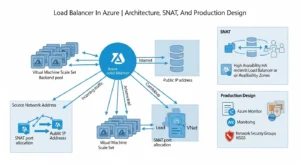
Azure Load Balancer is a regional, Layer 4 service for TCP and UDP traffic. It is pass-through, not a proxy. That distinction matters because it makes the service excellent for high-throughput, low-latency traffic distribution, but the wrong tool for features like path-based routing, TLS termination, cookie affinity at the HTTP layer, or WAF enforcement. Those are Layer 7 concerns, and they belong elsewhere.
This is why Azure Load Balancer fits best in four common patterns:
- Internet-facing TCP/UDP applications
- Internal load balancing between private app tiers
- VM Scale Set frontends
- Private east-west distribution with HA ports or internal services
It is not the universal frontend for all applications. Teams get into trouble when they expect web acceleration, application-aware routing, or global HTTP failover from a service designed for transport-level balancing.
How A Load Balancer In Azure Actually Works:
At its core, Azure Load Balancer has four moving parts: frontend IP configurations, backend pools, load-balancing rules, and health probes. The frontend receives traffic, rules define how flows map to backends, and probes decide which backend instances are healthy enough to receive traffic. If the probe fails, the instance is removed from rotation. That simple model is powerful, but also unforgiving if your probes, NSGs, or routing are misconfigured—this is where solutions like GoCloud’s cloud infrastructure and Azure management services can help ensure your load balancer, health probes, and network security settings are properly configured to maintain high availability and performance without unexpected downtime.
Public Vs. Internal:
A public load balancer exposes a public frontend IP and is typically used for inbound internet traffic to VMs or VMSS. It can also participate in outbound connectivity by translating private backend addresses to the public frontend IP. An internal load balancer exposes a private frontend inside a VNet and is used for internal app tiers, private services, and hybrid scenarios where traffic comes from on-premises or private network paths.
Architecturally, this means public vs. internal is not just a visibility setting. It changes where trust boundaries sit, how NSGs are applied, and whether the service is part of a public ingress path or a private east-west design. Internal load balancers are often the better fit for shared services, app middle tiers, or services fronted by private endpoints and enterprise network controls.
Standard Vs. Basic SKU:
For production, the decision is effectively made already: use Standard Load Balancer. Microsoft positions Standard as secure by default, closed to inbound traffic unless NSGs explicitly allow it, and backed by an SLA. Basic had no SLA and has been retired, which makes competitor pages that still treat Basic as a normal current option materially outdated.
Standard also gives you the operational model you actually want in enterprise environments: stronger observability, better control of outbound behavior, support for advanced features like HA ports, and better alignment with modern Azure security defaults. If your reference architecture still starts from “Basic vs. Standard,” update it. The real comparison is “Standard with the right design choices” versus “wrong Azure service for the workload.”
Health Probes And Backend Pool Design:
Health probes are where many simple deployments fail in real environments. A backend that looks “up” from the OS point of view can still be marked down by the load balancer if the probe endpoint is blocked, the application is not listening on the expected port, or the guest firewall drops probe traffic. Microsoft specifically calls out the need to allow probe reachability, including the Azure health probe IP behavior and service-tag logic.
Best practice is to treat probes as part of your application contract, not as an afterthought. The probe endpoint should reflect meaningful readiness, not just process existence. At the same time, probes should avoid being so fragile that brief dependency blips remove healthy nodes too aggressively. That balance matters for noisy apps, stateful services, and maintenance windows.
When To Use A Load Balancer In Azure Instead Of Application Gateway Or Azure Front Door:
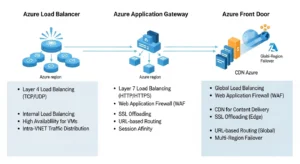
Microsoft’s clearest selection logic is two-dimensional: regional vs. global and HTTP(S) vs. non-HTTP(S). That is the simplest and most accurate way to explain the service boundary. Azure Load Balancer is regional Layer 4. Application Gateway is regional Layer 7. Azure Front Door is global Layer 7 with acceleration and edge-aware web delivery.
Use Azure Load Balancer when:
- Your traffic is TCP or UDP
- You need pass-through performance
- Your scope is regional
- You are balancing VMs or VMSS directly
- You do not need HTTP-aware features
Use Application Gateway when:
- You need TLS offload
- You need path-based or host-based routing
- You need WAF
- Your traffic is application-layer web traffic
Use Azure Front Door when:
- You need global web routing
- You want edge acceleration and fast failover
- You need global HTTP(S) entry with application delivery features
That service-selection clarity is missing from most competitor pages, and it is often the single biggest source of overengineering or underengineering in Azure networking.
Inbound And Outbound Flow Design:
Inbound design is what most teams think about first. You define a frontend, attach a backend pool, create rules, and configure health probes. That part is usually straightforward. Outbound design is where surprises happen, especially when architects assume the default behavior will scale cleanly under bursty or high-connection-count workloads.
Inbound Flow:
For inbound traffic, the load balancer distributes flows to healthy backends based on configured rules. In multi-instance environments, that gives you scalability and removes unhealthy nodes from service automatically. In single-instance environments, you may still gain a stable frontend abstraction, but you do not gain true redundancy. Microsoft also notes that the SLA expectation assumes at least two healthy backend instances in the pool.
Outbound Flow:
Outbound traffic through a public Standard Load Balancer works through Source Network Address Translation (SNAT). The load balancer translates a backend’s private IP into the public frontend IP for internet-bound connections. That is useful, but it is also finite. Each frontend IP contributes a bounded pool of ephemeral ports, and those ports must be shared across backend instances.
This is why outbound architecture deserves its own design review. If your workload makes frequent outbound calls to external APIs, package repositories, partner endpoints, or SaaS services, you should not assume the default egress path is enough. The more connection churn you have, the more likely you are to hit port pressure.
SNAT And Outbound Planning For A Load Balancer In Azure:
What SNAT Exhaustion Really Means:
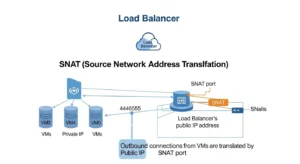
SNAT exhaustion occurs when a backend instance runs out of the SNAT ports allocated to it, even if the overall load balancer still has ports elsewhere in the total pool. The result is painful and often intermittent: new outbound connections fail while existing ones may continue until ports free up. That is why the symptom set feels random to application teams.
Common triggers include:
- Many backend instances sharing too few frontend IPs
- Bursty connection patterns
- Applications that do not reuse connections
- Overly conservative default port allocation
- Workloads with large fan-out to many external destinations
This is one of the biggest technical gaps in competitor content, yet it is a central production design issue.
When Outbound Rules Are Enough:
Outbound rules let you explicitly define SNAT behavior for a public Standard Load Balancer. That gives you control over which frontend IPs are used, how ports are allocated, which protocols are translated, and how idle timeout is handled. Each extra frontend IP adds another 64,000 ephemeral ports, which is the core scaling lever when you stay with load balancer-based outbound design.
For production, Microsoft recommends manual port allocation rather than relying on default conservative allocation. It also notes practical caveats: port allocation values must align correctly, backend pool design matters, and NSGs must still allow probe traffic or instances will disappear from service even if SNAT is planned correctly.
When NAT Gateway Is The Better Answer:
If your core requirement is reliable outbound internet access, NAT Gateway is usually the better architectural choice. Microsoft explicitly recommends it as the preferred outbound method because it is more extensible and avoids many of the port-allocation concerns that show up with load balancer-based outbound connectivity.
A simple rule works well here:
- Need inbound + outbound on the same traffic path with controlled SNAT behavior: Azure Load Balancer may be sufficient
- Need scalable, cleaner outbound-only internet egress: prefer NAT Gateway
- Need private access to Azure PaaS services: prefer Private Link where possible to avoid SNAT entirely
That decision alone can save weeks of intermittent troubleshooting later.
Practical Optimization Tips:
To reduce SNAT risk:
- reuse outbound connections in application code
- monitor Used SNAT Ports against Allocated SNAT Ports
- add frontend IPs when scale requires it
- use explicit outbound rules
- tune idle timeout and enable TCP reset where appropriate
- avoid accidental dependence on default outbound access
These are not cosmetic optimizations. They directly affect connection success rates under scale.
High Availability And Zone-Aware Architecture:
Azure Load Balancer supports both zonal and zone-redundant frontend configurations. Microsoft’s guidance is clear: where supported, prefer zone-redundant frontend design for resiliency. Zone-redundant frontends use infrastructure across multiple availability zones and allow traffic to continue flowing when one zone fails.
But there is a critical nuance many articles miss: frontend zone redundancy does not make the application resilient by itself. If all your backend instances are placed in one zone, a zone failure still takes the app down. Real HA requires distributing backend instances across zones and validating probe behavior, retries, and failover at the client and application layers.
For production design, apply this checklist:
- Use zone-redundant frontend IPs where available
- Keep at least two healthy backend instances
- Spread backends across zones
- Implement client retry logic with exponential backoff
- Test failover, not just configuration success
This is where a premium guide should go deeper than beginner tutorials. High availability is an end-to-end property, not a checkbox on the load balancer resource.
Backend Pool Design For VM Scale Sets And Private Workloads:
Azure Load Balancer is especially strong when fronting VM Scale Sets and private application workloads. Microsoft also recommends backend pool configuration choices carefully, including using NIC-based membership for secure-by-default behavior in demanding outbound scenarios. That matters because backend modeling affects both traffic behavior and operational clarity.
For private workloads, internal load balancers are often the right pattern for:
- App-to-app service distribution
- Shared services inside a hub-and-spoke VNet design
- Hybrid connectivity from on-premises environments
- Clustered or HA service listeners
- East-west traffic that does not belong on a public edge
In these cases, the design goal is not internet exposure. It is controlled private traffic flow with predictable failover behavior.
Architects should also pay attention to advanced features like HA ports and floating IP scenarios. These matter for network virtual appliances, clustered services, and complex private traffic patterns. If you enable floating IP, Microsoft notes that you must configure loopback behavior correctly in the guest OS. This is exactly the kind of operational detail that simple portal walkthroughs skip.
Observability With Azure Monitor And Network Watcher:
A load balancer in Azure is not production-ready unless it is observable. Microsoft surfaces the most useful signals through Azure Monitor, and the most useful troubleshooting tools through Network Watcher. Used together, they let you answer the three questions that matter during an incident:
Is Azure’s data path healthy?
Does the load balancer think the backend is healthy?
Is outbound connectivity failing because of SNAT, NSG, or routing?
Metrics That Matter:
Start with:
- Data Path Availability
- Health Probe Status
- Used SNAT Ports
- Allocated SNAT Ports
- SNAT Connection Count
- Byte Count
- Packet Count
- SYN Count
These are the metrics that tell you whether the problem is platform path, backend health, or outbound exhaustion. Microsoft also provides practical alert guidance, such as 75% and 90% thresholds for SNAT utilization and using five-minute averages to reduce noise.
Troubleshooting Workflow:
A disciplined troubleshooting sequence looks like this:
- Check Data Path Availability: If the data path is healthy, the platform edge is likely not the issue. Microsoft Learn
- Check Health Probe Status: If probes fail while data path remains healthy, suspect app readiness, guest firewall, NSGs, or port mismatches.
- Use IP flow verify and Effective security rules in Network Watcher: These tools quickly show whether traffic is allowed or denied and by which rule.
- Use Next hop and Connection troubleshoot: These help isolate route and reachability problems, especially in hybrid or UDR-heavy environments.
- Check Used SNAT Ports and failed SNAT connections: If outbound failures line up with high port utilization, you likely have a port planning issue, not an application bug.
- Capture packets if the answer is still unclear: Packet capture remains useful when symptoms point to asymmetric routing, firewall interference, or unexpected resets.
That workflow is more valuable to readers than another screenshot sequence of portal creation steps.
Deploying With Bicep And Terraform Patterns:
Portal deployment is fine for labs. It is not fine as the long-term operating model for enterprise Azure networking. Load balancer resources should be codified so frontend IPs, backend pools, probes, rules, diagnostics, and supporting resources can be versioned, reviewed, tested, and promoted consistently.
Microsoft’s template documentation directly supports Bicep and ARM, and points architects toward Azure Verified Modules and quickstart patterns for cross-region, internal HA ports, VMSS, and more complex scenarios. Even where Terraform is not shown inline on the same page, the architectural message is the same: standardized IaC is the right operating model.
What to codify:
- Frontend IP configs
- Backend pools
- Health probes
- Load-balancing rules
- Outbound rules
- Diagnostics and alerting
- NSG dependencies
- Zone configuration
- Tags, naming, and policy alignment
Why it matters:
- Repeatability
- Faster recovery
- Lower configuration drift
- Better change control
- Easier multi-environment rollout
Competitor content is overwhelmingly portal-first. That is a ranking opportunity because search intent at the professional tier increasingly favors implementation maturity, not just resource creation.
Common Production Mistakes:
The fastest way to improve a load balancer in Azure deployment is to avoid predictable design mistakes.
- 1. Treating Azure Load Balancer like a web application load balancer: If you need WAF, TLS offload, URL routing, or caching, you likely want Application Gateway or Front Door instead. Using Azure Load Balancer for the wrong layer creates design friction from day one.
- 2. Ignoring outbound architecture: Teams often design inbound carefully and leave outbound to defaults. That is how SNAT exhaustion incidents start.
- 3. Blocking or weakening probes: An NSG or host firewall that blocks probe traffic creates false failure. A probe that is too simplistic or too strict creates noisy rotation behavior.
- 4. Relying on a single backend instance: That defeats redundancy and undermines SLA expectations.
- 5. Assuming zone-redundant frontend means zone-resilient application: It does not. Backend placement still determines app survival during a zone outage.
- 6. Skipping metrics and alerts: Without probe, data-path, and SNAT monitoring, you are blind to the most common failure categories.
Best-Practice Recommendations By Scenario:
- For internet-facing TCP/UDP services: Use Standard Public Load Balancer, design probes carefully, keep at least two healthy backend instances, and plan outbound separately if the same nodes also make heavy external calls.
- For private app tiers: Use Internal Load Balancer, align probes with actual service readiness, and validate NSGs and routing paths with Network Watcher before production cutover.
- For VM Scale Set environments: Codify pool membership, health probes, zone spread, and alerting in IaC. Avoid ad hoc portal tuning that creates drift between scale environments.
- For heavy outbound dependency workloads: Prefer NAT Gateway or explicit outbound rules with manual SNAT planning. Also push application teams toward connection reuse.
- For web apps needing Layer 7 policy: Do not force Azure Load Balancer to do a proxy’s job. Move to Application Gateway or Front Door based on whether the scope is regional or global.
Frequently Asked Questions:
What Is The Main Purpose Of A Load Balancer In Azure?
Its job is to distribute Layer 4 TCP and UDP traffic across healthy backend instances using rules and probes. It supports both public and private designs and can also participate in outbound connectivity scenarios.
Is Azure Load Balancer Good For Web Applications?
It can be, if the requirement is transport-level distribution only. If you need application-layer capabilities like WAF, TLS offload, or URL routing, Application Gateway or Front Door is a better fit.
What Is The Difference Between Internal And Public Load Balancer In Azure?
A public load balancer exposes a public frontend for internet-facing traffic. An internal load balancer exposes a private frontend inside the VNet for internal or hybrid private traffic.
Why Is Standard SKU Recommended?
Because it is secure by default, supported for modern production use, and aligned with current Azure best practices. Basic is no longer the right architectural baseline.
What Is SNAT Exhaustion In Azure Load Balancer?
It is the condition where a backend instance runs out of allocated outbound SNAT ports and cannot open new outbound connections. It commonly appears under bursty or connection-heavy outbound patterns.
Conclusion:
The best load balancer in Azure design is not the one with the fastest portal setup. It is the one that matches the protocol layer, scopes traffic correctly, survives zonal failure, handles outbound demand without SNAT surprises, and is observable and repeatable through IaC. If you build around those principles, Azure Load Balancer is a strong production service for regional TCP/UDP distribution. If you ignore them, it becomes one more hidden dependency blamed for problems that were actually architectural choices.