When organizations decide to migrate SQL Server to AWS, they are often driven by a combination of expiring hardware, end-of-support deadlines, and the need to reduce oppressive licensing costs. In 2026, the case for migration is stronger than ever. With SQL Server 2014 long past its end-of-life and extended support costs rising, moving to the cloud offers an immediate remedy.
Recent ESG research confirms that companies can achieve an average of 45% in licensing cost savings by optimizing their SQL Server workloads on AWS. Whether you choose the fully managed Amazon RDS, the flexible RDS Custom, or the license-free Aurora PostgreSQL with Babelfish, AWS provides robust paths to modernization. This guide details how to execute a zero-downtime migration using AWS MS, ensuring your critical data moves securely and efficiently.
Why Organizations Are Moving SQL Server to AWS in 2026
SQL Server End-of-Support Deadlines — Upgrade or Migrate?
The lifecycle of Microsoft products is a primary catalyst for cloud migration. By 2026, SQL Server 2012 is firmly in the rearview mirror of history, and SQL Server 2014 is approaching its final end-of-life (EOL) phases. Running unsupported databases poses a severe security risk and compliance violation for enterprise organizations. The cost of purchasing Extended Security Updates (ESU) for on-premise servers is prohibitive, often costing up to 75% of the full license price annually.
AWS offers a strategic off-ramp. Amazon RDS supports fully compliant, patched versions of SQL Server 2016, 2017, 2019, 2022, and the newly released SQL Server 2025. Migrating to AWS allows you to upgrade the underlying engine version as part of the migration process (heterogeneous migration) or lift-and-shift to a supported environment where AWS handles the underlying infrastructure security.
The Licensing Cost Problem (45% Average Savings on AWS)
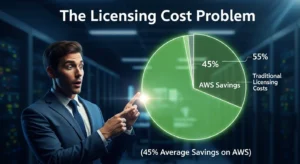
Licensing often constitutes the largest line item in a database budget. SQL Server Enterprise Edition licensing is calculated per core, and on-premise servers are frequently over-provisioned to handle peak loads that rarely occur. This leads to massive shelfware waste.
According to an Enterprise Strategy Group (ESG) White Paper, customers migrating Microsoft workloads to AWS realize an average of 45% savings in licensing costs. This is achieved through right-sizing instances (paying only for the CPU cores you actually need) and utilizing the AWS Optimization and Licensing Assessment (OLA). This free tool analyzes your actual resource consumption and recommends the
most cost-effective EC2 or RDS instance sizes, often allowing organizations to downgrade from Enterprise to Standard edition or reduce core counts significantly.
High Availability & Disaster Recovery Made Easier
Implementing SQL Server Always On Availability Groups (AG) on-premise requires expensive Enterprise Edition licenses, multiple physical servers, and complex witness configuration. On AWS, high availability is democratized.
Amazon RDS for SQL Server offers Multi-AZ deployments, which automatically replicate data to a standby instance in a different Availability Zone (physically separate data center). If the primary node fails, RDS automatically fails over to the standby without administrative intervention. Furthermore, features like Read Replicas allow you to offload reporting workloads from the primary transactional database, a feature that previously required complex AG routing.
Performance Gains with Aurora PostgreSQL
For organizations willing to modernize, Amazon Aurora PostgreSQL offers a compelling alternative. Aurora uses a log-structured storage system that scales automatically and delivers up to 3x the throughput of standard PostgreSQL.
With the Babelfish compatibility layer, Aurora can understand T-SQL commands natively. This enables legacy applications to run on a high-performance, cloud-native database without the “SQL Server tax.” Companies like iPromote have successfully migrated critical workloads to Aurora, saving millions in licensing fees while gaining the performance benefits of a storage engine designed specifically for the cloud.
What Does It Mean to Migrate SQL Server to AWS?
Your SQL Server Migration Options on AWS — The 7 Rs Applied
AWS categorizes migration strategies into the “7 Rs.” For SQL Server, five of these are particularly relevant. Choosing the right path depends on your need for OS-level control versus your desire to reduce administrative overhead.
| Strategy | Description | SQL Server Use Case | AWS Service | Cost Impact |
| Rehost | Lift & Shift | Legacy apps needing OS access or specific configs | SQL Server on EC2 | Low (CapEx to OpEx) |
| Replatform | Lift & Reshape | Standard DBs wanting managed backups/patching | Amazon RDS for SQL Server | Medium (Labor savings) |
| Replatform+ | Managed with Access | Apps needing CLR, agents, or file system access | Amazon RDS Custom | Medium |
| Repurchase | Drop & Shop | Modernize to open-source to kill license costs | Aurora PostgreSQL + Babelfish | High (License elimination) |
| Refactor | Re-architect | Breaking monoliths into microservices | DynamoDB / Aurora Serverless | Variable |
Option 1 — Rehost: SQL Server on Amazon EC2 (Full Control)
This is the closest match to your on-premise environment. You provision a Windows Server VM on EC2 and install SQL Server. You retain full administrative
access (RDP) to the operating system. This option is ideal for databases that rely on linked servers to non-SQL sources, third-party agents installed on the OS, or complex SSIS packages that run locally. The trade-off is that you are still responsible for OS patching, backups, and high-availability configuration.
Option 2 — Replatform: Managed RDS for SQL Server
Amazon RDS removes the heavy lifting. AWS manages the OS, patching, and backups. You do not have RDP access. This is the preferred option for 80% of enterprise workloads as it significantly reduces DBA toil. RDS supports SQL Server versions 2016 through 2025 in Web, Standard, and Enterprise editions. However, because you lack OS access, you cannot install custom drivers or run SSIS packages on the database server itself.
Option 3 — Replatform+: Amazon RDS Custom for SQL Server
RDS Custom bridges the gap between EC2 and RDS. It provides the automation of RDS (patching, backups) but allows you to access the underlying OS via RDP or Systems Manager. This is specifically designed for “problematic” legacy applications that require installation of custom software, legacy CLR assemblies, or specific agent configurations that prevented migration to standard RDS.
Option 4 — Repurchase: Aurora PostgreSQL + Babelfish (Eliminate Licensing)
This is the boldest move with the highest financial return. Babelfish allows Aurora PostgreSQL to understand the SQL Server wire protocol (TDS). Applications can connect to Aurora believing it is SQL Server. While it doesn’t support 100% of T-SQL surface area, it covers the vast majority of common operational SQL, allowing you to stop paying Microsoft licensing fees entirely.
Option 5 — Refactor: Microservices + DynamoDB/Aurora Serverless
For applications undergoing a complete rewrite, moving away from relational monoliths to purpose-built databases like DynamoDB or Aurora Serverless offers extreme scalability. This requires significant development effort but yields the highest long-term agility.
AWS Services for SQL Server Migration
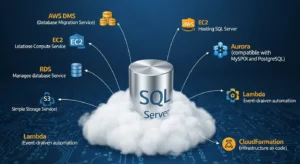
Amazon RDS for SQL Server — Features, Versions & Limits
RDS is the standard-bearer for managed SQL Server. It supports major versions 2016, 2017, 2019, 2022, and 2025. Available editions include Web (low cost), Standard (mid-range), and Enterprise (high-end features). Key features include Multi-AZ for synchronous replication and automated failover, automated backups with point-in-time recovery, and native TDE (Transparent Data Encryption). It listens on the standard port 1433 and is fully compatible with SQL Server Management Studio (SSMS).
Amazon RDS Custom — For Complex SQL Server Configurations
Introduced to solve the “last mile” migration challenges, RDS Custom runs in your VPC but allows AWS automation hooks. It is ideal for workloads that need to access the C:\ drive, install COM+ components, or require specific OS settings. It sits effectively between the total control of EC2 and the total management of RDS.
Amazon Aurora PostgreSQL with Babelfish — The License Killer
Babelfish is not a separate service but a capability of Aurora PostgreSQL. It opens a TDS port (1433) alongside the standard PostgreSQL port (5432). It supports T-SQL queries, cursors, stored procedures, triggers, and nested transactions. However, it does not support features tied strictly to the Microsoft ecosystem like SSRS, SSAS, or SSIS packages (which must be moved to other services).
AWS DMS — Zero-Downtime Migration Engine
AWS Database Migration Service (DMS) is the engine that moves the data. It supports two main modes: Full Load (bulk transfer of existing data) and CDC (Change Data Capture), which replicates ongoing transactions from the source log
file. This combination allows you to keep the source and target databases in sync until you are ready to cut over, resulting in near-zero downtime.
AWS SCT — Automatic Schema Conversion
The Schema Conversion Tool (SCT) is a desktop application that analyzes your source database schema. If you are migrating to a different engine (like Aurora PostgreSQL), SCT automatically converts tables, indexes, views, and stored procedures. It generates a detailed assessment report highlighting “action items” requiring manual intervention.
AWS OLA — Free Licensing Assessment Tool
The Optimization and Licensing Assessment (OLA) is a non-intrusive tool that scans your environment to determine actual resource utilization. It generates a report showing how much you can save by right-sizing instances and optimizing license usage (e.g., bringing your own licenses versus using license-included instances).
Step-by-Step: How to Migrate SQL Server to AWS
Step 1 — Assessment & Inventory
Start by creating a comprehensive inventory. Catalog every SQL Server instance, version, edition, and database size. Run the AWS OLA tool to identify potential licensing savings. Crucially, map out dependencies: identify all SSIS packages, SSRS reports, and SSAS cubes, as these cannot migrate directly to RDS. Create a decision matrix to determine whether each workload belongs on RDS, EC2, or Aurora. Document any Always On Availability Group configurations and list all SQL Server Agent jobs.
Step 2 — Prepare Your AWS Environment
Build the landing zone. Create a Virtual Private Cloud (VPC) with subnets across at least two Availability Zones (Multi-AZ). Configure Security Groups to allow traffic on port 1433 only from trusted application servers and your DMS instance. Set up IAM roles that allow DMS and RDS to access necessary S3 buckets for backups.
Define your parameter groups and subnet groups early to avoid configuration delays during deployment.
Step 3 — Schema Conversion with AWS SCT
Download and install AWS SCT. Connect it to your source SQL Server and your target AWS database. Run the “Create Assessment Report” function. This will produce a summary of how much of your schema can be converted automatically. For heterogeneous migrations (SQL to Aurora), SCT will convert the schema objects. Review the report for items marked with high complexity action codes—these will require manual rewriting. Export the converted SQL scripts and apply them to your target database.
Step 4 — Data Migration with AWS DMS
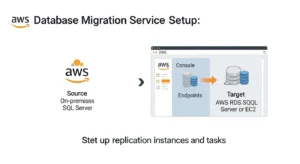
Provision a DMS replication instance; choose a compute-optimized instance class (c5 or r5) for heavy workloads. Create a source endpoint pointing to your on-premise SQL Server and a target endpoint for your AWS database.
Select the migration method “Migrate existing data and replicate ongoing changes” (Full Load + CDC). This ensures that while the bulk data is moving, any new transactions on the source are captured. Start the task and monitor the “Table Statistics” tab. Ensure that MS-CDC or Replication is enabled on the source SQL Server database to allow DMS to read the transaction logs.
Step 5 — Testing & Validation
Once the status reaches “Load Complete, Replication Ongoing,” perform validation. Compare row counts between source and target. Execute your test suite: run critical stored procedures, fire triggers, and query views. Perform load testing to ensure the chosen instance size handles the throughput. Validate that your applications can connect successfully. Test the failover capability by simulating an AZ outage (Reboot with Failover in RDS console).
Step 6 — Cutover & Go-Live
Schedule a maintenance window during low traffic. Stop all write traffic to the source SQL Server. Watch the DMS monitor until “CDCLatencySource” and “CDCLatencyTarget” drop to zero, indicating the databases are perfectly synced. Apply any final schema objects (like secondary indexes) that were deferred. Update
your application connection strings to point to the new RDS/Aurora endpoint. Perform a final smoke test and decommission the source server only after a designated rollback period (typically 1-2 weeks).
Migrating SQL Server to Aurora PostgreSQL with Babelfish
What is Babelfish and Why It’s a Game-Changer
Babelfish fundamentally changes the economics of migration. It implements the SQL Server wire protocol (TDS) on top of PostgreSQL. This means your applications can continue using their existing drivers (ODBC, JDBC, ADO.NET) and communicate with Aurora as if it were SQL Server. The primary benefit is cost: you move from a proprietary, per-core licensing model to an open-source compatible cloud-native model.
T-SQL Compatibility in Babelfish — What Works, What Doesn’t
What works: Standard CRUD operations (SELECT, INSERT, UPDATE, DELETE), transactions, cursors, stored procedures, scalar functions, table-valued functions, and triggers generally work without modification.
What doesn’t work: Features that are tightly coupled to the Microsoft Windows OS or specific SQL Server internals. This includes xp_cmdshell , CLR assemblies, Service Broker, SQL Server Agent, and proprietary tools like SSIS, SSRS, and SSAS. These components must be refactored or replaced with AWS native equivalents (e.g., AWS Glue for SSIS, QuickSight for SSRS).
Step-by-Step: SQL Server → Aurora PostgreSQL via SCT
+ DMS
The process involves using AWS SCT to identify incompatible T-SQL syntax. SCT will highlight code that Babelfish cannot interpret. You then manually adjust this code. Once the schema is compatible, use DMS to move the data. The “magic” happens when you point your legacy application to the Aurora endpoint on port 1433—it simply connects and runs.
Real-World: How iPromote Saved Millions Ditching SQL Server
iPromote, a digital advertising firm, faced escalating licensing costs. By leveraging Babelfish, they migrated their core ad-serving platform from SQL Server Enterprise to Aurora PostgreSQL. The migration required minimal code changes, primarily around proprietary stored procedures, and resulted in a massive reduction in annual operating costs while improving query performance due to Aurora’s superior storage subsystem.
| Feature | SQL Server | Aurora PostgreSQL | Babelfish Notes |
| Licensing Cost | High (Per Core) | None (Open Source) | Major cost driver |
| T-SQL Support | Native (100%) | Via Babelfish (~80-90%) | Requires testing |
| High Availability | Always On AG | Aurora Multi-AZ | Storage level replication |
| Read Replicas | Yes (Enterprise) | Up to 15 Replicas | Low latency (<10ms) |
| Storage Auto-Scaling | Manual | Automatic (up to 128TB) | No downtime scaling |
| Management Overhead | High/Medium | Low (Managed) | Less DBA toil |
SQL Server Licensing on AWS — Optimize Your Costs
BYOL vs. License Included — Which Saves More?
License Included (LI): You pay a higher hourly rate for the EC2 or RDS instance, but it includes the SQL Server license. This provides flexibility; you can terminate the instance and stop paying instantly. Ideally suited for variable workloads or dev/test environments.
Bring Your Own License (BYOL): You apply your existing licenses (purchased via Microsoft Volume Licensing) to AWS. This requires Software Assurance (SA) for License Mobility. If you have already paid for perpetual licenses, BYOL on EC2 Dedicated Hosts is often significantly cheaper than the LI model for steady-state production workloads.
Downgrade from Enterprise to Standard Edition on AWS
On-premise deployments often default to Enterprise Edition for features like TDE or Always On. However, RDS for SQL Server Standard Edition now supports TDE and Multi-AZ. AWS OLA often reveals that customers are paying for Enterprise features they aren’t using. Downgrading to Standard Edition during migration is one of the fastest ways to slash costs by 60-70%.
AWS OLA — Your Free Licensing Savings Assessment
AWS offers the Optimization and Licensing Assessment (OLA) at no cost. You install a lightweight collector (or use existing tools like RVTools) to gather performance data. The OLA report provides a detailed roadmap of rightsizing opportunities, specifically highlighting where you can reduce core counts or switch editions to maximize savings
RDS Reserved Instances for SQL Server Workloads
For production databases that run 24/7, purchasing Reserved Instances (RIs) is essential. RIs offer a significant discount (up to 69%) compared to On-Demand pricing in exchange for a 1-year or 3-year commitment. “Convertible” RIs allow you to change instance families later if your needs change, offering a balance between savings and flexibility.
SQL Server Migration to AWS — Common Challenges
T-SQL Compatibility Issues When Moving to Aurora
While Babelfish is powerful, it isn’t perfect. Common friction points include the lack of xp_cmdshell (for security reasons), differences in how ROWNUM is handled
compared to PostgreSQL’s implementation, and nuanced behavior in IDENTITY columns versus sequences. Proprietary functions for file system access or registry manipulation will fail and must be refactored
SSIS Packages — What to Do on AWS
SSIS (SQL Server Integration Services) does not run on Amazon RDS. You have three main options:
- Run on EC2: Spin up a separate EC2 instance with SQL Server to host and execute SSIS packages.
- Migrate to AWS Glue: Rewrite ETL jobs in Python/Spark using AWS Glue, a serverless ETL service.
- Third-Party Tools: Use tools that can execute SSIS packages in the cloud without a full SQL Server instance.
Migrating SQL Server Always On Availability Groups
Migrating a complex Always On cluster can be daunting. The direct mapping in RDS is a Multi-AZ deployment. The primary challenge is updating application connection strings. In RDS, you get a DNS endpoint that automatically resolves to the current primary capability. If you use Read-Only Routing in your on-premise AG, you will need to manually configure your application to point to RDS Read Replicas for read traffic.
Large Database Migration (10TB+) — Snowball Edge Option
For massive databases where network bandwidth is a bottleneck, AWS Snowball Edge is the solution. It is a ruggedized physical storage device shipped to your data center. You load your backup files onto it and ship it back to AWS. The data is uploaded directly to S3, from where you can restore it to RDS. You then use DMS to catch up on the changes (CDC) that occurred while the device was in transit.
Windows Authentication vs. SQL Authentication on RDS
Historically, RDS only supported SQL Authentication. Now, RDS supports Windows Authentication using AWS Managed Microsoft AD. The challenge lies in setting up the directory trust correctly. SQL Authentication is simpler to set up but less secure
for enterprise environments. Implementing Kerberos authentication for RDS requires careful planning of the Directory Service.
Performance Comparison: SQL Server on-prem vs. AWS
| Metric | On-Prem SQL Server | RDS SQL Server | Aurora PostgreSQL |
| IOPS (baseline) | Limited by SAN/Disk | Provisioned (io1/io2) | Scales with usage |
| Throughput (MB/s) | Controller bottleneck | Instance limit (up to 4,750) | High (Storage distributed) |
| Latency (ms) | <1ms (if local SSD) | Single digit ms | Single digit ms |
| Failover time | 10-60 seconds (AG) | 60-120 seconds (Multi-AZ) | <30 seconds |
| Backup duration | Hours (Impacts I/O) | Minutes (Snapshots) | Seconds (Continuous) |
| Cost per GB storage | High (Hardware + Admin) | $0.125 – $0.25 / mo | $0.10 / mo |
Frequently Asked Questions
Q1: How do I migrate SQL Server to AWS?
To migrate SQL Server to AWS effectively, start with a thorough assessment using AWS OLA. Use the AWS Schema Conversion Tool (SCT) for schema compatibility analysis. For the data transfer, employ AWS Database Migration Service (DMS) to perform a full load followed by continuous replication (CDC). Validate data integrity using DMS validation features before cutting over during a planned maintenance window.
Q2: What is the best AWS service for SQL Server?
The best service depends on your specific requirements. Amazon RDS for SQL Server is ideal for most workloads requiring a fully managed experience. Amazon RDS Custom is best if you need OS-level access for third-party agents or CLR assemblies. For cost optimization, Amazon Aurora PostgreSQL with Babelfish allows you to run SQL Server applications without licensing fees.
Q3: How much does it cost to run SQL Server on AWS?
Costs vary based on edition and instance size. For example, a db.m5.large (2 vCPU, 8GB RAM) running SQL Server Standard typically costs around $0.50-$0.60 per hour including licensing. Enterprise Edition is significantly more expensive. However, Bring Your Own License (BYOL) on EC2 or using Aurora PostgreSQL with Babelfish can reduce these costs by over 45% according to ESG research
Q4: Can I use SQL Server Management Studio (SSMS) with Amazon RDS?
Yes, you can use SSMS to connect to Amazon RDS for SQL Server, RDS Custom, and even Aurora PostgreSQL with Babelfish. You simply connect to the instance endpoint on port 1433, just as you would with an on-premises instance. Most standard DBA tasks can be performed via SSMS, though some system-level permissions are restricted on managed RDS.
Q5: What is Babelfish for Aurora PostgreSQL?
Babelfish is a translation layer for Amazon Aurora PostgreSQL that enables it to understand T-SQL commands and the SQL Server wire protocol (TDS). This allows applications written for SQL Server to run directly on Aurora PostgreSQL with little to no code changes, effectively eliminating Microsoft licensing costs while maintaining application compatibility.
Conclusion
In conclusion, migrating SQL Server to AWS is more than just a relocation — it’s a strategic modernization that can significantly reduce licensing costs and streamline database management. Whether you’re using EC2, RDS, RDS Custom, or Aurora PostgreSQL with Babelfish, AWS provides a solution for every workload. For a deeper look at another migration scenario, check out our previous guide on VMware to AWS Migration here at GoCloud. Following these best practices ensures a smooth, cost-effective migration that empowers your business to scale efficiently.
The combination of AWS DMS for zero-downtime data transfer and AWS SCT for schema conversion makes the technical execution predictable and safe. We strongly recommend starting your journey with an AWS Optimization and Licensing Assessment (OLA) to gather the data needed to make informed decisions. In 2026, staying on-premise means accepting rising costs and operational risks. Moving to AWS positions your organization to leverage the agility, scalability, and innovation of the cloud.