

The top cloud platforms are no longer separated by basic compute and storage alone. Today, the real decision comes down to workload fit, AI infrastructure maturity, Kubernetes operations, pricing mechanics, data residency, governance controls, and how much platform complexity your team can realistically absorb. Buyers who evaluate cloud service providers only on brand recognition or list prices usually end up overpaying, overbuilding, or locking themselves into an operating model they did not intend to buy.
If you are a CTO, cloud architect, startup founder, DevOps lead, or platform engineer, this guide is designed to help you choose based on architecture tradeoffs, not marketing claims.
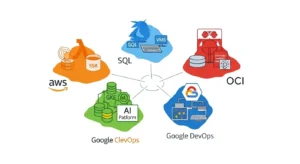
Why “Best Cloud” is the Wrong Buying Question :
There is no universal winner among the top cloud platforms. There is only the best platform for a specific operating model.
A startup shipping a multi-tenant SaaS product does not need the same cloud design as a regulated healthcare enterprise. A team training LLMs on GPUs has very different constraints than a company modernizing .NET apps or moving Oracle databases off legacy infrastructure.
In practice, the right cloud choice depends on five questions:
- What workloads matter most over the next 24 to 36 months?
- How much platform engineering maturity does your team have?
- Are you optimizing for speed, control, compliance, or unit economics?
- Will AI/ML and GPU capacity become strategic?
- How expensive will it be to operate, not just to launch?
That last point matters most. Real cloud TCO includes engineering time, migration rework, support tiers, observability tooling, data egress, managed service premiums, and commitment mistakes.
Architect perspective:
Cloud decisions fail when executives buy for optionality while engineers build for immediate delivery. Align the platform to the next two years of roadmap reality, not a hypothetical five-cloud future.
Common mistake:
Choosing the most feature-rich public cloud when the team cannot operate it efficiently.
Optimization tip:
Shortlist platforms by your top three workload types first. Only then compare pricing, security, and ecosystem depth.
How to Compare Top Cloud Platforms Without Buying the Wrong one :
Most comparison articles stay at the “AWS vs Azure vs Google Cloud” level. That is too shallow for technical buyers. A useful evaluation framework should score platforms across these dimensions:
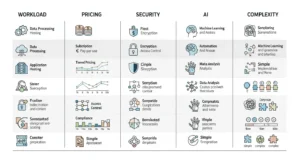
1. Workload Fit
Ask how well the platform handles:
- General-purpose web apps
- Kubernetes and platform engineering
- Data analytics and lakehouse workloads
- AI training and inference
- Managed databases
- Edge, hybrid cloud, and multi-cloud integration
- High-performance computing
- Regulated or sovereign workloads
2. Pricing Mechanics
Ignore headline rates until you understand:
- On-demand vs reserved instances vs savings plans
- Spot pricing or preemptible capacity
- Egress fees
- Cross-region traffic charges
- Managed service markups
- Support plans
- License mobility and marketplace commitments
3. Security and Governance
Evaluate:
- IAM granularity
- Org-level policy controls
- Key management and secrets handling
- Logging, auditability, and policy-as-code
- Data residency options
- Compliance coverage
- Isolation model for multi-account or multi-subscription environments
4. AI and GPU Ecosystem
For AI/ML infrastructure, compare:
- GPU and accelerator availability
- Cluster networking
- Model training and inference services
- MLOps tooling
- Open framework support
- Kubernetes-based AI deployment paths
- Cost controls for experimental versus production AI
5. Operational Complexity
This is often the hidden decider.
Ask:
- How difficult is day-2 operations?
- How mature are the managed Kubernetes, serverless, IAM, and networking tools?
- How many full-time platform engineers will you need?
- Can the team standardize landing zones, policies, and CI/CD across accounts?
Best practice:
Build a weighted scorecard. A bank, SaaS startup, and AI lab should not use the same weights.
Common mistake:
Treating “more services” as automatically better. More services often mean more operational surface area.
Optimization tip:
Score each platform on both capability and operational burden. The most capable platform is not always the highest-value one.
A Practical Snapshot Of The Top Cloud Platforms :
Here is the buyer-oriented view.
| Platform | Best fit | AI/ML readiness | Kubernetes posture | Pricing personality | Main watchout |
| AWS | Broadest workload coverage, mature enterprise/platform teams | Strong ML stack, deep ecosystem | EKS is mature but can be operationally heavy | Flexible discounts, but billing complexity is real | Service sprawl and cost control |
| Microsoft Azure | Microsoft-heavy enterprises, hybrid environments, regulated orgs | Strong enterprise AI stack and GPU positioning | AKS is attractive in Microsoft shops | Savings plans + Hybrid Benefit can be powerful | Governance and subscription complexity |
| Google Cloud | Data, analytics, Kubernetes, AI-native teams | Excellent AI infra, TPU/GPU options, strong inference story | GKE remains a strong differentiator | Automatic discounts can simplify economics | Smaller enterprise footprint than AWS/Azure in some orgs |
| OCI | Oracle-heavy estates, HPC, some GPU-intensive buyers, egress-sensitive architectures | Strong GPU and bare-metal value proposition | Managed Kubernetes available | Aggressive egress and infrastructure economics | Smaller ecosystem and talent pool |
| IBM Cloud | Hybrid, regulated, IBM ecosystem alignment | More selective fit | Managed Kubernetes available | Often part of broader enterprise deals | Narrower default fit for greenfield SaaS |
| DigitalOcean / niche clouds | Small teams, simpler apps, cost-sensitive dev velocity | Limited versus hyperscalers | Simpler managed Kubernetes | Easier to understand | Less global depth and enterprise breadth |
AWS’s value proposition is breadth. Its machine learning platform centers on SageMaker and a large set of ML services, and AWS positions itself as serving more than 100,000 ML customers. AWS also emphasizes flexible discounting through Savings Plans, which it says can reduce eligible compute spending by up to 72% compared with on-demand pricing—something many teams further optimize with expert partners through AWS cost optimization strategies by GoCloud.
Azure’s strength is enterprise alignment. It pairs strong hybrid and Microsoft ecosystem integration with broad AI infrastructure positioning, and Microsoft says Azure offers over 60 datacenter regions for global coverage. Azure savings plans apply across eligible compute services through an hourly spend commitment rather than instance-specific reservations, which can be easier for dynamic estates.
Google Cloud is strongest when analytics, Kubernetes, and AI are strategic. Google says it operates in 43 global regions and positions AI Hypercomputer as an integrated system for training and inference with TPUs, GPUs, open frameworks, GKE, and flexible consumption options including committed discounts and Spot VMs—areas where cloud optimization and scaling support from GoCloud can further improve performance and cost efficiency.
OCI is often underestimated. Oracle explicitly highlights lower network egress costs, including the first 10 TB of outbound data transfer per month free in many geographies, and positions its GPU platform around large superclusters, high RDMA bandwidth, and bare-metal GPU options.
Which of The Top Cloud Platforms Fits Your Workload?
This is where the decision gets real.
Startup SaaS and Product Engineering
Best fit usually:
- AWS
- Google Cloud
- DigitalOcean for simpler use cases
Why:
- Fast access to managed databases, serverless, object storage, IAM, CI/CD integrations
- Strong support for container platforms and microservices
- Plenty of ecosystem tooling for observability, security, and DevOps
Choose AWS if:
- You want maximum service breadth
- You expect architecture complexity to grow quickly
- You need many deployment patterns: serverless, containers, event-driven, data services
Choose Google Cloud if:
- You are standardizing on Kubernetes
- Analytics and AI are already on the roadmap
- Your team values cleaner product lines and simpler platform ergonomics
Choose DigitalOcean if:
- You need simpler infrastructure
- Your workloads are straightforward
- Your platform team is very small
Architect perspective:
For startups, speed beats theoretical optionality. Optimize for product delivery and platform simplicity before multi-cloud ambitions.
Common mistake:
Building an enterprise-grade landing zone before product-market fit.
Optimization tip:
Use managed databases, object storage, and a managed Kubernetes or serverless path early. Avoid self-operating everything.
Enterprise Microsoft Environments :
Best fit usually:
- Azure
Why:
- Strong integration with Active Directory, Windows Server, SQL Server, Microsoft security tooling, and enterprise procurement models
- Good fit for hybrid cloud and stepwise modernization
Azure savings plans can reduce eligible compute costs through hourly commitment, while Azure Hybrid Benefit can further change the economics for Windows and SQL-heavy estates.
Best practice:
Model the economics of Azure savings plans, reservations, and license mobility together. The wrong combination can leave money on the table.
Data Analytics, lakehouse, And ML-Heavy Platforms :
Best fit usually:
- Google Cloud
- AWS
- Azure, depending on existing estate
Google Cloud has a strong position here because of its analytics heritage, GKE alignment, and AI Hypercomputer architecture. It also offers automatic sustained use discounts for eligible resources used more than 25% of the month, with up to a 30% net discount for VMs running the full month.
Common mistake:
Choosing a cloud for data science features, then underestimating network, storage, and governance design for production.
AI training, inference, and GPU-Intensive Workloads
Best fit usually:
- Google Cloud
- Azure
- AWS
- OCI for value-sensitive or specialized GPU/HPC scenarios
Google positions AI Hypercomputer as a full AI system, not just rented GPU VMs. It supports TPUs, NVIDIA GPUs, GKE, Compute Engine, and frameworks like PyTorch, JAX, Keras, vLLM, and more. Google also advertises committed use discounts up to 70%, Spot VMs up to 91% off for suitable workloads, and hybrid or multi-cloud support through Cross-Cloud Interconnect.
Azure positions its AI infrastructure around high-performance GPU clusters, resilient checkpointing, hardware-rooted security, and integration with Azure AI Foundry.
AWS offers broad ML tooling with SageMaker and deep service breadth, which matters if your AI platform must integrate tightly with the rest of your application estate.
OCI is compelling when economics matter. Oracle says OCI supports superclusters up to 131,072 GPUs, up to 3,200 Gb/sec of RDMA bandwidth, and both VM and bare-metal GPU options.
Architect perspective:
For AI, do not buy on GPU availability alone. Buy on the whole system:
- Storage throughput
- Cluster networking
- Framework support
- Inference economics
- Scheduling model
- Reserved vs spot capacity strategy
Optimization tip:
Separate training and inference decisions. The best cloud for model training is not always the best one for low-latency inference.
Regulated Industries and Sovereignty-Sensitive Workloads :
Best fit usually:
- Azure
- AWS
- Google Cloud
- IBM Cloud or OCI in specific sovereignty or enterprise constraints
The decision hinges on:
- Data residency options
- Regional footprint
- IAM and auditability
- Policy enforcement
- Encryption and key management
- Private connectivity
- Contracting and supportability
Google explicitly frames region selection around latency, resilience, and sovereignty requirements. Azure emphasizes trusted infrastructure and hardware-rooted security in its AI platform messaging. OCI also positions sovereign and distributed deployment options as differentiators.
Pricing Traps that Distort Cloud TCO :
This is where most “top cloud platforms” content falls apart.
1. Egress fees
Data egress changes architecture.If your product moves a lot of data to customers, between regions, or across clouds, network pricing becomes a first-order design variable. OCI is unusually aggressive here, offering free inbound transfer and the first 10 TB of outbound transfer free per month in many regions.
Best practice:
Estimate monthly egress for:
- customer downloads
- replication
- backups
- analytics exports
- cross-cloud transfers
- CDN origin traffic
Common mistake:
Comparing only VM and storage pricing.
2. Commitment discounts
Each hyperscaler discounts differently.
AWS Savings Plans provide a flexible compute discount model and AWS says they can save up to 72% versus on-demand for eligible usage.
Azure savings plans are based on an hourly spend commitment and can apply to select compute services, including some underlying VM usage in services such as AKS, Azure Virtual Desktop, and Azure Databricks. Microsoft notes savings plans do not provide capacity guarantees and cannot be canceled after purchase.
Google sustained use discounts are automatic for eligible resources used beyond 25% of the month, and can reach up to 30% net discount for full-month VM use.
Architect perspective:
Discount flexibility matters as much as discount size. Dynamic workloads rarely fit rigid reservations cleanly.
3. Spot Pricing And Interruptible Capacity :
Spot pricing is powerful, but only for workloads designed to fail gracefully.
Azure says Spot VMs can offer discounts up to 90% compared with pay-as-you-go pricing, but workloads can be evicted based on price or capacity and do not carry an SLA.
Google frames Spot VMs as suitable for fault-tolerant batch jobs, and AWS has a long-standing spot model as well. For AI training, batch data processing, CI/CD runners, and rendering, spot can radically improve unit economics.
Common mistake:
Running stateful production services on spot without eviction-aware architecture.
4. Managed Service Premiums :
Managed Kubernetes, managed databases, serverless, API gateways, and observability stacks reduce toil, but they often shift cost from people to platform.
That trade can be worth it. But it needs to be modeled.
Optimization tip:
Track unit economics as:
- cost per deployed service
- cost per customer environment
- cost per million requests
- cost per training run
- cost per TB processed
5. Support Plans and Operational labor :
Support is not a rounding error.When incidents hit, premium support, TAM access, architecture guidance, and faster ticket paths affect uptime and engineering focus. Also count:
- additional security tooling
- observability platforms
- backup platforms
- cloud management platforms
- FinOps tooling
- internal platform engineering headcount
AI/ML and GPU Ecosystem: What Technical Buyers Should Actually Inspect :
If AI is strategic, evaluate the cloud like an infrastructure platform, not like a feature brochure.
GPU and Accelerator Portfolio :
Look at:
- NVIDIA generation availability
- TPUs or custom accelerators
- regional GPU capacity
- queue times and reservation mechanics
- cluster networking
- local NVMe and checkpointing performance
Google’s AI Hypercomputer emphasizes integrated accelerators, GKE, Compute Engine, storage, networking, and open frameworks. Azure emphasizes optimized AI VMs, advanced networking, and resilient checkpointing. OCI emphasizes supercluster scale, RDMA bandwidth, and high local storage per node.
MLOps and Deployment Path :
Ask whether your teams will use:
- managed AI platforms
- notebook environments
- Kubernetes-based model serving
- batch training pipelines
- prompt and model safety tooling
- model registry and feature store integrations
Google explicitly recommends Vertex AI for the simplest entry path while still allowing direct infrastructure control through GKE or Compute Engine.
Inference Economics :
Many teams obsess over training. Production cost usually comes from inference.
Inspect:
- token-serving economics
- autoscaling behavior
- multi-model endpoints
- cache strategy
- prompt routing
- networking cost to data sources
- GPU right-sizing
Best practice:
Benchmark the full inference path, not only GPU hourly price.
Security, Governance, and Compliance Criteria that Matter in Real Deployments :
Security posture is not just a list of certifications.
A strong platform decision should evaluate:
- IAM model and least-privilege practicality
- policy guardrails at org/account/subscription/project level
- key management and external key options
- secrets management
- centralized logging and audit trails
- data residency
- segmentation for dev, test, prod, and regulated workloads
Google emphasizes region choice for sovereignty and resilience. Azure emphasizes hardware-rooted security and data protection across its AI infrastructure. Competitor analysis also consistently places security, compliance, and support among the highest-priority buyer criteria.
Architect perspective:
The right question is not “Is the cloud compliant?” It is “Can we operate our workloads compliantly on this cloud with our current team and controls?”
Common mistake:
Assuming provider certifications automatically satisfy customer obligations.
Optimization tip:
Build policy-as-code and landing zones early. Governance retrofits are expensive.
Kubernetes, Platform Engineering, and Day-2 Operations :
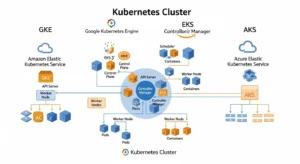
For many organizations, the cloud decision is now a Kubernetes decision.
Managed Kubernetes exists everywhere. But the buying question is not whether the provider offers it. The question is how much operational overhead remains after you adopt it.
Google’s AI Hypercomputer guidance explicitly recommends GKE for customers who want the easiest managed path. AWS includes EKS among the core services broadly launched with new Regions, while Azure savings plans can also cover underlying VM usage for AKS in some cases.
What architects should compare:
- cluster lifecycle automation
- node pool flexibility
- autoscaling maturity
- private cluster support
- identity integration
- ingress and service mesh patterns
- logging and metrics defaults
- GPU scheduling
- multi-cluster management
- cost visibility
Best practice:
Do not compare Kubernetes platforms in isolation. Compare the entire developer platform experience around them.
Migration risk and lock-in: what to standardize and What to Embrace
Lock-in is not binary.
There are good forms of lock-in and bad forms.
Good lock-in:
- using managed services that materially accelerate delivery
- adopting cloud-native primitives that improve resilience and speed
Bad lock-in:
- architecture coupled to proprietary services without an exit design
- data gravity that makes relocation financially painful
- deeply embedded IAM or networking designs that are hard to replicate elsewhere
What to keep portable:
- containers
- Terraform or infrastructure-as-code patterns
- CI/CD workflows
- observability standards
- data export pathways
- identity abstraction where realistic
What to selectively embrace:
- managed databases
- event buses
- serverless for clearly bounded use cases
- cloud-native AI services when they meaningfully shorten time-to-value
Optimization tip:
Design your exit path before you need it. Especially for data platforms, AI pipelines, and streaming architectures.
Multi-cloud and hybrid cloud: when it helps and when it hurts
Multi-cloud is not automatically strategic. Often it is just duplicated complexity.
Use multi-cloud when you have one of these conditions:
- regulatory separation requirements
- merger-driven platform coexistence
- resilience requirements that justify the cost
- specialized workload fit across providers
- negotiating leverage tied to large spend
- geographic or sovereignty constraints
Use hybrid cloud when:
- you have latency-sensitive on-prem systems
- data gravity keeps certain workloads local
- compliance or operational constraints prevent full migration
- you are modernizing in phases
CloudZero, ProsperOps, and DataCamp all mention multi-cloud or hybrid support as an evaluation factor, but their coverage stays relatively high-level. The real question is whether your organization can operate identity, networking, security policy, observability, and FinOps across multiple estates without multiplying failure modes.
Architect perspective:
One well-run cloud beats three poorly governed clouds.
Final recommendations by buyer type
Choose AWS when
- You need the broadest service catalog
- You expect architectural diversity
- You have a mature cloud engineering team
- You want maximum ecosystem and marketplace depth
Choose Azure when
- You are Microsoft-centric
- Hybrid cloud matters
- Security, governance, and enterprise procurement alignment are major factors
- You can benefit from Azure Hybrid Benefit and savings plans
Choose Google Cloud when
- Kubernetes, data, and AI are central
- You want strong analytics and modern platform ergonomics
- You need an AI-native infrastructure story from training through inference
Choose OCI when
- Egress economics matter
- Oracle workloads are strategic
- HPC or GPU value/performance is a priority
- You need bare-metal GPU options or sovereign deployment considerations
Choose IBM Cloud or a niche provider when
- You have a specific enterprise, industry, or ecosystem alignment
- You are solving for a narrower set of regulated or hybrid requirements
- Simplicity or contract structure matters more than hyperscale breadth
FAQs :
1. Which cloud platform is best for startups?
For most startups, AWS and Google Cloud are the strongest default options because they offer broad managed services, strong developer ecosystems, and fast paths to scale. Smaller teams with simpler workloads may also prefer DigitalOcean for lower operational complexity.
2. Which cloud is best for AI and machine learning workloads?
Google Cloud, Azure, and AWS are the top choices for AI/ML, while OCI can be compelling for GPU-intensive and cost-sensitive scenarios. The right pick depends on your need for TPUs or GPUs, cluster networking, MLOps tooling, and inference economics.
3. What is the biggest hidden cloud cost?
In many environments, it is not compute. Hidden costs often come from egress fees, overprovisioned managed services, premium support, observability tooling, and engineering labor needed to operate the platform well.
4. Is AWS cheaper than Azure or Google Cloud?
Not universally. Cost depends on workload shape, discount model, software licensing, egress, and whether you can use spot pricing or commitment-based discounts effectively.
5. Is multi-cloud a good strategy for most companies?
Usually not at the beginning. Multi-cloud helps when you have regulatory, resilience, or workload-specific reasons, but it also increases IAM, networking, governance, and FinOps complexity.
Conclusion :
The top cloud platforms all look capable on paper. The right choice comes from matching platform strengths to your workload mix, security model, AI roadmap, cost structure, and operational maturity.
If you are building broad enterprise platforms, AWS and Azure remain the default shortlist. If analytics, Kubernetes, and AI are strategic differentiators, Google Cloud deserves serious weight. If bandwidth economics, Oracle alignment, or GPU value matter, OCI may be stronger than many buyers expect.