


Why Content Delivery Speed Matters in 2026
A 1-second delay in page load time causes a 7% drop in conversions. For a UK e-commerce store generating £100,000 per month, that one second silently drains £7,000 every single month — without a single error message or warning.
In 2026, the stakes of slow content delivery have never been higher. Businesses in the USA, UK, and UAE are competing across global audiences that expect pages to load in under a second — on mobile, over 4G, from any continent. Your server cannot physically be everywhere at once.
That is exactly what Amazon CloudFront solves. It is AWS’s globally distributed content delivery network — a service that caches your content at over 400 Points of Presence (PoPs) worldwide, so every user receives it from a server close to them rather than from your distant origin.
This complete 2026 guide explains what Amazon CloudFront is and how it works, covers its key features, edge computing capabilities, 2026 pricing, and provides a direct head-to-head comparison with Cloudflare — everything developers, CTOs, startup founders, and DevOps engineers need to make an informed decision.
What Is Amazon CloudFront?
Amazon CloudFront is a fast, secure, and globally distributed content delivery network (CDN) service offered by Amazon Web Services (AWS). It accelerates the delivery of websites, APIs, videos, and applications by caching content at 400+ edge locations across 90+ cities in 48+ countries — serving users from the nearest physical server rather than a central origin, dramatically reducing latency and improving load speeds.
Rather than every user request travelling thousands of miles to your origin server in London, Virginia, or Dubai, CloudFront stores cached copies of your content at edge locations worldwide. A visitor in Tokyo gets served from a Tokyo edge server. A visitor in London gets served from a London edge server. The result is faster load times, higher availability, and lower origin bandwidth costs — all simultaneously.
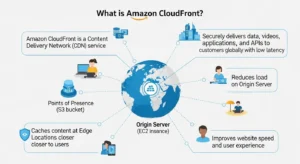
In one sentence: Amazon CloudFront is AWS’s programmable global CDN that accelerates content delivery, hardens security, and reduces latency by serving users from 400+ edge locations interconnected via the AWS private backbone network.
Common Misconception: Amazon CloudFront is NOT a web host. It does not store your application or replace your origin server. It is a delivery and security layer that sits in front of your origin — caching, accelerating, and protecting. Your origin still runs on S3, EC2, or wherever you choose.
How Does Amazon CloudFront Work?
The Three Core Components
Every CloudFront deployment has three essential building blocks:
| Component | What It Is | Examples |
| Origin | The source of your original content | AWS S3, Amazon EC2, Elastic Load Balancer, any public HTTP/HTTPS server |
| Edge Locations (PoPs) | Globally distributed cache servers close to users | 400+ locations across 90+ cities in 48+ countries |
| CloudFront Distribution | Your configuration unit — defines routing, caching, security, and behaviour rules | Web distribution for HTTP/HTTPS content |
Your origin can be an AWS S3 bucket for static assets, an Amazon EC2 instance or Elastic Load Balancer for your application, or any publicly accessible custom origin. You define the rules — CloudFront handles the global delivery.
The Content Delivery Workflow — Step by Step
- User makes a request — A visitor in Dubai types your URL or streams a video from your platform.
- DNS routes to nearest edge — Amazon Route 53 or your DNS provider uses Anycast routing to direct the request to the nearest CloudFront PoP — in this case, the Dubai or Bahrain edge.
- Cache check at edge — CloudFront checks whether the requested content is already stored (cached) at that PoP.
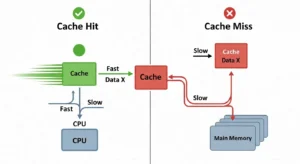
- Cache Hit — The content is cached. CloudFront serves it instantly with minimal latency. The origin server is never contacted.
- Cache Miss — The content is not cached. CloudFront forwards the request to your origin server.
- Origin fetch — Your origin responds with the requested content.
- Cache and deliver — CloudFront caches the content at the edge (based on your TTL settings) and delivers it to the user.
- All future requests — Served from the edge cache until TTL expires or you manually invalidate.
Pro Tip: The higher your cache hit ratio, the lower your origin load, bandwidth costs, and latency. Enable Origin Shield between your edge locations and your origin to push cache hit ratios even higher — consolidating all edge-to-origin traffic through one centralised cache layer.
Cache Hit vs Cache Miss Explained
| Term | Meaning | Business Impact |
| Cache Hit | Content found at edge; served immediately | Near-zero latency, no origin cost |
| Cache Miss | Content not at edge; fetched from origin | Slightly slower first delivery; subsequent requests served from edge |
| TTL (Time To Live) | How long content remains cached before expiry | Higher TTL = more cache hits, less origin load |
| Cache Invalidation | Manually purge cached content before TTL expires | First 1,000 paths/month free; useful after deployments |
| Origin Shield | Extra cache layer between all PoPs and origin | Reduces cache misses reaching your origin by 60–80% |
Key Features of Amazon CloudFront in 2026
Global Edge Network and Points of Presence
Amazon CloudFront’s network in 2026 consists of over 400 Points of Presence — including 400+ Edge Locations and 13 Regional Edge Caches — spread across 90+ cities in 48+ countries. Key hubs include London, New York, Dubai, Singapore, Frankfurt, São Paulo, and Tokyo.
All PoPs are interconnected via the AWS private backbone — a dedicated 100 GbE metro fiber network spanning the Atlantic, Pacific, and Indian Oceans. Your content travels between users and your origin on this private network, not the unpredictable public internet — resulting in more consistent latency and better performance.
| Network Metric | Amazon CloudFront | Cloudflare (comparison) |
| Total PoPs | 400+ | 330+ |
| Cities covered | 90+ | 120+ |
| Private backbone | AWS 100 GbE fiber | Cloudflare network |
| Regional edge caches | 13 | Multiple |
Security Features — DDoS, WAF, and SSL/TLS
Security is not a CloudFront add-on — it is a foundational layer built into every distribution:
| Security Feature | Detail | Cost |
| AWS Shield Standard | Automatic Layer 3/4 DDoS protection against volumetric and state exhaustion attacks | Free — included with all distributions |
| AWS Shield Advanced | Advanced application-layer DDoS protection with dedicated response team and cost protection | Paid add-on |
| AWS WAF (Web Application Firewall) | Filter malicious traffic via Web ACLs — OWASP Top 10, CVEs, SQL injection, XSS, bot management | Paid per rule/request |
| SSL/TLS via AWS Certificate Manager | Free SSL certificates, auto-renewed, no manual management | Free via ACM |
| HTTPS enforcement | Auto-redirect HTTP to HTTPS | Free |
| Origin Access Control (OAC) | Restrict S3 bucket access to CloudFront only — prevents direct public access | Free |
| Field-Level Encryption | Encrypt specific sensitive data fields (e.g., credit card numbers) end-to-end through the stack | Free (encryption feature) |
Pro Tip:
Always use Origin Access Control (OAC) — not the legacy Origin Access Identity (OAI) — when securing S3 origins. OAC is more secure, supports all S3 regions including AWS GovCloud, and supports SSE-KMS encrypted buckets. Never expose your S3 bucket publicly when CloudFront is in front of it.
Edge Computing — Lambda@Edge vs CloudFront Functions
One of CloudFront’s most powerful features is the ability to run code at the network edge — modifying requests and responses without round-tripping to your origin server. Two options are available, each suited to different use cases:
| Feature | CloudFront Functions | Lambda@Edge |
| Best For | Simple, lightweight tasks | Complex business logic |
| Max Execution Duration | Sub-millisecond | Up to 30 seconds |
| Languages Supported | JavaScript (ES5.1) | Node.js and Python |
| Maximum Memory | 2 MB | 128 MB – 10 GB (origin events) |
| Network Access | ❌ No | ✅ Yes |
| File System Access | ❌ No | ✅ Yes |
| Scale | Millions of requests/second | 10,000 requests/second per Region |
| KeyValueStore Access | ✅ Yes (JS runtime 2.0) | ❌ No |
| Cost | Cheapest option | Higher (Lambda pricing) |
| Ideal Use Cases | URL rewrites, header manipulation, JWT validation, cache key normalisation | A/B testing, auth flows, server-side rendering, image processing, third-party API calls |
Pro Tip:
Use CloudFront Functions for anything that runs in under 1ms — redirects, header manipulation, simple JWT checks. Reserve Lambda@Edge for operations requiring external API calls, file system access, or complex authentication logic. Lambda@Edge costs more and introduces more latency — do not use it for tasks CloudFront Functions can handle.
Deep AWS Integration
For teams building on AWS, CloudFront’s native ecosystem integrations are a decisive advantage over third-party CDNs:
| AWS Service | Integration Role |
| Amazon S3 | Static website hosting, private asset delivery, OAC-protected buckets |
| Amazon EC2 / ELB | Dynamic application origins with automatic failover |
| Amazon Route 53 | DNS routing, health-check-driven failover, Alias record support |
| AWS Certificate Manager (ACM) | Free SSL/TLS certificates provisioned and auto-renewed |
| AWS WAF | Web Application Firewall rules attached directly to distributions |
| AWS CloudWatch | Real-time metrics, alarms, and performance dashboards |
| AWS Kinesis Data Firehose | Real-time log streaming for analytics and SIEM integration |
| AWS IAM | Fine-grained access control for distribution management |
Data transfer from all AWS origins — S3, EC2, ELB, API Gateway — to CloudFront edge locations is completely free. You only pay for CloudFront’s delivery to end users.
Amazon CloudFront Use Cases
Static Website Hosting and S3 Integration
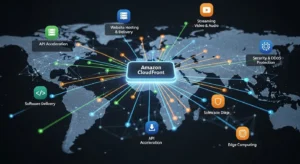
The most common CloudFront deployment: host your HTML, CSS, JavaScript, images, and fonts in Amazon S3 — then serve them globally through CloudFront. With Origin Access Control (OAC), your S3 bucket remains entirely private. No direct public access is possible — CloudFront is the only door in.
This pattern is the foundation for virtually every JAMstack deployment on AWS, providing global performance with zero server management.
Video Streaming and Media Delivery
CloudFront supports both on-demand (VOD) and live video streaming over HTTP/HTTPS. Integrated with AWS Elemental Media Services, it delivers adaptive bitrate (HLS/DASH) streams that automatically adjust video quality based on the viewer’s connection speed — eliminating buffering for audiences in London, New York, and Dubai simultaneously.
Media companies use CloudFront to distribute 4K content to millions of concurrent global viewers without maintaining their own CDN infrastructure.
API Acceleration and Backend Offloading
Even for dynamic, non-cacheable API responses, CloudFront reduces latency by:
- Terminating TLS close to the user — eliminating the slow HTTPS handshake from distant origins
- Maintaining persistent connections to the origin — no TCP setup overhead per request
- Routing traffic over the AWS private backbone — not the unpredictable public internet
For fintech companies in the UAE and UK processing time-sensitive API calls, this alone can reduce API response times by 30–60ms per request.
Software Distribution at Scale
Software companies use CloudFront to distribute application installers, game updates, OS patches, and large binary files at massive scale. When a new version launches and millions of users download simultaneously, CloudFront distributes the load across 400+ edge locations — your origin server sees a fraction of the actual request volume.
Security Perimeter and WAF Shield
Placing CloudFront in front of your origin creates an edge security perimeter. Every request passes through CloudFront before it reaches your application. AWS WAF rules filter based on OWASP Top 10 patterns and known CVEs. AWS Shield absorbs DDoS traffic before it can overwhelm your origin. Your application servers become invisible to the public internet.
Amazon CloudFront Pricing 2026 — Full Breakdown
CloudFront uses pay-as-you-go pricing with no upfront fees or minimum commitments. Pricing below reflects the US/Europe region baseline.
Full Pay-As-You-Go Pricing Table
| Pricing Component | Cost |
| Data Transfer Out — first 10 TB/month | $0.085 per GB |
| Data Transfer Out — next 40 TB/month | $0.080 per GB |
| Data Transfer Out — next 100 TB/month | $0.060 per GB |
| HTTP Requests | $0.0075 per 10,000 requests |
| HTTPS Requests | $0.0100 per 10,000 requests |
| Cache Invalidation — first 1,000 paths/month | Free |
| Cache Invalidation — beyond 1,000 paths | $0.005 per path |
| Origin Shield Requests | ~$0.0075 per 10,000 requests |
| Real-Time Log Lines | $0.01 per 1,000,000 lines |
| Data Transfer from AWS Origins to CloudFront | Free |
AWS Free Tier — What You Get
| Free Tier | Monthly Allowance | Duration |
| Always Free | 1 TB data transfer + 10M requests/month + 2M CloudFront Function invocations | Permanent, no expiry |
| 12-Month New User Free Tier | 50 GB data transfer out + 2M HTTP/HTTPS requests | 12 months from account creation |
Pro Tip: AWS now offers a permanent Always Free tier for CloudFront — 1 TB/month and 10 million requests/month — with no 12-month expiry restriction. This is ideal for personal projects, low-traffic websites, and developers testing CloudFront distributions.
Flat-Rate Pricing Plans (New in 2025/2026)
AWS introduced flat-rate plans that bundle CloudFront + WAF + DDoS protection + Route 53 DNS + SSL into one monthly price with no overage charges — even during DDoS attacks or traffic spikes:
| Plan | Monthly Price | Key Inclusions |
| Free | $0/month | 100 GB transfer, 1M requests |
| Pro | $15/month | CDN + WAF + DDoS + DNS + TLS + logging |
| Business | $200/month | All Pro features + higher limits |
| Premium | $1,000/month | Enterprise-scale with maximum limits |
CloudFront Security Savings Bundle
For teams committing to both CloudFront and AWS WAF usage, the CloudFront Security Savings Bundle offers savings of up to 30% versus separate pay-as-you-go pricing — ideal for established businesses with predictable monthly traffic volumes.
Amazon CloudFront vs Cloudflare — Head-to-Head Comparison 2026
| Feature | Amazon CloudFront | Cloudflare |
| Network Size | 400+ PoPs, 90+ cities | 330+ PoPs, 120+ countries |
| Free Tier | Always Free: 1 TB/mo + 10M req/mo | Generous free plan (unlimited bandwidth) |
| DDoS Protection | AWS Shield Standard (free), Advanced (paid) | Built-in, included in free tier |
| Edge Compute | Lambda@Edge + CloudFront Functions | Cloudflare Workers |
| AWS Integration | Native, deep (S3, EC2, WAF, Route 53, ACM) | Via third-party connectors |
| DNS Service | Amazon Route 53 | Cloudflare DNS (fastest globally ~11ms) |
| WAF | AWS WAF (paid add-on) | Included in Pro+ plans |
| SSL/TLS Certificates | Free via ACM | Free on all plans |
| Pricing Model | Pay-as-you-go + flat-rate plans | Free tier + paid tiers |
| Analytics Dashboard | AWS CloudWatch (powerful, less intuitive) | Built-in, very user-friendly |
| Traffic Routing Policies | Via Route 53 (8 policy types) | Basic DNS routing |
| Private VPC DNS | ✅ Yes (Route 53 Private Zones) | ❌ Not available |
| Ease of Setup | Moderate (AWS console knowledge needed) | Very easy, beginner-friendly |
| Multi-Cloud Support | AWS-native (less flexible for multi-cloud) | ✅ Excellent multi-cloud support |
| Best For | AWS-native workloads, enterprises on AWS | Multi-cloud setups, simplicity |
Honest Limitation: If your infrastructure is not on AWS, CloudFront loses most of its advantages over Cloudflare. The native integrations that make CloudFront exceptional — free S3 origin transfer, OAC, Lambda@Edge, Route 53 Alias records, ACM certificates — are all AWS-specific. For non-AWS workloads, Cloudflare is likely a simpler and more cost-effective choice.
Amazon CloudFront vs AWS Global Accelerator
These two AWS services are frequently confused. Here is when to use each:
| Feature | Amazon CloudFront | AWS Global Accelerator |
| Protocol | HTTP / HTTPS (Layer 7) | TCP / UDP (Layer 4) |
| Caching | ✅ Yes — core feature | ❌ No caching |
| Static IPs | ❌ No fixed IPs | ✅ 2 static Anycast IPs |
| Edge Compute | ✅ Lambda@Edge, CloudFront Functions | ❌ None |
| Best For | Web content, APIs, video, static assets | Gaming, IoT, VoIP, non-HTTP apps |
| Primary Benefit | Caching + content acceleration | Network path optimisation |
| Use When | Delivering web content globally | Fixed IPs needed or non-HTTP protocols |
Rule of thumb: If it is HTTP/HTTPS web content — use CloudFront. If it is TCP/UDP (gaming, VoIP, IoT) or you need static IPs — use Global Accelerator.
How to Get Started with Amazon CloudFront — Quick Setup Overview
Step 1 — Create an AWS Account
Go to aws.amazon.com and register. New accounts automatically qualify for the Always Free tier (1 TB/month, 10 million requests/month) with no commitment or credit card charge within free limits.
Step 2 — Set Up Your Origin (S3 or EC2)
Create an Amazon S3 bucket and upload your static files (HTML, CSS, images, JavaScript). Enable static website hosting on the bucket if needed. Alternatively, ensure your EC2 instance or Elastic Load Balancer endpoint is running and accessible via a public URL.
Step 3 — Create a CloudFront Distribution
In the AWS Console → CloudFront → Create distribution. Specify:
- Origin domain — your S3 bucket URL or EC2/ELB endpoint
- Origin access — select Origin Access Control (OAC) for S3 to block direct public bucket access
- Price class — choose geographic coverage based on your audience (All Locations or regional subset)
- Default root object — e.g., index.html
Step 4 — Configure Cache Behaviours and TTL
Set TTL values per content type for optimal caching:
| Content Type | Recommended TTL |
| Static images, fonts, CSS, JS | 86,400–604,800 seconds (1–7 days) |
| HTML pages (semi-static) | 300–3,600 seconds (5 min – 1 hour) |
| API responses (cacheable GETs) | 60–300 seconds |
| Dynamic / personalised content | 0 (bypass cache entirely) |
Step 5 — Enable SSL/TLS with AWS Certificate Manager
In your distribution settings, request a free certificate via AWS Certificate Manager (ACM). Select your domain, complete DNS validation (Route 53 handles this automatically if your domain is there), and CloudFront handles renewal indefinitely. Enable Redirect HTTP to HTTPS in viewer protocol policy.
Step 6 — Attach WAF Rules (Optional but Strongly Recommended)
Navigate to AWS WAF → Create Web ACL → Attach to your CloudFront distribution. Add AWS Managed Rule Groups to instantly protect against:
- OWASP Top 10 vulnerabilities
- Known bad inputs
- SQL database attacks
- Linux/PHP/WordPress-specific exploits
- Bot control and IP reputation filtering
Best Practices and Expert Recommendations
| # | Best Practice | Why It Matters |
| 1 | Use Origin Shield for all high-traffic origins | Reduces origin requests by up to 60–80%, cuts bandwidth costs |
| 2 | Enable OAC for S3, not legacy OAI | OAC is more secure, supports SSE-KMS and all S3 regions |
| 3 | Set TTL per content type | Balances freshness and caching efficiency — images vs HTML vs APIs |
| 4 | Use CloudFront Functions for simple rewrites/headers | Sub-millisecond execution at the cheapest cost point |
| 5 | Reserve Lambda@Edge for complex logic | Higher cost and latency — only justified for auth, SSR, image processing |
| 6 | Enable real-time logging to CloudWatch | Monitor cache hit ratios, error rates, and regional latency live |
| 7 | Use flat-rate or Security Savings Bundle | Save up to 30% vs pay-as-you-go for predictable traffic |
| 8 | Invalidate cache with wildcard paths | /* invalidates everything; first 1,000 paths/month are free |
Frequently Asked Questions About Amazon CloudFront
Q1: What is Amazon CloudFront used for?
Amazon CloudFront is AWS’s CDN service used to deliver static websites, dynamic web applications, video streams, APIs, and software globally with low latency. It integrates natively with S3, EC2, Route 53, WAF, and Lambda@Edge — serving users from 400+ edge locations worldwide with minimal latency and enterprise-grade security.
Q2: Is Amazon CloudFront free to use?
Yes. CloudFront now has a permanent Always Free tier — 1 TB data transfer/month and 10 million requests/month at zero cost, with no 12-month expiry. New AWS users also receive an additional 12-month free tier of 50 GB/month. Beyond free limits, CloudFront uses pay-as-you-go pricing with no minimum commitment.
Q3: What is the difference between Amazon CloudFront and a regular CDN?
Unlike generic CDNs, Amazon CloudFront is deeply integrated with the AWS ecosystem — enabling native, zero-friction connections with S3 (via OAC), EC2, Lambda@Edge, AWS WAF, Route 53, and AWS Certificate Manager. This gives AWS-native teams unified security, billing, access control, and observability in a single platform — something no third-party CDN can replicate.
Q4: How many edge locations does Amazon CloudFront have?
As of 2026, Amazon CloudFront operates 400+ Points of Presence (PoPs), including 400+ Edge Locations and 13 Regional Edge Caches, spread across 90+ cities in 48+ countries — all interconnected via the AWS private 100 GbE fiber backbone network.
Q5: What is Lambda@Edge in Amazon CloudFront?
Lambda@Edge lets you run AWS Lambda functions at CloudFront’s edge locations, modifying HTTP requests and responses in real time. It supports Node.js and Python, executes for up to 30 seconds, and is used for server-side rendering, A/B testing, authentication, personalisation, and ad insertion — without modifying your origin server or adding round-trip latency.
Conclusion — Is Amazon CloudFront the Right CDN for You?
Amazon CloudFront is a powerful, flexible, and cost-effective CDN with 400+ global PoPs, delivering content at sub-50ms latency. It includes built-in enterprise security, Lambda@Edge and CloudFront Functions for edge computing, and a permanent Always Free tier (1 TB/month) with flat-rate plans starting at $0.
CloudFront provides unmatched AWS integration, unified security control, and operational simplicity, making it ideal for startups, enterprises, and global applications. For expert guidance on deploying and optimizing CloudFront, GoCloud helps businesses maximize performance, security, and cost efficiency.