


What is Amazon EKS?
78% of companies running containers in the public cloud use AWS — making Amazon EKS the most critical managed Kubernetes service on the planet. Yet, managing Kubernetes at scale remains one of the most complex challenges in modern cloud infrastructure. Setting up control planes, patching nodes, ensuring high availability across regions — done manually, these tasks consume thousands of engineering hours every year.
That’s exactly the problem Amazon EKS (Amazon Elastic Kubernetes Service) was built to solve.
In this complete guide, you’ll learn what Amazon EKS is, how it works, how its architecture is structured, what it costs, and when to use it — versus competitors like Google GKE and Azure AKS. Whether you’re a CTO evaluating container strategy, a DevOps engineer ready to deploy your first cluster, or a backend developer moving from monoliths to microservices, this guide gives you everything you need.
Amazon EKS vs. Vanilla Kubernetes: Key Differences
Amazon EKS is AWS’s fully managed implementation of Kubernetes. Kubernetes (K8s) is the open-source container orchestration platform originally developed by Google — it automates deploying, scaling, and managing containerized applications.
The key difference: with vanilla Kubernetes, your team manages the control plane — API servers, etcd, scheduler, and controller manager — across multiple availability zones. With Amazon EKS, AWS manages all of that for you. You only manage your worker nodes and application workloads.
| Amazon EKS | Self-Managed Kubernetes | |
| Control Plane Management | AWS manages | Your team manages |
| HA Across Availability Zones | Automatic | Manual configuration |
| Security Patching | AWS handles | Your responsibility |
| Kubernetes Version Upgrades | Managed (with control) | Manual |
| AWS Service Integration | Deep native | Manual setup |
Why Container Orchestration Matters in 2026
The Rise of Kubernetes: Industry Statistics
Container adoption has exploded over the past five years. From 2020 to 2021 alone, the number of Kubernetes engineers grew by 67%, reaching 3.9 million globally — representing 31% of all backend developers. Today, Kubernetes is the fastest-growing open-source project in history after Linux.
As businesses scale their microservices architectures, the number of containerized applications they manage increases exponentially. A startup running 10 containers today may be managing 10,000 within two years. Without orchestration, that’s unmanageable.
Container orchestration automates container deployment, scaling, scheduling, and networking — cutting manhours, reducing operational costs, and eliminating single points of failure that would otherwise bring production systems down.
Why Businesses Choose Managed Kubernetes Over Self-Managed
Running Kubernetes yourself means your engineers spend time on infrastructure — not on building products. Data shows approximately 70% of developers now use container orchestration tools, and the majority prefer managed services for one simple reason: they eliminate undifferentiated heavy lifting.
With managed Kubernetes like Amazon EKS, teams benefit from:
- Reduced operational overhead — no control plane to install, patch, or scale
- Built-in high availability — master nodes distributed across multiple AWS Availability Zones
- AWS ecosystem access — IAM, VPC, ELB, CloudWatch, and EBS work natively
- Faster time-to-production — focus on application code, not cluster infrastructure
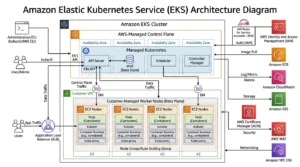
How Amazon EKS Works: Core Architecture Explained
Understanding what is Amazon EKS and how does it work starts with its two-layer architecture.
The Kubernetes Control Plane (Managed by AWS)
Amazon EKS operates with three Kubernetes master nodes distributed across three separate AWS Availability Zones within a region. This ensures that even if one zone experiences an outage, your applications continue running on the remaining two.
The control plane includes:
- Kubernetes API Server — the front-end for the Kubernetes control plane
- etcd — the distributed key-value store holding cluster state
- Scheduler and Controller Manager — handle pod placement and state reconciliation
You cannot directly access the control plane — AWS manages it entirely through EKS. All interaction happens through kubectl, the Kubernetes command-line tool, or the AWS Management Console.
Worker Nodes: EC2 vs. AWS Fargate
Worker nodes are where your actual containerized applications run. With Amazon EKS, you have two options:
- Amazon EC2 instances — You control the node configuration, instance type, OS, and networking. Best for GPU workloads, custom configurations, and cost control via Reserved Instances.
- AWS Fargate serverless containers — Fully serverless. AWS manages the underlying infrastructure entirely. No EC2 instance selection required. Best for unpredictable workloads and teams that want zero infrastructure management.
EKS and the AWS Ecosystem Integrations
Amazon EKS integrates natively with the entire AWS service ecosystem — a major advantage over self-managed Kubernetes:
| Category | AWS Services Integrated |
| Networking | Amazon VPC, ELB, AWS PrivateLink |
| Storage | Amazon EBS, Amazon EFS, Amazon S3 |
| Security | AWS IAM, AWS KMS, AWS Shield |
| Monitoring | Amazon CloudWatch, AWS CloudTrail, AWS X-Ray |
| CI/CD | AWS CodePipeline, ArgoCD, Jenkins, GitLab |
Amazon EKS Deployment Options
Amazon EKS explained for beginners often starts with a key question: which deployment model fits your use case?
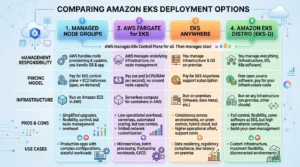
Standard EKS (Managed Node Groups)
AWS provisions, scales, and manages your EC2 worker nodes automatically. Best for most production workloads — combines control with operational simplicity.
Self-Managed Nodes
You deploy and configure your own EC2 instances as worker nodes. Provides maximum customization — required for specialized hardware like GPU instances or custom OS images.
AWS Fargate with EKS (Serverless)
No node management at all. Define your Kubernetes pods, and Fargate provisions the compute dynamically. Ideal for stateless microservices, batch processing, and teams with no desire to manage infrastructure.
Amazon EKS Anywhere (Hybrid & On-Premises)
Run EKS-managed Kubernetes clusters in your own data center using the same tooling and APIs as AWS cloud EKS. Powered by AWS Outposts or standalone on-premises hardware. Delivers a consistent hybrid cloud Kubernetes experience.
Amazon EKS Distro
The exact same Kubernetes distribution that powers Amazon EKS — available for you to deploy anywhere: on-premises, another cloud, or your own laptop. Gives you consistency without vendor lock-in.
Key Features of Amazon EKS
Automated Control Plane Management
EKS automatically provisions, scales, and patches the Kubernetes control plane. Kubernetes version upgrades can be performed with a single API call, eliminating multi-day manual upgrade procedures.
Built-in Security: IAM, RBAC, KMS, and VPC
- AWS IAM handles authentication — no separate identity provider needed
- Kubernetes RBAC provides fine-grained, role-based access control within clusters
- AWS KMS encrypts secrets at rest
- Amazon VPC provides network isolation; traffic between nodes and the control plane is encrypted via TLS
- AWS Shield offers built-in DDoS protection
Auto-Scaling with Cluster Autoscaler & HPA
- Kubernetes Cluster Autoscaler automatically adjusts the number of EC2 worker nodes based on pending pod demand
- Horizontal Pod Autoscaler (HPA) scales individual pod replicas based on CPU, memory, or custom CloudWatch metrics
Multi-Region and High Availability
EKS runs master nodes across three Availability Zones by default, with automatic failover. Cross-region deployments are supported for globally distributed applications.
Native AWS Service Integrations (EBS, ELB, CloudWatch)
Persistent storage via Amazon EBS, traffic distribution via Elastic Load Balancing, and comprehensive monitoring via Amazon CloudWatch are available out of the box — no manual integration required.
Amazon EKS Use Cases
Understanding what is AWS EKS used for helps you determine whether it’s right for your workload.
Microservices and Web Applications
EKS is the go-to platform for deploying microservices-based web applications. Its automatic scaling, high availability, and load balancing make it ideal for handling variable traffic — from steady-state to viral spikes.
Machine Learning Workloads (TensorFlow, PyTorch)
EKS integrates natively with AWS SageMaker, Amazon S3 (data storage), and GPU-enabled EC2 instances. Teams running TensorFlow or PyTorch training jobs benefit from EKS’s dynamic resource allocation and Kubernetes-native ML frameworks like Kubeflow.
CI/CD Pipelines and DevOps
Development teams use EKS as the runtime environment for CI/CD pipelines built with AWS CodePipeline, Jenkins, GitLab, or ArgoCD. GitOps workflows using tools like Helm and Terraform deploy infrastructure-as-code changes directly to EKS clusters.
Hybrid Cloud and Multi-Cloud Deployments
With EKS Anywhere, enterprises running sensitive on-premises workloads alongside AWS cloud services maintain a consistent Kubernetes management experience across environments — critical for regulated industries.
Regulated Industries: Healthcare, Finance, and E-Commerce
EKS supports HIPAA-eligible, PCI DSS, and ISO-compliant deployments. Financial services firms run EKS for secure fintech applications; healthcare providers use it for HIPAA-compliant patient data platforms.
Amazon EKS Pricing: How Much Does EKS Cost?
EKS Cluster Control Plane Cost
Amazon EKS charges $0.10 per cluster per hour (~$72/month) for the managed Kubernetes control plane. This applies regardless of the number of worker nodes or overall cluster utilization.
Worker Node Costs (EC2 vs. Fargate)
- EC2 worker nodes: Billed at standard EC2 On-Demand, Reserved, or Spot Instance rates based on instance type and region
- AWS Fargate: Billed per vCPU and GB of memory per second, with a one-minute minimum
EKS Auto Mode Pricing
EKS Auto Mode (fully automated node lifecycle management) charges are based on the EC2 instances launched and managed by EKS Auto Mode — billed per second, independent of Reserved Instance or Spot options.
EKS Hybrid Nodes Pricing
Amazon EKS Hybrid Nodes pricing is based on monthly vCPU-hour usage and varies by usage tier.
Tips to Reduce Your EKS Bill
- Use Spot Instances for non-critical worker node capacity (up to 90% savings)
- Enable Cluster Autoscaler to terminate idle nodes automatically
- Right-size node instances with AWS Compute Optimizer recommendations
- Use Fargate Spot for interruptible stateless workloads
- Delete unused clusters — you’re billed $0.10/hr even for idle clusters
Amazon EKS vs. Competitors
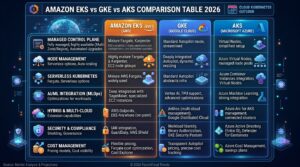
Comparison Table: EKS vs. GKE vs. AKS vs. Self-Managed Kubernetes
| Feature | Amazon EKS | Google GKE | Azure AKS | Self-Managed K8s |
| Control Plane Managed | ✅ Yes | ✅ Yes | ✅ Yes | ❌ No |
| Serverless Option | ✅ Fargate | ✅ Autopilot | ✅ Virtual Nodes | ❌ No |
| Hybrid Support | ✅ EKS Anywhere | ✅ Anthos | ✅ Arc | ✅ Manual |
| Pricing (Control Plane) | $0.10/hr | Free | Free | Free |
| AWS-Native Integration | ✅ Deep | ⚠️ Limited | ⚠️ Limited | ❌ Manual |
| Multi-Region Support | ✅ Yes | ✅ Yes | ✅ Yes | ✅ Manual |
| ARM/Graviton Support | ✅ Yes | ✅ Yes | ✅ Yes | ✅ Manual |
Amazon EKS vs. Google Kubernetes Engine (GKE)
GKE offers a free control plane and is deeply integrated with Google Cloud services — a strong choice for teams already on GCP. Amazon EKS wins for teams in the AWS ecosystem, offering unparalleled integration with IAM, VPC, ELB, and 200+ other AWS services.
Amazon EKS vs. Azure Kubernetes Service (AKS)
AKS also provides a free control plane with strong Azure Active Directory integration. EKS is the better choice for AWS-first organizations — especially those leveraging EC2 Reserved Instances, Amazon RDS, ElastiCache, or AWS SageMaker.
Amazon EKS vs. Amazon ECS
Amazon ECS is Amazon’s proprietary container orchestration service — simpler and fully integrated with AWS but not portable to other clouds. EKS runs standard Kubernetes, making it portable across cloud providers and compatible with the vast Kubernetes ecosystem of tools.
Amazon EKS vs. AWS Fargate (Standalone)
Fargate can run containers via ECS without Kubernetes entirely. EKS + Fargate combines Kubernetes orchestration power with serverless infrastructure. For teams that don’t need Kubernetes APIs, ECS + Fargate is simpler. For teams already using K8s, EKS + Fargate is the natural fit.
Best Practices for Managing Amazon EKS
Automate with IaC (Terraform, CloudFormation)
Use Terraform or AWS CloudFormation to define your EKS clusters as code. This ensures reproducibility, version control, and disaster recovery. Tools like eksctl provide quick CLI-based cluster creation.
Implement Least Privilege with IAM and RBAC
Grant the minimum permissions necessary. Use AWS IAM roles (not access keys) for EKS worker nodes. Configure Kubernetes RBAC with namespace-scoped roles to prevent lateral movement within clusters.
Optimize Performance with Auto-Scaling
Enable both the Kubernetes Cluster Autoscaler (node-level scaling) and Horizontal Pod Autoscaler (pod-level scaling). Set resource requests and limits on all pods to help the scheduler make accurate placement decisions.
Monitor with CloudWatch and AWS X-Ray
Deploy the CloudWatch Container Insights add-on for real-time metrics on pod health, node utilization, and network performance. Use AWS X-Ray for distributed tracing across microservices — critical for identifying latency bottlenecks in complex service meshes.
Keep Clusters Updated and Patched
AWS provides standard Kubernetes version support for 14 months post-release, followed by extended support for another 12 months at a higher rate. Regularly test version upgrades in staging environments before applying to production.
How to Get Started with Amazon EKS (Quick-Start Checklist)
Getting started with Amazon EKS explained for beginners — follow these steps:
- Create an AWS Account and enable the EKS service in the AWS Management Console
- Install prerequisites — AWS CLI, kubectl, and eksctl (the official EKS CLI tool)
- Create your EKS cluster — use eksctl create cluster or the AWS Console wizard
- Choose your compute type — Managed Node Groups (EC2) or Fargate (serverless)
- Configure networking — set up your VPC, subnets, and security groups
- Deploy your application — apply Kubernetes manifests using kubectl apply
- Set up monitoring — enable CloudWatch Container Insights and AWS X-Ray
- Configure auto-scaling — install the Cluster Autoscaler and define HPA policies
- Secure your cluster — configure IAM roles, RBAC policies, and KMS encryption
- Set up a CI/CD pipeline — integrate with AWS CodePipeline, GitHub Actions, or ArgoCD
Frequently Asked Questions About Amazon EKS
Q1: What is Amazon EKS in simple terms? Amazon EKS (Elastic Kubernetes Service) is a fully managed AWS service that runs Kubernetes for you — handling the control plane, patching, and high availability so you don’t have to. You focus on deploying apps; AWS manages the infrastructure.
Q2: What is the difference between Amazon EKS and Amazon ECS? ECS is Amazon’s proprietary container orchestration service, while EKS is based on open-source Kubernetes. ECS is simpler and AWS-native; EKS offers Kubernetes portability and a massive ecosystem of tools for teams already using K8s.
Q3: Is Amazon EKS free? No. EKS charges $0.10 per hour per cluster for the managed control plane (~$72/month). You also pay separately for EC2 worker node instances or Fargate compute resources.
Q4: What is the difference between EKS and Kubernetes? Kubernetes is the open-source container orchestration platform. Amazon EKS is AWS’s fully managed implementation of Kubernetes, which removes the burden of managing the control plane, upgrades, and availability.
Q5: Can Amazon EKS run on-premises? Yes. Amazon EKS Anywhere allows you to run EKS-managed Kubernetes clusters in your own data center or on-premises infrastructure, providing a consistent experience across cloud and on-prem environments.
Q6: What is the difference between EKS managed node groups and self-managed nodes? Managed node groups let AWS handle provisioning, scaling, and updating your worker nodes automatically. Self-managed nodes give you full control over configuration but require more manual operational effort.
Q7: When should I use AWS Fargate with EKS instead of EC2? Use Fargate with EKS when you want fully serverless Kubernetes — no EC2 instance management at all. It’s best for unpredictable workloads. Use EC2 nodes when you need GPU support, custom configurations, or cost control through Reserved Instances.
Q8: How does Amazon EKS handle security? EKS uses AWS IAM for authentication, Kubernetes RBAC for authorization, Amazon VPC for network isolation, AWS KMS for data encryption, and AWS Shield for DDoS protection. You can also use GuardDuty for threat detection.
Q9: How many Kubernetes worker nodes can I run in EKS? Amazon EKS supports up to 450 nodes and 110 pods per node by default, though these limits can be increased by requesting a quota increase from AWS Support.
Q10: How does EKS pricing compare to running Kubernetes on EC2 without EKS? EKS adds ~$0.10/hr per cluster but eliminates the need to manage the control plane manually. Without EKS, control plane management, patching, and high availability are your responsibility — often costing more in engineering time than the $72/month fee.
Conclusion
Amazon EKS is the undisputed leader in managed Kubernetes services for teams building and scaling cloud-native applications on AWS. From automated control plane management to deep AWS ecosystem integrations — IAM, CloudWatch, ELB, and EBS — EKS removes the infrastructure complexity that slows engineering teams down. If you want to learn more about AWS services and how they can benefit your business, visit GoCloud for detailed insights.
Here are the key takeaways from this guide:
- ✅ EKS removes control plane complexity — AWS manages it so your team doesn’t have to
- ✅ Supports EC2 nodes, Fargate (serverless), and hybrid deployments via EKS Anywhere
- ✅ Deep AWS ecosystem integrations with IAM, CloudWatch, ELB, EBS, KMS, and 200+ services
- ✅ Pay $0.10/hr per cluster + worker node costs (EC2 or Fargate rates)
- ✅ Use EKS Anywhere for consistent Kubernetes management across cloud and on-premises
Ready to deploy your first EKS cluster? Start with the AWS Free Tier, explore our guide on AWS Fargate serverless containers, and dive deeper into EC2 instance types to choose the right worker node configuration for your workloads.
As AI workloads and edge computing grow in 2026, Amazon EKS continues to expand — with EKS Auto Mode, deeper ML integrations via SageMaker, and stronger multi-cloud capabilities — cementing its position as the Kubernetes platform of choice for enterprise teams worldwide.

