The Database Management Challenge in the Cloud Era
The average enterprise manages over 163 terabytes of data — and that number is growing faster than most IT teams can keep up with. Behind every web application, SaaS platform, e-commerce store, and enterprise system sits a relational database that needs to be provisioned, patched, backed up, scaled, secured, and monitored around the clock. Doing all of that manually, on self-managed infrastructure, is one of the most resource-intensive responsibilities a development or operations team can carry.
That is precisely the problem Amazon RDS was designed to solve. Amazon RDS, short for Amazon Relational Database Service, is a fully managed cloud database service from Amazon Web Services (AWS) that handles the heavy lifting of database administration so your team can focus entirely on building applications. Whether you are a CTO evaluating cloud infrastructure options, a developer setting up your first production database, a database administrator looking to migrate an on-premise RDBMS to the cloud, or a DevOps engineer managing a microservices stack, understanding Amazon RDS is foundational to working effectively in the AWS ecosystem.
This guide covers everything you need to know about Amazon RDS in 2026: how it works under the hood, which database engines it supports, its key features, how it compares to running a database on EC2, real pricing figures, and a step-by-step guide to getting started. By the end, you will have a clear picture of whether Amazon RDS is the right choice for your workload — and how to get the most out of it if it is.
What Is Amazon RDS?
Amazon RDS (Amazon Relational Database Service) is a fully managed, cloud-based relational database service offered by Amazon Web Services. Launched in October 2009, it automates the setup, operation, patching, backups, and scaling of relational databases in the cloud, supporting six database engines. It operates as a Database as a Service (DBaaS) — a Platform as a Service (PaaS) model where AWS manages the infrastructure layer so developers and businesses interact only with the database itself.
It is important to understand that Amazon RDS is not a database engine itself. It is a management layer — a service that runs your chosen database engine (MySQL, PostgreSQL, Oracle, and others) inside an isolated, managed environment called a DB instance, hosted on AWS’s global cloud infrastructure.
What Is a Relational Database? (Quick Background)
A relational database organizes data into tables made up of rows and columns, where relationships between tables are defined and enforced through keys and constraints. You interact with a relational database using SQL (Structured Query Language) — writing queries to insert, retrieve, update, and delete records. Examples include a customer table linked to an orders table, or a products table linked to an inventory table. The relational model enforces data integrity through normalization, foreign keys, and transactional guarantees (ACID compliance — Atomicity, Consistency, Isolation, Durability).
This stands in contrast to NoSQL databases, which store data as key-value pairs, documents, wide-column records, or graph structures. NoSQL databases excel at horizontal scale and flexible schemas — but for structured enterprise data with complex relationships, compliance requirements, and reporting needs, relational database management systems (RDBMSs) remain the dominant choice. Applications like ERP systems, e-commerce platforms, financial systems, healthcare records, and SaaS backends almost universally depend on relational databases.
How Does Amazon RDS Work? (Architecture Breakdown)
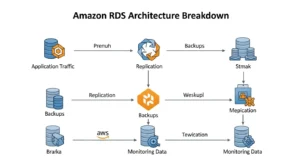
Under the hood, Amazon RDS is built on top of Amazon EC2 infrastructure. When you create a database in RDS, AWS provisions an EC2 instance behind the scenes, installs and configures your chosen database engine on it, and attaches Amazon EBS (Elastic Block Store) volumes for storage. However, you never interact with that EC2 instance directly — you access only the database endpoint, and AWS manages everything at the operating system and infrastructure level.
The fundamental unit in Amazon RDS is the DB instance — an isolated database environment that can run one or more databases of your chosen engine. Each DB instance runs in a specific AWS Region and Availability Zone, and is associated with a DB instance class that defines its CPU, memory, and network capacity. Access to the DB instance is controlled through AWS IAM (Identity and Access Management) policies, VPC security groups, and database-level user credentials. Automated backups are taken daily via EBS snapshots and transaction logs, enabling both daily restore points and granular point-in-time recovery. Manual database snapshots can also be triggered at any time and retained indefinitely.
Amazon RDS supports three storage types. General Purpose SSD (gp2/gp3) is the default and delivers a balance of price and performance suitable for most workloads, with a baseline of 3 IOPS per GB and the ability to burst. Provisioned IOPS SSD (io1/io2) is designed for I/O-intensive workloads such as large transactional databases, delivering consistent IOPS (input/output operations per second) independent of storage capacity — you specify the exact IOPS your application requires. Magnetic storage is a legacy option now rarely used in new deployments, appropriate only for infrequently accessed, cost-sensitive workloads.
For high availability, Amazon RDS offers Multi-AZ deployment. When enabled, RDS automatically provisions a synchronous standby replica in a different Availability Zone in the same AWS Region. Every write to the primary DB instance is simultaneously replicated to the standby. If the primary instance fails — due to hardware failure, AZ outage, or maintenance — RDS automatically fails over to the standby with no manual intervention, typically within 60 to 120 seconds. The application connects via a DNS endpoint that automatically points to whichever instance is currently primary.
For read scalability, Amazon RDS supports read replicas — read-only copies of the primary database that receive asynchronous replication of writes. Read replicas offload read-heavy query traffic from the primary instance, improving overall throughput. You can have up to 15 read replicas for Amazon Aurora and up to 5 for MySQL and PostgreSQL. In a failure scenario, a read replica can be manually promoted to become a standalone primary database.
The Separation of Duty Principle
The best way to understand what Amazon RDS does is through the principle of separation of duty. Think of it like opening a restaurant. A traditional on-premise database setup is like buying a commercial kitchen from scratch — you purchase and install every appliance, handle the plumbing and electrical work, maintain the equipment, and deal with every breakdown yourself. Amazon RDS is like renting a fully equipped commercial kitchen — everything is set up, maintained, and upgraded by the landlord. You walk in, use the kitchen to cook your food, and leave the maintenance to someone else.
In practical terms, this means AWS handles database software patching, operating system updates, hardware replacement, storage provisioning, automated backups, failure detection, and failover. What you retain full control over is everything that makes your database yours: your schema design, SQL queries, database configurations, instance type selection, storage sizing, and access policies. This division of responsibility is why Amazon RDS is classified as a Platform as a Service (PaaS) offering rather than Infrastructure as a Service (IaaS).
Multi-AZ vs. Read Replicas: What’s the Difference?
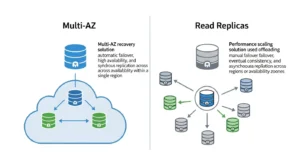
These two features are frequently confused. Here is a direct comparison:
| Feature | Multi-AZ Deployment | Read Replicas |
| Purpose | High availability and failover | Read scalability and performance |
| Replication Type | Synchronous | Asynchronous |
| Automatic Failover | Yes — automatic, DNS-based | No — manual promotion required |
| Accepts Read Traffic | No — standby is passive | Yes — read-only queries |
| Cross-Region Support | No (same region) | Yes — cross-region replicas supported |
| Availability SLA | 99.95% uptime | No specific SLA |
| Use Case | Production workloads, disaster recovery | Reporting, analytics, read-heavy apps |
Amazon RDS Database Engines — Which One Should You Choose?
Amazon RDS supports six database engines: five third-party engines and one AWS-native engine. Each has distinct strengths, licensing models, and ideal use cases. Here is a summary:
| Engine | Type | Best For | Key Strength | Licensing |
| Amazon Aurora | AWS-native (MySQL/PostgreSQL compatible) | High-performance cloud apps | 5x faster than MySQL, serverless option | Included in RDS pricing |
| MySQL | Open-source RDBMS | Web apps, CMS, e-commerce | Wide community, cost-effective | Free (open-source) |
| PostgreSQL | Open-source object-RDBMS | Complex queries, analytics, geospatial | ACID compliance, extensibility | Free (open-source) |
| MariaDB | Open-source MySQL fork | Cloud-first apps, fast replication | Transparent development, performance | Free (open-source) |
| Oracle | Commercial RDBMS | Enterprise ERP, large data volumes | Mature ecosystem, advanced features | BYOL or License Included |
| Microsoft SQL Server | Commercial RDBMS | Windows apps, .NET integration | Row-level security, HIPAA workloads | BYOL or License Included |
Amazon Aurora — AWS’s Cloud-Native Database
Amazon Aurora is AWS’s own cloud-native relational database engine, fully compatible with both MySQL and PostgreSQL. It is designed from the ground up for the cloud and delivers up to five times the throughput of standard MySQL and up to three times that of standard PostgreSQL on the same hardware. Aurora stores data across three Availability Zones with six-way replication by default, providing exceptional durability without additional configuration.
Aurora Serverless v2 is the evolution of the Aurora architecture and one of the most significant developments in managed databases in recent years. It automatically scales compute capacity up or down in fine-grained increments — measured in Aurora Capacity Units (ACUs) — in response to actual application demand. As of August 2025, Aurora Serverless v2 supports scaling from zero ACUs (complete auto-pause during inactivity) up to 256 ACUs, and offers up to 30% performance improvements over the previous serverless platform. When your database is paused, you pay nothing for compute — only for storage. This makes Aurora Serverless v2 ideal for development environments, variable workloads, and applications with unpredictable traffic spikes, potentially delivering up to 90% cost savings compared to provisioned Aurora instances for intermittent workloads.
MySQL — The Developer’s Favorite
MySQL is the world’s most widely deployed open-source relational database and the default choice for countless web applications. On Amazon RDS, MySQL is easy to get started with, cost-efficient, and integrates seamlessly with popular frameworks and platforms including WordPress, Laravel, Django, and most e-commerce solutions. RDS for MySQL supports versions 8.0 and above and handles automated minor version upgrades during your configured maintenance window. For any team already running MySQL on-premise or on a VPS, migrating to RDS for MySQL is the most straightforward path to a managed cloud database.
PostgreSQL — Power and Flexibility
PostgreSQL is an open-source, object-relational database system known for its strict ACID compliance, rich feature set, and extensibility. It supports advanced data types (JSON, arrays, hstore), full-text search, window functions, and geospatial queries via the PostGIS extension — making it the preferred choice for complex analytical queries, data engineering pipelines, and applications that need more than standard SQL. RDS for PostgreSQL supports a wide range of extensions and is the engine of choice for teams building data-intensive applications, ETL pipelines, or anything requiring robust query planning and sophisticated indexing strategies.
MariaDB — MySQL’s Open-Source Fork
MariaDB originated as a community-driven fork of MySQL, created in response to Oracle’s acquisition of Sun Microsystems, and has since developed its own optimizations and features. On Amazon RDS, MariaDB delivers faster replication than MySQL in many configurations, transparent open-source development, and strong compatibility with MySQL-based applications. It is a solid choice for teams who want the familiarity of MySQL with greater confidence in the open-source governance model.
Oracle — Enterprise-Grade Workloads
Oracle Database on RDS is aimed at large enterprises running legacy ERP systems, financial applications, or data warehouses that require Oracle’s mature, feature-rich ecosystem. It supports two licensing models: Bring Your Own License (BYOL) for organizations already holding Oracle licenses, and License Included, where the Oracle license cost is bundled into the hourly instance price. Oracle on RDS is the most expensive option and is typically chosen when application compatibility with Oracle-specific features — such as advanced partitioning, Oracle RAC compatibility, or PL/SQL stored procedures — is a hard requirement.
Microsoft SQL Server — Windows-Native Integration
Microsoft SQL Server on Amazon RDS is the right choice for organizations running .NET applications, Windows-based enterprise stacks, or systems that leverage SQL Server-specific features such as SQL Server Reporting Services (SSRS), row-level security, and Always Encrypted. It is a natural fit for HIPAA and HITECH compliant workloads in healthcare and financial services, where SQL Server’s native audit and encryption capabilities simplify compliance. Like Oracle, SQL Server is available in both BYOL and License Included configurations. In November 2025, AWS added Multi-AZ support for SQL Server Web Edition, making high availability accessible for a broader range of SQL Server deployment tiers.
Top Features of Amazon RDS
1. High Availability with Multi-AZ
Multi-AZ deployment is the cornerstone of Amazon RDS’s high availability story. When you enable Multi-AZ, RDS synchronously replicates every database write to a standby instance in a different Availability Zone within the same AWS Region. If the primary instance becomes unavailable — due to hardware failure, network disruption, or a planned maintenance event — RDS automatically fails over to the standby by updating the DNS record for your DB endpoint. Applications reconnect to the same endpoint address without requiring code changes. RDS provides a 99.95% uptime SLA for Multi-AZ deployments, making it suitable for production workloads with strict availability requirements.
2. Automated Backups and Point-in-Time Recovery
Amazon RDS takes automated daily backups of your DB instance during a configurable backup window. These backups are stored in Amazon S3 and can be retained for between 1 and 35 days. In addition to daily snapshots, RDS captures transaction logs every five minutes. Together, these enable Point-in-Time Recovery (PITR) — the ability to restore your database to any specific second within your backup retention window. This is significantly more powerful than simple daily backups. If a developer accidentally truncates a table at 2:47 PM, you can restore the database to 2:46 PM with surgical precision, recovering all data up to that exact moment. Manual snapshots are separate from automated backups and can be retained indefinitely — they are not deleted when you terminate a DB instance.
3. Easy Vertical and Horizontal Scalability
Amazon RDS supports both vertical scaling (changing the DB instance class to add more CPU and memory) and horizontal scaling (adding read replicas to distribute read traffic). Vertical scaling can be performed with a few clicks in the AWS console and takes effect during the next maintenance window or immediately if you choose to apply changes right away. Storage can be scaled up at any time without downtime — RDS supports Auto Scaling for storage, which automatically increases allocated storage when it approaches capacity. For Aurora, compute capacity scales automatically and continuously with Aurora Serverless v2, eliminating the need to manually right-size instances for variable workloads.
4. Security — IAM, VPC, Encryption, and Compliance
Security in Amazon RDS is implemented at multiple layers. At the network level, all RDS instances run inside an Amazon VPC (Virtual Private Cloud), giving you complete control over inbound and outbound traffic through security groups and network ACLs. Instances can be placed in private subnets with no internet exposure, accessible only from specific application servers or through an encrypted VPN or AWS Direct Connect connection. At the data level, RDS supports encryption at rest using AES-256 encryption backed by AWS KMS (Key Management Service), covering all data, automated backups, read replicas, and snapshots. Encryption in transit is enforced using SSL/TLS for all connections. Access control uses AWS IAM for authentication and authorization alongside database-native user credentials. AWS handles automated security patching during your configured maintenance window. Amazon RDS holds compliance certifications for HIPAA, HITECH, GDPR, PCI-DSS, FedRAMP, SOC 1/2/3, and ISO 27001, making it suitable for regulated workloads across healthcare, financial services, and government sectors in the US, UK, UAE, and globally.
5. Performance Insights and CloudWatch Monitoring
AWS Performance Insights is a database performance monitoring tool built into Amazon RDS that makes it easy to identify bottlenecks and diagnose slow queries. It provides a visual dashboard showing database load by SQL query, wait type, user, or host — allowing you to pinpoint exactly which query is consuming the most resources at any given moment. It retains up to two years of performance history (with the paid tier), making trend analysis and capacity planning straightforward. Amazon CloudWatch complements Performance Insights with infrastructure-level metrics: CPU utilization, free storage space, database connections, read/write IOPS, replication lag, and more. You can configure CloudWatch alarms to notify your team via Amazon SNS when any metric crosses a threshold — for example, alerting when CPU exceeds 80% for more than five consecutive minutes.
Amazon RDS vs. EC2 Database: Which Should You Choose?
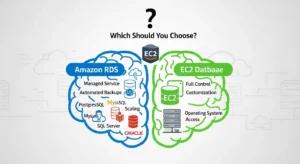
One of the most common questions teams face when moving to AWS is whether to use Amazon RDS or simply install their database on an EC2 instance themselves. Both approaches work — but they represent fundamentally different tradeoffs.
| Criterion | Amazon RDS | EC2 + Self-Managed Database |
| Management Overhead | Low — AWS handles patching, backups, HA | High — your team owns everything |
| Scalability | Built-in vertical scaling, read replicas, Aurora auto-scale | Manual — requires scripting or tooling |
| HA and Failover | Automatic (Multi-AZ, DNS-based failover) | Manual — you build HA architecture |
| Automated Backups | Built-in with PITR (up to 35-day retention) | Custom scripts or third-party tools |
| Cost | Higher hourly rate, but no DBA operational overhead | Lower infrastructure cost, higher labor cost |
| Engine Flexibility | 6 supported engines, managed versions only | Any engine, any version, any extension |
| Root/OS Access | Not available | Full root access |
| Best For | Most production workloads, teams without dedicated DBAs | Niche requirements, full OS control, unsupported engines |
When RDS Wins
Amazon RDS is the right choice for the vast majority of production workloads. If your team does not have a dedicated, experienced DBA, the time cost of managing patching cycles, backup verification, replication monitoring, and failover testing on a self-managed EC2 database quickly exceeds any cost saving from cheaper compute. RDS is also the clear winner for teams with compliance requirements — the built-in encryption, audit logging, and certified compliance posture would take months to replicate on a self-managed EC2 instance. For startups, SaaS products, and scale-up teams, RDS removes an entire category of operational risk from the day your database goes live.
When EC2 Database Wins
There are legitimate edge cases where running a database on EC2 makes more sense. If you require a database engine not supported by RDS — an older version of Oracle, a niche time-series database, or a heavily customized MySQL build — EC2 is your only option. If you need direct OS-level access for specialized tuning, custom database extensions, or integration with OS-level backup tools, EC2 provides that root access RDS does not. Large enterprises running petabyte-scale Oracle RAC clusters or highly customized SQL Server environments with third-party management tooling may also find EC2 more practical. These are genuine edge cases — for 90% of workloads, RDS is more cost-effective once you factor in DBA time, patching overhead, backup tooling, and the opportunity cost of engineering hours spent on infrastructure rather than product.
Amazon RDS Use Cases
Web and SaaS Applications
Amazon RDS is the most common database backend for web applications and SaaS platforms of every size. A typical architecture places an RDS instance (usually MySQL, PostgreSQL, or Aurora) in a private subnet within a VPC, accessible only from the application tier running on EC2 or in containers on Amazon ECS or EKS. Multi-AZ ensures the database stays available even during infrastructure failures, while read replicas handle the read-heavy query patterns typical of SaaS dashboards and reporting features. RDS’s automated patching ensures the database stays secure without requiring a maintenance sprint from the engineering team.
E-Commerce Platforms
E-commerce workloads have demanding and often unpredictable characteristics — steady background traffic punctuated by sharp spikes during sales events, product launches, or seasonal peaks. Amazon RDS handles this through a combination of read replicas for catalog browsing traffic, Multi-AZ for order processing reliability, and Aurora Serverless v2 for teams that want automatic scaling without pre-provisioning for peak load. The transactional integrity of relational databases is non-negotiable for e-commerce — every order must be recorded accurately, every inventory decrement must be atomic — making RDS’s ACID-compliant engines the correct foundation for any checkout and fulfillment system.
Business Analytics and Reporting
While purpose-built analytics engines like Amazon Redshift are the right choice for large-scale data warehousing, many organizations run business analytics and operational reporting directly against their Amazon RDS database. Using read replicas dedicated to reporting queries, you can run complex, long-running SQL reports against a copy of your production data without affecting primary database performance. PostgreSQL on RDS is particularly well-suited for this pattern given its advanced query optimizer and support for analytical functions. For teams building data pipelines, RDS serves as both the source for ETL (Extract, Transform, Load) processes and the destination for transformed, analytics-ready data.
Healthcare and Banking Compliance Workloads
Regulated industries — healthcare, banking, insurance, and government — have strict requirements around data encryption, audit logging, access control, and geographic data residency. Amazon RDS addresses all of these out of the box. Encryption at rest and in transit is available for all engines. AWS offers a Business Associate Agreement (BAA) for HIPAA-covered workloads, enabling organizations to store Protected Health Information (PHI) in RDS. VPC isolation prevents unauthorized network access. CloudTrail logs every API call for audit purposes. For healthcare organizations in the US and UK, and financial institutions in the UAE and across EMEA, RDS provides a compliant, managed database foundation that would otherwise require significant investment to build and certify on self-managed infrastructure.
Microservices and Modern Application Architectures
In microservices architectures, the database-per-service pattern calls for multiple small, independently scalable databases rather than one large shared database. Amazon RDS supports this pattern efficiently — you can provision a separate RDS instance for each service, right-size each one independently, and use RDS Proxy to manage the connection overhead that naturally accumulates when many services connect to multiple databases simultaneously. For Lambda-based serverless backends, RDS Proxy is essentially required for production use, eliminating connection exhaustion at scale. Aurora Serverless v2’s ability to scale to zero during inactivity is particularly well-suited to development, staging, and lower-traffic microservice databases that should not incur compute costs when idle.
Amazon RDS Pricing: What You’ll Actually Pay
| Workload Size | Instance Type | Storage | Multi-AZ | Est. Monthly Cost (On-Demand) |
| Small (dev/staging) | db.t3.micro (2 vCPU, 1 GB) | 20 GB gp3 | No | ~$25–$30/month |
| Medium (production SaaS) | db.m5.large (2 vCPU, 8 GB) | 100 GB gp3 | Yes | ~$200–$250/month |
| Large (enterprise) | db.r6g.2xlarge (8 vCPU, 64 GB) | 500 GB io2 | Yes | ~$1,200–$1,600/month |
Key Cost Components of Amazon RDS
- Instance Cost: Hourly rate for your DB instance class.
- Storage Cost: Per GB per month, depending on storage type.
- Multi-AZ Surcharge: Approximately double the instance cost when enabled.
- Data Transfer OUT: Costs for data leaving AWS to the internet.
- Database Engine Licensing: Oracle and SQL Server have additional per-hour license costs unless BYOL.
- Backup Storage: Beyond allocated instance storage.
Free Tier (New AWS Accounts)
- 750 hours/month of db.t3.micro Single-AZ instance (MySQL, PostgreSQL, MariaDB, Oracle BYOL, SQL Server Express Edition).
- 20 GB General Purpose SSD storage.
- 20 GB automated backup storage.
- Note: Verify Free Tier eligibility for accounts created after July 15, 2025: AWS RDS Free Tier.
Cost Optimization Strategy
- Reserved Instances: Commit to 1-year or 3-year term → 40–53% savings over on-demand.
- Example: db.m5.large → ~$45–$60/month saved (~$540–$720/year per instance).
- Ideal for steady-state production workloads with multiple RDS instances.
References & Tools
- AWS Pricing Calculator: https://calculator.aws
- Official RDS Pricing: https://aws.amazon.com/rds/pricing/
Amazon RDS vs. Azure SQL vs. Google Cloud SQL
For teams evaluating managed relational database services across cloud providers, here is how the three major options compare:
| Feature | Amazon RDS | Azure SQL Database | Google Cloud SQL |
| AWS-Native Engine | Amazon Aurora | N/A | N/A |
| Supported Engines | MySQL, PostgreSQL, MariaDB, Oracle, SQL Server, Aurora | SQL Server (native), MySQL, PostgreSQL | MySQL, PostgreSQL, SQL Server |
| Serverless Option | Aurora Serverless v2 | Azure SQL Serverless | Cloud SQL — limited auto-scaling |
| Free Tier | 750 hrs/month db.t3.micro (12 months) | 32 GB/month DTU-based (12 months) | $300 free credit (all services) |
| Multi-Region Replication | Aurora Global Database, cross-region replicas | Active geo-replication | Cross-region replicas |
| Compliance | HIPAA, GDPR, PCI-DSS, FedRAMP, ISO 27001 | HIPAA, GDPR, PCI-DSS, FedRAMP, ISO 27001 | HIPAA, GDPR, PCI-DSS, ISO 27001 |
| Best Ecosystem Fit | AWS-native applications, broadest engine choice | Microsoft/.NET/Azure-native workloads | Google Cloud/GCP-native applications |
How to Get Started with Amazon RDS (Step-by-Step)
Launching your first Amazon RDS database takes less than ten minutes from the AWS Management Console. Here is a step-by-step walkthrough.
Step 1 — Choose Your Database Engine
Sign in to the AWS Management Console and navigate to the RDS service. Click “Create database.” Select the “Standard create” option for full configuration control (or “Easy create” for sensible defaults with less configuration). Choose your database engine from the six available options. If you are starting fresh without an existing technology commitment, RDS for MySQL or Amazon Aurora MySQL are the most common starting points for web and SaaS applications. PostgreSQL is the right choice if you need advanced query features, JSON support, or geospatial capabilities.
Step 2 — Select DB Instance Class and Storage
Choose your DB instance class based on your workload’s CPU and memory requirements. For development and testing, db.t3.micro (covered by the Free Tier) or db.t3.small is sufficient. For production workloads, db.m5.large or db.r6g.large provides a better starting point. Select your storage type — General Purpose SSD (gp3) is recommended for most workloads. Specify your initial storage allocation and enable “Storage autoscaling” to allow RDS to automatically expand storage if your database approaches capacity. Set a maximum storage threshold to prevent runaway growth.
Step 3 — Configure Multi-AZ and Backups
Under “Availability and durability,” select “Multi-AZ DB instance” for any production workload. This doubles the effective instance cost but provides automatic failover and a 99.95% availability SLA. Under “Additional configuration,” set your backup retention period — a minimum of 7 days is recommended, with 14–30 days for production systems with compliance requirements. Configure your backup window to a low-traffic period (for example, 3:00–4:00 AM UTC). Enable automated minor version upgrades and set your maintenance window to a scheduled low-impact period.
Step 4 — Set Up VPC, Security Groups, and IAM
Place your RDS instance inside a VPC in private subnets with no public internet access. Under “Connectivity,” select your VPC, choose private subnet groups, and set “Public access” to No. Create or select a VPC security group that allows inbound traffic on the database port (3306 for MySQL, 5432 for PostgreSQL) only from the security groups associated with your application servers or Lambda functions. Under “Database authentication,” choose “Password and IAM database authentication” to enable both password-based and IAM-token-based access. This allows your application to authenticate to RDS using its IAM role rather than embedding static credentials in environment variables.
Step 5 — Launch and Connect to Your DB Instance
Review your configuration and click “Create database.” RDS will provision your instance in approximately 5–10 minutes. Once the status shows “Available,” navigate to the instance details page and copy the endpoint hostname — this is the connection string your application will use. Connect using any standard SQL client (MySQL Workbench, pgAdmin, DBeaver, or a command-line client) or from within your application code using your language’s database driver. Test the connection from your application server to confirm security group and network routing are configured correctly before deploying your application.
Amazon RDS Limitations — Know Before You Go
Amazon RDS is not the right solution for every scenario. Understanding its limitations before committing helps avoid surprises in production.
You have no direct access to the underlying operating system or the EC2 instance running your database. This means you cannot install OS-level software, use non-standard file system paths, or interact with the database process outside of standard database API calls. Some database features that require OS-level access — certain Oracle RAC configurations, for example — are simply not available in RDS.
Customization is limited compared to a self-managed EC2 database. While RDS exposes a wide range of DB parameter groups that let you tune database configuration settings, options that require direct file system access or custom binaries cannot be accommodated. Amazon offers RDS Custom for Oracle and SQL Server as a middle-ground option that provides more OS-level access while retaining some managed features, but it carries a more complex operational model.
Scaling operations — particularly vertical scaling (changing instance class) — require a brief maintenance window restart. While modern RDS versions minimize downtime for many scaling operations, teams running zero-downtime continuous deployment pipelines should plan scaling events carefully. Aurora Serverless v2 largely eliminates this concern for teams willing to adopt it.
Finally, the per-hour instance cost of RDS is higher than running an equivalent EC2 instance alone. For very large, stable database deployments managed by experienced DBAs, the raw infrastructure cost of RDS may exceed that of a self-managed EC2 database over a long time horizon. However, this comparison rarely accounts for the full cost of DBA labor, patching tooling, backup infrastructure, and monitoring systems required to run a self-managed database at the same level of reliability RDS delivers by default.
Best Practices for Amazon RDS
These are the most impactful recommendations from AWS Solutions Architects and experienced database engineers for running Amazon RDS reliably and cost-effectively at any scale.
- Enable Multi-AZ for all production workloads. The cost is approximately double the single-AZ instance price, but the alternative — a manual failover during an AZ outage at 3 AM — is far more expensive.
- Set automated backup retention to a minimum of 7 days. For compliance-sensitive workloads in healthcare or finance, 14–30 days provides a more robust recovery window and satisfies most regulatory requirements around data retention.
- Use read replicas to distribute read-heavy workloads. Configure your application to route read queries (SELECT statements for reporting, search, and dashboard features) to a read replica endpoint, reserving the primary instance for write operations.
- Monitor continuously with Performance Insights and CloudWatch. Set CloudWatch alarms for CPU utilization above 80%, free storage below 10%, replication lag above 30 seconds, and database connection count approaching your engine’s connection limit.
- Purchase Reserved Instances for steady-state production workloads. Any database instance that will run 24/7 for more than six months should be converted to a one-year Reserved Instance commitment, saving 40–53% versus on-demand pricing.
Frequently Asked Questions — Amazon RDS
Q1: What is Amazon RDS and what is it used for?
Amazon RDS (Amazon Relational Database Service) is a fully managed cloud-based relational database service from AWS that automates database setup, patching, backups, and scaling. It supports six database engines including MySQL, PostgreSQL, and Amazon Aurora, and is used for web applications, SaaS platforms, e-commerce backends, analytics workloads, and any application that requires a structured, SQL-based relational database in the cloud.
Q2: How is Amazon RDS different from a regular database?
A regular (self-managed) database is software you install and operate yourself, on your own hardware or on a virtual machine. Amazon RDS provides the same database engines — MySQL, PostgreSQL, Oracle, and others — but wraps them in a managed service layer where AWS handles the administrative tasks: OS patching, database software updates, hardware replacement, automated backups, failure detection, and failover. You interact with the database itself while AWS manages the infrastructure beneath it.
Q3: What database engines does Amazon RDS support?
Amazon RDS supports six database engines. Amazon Aurora is AWS’s cloud-native engine, compatible with MySQL and PostgreSQL, and offers the highest performance. MySQL is the most widely used open-source RDBMS, ideal for web applications. PostgreSQL is an advanced open-source engine with strong ACID compliance and analytical capabilities. MariaDB is a community-developed MySQL fork with enhanced replication performance. Oracle is a commercial enterprise-grade RDBMS for large-scale ERP and financial workloads. Microsoft SQL Server is a commercial engine with deep integration for Windows and .NET environments.
Q4: What is the difference between Amazon RDS and Amazon Aurora?
Amazon Aurora is one of the six database engines available within Amazon RDS — so all Aurora databases are technically RDS databases, but not all RDS databases are Aurora. The key differences are that Aurora is AWS’s own cloud-native engine, delivering up to five times the throughput of standard MySQL and three times that of PostgreSQL. Aurora uses a distributed storage architecture with six-way replication across three AZs by default. Aurora Serverless v2 provides automatic compute scaling down to zero — a capability unique to Aurora that other RDS engines do not offer. Aurora is generally more expensive per instance hour than equivalent MySQL or PostgreSQL instances, but can be more cost-effective at scale due to its performance efficiency.
Q5: What is Multi-AZ in Amazon RDS?
Multi-AZ (Multiple Availability Zone) deployment is an Amazon RDS feature that maintains a synchronous standby replica of your database in a different Availability Zone within the same AWS Region. Every write to the primary database is simultaneously replicated to the standby. If the primary instance fails for any reason, RDS automatically fails over to the standby by updating the DNS endpoint — typically within 60 to 120 seconds — without any manual intervention. Multi-AZ does not improve read performance (the standby is passive) but provides a 99.95% uptime SLA and is the primary mechanism for high availability in production RDS deployments.
Conclusion — Should You Use Amazon RDS?
Amazon RDS is one of the most mature and widely adopted services in the AWS ecosystem — and for good reason. It removes the most operationally demanding category of infrastructure work from your team’s plate: running a reliable, secure, and performant relational database. Whether you are building your first SaaS product, migrating a legacy Oracle system to the cloud, or designing a microservices architecture that needs dozens of small, independently managed databases, Amazon RDS provides the right foundation.
The most important strategic signal for 2026 and beyond is Aurora Serverless v2. With its ability to scale compute from zero to 256 Aurora Capacity Units in real time, auto-pause during inactivity, and deliver up to 90% cost savings over provisioned databases for variable workloads, Aurora Serverless v2 is redefining what it means to run a managed relational database. Teams that adopt it today will be better positioned for the next wave of cost efficiency in cloud database architecture. For organizations looking to implement and optimize this technology, GoCloud provides the expertise and guidance needed to design scalable, cost-efficient AWS database solutions.
Key Takeaways:
- Amazon RDS is AWS’s fully managed relational database service, launched in October 2009, supporting six database engines including Aurora, MySQL, PostgreSQL, MariaDB, Oracle, and SQL Server.
- It operates as a DBaaS/PaaS model — AWS manages patching, backups, HA, and infrastructure; you manage schema, queries, and configurations.
- Multi-AZ deployment provides synchronous standby replication, automatic failover, and a 99.95% uptime SLA for production workloads.
- Automated backups with Point-in-Time Recovery allow restoration to any second within a 1–35 day retention window.
- RDS Proxy is essential for serverless and Lambda-based architectures — it reduces database connections by up to 70% at high concurrency.
- Reserved Instances save 40–53% versus on-demand pricing for steady-state production workloads.
- Aurora Serverless v2 — the future of RDS — now scales to zero and back automatically, delivering up to 90% cost savings for variable workloads.