


AWS Aurora is Amazon’s proprietary cloud-native relational database. It sits inside the Amazon RDS family, meaning you manage it through the same AWS Console, CLI, and APIs — but under the hood it is architecturally different from every other RDS engine.
Key facts at a glance :
- Compatible with MySQL and PostgreSQL — migrate existing apps with minimal or no code changes
- Fully managed — AWS handles provisioning, patching, backups, and replication
- Pay-as-you-go — no upfront licensing; storage auto-scales without manual intervention
- Available in two capacity modes — Provisioned (fixed instance class) and Serverless v2 (auto-scales per second)
- Two engine editions — Aurora MySQL-Compatible and Aurora PostgreSQL-Compatible
If you are looking for what is AWS Aurora in the simplest possible terms: it is a MySQL/PostgreSQL database that AWS re-engineered to be faster, more resilient, and more scalable than the open-source engines it replaces — while staying compatible with your existing drivers, ORMs, and tooling.
How AWS Aurora Works with Amazon RDS
Aurora is part of Amazon RDS — but the relationship requires some nuance to avoid confusion.
When you create a new database in the RDS console, Aurora MySQL and Aurora PostgreSQL appear alongside standard MySQL, PostgreSQL, MariaDB, SQL Server, and Oracle. You select Aurora as the engine; RDS provides the management plane (Console, CLI, API, CloudWatch integration, IAM policies). AWS manages the heavy operational work: provisioning, OS and engine patching, automated backups, point-in-time recovery, and failover.
Aurora Clusters vs Single DB Instances
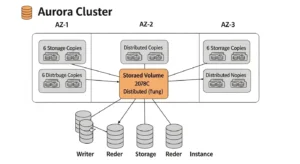
This is where Aurora diverges from standard RDS. When you deploy standard RDS MySQL, you get one primary instance optionally paired with a standby in another AZ. When you deploy Aurora, you always get a cluster — a logical grouping that includes:
- One writer instance (handles all reads and writes)
- Up to 15 reader instances (handle read-only queries, all sharing the same underlying storage volume)
- A shared cluster storage volume that spans three Availability Zones
There is no data copying between nodes during replica creation. Readers attach to the same distributed storage the writer uses — this is the architectural insight that eliminates traditional replication lag.
Provisioning, Patching, and Backups: AWS vs. You
| Responsibility | AWS Manages | You Manage |
| Hardware, data centers, networking | ✅ | |
| Database engine patching | ✅ | |
| Automated backups to S3 | ✅ | |
| Multi-AZ replication | ✅ | |
| Storage scaling | ✅ | |
| Query tuning and indexing | ✅ | |
| IAM roles and access control | ✅ | |
| Parameter group configuration | ✅ | |
| Monitoring and alerting setup | ✅ |
You focus on your schema, queries, and access policies. AWS handles everything below the database engine.
AWS Aurora Architecture (What Makes It Different)
AWS Aurora architecture is the primary reason it outperforms standard RDS. The key insight is a deliberate separation of compute from storage — a design that most traditional databases, even those running on AWS, do not follow.
Storage Architecture (Distributed, Multi-AZ Replication)
Rather than writing data to a local EBS volume attached to the instance, Aurora uses a log-structured distributed storage system:
- 6 copies across 3 AZs — every write is automatically replicated to six storage nodes, two per Availability Zone
- Fault tolerance — the cluster tolerates the loss of up to 2 copies without affecting write availability, and up to 3 copies without affecting read availability
- Self-healing — Aurora continuously scans storage blocks, detects errors, and repairs them automatically from surviving copies
- Auto-scaling — storage begins at 10 GB and scales automatically in 10 GB increments up to 128 TB, with no downtime and no manual intervention required
This is why Aurora storage architecture is one of its most compelling differentiators from standard RDS: you never resize a storage volume, you never run out of space without warning, and you never experience data loss from a single AZ failure.
Cluster Components (Writer + Readers)
Every Aurora cluster has exactly two types of compute:
Writer Instance (Primary):
- Handles 100% of all write operations
- Also handles read queries (though you should offload reads to replicas under load)
- Exactly one per cluster at any given time
Reader Instances (Read Replicas):
- Handle read-only queries
- Up to 15 per cluster
- Read from the same shared storage as the writer — no data copy, no binlog lag
- Replication lag is typically under 10 milliseconds (vs. seconds or minutes for standard RDS binlog replication)
Read Scaling and Failover Behavior
Aurora read replicas serve two purposes: horizontal read scaling and automatic failover. If the primary writer instance fails:
- Aurora detects the failure (typically within seconds)
- One of the reader instances is automatically promoted to primary writer
- The cluster endpoint DNS is updated to point to the new writer
- Failover completes in under 30 seconds — compared to 60–120 seconds for standard RDS Multi-AZ
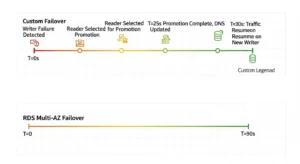
You can also assign failover priority tiers to reader instances, giving you control over which replica is promoted first — critical for applications where replica sizing or placement matters.
Provisioned vs Serverless (Aurora Serverless v2)
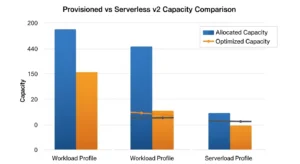
Aurora Serverless v2 explained: instead of choosing an instance class (e.g., db.r6g.2xlarge), you define a capacity range in Aurora Capacity Units (ACUs). Each ACU corresponds to approximately 2 GB of memory plus proportional CPU. Aurora scales your compute up and down in fractions of an ACU, in fractions of a second — without dropping connections or requiring a restart.
When Provisioned Wins (Steady Workloads)
Choose Aurora Provisioned when:
- Your traffic is consistent and predictable (e.g., a B2B SaaS app with business-hours usage)
- You want maximum price predictability (flat hourly instance cost)
- You have Reserved Instance commitments or Savings Plans to apply
- You need the largest instance sizes (high-memory compute-intensive workloads)
When Serverless Wins (Spiky Workloads)
Choose Aurora Serverless v2 when:
- Traffic is variable, bursty, or unpredictable (e-commerce, event-driven applications)
- You’re running dev/test environments that can scale to zero during off-hours
- You’re a startup or new product where usage patterns are not yet established
- You want per-second billing with no idle capacity waste
Capacity Planning Notes (How to Think About Scaling)
Set your minimum ACU low enough to control idle costs but not so low that cold starts impose latency on first requests. Set your maximum ACU at the ceiling you’d provision as a fixed instance — this is your burst protection. A common starting point for production workloads: min 2 ACUs, max 64 ACUs. Monitor ServerlessDatabaseCapacity in CloudWatch for the first two weeks and adjust accordingly.
Key Features and Benefits of AWS Aurora
The Amazon Aurora database ships with a set of advanced capabilities that are either absent from or significantly inferior in standard RDS engines.
Performance Claims (How to Validate in Your Own App)
AWS publishes up to 5× MySQL throughput and 3× PostgreSQL throughput benchmarks. These are measured on synthetic OLTP benchmarks (SysBench) against on-premises standard MySQL on similar hardware — real-world gains depend on your workload. To validate in your own application: run EXPLAIN ANALYZE on your 10 slowest queries after migrating to Aurora, compare Queries and Threads_running metrics in CloudWatch, and use RDS Performance Insights to identify the top SQL statements by load.
High Availability and Durability
- Greater than 99.99% availability SLA
- Six-way storage replication across three AZs
- Continuous backup to Amazon S3 (point-in-time recovery to any second within your retention window)
- Backtrack — rewind your database to a prior point in time (up to 72 hours) in seconds, without restoring a snapshot. Invaluable for DROP TABLE accidents and bad migration deployments
- Fast Cloning — create a full-size production clone in minutes using copy-on-write semantics. The clone shares storage blocks with the original; new storage is allocated only as the clone diverges. A 10 TB database can be cloned for testing in under 5 minutes
Security (VPC, KMS, TLS/SSL)
- VPC isolation — Aurora clusters run inside your VPC; no public internet access unless explicitly configured
- KMS encryption at rest — all data, backups, and snapshots encrypted using AWS Key Management Service
- TLS/SSL in transit — enforced via parameter group settings (require_secure_transport = ON for MySQL)
- IAM database authentication — authenticate using AWS IAM tokens instead of static passwords
Migration Friendliness (MySQL / Postgres Compatibility)
Aurora MySQL vs Aurora PostgreSQL compatibility means you can point your existing mysql:// or postgresql:// connection strings at Aurora with no driver changes. For RDS-to-Aurora migrations, AWS supports snapshot restore (MySQL) and logical replication via the AWS Database Migration Service. Most schema and application code migrates without modification.
AWS Aurora vs RDS (MySQL/PostgreSQL): What’s the Difference?
The AWS Aurora vs RDS question is the first decision most teams face. Here is the definitive comparison:
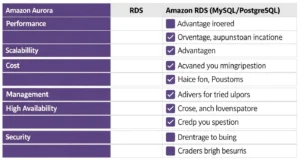
| Feature | AWS Aurora | Standard RDS (MySQL/PostgreSQL) |
| Performance | Up to 5× faster (MySQL), 3× faster (PostgreSQL) | Standard open-source engine performance |
| Storage scaling | Auto-scales to 128 TB, no intervention | Manual scaling required (up to 64 TB) |
| Read replicas | Up to 15 per cluster | Up to 5 per instance |
| Replication lag | < 10 ms (shared storage) | Seconds to minutes (binlog replication) |
| Failover time | < 30 seconds | 60–120 seconds |
| Supported engines | MySQL and PostgreSQL only | MySQL, PostgreSQL, MariaDB, SQL Server, Oracle |
| Serverless option | ✅ Aurora Serverless v2 (ACU-per-second billing) | ❌ Not available |
| Backtrack (instant undo) | ✅ Available (MySQL-compatible) | ❌ Not available |
| Fast Cloning | ✅ Copy-on-write, minutes regardless of size | ❌ Full data copy required |
| Global Database | ✅ Cross-region replication < 1 second | ❌ Not available |
| Instance cost | ~20% higher per instance-hour | Lower base instance cost |
| Free Tier | ❌ No free tier | ✅ 750 hours/month (single AZ, t-class) |
Decision rule: If you need SQL Server, Oracle, or MariaDB — choose RDS. If you need MySQL or PostgreSQL at scale, with faster failover, more replicas, and Serverless flexibility — choose Aurora. The ~20% instance cost premium is typically recovered by the operational efficiency and reduced engineering overhead.
AWS Aurora Pricing (What You Actually Pay For)
Aurora pricing model has more dimensions than most teams expect. Here is a breakdown of every cost component.

Compute (Instances / ACUs)
- Provisioned: Hourly rate per instance class (e.g., db.r6g.large, db.r7g.2xlarge). Each reader instance is billed separately at the same hourly rate. Reserved Instances and Savings Plans apply.
- Serverless v2: Per ACU-hour, billed per second. You pay for the ACUs actually consumed, not the maximum configured.
Storage
Pay per GB-month for the data your cluster stores. Storage auto-scales; you are billed for peak usage. Storage costs are shared across all instances in the cluster — you do not pay per-replica for storage.
I/O (Standard vs I/O-Optimized)
This is the most common Aurora cost surprise:
- Aurora Standard: Pay per million I/O requests. Each page read from storage (not from buffer pool) counts as one I/O. Write I/Os are counted in 4 KB increments.
- Aurora I/O-Optimized: Higher base storage and instance cost, but zero charges for I/O. AWS recommends switching to I/O-Optimized when your I/O costs exceed 25% of your total Aurora bill — at that point, I/O-Optimized can deliver up to 40% cost savings.
Practical rule: start on Standard, monitor the VolumeReadIOPs and VolumeWriteIOPs CloudWatch metrics, and switch to I/O-Optimized when the math tips.
Data Transfer + Global Database Considerations
- Same-region, same-AZ: Free
- Cross-AZ (e.g., application to Aurora reader in a different AZ): Standard EC2 data transfer rates apply
- Cross-region replication (Aurora Global Database): Additional per-GB charge for replicated data plus the cost of running writer and reader instances in each region
Backups and Backtrack (Cost Gotchas)
- Automated backups: Free for backup storage up to 100% of your cluster’s provisioned storage size. Backups beyond that retention window (or from deleted clusters) are billed per GB-month.
- Backtrack: Billed per change record hour — the longer your backtrack window (up to 72 hours), the more you pay. Keep backtrack windows tight (24 hours) unless your use case demands longer undo capability.
- Extended support: If you run an Aurora engine version past its standard support end-of-life, AWS charges extended support fees per vCPU per hour. Set a calendar reminder to upgrade before your engine version reaches EOL.
Common Use Cases (When Aurora Is a Great Fit)
SaaS Multi-Tenant Applications
Multi-tenant SaaS backends with unpredictable per-tenant load spikes are ideal for Aurora. Use Aurora Serverless v2 for the writer (absorbs spikes without over-provisioning) plus a pool of readers behind the reader endpoint, and use cost allocation tags to track database spend per environment or tenant tier.
Read-Heavy Applications
Applications with high read-to-write ratios — content platforms, analytics dashboards, product catalogs — benefit enormously from Aurora’s up to 15 read replicas with sub-10ms lag. Route read traffic to the cluster reader endpoint; Aurora load-balances across replicas automatically.
Globally Distributed Applications (Aurora Global Database)
Aurora Global Database is designed for applications that need low-latency reads in multiple AWS Regions. A primary cluster in us-east-1 replicates to secondary clusters in eu-west-1 and ap-southeast-1 with typical lag under 1 second. Secondary clusters serve local reads; in a disaster recovery scenario, a secondary can be promoted to primary in under 1 minute.
Dev/Test with Fast Cloning
Use Aurora Fast Cloning to create full-scale production clones for load testing, schema migration validation, or analytics workloads. Because cloning uses copy-on-write, a 5 TB production database can be cloned in minutes at near-zero incremental storage cost — until the clone starts diverging from the original.
Best Practices (Expert Checklist)
Indexing and Query Hygiene
- Enable slow query log on Aurora MySQL (slow_query_log = 1, long_query_time = 1) or pg_stat_statements on Aurora PostgreSQL
- Review the top 10 queries by total execution time weekly via RDS Performance Insights — this single habit catches 80% of performance regressions before they become incidents
- Avoid full-table scans on high-cardinality tables; use EXPLAIN before deploying any new query touching more than 10,000 rows in production
Observability (CloudWatch + Performance Insights)
- Set CloudWatch alarms on CPUUtilization > 80%, DatabaseConnections > 80% of max_connections, FreeableMemory < 10%, and DiskQueueDepth > 1
- Enable Enhanced Monitoring (1-second granularity OS metrics) for writer instances in production
- Use RDS Performance Insights to correlate query load with wait events — this is the fastest path from “database is slow” to “this specific query is the reason”
Cost Controls (Capacity + I/O Model Selection)
- Review I/O costs monthly; switch to I/O-Optimized configuration when I/O spend exceeds 25% of your total Aurora line item
- For Serverless v2, set max_capacity conservatively at first and monitor ServerlessDatabaseCapacity; an unintentionally high max ACU is the Serverless equivalent of right-sizing failure
- Delete unused cluster snapshots older than your compliance retention requirement — orphaned snapshots from deleted clusters continue to accrue storage charges silently
- Use AWS Cost Anomaly Detection alongside Aurora to catch unexpected I/O or storage spikes before they compound into a large monthly bill
FAQs :
Q1: What is AWS Aurora, and how is it different from regular MySQL?
AWS Aurora is a cloud-native relational database engine built by AWS that is compatible with MySQL and PostgreSQL. It is different from regular MySQL because it uses a distributed storage architecture with 6-way replication across 3 AZs, supports up to 15 read replicas with sub-10ms lag, and offers automatic storage scaling up to 128 TB — none of which standard MySQL provides natively.
Q2: What is the difference between AWS Aurora vs RDS MySQL?
The main differences are performance (Aurora is up to 5× faster), replica count (15 vs 5), failover speed (under 30 seconds vs 60–120 seconds), replication lag (milliseconds vs seconds), and additional features like Backtrack and Fast Cloning. Aurora costs approximately 20% more per instance-hour but often delivers better total cost of ownership at scale.
Q3: What is Aurora Serverless v2 and when should I use it?
Aurora Serverless v2 explained: it is an on-demand capacity mode where you define a min/max ACU range and Aurora scales compute in fractions of a second based on actual traffic. Use it for variable, bursty, or unpredictable workloads, dev/test environments that can scale to zero, and new applications where capacity planning is uncertain.
Q4: What is Aurora MySQL vs Aurora PostgreSQL — which should I choose?
Choose Aurora MySQL-Compatible if your existing application uses MySQL syntax, tools, or an ORM configured for MySQL. Choose Aurora PostgreSQL-Compatible if you use PostgreSQL features (advanced indexing, JSONB, window functions, PostGIS). Both editions share the same distributed storage architecture and performance characteristics. The choice is driven by your application’s existing database dialect, not by any Aurora-specific capability difference.
Q5: What are Aurora read replicas and how many can I have?
Aurora read replicas are reader instances in the Aurora cluster that serve read-only queries from the same shared storage volume as the writer. You can have up to 15 per cluster. They provide horizontal read scaling and serve as automatic failover targets — if the writer fails, the highest-priority reader is promoted in under 30 seconds.
Conclusion :
AWS Aurora is not simply a faster version of traditional managed databases — it represents a fundamentally different database architecture designed to deliver significantly better performance, reliability, and scalability. While services like standard managed databases offer simplicity, Aurora introduces a distributed storage model that improves resilience and reduces the operational limitations that often affect large-scale database systems. For organizations running MySQL- or PostgreSQL-compatible workloads at scale, Aurora has become a strong choice for modern cloud applications. With the guidance of GoCloud, businesses can evaluate when Aurora is the right fit and design database architectures that balance performance, cost efficiency, and operational reliability.
