What is AWS Lambda?
AWS offers over 200 cloud services — yet AWS Lambda remains one of the most transformative of them all. With over 80% of former container users now adopting Lambda, serverless computing is no longer optional — it’s a competitive necessity. Developers who spend their days provisioning servers, applying security patches, and manually scaling infrastructure are losing ground to teams that ship code faster, at lower cost, using AWS Lambda.
This guide answers the questions every developer, startup founder, and cloud engineer asks: what is AWS Lambda and how does it work, how much it costs, what it’s used for, and when you should choose it over Amazon EC2 virtual machines or AWS Fargate serverless containers.
By the end of this guide, you’ll have a complete, practical understanding of AWS Lambda — from its event-driven architecture and Lambda functions to pricing, cold starts, and production best practices for 2026.
Is AWS Lambda the Same as Serverless Computing?
Not exactly — but Lambda is serverless computing’s most important component on AWS. Serverless computing is a broader execution model where the cloud provider dynamically manages infrastructure allocation. AWS Lambda is the specific serverless compute service that executes your code in this model.
Think of it this way: serverless is the architecture pattern; Lambda is the engine. A complete serverless application on AWS typically combines Lambda (compute) with Amazon API Gateway (HTTP routing), Amazon DynamoDB (database), and Amazon S3 (storage) — all managed, all auto-scaling.
AWS Lambda vs. Traditional Server Architecture
In traditional architectures, your team provisions a server (physical or virtual), installs an OS, deploys application code, manages scaling, applies patches, and pays for the server 24/7 — whether it’s processing requests or sitting idle.
With AWS Lambda, that entire layer disappears. You write your function, upload it to Lambda, define a trigger, and AWS handles every operational responsibility. No server to provision. No OS to patch. No idle cost. Your code runs — and you pay only for the exact milliseconds it runs.
How AWS Lambda Works: Step-by-Step
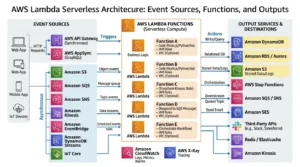
Understanding what is AWS Lambda and how does it work starts with its core execution model: event-driven, stateless function execution.
What is a Lambda Function in AWS?
A Lambda function is the fundamental unit of execution in AWS Lambda. It’s a self-contained block of code — written in a supported language — that performs a specific task and terminates once complete.
Every Lambda function consists of:
- Handler — the entry point method AWS invokes when the function runs
- Runtime — the language environment (Python, Node.js, Java, etc.)
- Configuration — memory allocation (128MB to 10,240MB), timeout (1 second to 15 minutes), and IAM execution role
- Trigger — the event source that causes the function to execute
- Code package — your application code and dependencies (as a ZIP or Docker container image)
What Triggers AWS Lambda Functions?
Lambda functions don’t run continuously — they execute in response to events. This is the heart of its event-driven architecture. Supported triggers include:
| Category | AWS Service Trigger | Example Use Case |
| HTTP/API | Amazon API Gateway, ALB | REST API backend calls |
| Storage | Amazon S3 | Process file on upload |
| Database | Amazon DynamoDB Streams | React to table changes |
| Messaging | Amazon SQS, SNS | Process queued messages |
| Streaming | Amazon Kinesis | Real-time data pipeline |
| Scheduled | Amazon CloudWatch Events | Cron jobs, backups |
| Edge | Lambda@Edge, CloudFront | Personalize CDN responses |
| IoT | AWS IoT | Process sensor data |
| Voice | Alexa Smart Home | Voice-activated skills |
Lambda Execution Environment: How AWS Runs Your Code
When an event triggers a Lambda function, AWS spins up a secure, isolated execution environment — a lightweight microVM that contains your code, runtime, and dependencies. AWS manages this environment entirely, including:
- Initialization — downloading your code package and setting up the runtime
- Invocation — executing your handler function with the event payload
- Shutdown — cleaning up the environment after execution completes
AWS reuses warm execution environments for subsequent invocations when possible — which is why cold starts (discussed later) occur only on first invocation or after periods of inactivity.
Key Features of AWS Lambda
Auto-Scaling (From Zero to Infinity)
Lambda scales automatically and instantaneously — from zero invocations to thousands of concurrent executions in seconds. When an event arrives, Lambda provisions a new execution environment in parallel if no warm environment is available. This means Lambda can handle sudden traffic spikes — millions of requests — without any pre-configuration or capacity planning.
Pay-Per-Use Pricing Model
Lambda’s cost model is uniquely aligned with actual usage. There are no idle costs. You pay only for:
- The number of requests your function receives
- The duration your code runs (billed per millisecond)
This stands in direct contrast to Amazon EC2 virtual machines, which charge by the hour regardless of whether they’re actively processing requests.
Built-in Security and IAM Integration
Every Lambda function executes with an IAM execution role that governs what AWS resources it can access. Lambda runs inside a VPC (optionally) or in an AWS-managed network environment. All code is isolated in its own execution environment — functions from different customers never share compute resources.
Native Integration with 200+ AWS Services
AWS Lambda connects natively to the entire AWS ecosystem without custom integration code. This means triggering Lambda from DynamoDB Streams, writing results to Amazon S3, publishing notifications via Amazon SNS, or querying Amazon RDS — all within the same Lambda function using the AWS SDK.
Support for Multiple Programming Languages
Lambda supports the languages developers already use — with no runtime management required. AWS handles runtime updates, security patches, and underlying OS maintenance automatically.
What Programming Languages Does AWS Lambda Support?
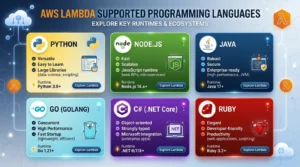
AWS Lambda natively supports seven language runtimes, plus the ability to bring any language via custom runtimes or Docker container images:
| Language | Runtime | Operating System | Notes |
| Python | 3.12, 3.11, 3.10 | Amazon Linux 2023 | Most popular Lambda language |
| Node.js | 20.x, 18.x | Amazon Linux 2023 | Ideal for API backends |
| Java | 21, 17, 11, 8 | Amazon Linux 2 | Best for enterprise apps |
| Go | 1.x | Amazon Linux 2 | High performance, low latency |
| C# (.NET) | .NET 8, .NET 6 | Amazon Linux 2023 | Microsoft workloads |
| Ruby | 3.3, 3.2 | Amazon Linux 2023 | Scripting and automation |
| Custom Runtime | Any language | Amazon Linux 2023 | Via Runtime API |
| Container Image | Any (Docker) | Your base image | Up to 10GB image size |
Pro Tip: Container Image support means you can package Lambda functions with any language, framework, or binary dependency — including custom ML model runtimes — as long as you implement the Lambda Runtime Interface.
AWS Lambda Use Cases: When Should You Use Lambda?
AWS Lambda explained for beginners often focuses on the concept — but understanding real use cases is what drives adoption. Lambda excels in these scenarios:
Real-Time Data Processing and Stream Processing
Connect Lambda to Amazon Kinesis or Amazon DynamoDB Streams to process records in real time. Common use cases: fraud detection, clickstream analytics, IoT sensor processing, and log transformation pipelines.
REST API Backends with Amazon API Gateway
Pair Lambda with Amazon API Gateway to build fully serverless REST APIs. Each route maps to a Lambda function. APIs scale automatically, require zero server management, and cost nothing when idle.
Automated File Processing (Amazon S3)
Trigger Lambda automatically when files are uploaded to Amazon S3. Use cases: image resizing and thumbnail generation, document format conversion, video transcoding triggers, CSV data ingestion into DynamoDB or RDS.
Scheduled Tasks and Automated Backups
Replace traditional cron jobs with CloudWatch Events (EventBridge) triggers. Lambda functions can run database backups, generate nightly reports, clean up temporary files, or send scheduled notifications — all without maintaining a dedicated server.
Machine Learning Inference and Data Transformation
Lambda is ideal for real-time ML inference — receiving an input, running it through a pre-trained model (via SageMaker endpoint or embedded model), and returning a prediction. It’s also widely used for data preprocessing pipelines that feed training datasets to Amazon SageMaker.
IoT Backend Processing
AWS IoT rules can trigger Lambda functions in response to device messages. Lambda processes the data, stores it in DynamoDB or S3, and triggers alerts via SNS — creating a fully serverless IoT backend.
Real-Time Log Analysis
Stream application logs from Amazon CloudWatch Logs to Lambda for real-time parsing, anomaly detection, alerting, or forwarding to external analytics platforms.
AWS Lambda vs. Amazon EC2: Which Should You Choose?
This is one of the most common questions when evaluating serverless on AWS: AWS Lambda vs EC2 — which to choose?
Comparison Table: Lambda vs. EC2 vs. Fargate
| Feature | AWS Lambda | Amazon EC2 | AWS Fargate |
| Infrastructure Management | None (Serverless) | Full Control | Abstracted |
| Pricing Model | Per request/millisecond | Per hour (instance) | Per vCPU/memory/second |
| Auto-Scaling | Automatic (0 → ∞) | Manual / Auto Scaling | Automatic |
| Max Execution Time | 15 minutes | Unlimited | Unlimited |
| Stateful Support | ❌ Stateless only | ✅ Yes | ✅ Yes |
| Best For | Event-driven tasks | Long-running apps | Containerized apps |
| Cold Start | ✅ Yes (100ms–1s) | ❌ No | Minimal |
| Language Support | Multi-language (managed) | Any | Any (containerized) |
| Idle Cost | $0 | Charged per hour | Charged per second |
When to Use Lambda Over EC2
Choose Lambda when your workload is:
- Event-driven — triggered by specific events rather than running continuously
- Short-duration — completes within 15 minutes per invocation
- Stateless — each invocation is independent with no shared in-memory state
- Variable traffic — spikes unpredictably and benefits from zero-to-infinity scaling
- Cost-sensitive — idle cost must be zero (Lambda charges nothing when not running)
When to Use EC2 Over Lambda
Choose Amazon EC2 when your workload:
- Requires long-running processes (beyond 15 minutes)
- Needs persistent in-memory state across requests
- Requires GPU acceleration for ML training or rendering
- Requires custom OS configuration, kernel parameters, or legacy software
- Has predictable, steady-state traffic where Reserved Instances cut costs by 72%
AWS Lambda vs. AWS Fargate: Key Differences
Both Lambda and AWS Fargate serverless containers eliminate infrastructure management — but they serve different execution models. Lambda runs functions (code snippets triggered by events); Fargate runs containers (full application environments). Use Lambda for event-driven, short-lived processing. Use Fargate for containerized applications requiring longer execution, persistent connections, or complex dependencies that are better packaged as Docker containers. For managing Kubernetes with Amazon EKS, Fargate is often the serverless compute backend of choice.
AWS Lambda Pricing Explained (2026)
How Lambda Billing Works (Requests + Duration)
AWS Lambda pricing has two components:
- Request charges: $0.20 per 1 million requests (after the free tier)
- Duration charges: $0.0000166667 per GB-second (North Virginia/most regions)
Duration is calculated as: Number of invocations × execution time (seconds) × memory allocated (GB). Billing is in 1-millisecond increments — one of the most granular compute billing models available.
Lambda Free Tier: What’s Included?
Every AWS account receives a permanent free tier for Lambda (not just the 12-month introductory tier):
- 1 million free requests per month
- 400,000 GB-seconds of compute time per month
For most development workloads and low-traffic applications, Lambda runs entirely within the free tier.
How to Calculate Your AWS Lambda Cost (Worked Example)
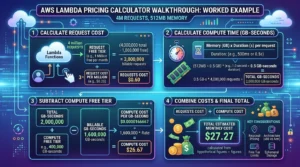
Scenario: Your function runs in the US East (N. Virginia) region, with 512MB memory, invoked 4 million times/month, each running for 150 milliseconds.
| Component | Calculation | Cost |
| Memory in GB | 512MB ÷ 1024 = 0.5 GB | — |
| Duration per invocation | 150ms = 0.15 seconds | — |
| Total GB-seconds | 4M × 0.15s × 0.5GB = 300,000 GB-sec | — |
| Billable GB-seconds | 300,000 − 400,000 free tier = $0.00 | $0.00 |
| Billable requests | 4M − 1M free = 3M requests | $0.60 |
| Monthly Total | $0.60 |
This example highlights Lambda’s cost efficiency for moderate workloads. Increase memory to 1,024MB or run 50M invocations and costs scale linearly — with full predictability.
Provisioned Concurrency Pricing
Provisioned Concurrency eliminates cold starts by keeping execution environments pre-initialized. This adds a separate charge based on the amount of concurrency configured and the duration it’s enabled. Provisioned Concurrency is billed per GB-second of provisioned capacity — typically 3–5x more expensive than standard Lambda — but critical for latency-sensitive production APIs.
Tips to Optimize Lambda Costs
- Right-size memory — test your function with AWS Lambda Power Tuning to find the optimal memory/cost balance
- Minimize package size — smaller deployment packages initialize faster and reduce cold start latency
- Use Lambda Layers — share common dependencies across functions instead of bundling them per function
- Set appropriate timeouts — avoid paying for functions that hang due to unhandled errors
- Monitor with AWS Cost Explorer and set billing alerts via Amazon CloudWatch
AWS Lambda Limitations and Cold Start Problem
What is a Cold Start in Lambda?
A cold start occurs when Lambda must initialize a new execution environment from scratch — downloading your code package, starting the runtime, and running initialization code — before executing your handler. Cold starts typically add 100ms to 1,000ms of latency on top of normal execution time.
Cold starts happen:
- On the first invocation after deployment
- After periods of inactivity (the environment has been recycled)
- When concurrent invocations exceed the number of warm environments available
Solutions:
- Enable Provisioned Concurrency to keep environments pre-warmed
- Use lighter runtimes (Python, Node.js) — Java has the longest cold starts
- Keep deployment packages small to reduce initialization time
- Use Lambda SnapStart (available for Java) to reduce cold start time by up to 90%
Execution Timeout Limits (15-Minute Max)
Lambda functions have a hard maximum execution timeout of 15 minutes (900 seconds). For workflows requiring longer processing, use AWS Step Functions to chain multiple Lambda functions into a state machine, or migrate long-running tasks to Amazon EC2 or AWS Fargate serverless containers.
Concurrency Limits (Default 1,000)
By default, Lambda allows 1,000 concurrent executions per region across all functions in your account. If your application requires higher concurrency, request a quota increase via AWS Support. Use Reserved Concurrency to dedicate capacity to critical functions and prevent one function from consuming the account-wide limit.
Stateless Architecture Requirement
Lambda functions must be written as stateless code — each invocation is independent and should not assume any local memory state persists between executions. For stateful applications, use external services: Amazon DynamoDB (key-value state), Amazon ElastiCache (in-memory cache), or Amazon S3 (file-based state).
AWS Lambda Best Practices
Write Stateless, Single-Purpose Functions
Each Lambda function should do one thing well. Small, focused functions are easier to test, debug, and optimize. Avoid bundling multiple business logic paths into a single Lambda — split them by event type or business domain.
Use Environment Variables for Configuration
Store configuration values (API endpoints, database connection strings, feature flags) as environment variables — never hard-code them in your function code. For sensitive values like API keys, use AWS Secrets Manager or AWS SSM Parameter Store and retrieve them at runtime.
Set Appropriate Memory and Timeout Values
Lambda allocates CPU proportionally to memory. A function allocated 1,792MB receives exactly 1 full vCPU. Use AWS Lambda Power Tuning (an open-source Step Functions state machine) to empirically identify the memory setting that minimizes cost × execution time.
Monitor with CloudWatch Metrics and Alarms
Enable Amazon CloudWatch monitoring for:
- Errors — function execution failures
- Duration — execution time (p50, p95, p99 percentiles)
- Throttles — invocations rejected due to concurrency limits
- ConcurrentExecutions — real-time concurrency usage
Set CloudWatch Alarms to notify via Amazon SNS when error rates or duration thresholds are exceeded.
Use Lambda Layers for Shared Dependencies
Lambda Layers allow you to package common dependencies (e.g., NumPy for Python ML functions, Lodash for Node.js functions) separately from your function code. Layers are reusable across functions, reduce deployment package size, and can be versioned independently.
How to Get Started with AWS Lambda (Quick-Start Steps)
Follow these steps to deploy your first Lambda function:
- Sign in to the AWS Management Console and navigate to the Lambda service
- Click “Create function” — choose “Author from scratch”
- Name your function and select a runtime (e.g., Python 3.12 or Node.js 20.x)
- Write or paste your function code in the inline editor or upload a ZIP package
- Configure the trigger — add an API Gateway trigger for HTTP, an S3 trigger for file events, or a CloudWatch Events trigger for scheduled execution
- Set memory and timeout — start with 256MB and 30 seconds; adjust based on profiling
- Assign an IAM execution role — grant only the permissions your function needs (least privilege)
- Deploy the function by clicking “Deploy”
- Test your function using the built-in test console with a sample event payload
- Monitor performance via CloudWatch Logs and Metrics in the Lambda console
Frequently Asked Questions About AWS Lambda
Q1: What is AWS Lambda in simple terms? AWS Lambda is a serverless compute service that runs your code in response to events without requiring you to manage any servers. You write the function, upload it to Lambda, and AWS handles scaling, availability, and execution.
Q2: What is a Lambda function in AWS? A Lambda function is the code you run inside AWS Lambda. It’s a self-contained unit of code that executes in response to a trigger — like an API call, S3 upload, or DynamoDB change — and terminates once complete.
Q3: What triggers AWS Lambda functions? Lambda can be triggered by 20+ AWS services including Amazon API Gateway (HTTP requests), S3 (file uploads), DynamoDB (database changes), SQS/SNS (messaging), Kinesis (streaming), CloudWatch Events (scheduled), IoT, CloudFront, and ALB (load balancer).
Q4: What programming languages does AWS Lambda support? Lambda natively supports Node.js, Python, Java, Go, C# (.NET), Ruby, and custom runtimes via the Runtime API. You can also package Lambda functions as Docker container images.
Q5: How does AWS Lambda pricing work? Lambda charges for the number of requests ($0.20 per 1M requests) and duration (billed per millisecond based on memory allocated). The free tier includes 1M requests and 400,000 GB-seconds per month at no charge.
Conclusion
AWS Lambda is the foundation of serverless computing on AWS — a purpose-built, event-driven compute service that eliminates infrastructure management, scales from zero to millions of invocations automatically, and charges only for what you actually use. If you want to learn more about AWS services and cloud solutions, you can explore the AWS section on GoCloud .
Here are the key takeaways from this guide:
- ✅ Lambda runs code without servers — AWS handles provisioning, scaling, and availability entirely
- ✅ Billed per request + duration — at millisecond precision, with a generous permanent free tier
- ✅ Best for short, stateless, event-driven tasks — functions under 15 minutes with no idle cost
- ✅ Integrates natively with 200+ AWS services — API Gateway, S3, DynamoDB, Kinesis, and more
- ✅ Cold starts can be mitigated — use Provisioned Concurrency or Lambda SnapStart for Java
Ready to go serverless? Explore our complete guides on AWS Fargate for containers and managed Kubernetes with Amazon EKS — or dive into choosing the right EC2 instance type for workloads that don’t fit Lambda’s execution model.
In 2026, AWS Lambda continues to evolve — with larger memory limits (up to 10GB), faster cold starts via SnapStart, deeper integration with Amazon Bedrock for AI/ML inference, and expanded Container Image support — cementing serverless as the default compute model for modern cloud-native applications.