The Hidden Cost of Storing Data in the Wrong S3 Class
AWS users waste an estimated 30 to 40 percent of their S3 budget by storing data in the wrong storage class — and the root cause is almost always the same: access patterns change, and storage configurations do not. Data that was actively queried every day during a product launch sits cold and untouched six months later, still billed at S3 Standard rates. A machine learning dataset gets accessed intensively during a training cycle, then sits idle for weeks while the team iterates on model architecture. User-uploaded photos are viewed heavily in the first 48 hours and rarely again after that. In each case, the data is in the right place on day one and in the wrong place by day ninety.
S3 Intelligent-Tiering was designed specifically to solve this problem. Rather than requiring you to predict how your data will be accessed — and write lifecycle rules to match those predictions — S3 Intelligent-Tiering monitors the actual access behavior of each object and moves it automatically between storage tiers to minimize cost, without retrieval fees, without performance impact, and without any changes to your application code or object URLs.
This guide covers everything you need to know about AWS S3 Intelligent-Tiering in 2026: how its five access tiers work, exactly what it costs, when it will save you money and when it will not, how it compares to S3 Standard and lifecycle-based approaches, and how to enable it in minutes. Whether you are a FinOps engineer trying to reduce a six-figure S3 bill, a cloud architect designing a new data lake, or a developer building a platform with unpredictable user storage patterns, this is the complete reference.
What Is S3 Intelligent-Tiering?
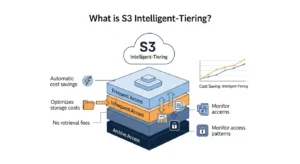
S3 Intelligent-Tiering is an Amazon S3 storage class that automatically monitors the access frequency of each stored object and moves it between up to five storage tiers — from high-performance, low-cost frequent access to deep archive — based on actual usage patterns, with no retrieval fees between tiers, no performance degradation, and no manual intervention required.
AWS launched S3 Intelligent-Tiering in November 2018 as a direct response to a fundamental challenge of cloud storage: access patterns for real-world workloads are rarely uniform or predictable, but the economics of cloud storage reward teams who can accurately classify their data and store it in the cheapest appropriate tier. Intelligent-Tiering automates that classification entirely, making cost optimization the default behavior rather than the result of diligent manual management.
The key differentiators from every other S3 storage class are three: the automation is access-based rather than time-based, there are no retrieval fees when objects move between tiers or when cold data is accessed, and the process is completely transparent to applications — no code changes, no URL changes, no API changes are required.
How S3 Intelligent-Tiering Fits Within All S3 Storage Classes
| Storage Class | Access Pattern | Latency | Availability | Starting Price/GB/month | Retrieval Fee |
| S3 Standard | Frequent | Milliseconds | 99.99% | $0.023 | None |
| S3 Intelligent-Tiering | Unknown / Variable | Milliseconds (to hours for archive) | 99.9% | $0.023 (Frequent) | None between tiers |
| S3 Standard-IA | Infrequent, rapid | Milliseconds | 99.9% | $0.0125 | Per GB |
| S3 One Zone-IA | Infrequent, single AZ | Milliseconds | 99.5% | $0.01 | Per GB |
| S3 Express One Zone | Ultra-high frequency, ML/AI | Single-digit ms | 99.95% | $0.016 | None |
| S3 Glacier Instant | Archive + instant retrieval | Milliseconds | 99.9% | $0.004 | Per GB |
| S3 Glacier Flexible | Archive, flexible retrieval | Minutes to hours | 99.99% | $0.0036 | Per GB |
| S3 Glacier Deep Archive | Coldest archive | Up to 12 hours | 99.99% | $0.00099 | Per GB |
How Does S3 Intelligent-Tiering Work? (Deep Dive)
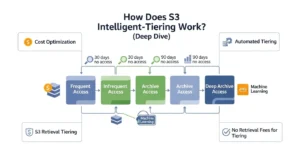
The mechanism behind S3 Intelligent-Tiering is both elegant and simple: S3 tracks the last-access timestamp for every monitored object and runs an automation engine that compares each object’s inactivity period against configured thresholds. When an object crosses a threshold — for example, 30 consecutive days without being accessed — S3 moves it to the next lower-cost tier. When the object is accessed again, regardless of which tier it is in, it automatically returns to the Frequent Access tier. The transition is seamless, bidirectional, and requires no action from your application or your team.
The monitoring charge for this automation is $0.0025 per 1,000 objects per month — meaning monitoring 1 million objects costs $2.50 per month. This is an important number to keep in mind: for very small objects, the monitoring fee can exceed the storage savings from tiering, which is why S3 Intelligent-Tiering does not monitor objects smaller than 128 KB. Objects below that threshold are stored in the Frequent Access tier permanently and are not eligible for automatic tiering — they benefit from the object-level storage consolidation but incur the monitoring charge without gaining the tiering benefit. For a bucket containing predominantly tiny objects (small JSON files, thumbnail images, configuration records), this is a critical consideration.
Intelligent-Tiering has no impact on object URLs, object metadata, object tags, version IDs, or any property visible to your application. A GET request to an Intelligent-Tiering object looks identical to a GET request to an S3 Standard object. The only difference is the storage class label in the object’s metadata and the billing tier applied to the storage cost.
The 5 S3 Intelligent-Tiering Access Tiers Explained
Tier 1 — Frequent Access Tier (Default, Day 0)
Every object uploaded with the INTELLIGENT_TIERING storage class starts in the Frequent Access tier. This tier delivers the same performance as S3 Standard — millisecond first-byte latency, high throughput, and no constraints on request volume. The storage price is identical to S3 Standard at $0.023 per GB per month for the first 50 TB. Objects remain in this tier for as long as they are accessed at least once every 30 days. This is the default landing zone, and for actively used data it is simply S3 Standard under a different billing label.
Tier 2 — Infrequent Access Tier (Automatic, Day 30)
After 30 consecutive days without a single access event, S3 automatically moves the object to the Infrequent Access tier. The storage price drops to $0.0125 per GB per month — approximately 46 percent cheaper than the Frequent Access tier. Latency remains at milliseconds, throughput remains high, and there is no retrieval fee. If the object is accessed at any point while in this tier, it immediately returns to the Frequent Access tier and the 30-day inactivity clock resets. For most mixed-access workloads, a significant portion of objects reach this tier within the first month, which is where Intelligent-Tiering begins generating meaningful savings.
Tier 3 — Archive Instant Access Tier (Automatic, Day 90)
Objects that go unaccessed for 90 consecutive days move to the Archive Instant Access tier. Despite the word “archive” in the name, this tier maintains millisecond access latency — it is not Glacier, and no restore request is required. The storage price drops to $0.004 per GB per month, which is approximately 83 percent cheaper than S3 Standard. This tier is enabled by default for all Intelligent-Tiering configurations — no opt-in is required. For workloads where much of the data is accessed infrequently after the first few months (user-generated content is a textbook example), the Archive Instant Access tier is often where the largest share of cost savings is realized.
Tier 4 — Archive Access Tier (Optional, Configurable — 90 to 730 Days)
The Archive Access tier is an optional extension that must be explicitly enabled via an S3 Intelligent-Tiering archive configuration. When activated, you specify a threshold between 90 and 730 days of inactivity, after which S3 moves eligible objects to this tier. Storage is priced at $0.0036 per GB per month — comparable to S3 Glacier Flexible Retrieval — and retrieval takes 3 to 5 hours (equivalent to Glacier Flexible Retrieval’s Standard retrieval speed). There is no retrieval fee. This tier is appropriate for data that is accessed very rarely but must remain in S3 rather than being deleted or manually archived.
Tier 5 — Deep Archive Access Tier (Optional, Configurable — 180 to 730 Days)
The Deep Archive Access tier is the coldest and cheapest option and also requires explicit opt-in. You set a threshold between 180 and 730 days of inactivity. Storage is priced at $0.00099 per GB per month — the same as S3 Glacier Deep Archive and up to 96 percent cheaper than S3 Standard. Retrieval takes up to 12 hours. There is no retrieval fee between tiers. For compliance archives, old log data, and historical records that must be retained for regulatory purposes but will almost never be read, this tier offers extraordinary cost efficiency without the management overhead of setting up and maintaining a separate Glacier workflow.
Intelligent-Tiering Object Lifecycle Flow
To visualize how an object moves through Intelligent-Tiering over time, imagine the following sequence:
Day 0: Object uploaded. Lands in Frequent Access tier at $0.023/GB.
Day 1 to 29: Object accessed regularly. Stays in Frequent Access tier.
Day 30: Object not accessed for 30 days. Automatically moved to Infrequent Access tier at $0.0125/GB.
Day 31: Object is accessed. Immediately moved back to Frequent Access tier. Inactivity clock resets to zero.
Day 31 to 120: Object not accessed again. Reaches Infrequent Access at day 61, Archive Instant Access at day 121 if the Archive Access opt-in threshold is set to 90 days.
Day 180: If Deep Archive Access is enabled and the threshold is set to 180 days, the object moves to Deep Archive Access tier at $0.00099/GB.
Any time: One access event returns the object to Frequent Access tier regardless of its current depth. No fee. No action required on your part.
This bidirectional, access-triggered lifecycle is what makes Intelligent-Tiering fundamentally different from traditional lifecycle policies — the system responds to actual behavior rather than executing predetermined rules on a schedule.
S3 Intelligent-Tiering Pricing — What You’ll Actually Pay
S3 Intelligent-Tiering: Tier Pricing Table (US East — N. Virginia)
| Tier | Price per GB/month | Retrieval Fee | Latency | Opt-In Required |
| Frequent Access | $0.023 | None | Milliseconds | No (default) |
| Infrequent Access | $0.0125 | None | Milliseconds | No (automatic at day 30) |
| Archive Instant Access | $0.004 | None | Milliseconds | No (automatic at day 90) |
| Archive Access | $0.0036 | None | 3–5 hours | Yes (configurable 90–730 days) |
| Deep Archive Access | $0.00099 | None | Up to 12 hours | Yes (configurable 180–730 days) |
Cost Components
| Component | Description |
| Storage Cost | Varies by tier, from $0.023/GB (Frequent Access) down to $0.00099/GB (Deep Archive). |
| Monitoring & Automation | $0.0025 per 1,000 objects per month. Applies to all monitored objects regardless of tier. |
| Request Fees | Standard S3 GET, PUT, COPY, LIST, DELETE rates. Data transfer OUT follows standard AWS pricing. |
Worked Example — 1 TB Mixed-Access Data
| Data Tier | Data Size | Calculation | Cost |
| Frequent Access | 300 GB | 300 × $0.023 | $6.90 |
| Infrequent Access | 400 GB | 400 × $0.0125 | $5.00 |
| Archive Instant Access | 300 GB | 300 × $0.004 | $1.20 |
| Monitoring Fee (500,000 objects) | — | 500 × $0.0025 | $1.25 |
| Total Cost (Intelligent-Tiering) | 1 TB | — | $14.35 |
| S3 Standard Cost | 1 TB | 1,024 × $0.023 | $23.55 |
| Savings | — | — | ~$9.20 (~39%) |
Notes & Caveats
- Deep Archive Savings: Cold data in Deep Archive can save up to 96% vs. S3 Standard for that portion.
- Small Objects (<128 KB): No tiering benefits; monitoring fees still apply. For example, 10 million objects averaging 50 KB incur $25/month monitoring cost with no storage savings.
- Recommendation: For workloads with millions of small objects, S3 Standard with lifecycle policies may be more economical.
For precise estimates tailored to your actual data volumes and object count, use the AWS Pricing Calculator
S3 Intelligent-Tiering vs S3 Standard vs S3 Lifecycle Rules
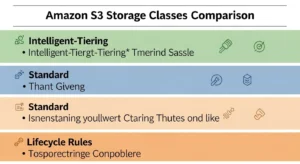
This is the comparison that matters most for most teams evaluating Intelligent-Tiering. Here is a direct head-to-head across eight criteria:
| Criterion | S3 Standard | S3 Lifecycle Rules | S3 Intelligent-Tiering |
| Cost Structure | Fixed $0.023/GB | Varies by target class | Dynamic, tier-dependent |
| Manual Configuration | None | Required (rules per prefix/tag) | None beyond initial opt-in |
| Access Pattern Flexibility | N/A (no optimization) | Requires predictable patterns | Handles unpredictable patterns |
| Retrieval Fees | None | Varies (IA/Glacier classes charge) | None between tiers |
| Minimum Duration Charge | None | Varies by target class | None |
| Object Monitoring | None | None | $0.0025/1,000 objects/month |
| Best For | Hot, frequently accessed data | Predictable aging workloads | Variable, unknown access patterns |
| Admin Overhead | None | Medium (rule design, maintenance) | Very Low |
S3 Intelligent-Tiering vs S3 Standard-IA
S3 Standard-IA costs $0.0125 per GB per month — identical to Intelligent-Tiering’s Infrequent Access tier — but with one critical difference: Standard-IA charges a per-GB retrieval fee. If you access data more often than you expected, those retrieval fees can erase the storage savings entirely. Standard-IA also enforces a 30-day minimum storage duration: delete an object before 30 days and you are billed for the full period. Intelligent-Tiering has no retrieval fees between tiers and no minimum storage duration. For any data where access frequency is uncertain, Intelligent-Tiering eliminates the financial risk that Standard-IA carries.
S3 Intelligent-Tiering vs S3 Lifecycle Policies
The key distinction comes down to what drives the transitions. Lifecycle policies are time-based and rule-driven: you define a rule that says “move all objects in this prefix to S3-IA after 60 days” and S3 executes that rule mechanically on a schedule, regardless of whether any object in that prefix was accessed yesterday or has not been touched in a year. This works well when access patterns are known and consistent — a log archive that is always cold after 30 days, for example.
S3 Intelligent-Tiering is access-pattern-based and fully automated. It does not care how old an object is; it cares whether anyone has read it recently. If a two-year-old object was accessed yesterday, it stays in Frequent Access. If a one-day-old object was never accessed again after upload, it will move to Infrequent Access on day 30. For workloads where age is a poor proxy for access frequency — user-generated content, ML datasets, analytics files — Intelligent-Tiering is substantially more efficient than lifecycle policies.
The two approaches are also complementary rather than mutually exclusive. A mature S3 architecture might use Intelligent-Tiering for active objects in a data lake while using lifecycle policies to expire older versioned objects and delete incomplete multipart uploads. Combining both tools gives you dynamic cost optimization for active data and deterministic cleanup for aged data.
S3 Intelligent-Tiering vs S3 Glacier
Glacier wins when you know with certainty that data will not be accessed for months or years and cost minimization is the paramount concern. If you are archiving seven years of financial records that will only be retrieved in the event of a regulatory audit, putting them directly into S3 Glacier Deep Archive at $0.00099/GB with a lifecycle policy is slightly cheaper than routing them through Intelligent-Tiering’s monitoring layer. Intelligent-Tiering wins when you need the flexibility to access archived data on demand without retrieval fees — for example, compliance data that is occasionally needed for ad hoc queries — or when you cannot predict which objects will and will not be accessed.
When Should You Use S3 Intelligent-Tiering?
S3 Intelligent-Tiering delivers the most value when your data has unpredictable, unknown, or dynamic access patterns — scenarios where you cannot confidently write lifecycle rules that match actual behavior.
5 Ideal Use Cases for S3 Intelligent-Tiering
- New applications with unknown access frequency. When you are launching a new product or migrating a workload to AWS and have no historical access data to base lifecycle rules on, Intelligent-Tiering is the safest and most cost-efficient default. You can always revisit the strategy after 90 days of S3 Storage Lens analysis and switch to explicit lifecycle rules if patterns turn out to be predictable.
- Data lakes with mixed-frequency analytics workloads. Enterprise data lakes commonly contain datasets that are accessed intensively during a specific analysis project and then go cold for months until a related project begins. Intelligent-Tiering continuously adjusts to these burst-then-idle patterns, ensuring that cold datasets are not sitting at S3 Standard pricing and that hot datasets are instantly accessible when analysts need them.
- User-generated content platforms — photos, videos, social media content. UGC access patterns follow a well-documented power law: the newest content is viewed heavily and immediately, while older content is rarely accessed unless it goes viral or is explicitly searched for. Intelligent-Tiering handles this pattern naturally, keeping recent uploads in Frequent Access and moving aging content to cheaper tiers without the complexity of writing prefix-based lifecycle rules for millions of user accounts.
- Machine learning datasets with irregular training cycles. ML training workloads are among the most access-variable in cloud infrastructure. A dataset might be accessed intensively for a week of training runs, sit completely idle for three weeks while the team analyzes results and prepares the next experiment, then be accessed again in a burst during the next training iteration. Intelligent-Tiering tracks this behavior precisely and ensures you are not paying S3 Standard rates for data that is sitting idle between training cycles.
- Long-term log storage with occasional ad hoc queries. Application and infrastructure logs typically go cold within days of generation but must be retained for months or years for compliance, debugging, and audit purposes. Most logs will never be accessed again; some will be needed urgently for incident investigation. Intelligent-Tiering’s no-retrieval-fee model means you can query cold log data instantly without a financial penalty for doing so — something neither S3 Glacier nor Standard-IA can offer without additional cost.
When Should You NOT Use S3 Intelligent-Tiering?
Being honest about the limitations of a tool is what separates authoritative technical writing from marketing copy. There are real scenarios where Intelligent-Tiering is the wrong choice.
Objects smaller than 128 KB should not be managed with Intelligent-Tiering. These objects are stored in the Frequent Access tier permanently — they will never transition to a cheaper tier — but they still incur the $0.0025 per 1,000 objects monitoring charge. For a bucket containing billions of tiny objects (small metadata files, thumbnails, configuration records, key-value-style data), the monitoring cost accumulates with no corresponding savings. Use S3 Standard with lifecycle-based expiration for such workloads.
Data with predictable, uniform access patterns should use explicit lifecycle rules rather than Intelligent-Tiering. If you know with certainty that your application logs are never accessed after 14 days, a lifecycle rule that transitions them to S3-IA at day 14 and Glacier at day 90 is cheaper than Intelligent-Tiering because it eliminates the monitoring fee entirely while achieving the same storage cost outcome. Intelligent-Tiering is valuable precisely because it handles the unknown — if the access pattern is known, remove the uncertainty and remove the monitoring overhead.
Very short-lived data — objects that will be deleted within 30 days — derives no benefit from Intelligent-Tiering. Since objects only begin to move to cheaper tiers after 30 days of inactivity, data that is consumed and deleted within its first month never transitions and incurs only the monitoring charge with no savings offset.
Extremely cost-sensitive workloads where a dedicated FinOps engineer is willing to invest time in manual lifecycle rule optimization may be able to achieve lower total costs through carefully tuned rules than through Intelligent-Tiering’s monitoring overhead. This is the exception rather than the rule, but it is a legitimate consideration for organizations with very large S3 footprints and mature cloud cost management practices.
EXPERT TIP:
Before enabling Intelligent-Tiering on an existing bucket, run a 30-day analysis using S3 Storage Lens and S3 Inventory to understand your current access patterns, object size distribution, and access frequency distribution. If you find that 80 percent of your objects are below 128 KB, or that access patterns are clearly time-based and predictable, stick with lifecycle rules. Intelligent-Tiering is most valuable for the data whose behavior you cannot confidently predict.
How to Enable S3 Intelligent-Tiering (Step-by-Step)
Option 1 — Set Intelligent-Tiering as Default Storage Class via the AWS Console
Step 1 — Sign in to the AWS Management Console and navigate to the S3 service. Click on the bucket you want to configure.
Step 2 — Click the “Properties” tab. Scroll to the “Default storage class” section and click “Edit.”
Step 3 — From the storage class dropdown, select “Intelligent-Tiering.”
Step 4 — Click “Save changes.” All objects subsequently uploaded to this bucket without an explicit storage class header will automatically use Intelligent-Tiering.
Option 2 — Enable Archive Access and Deep Archive Access Tiers
The Archive Access and Deep Archive Access tiers are opt-in and must be enabled via an S3 Intelligent-Tiering archive configuration. In the AWS Console, navigate to your bucket, click the “Properties” tab, scroll to “Intelligent-Tiering Archive configurations,” and click “Create configuration.” Give the configuration a name, set the scope (entire bucket or filtered by prefix and tags), and specify the number of days of inactivity required before objects move to Archive Access (minimum 90 days) and Deep Archive Access (minimum 180 days). Save the configuration. It applies immediately to all matching objects already in the Intelligent-Tiering storage class and to all future uploads.
Monitoring S3 Intelligent-Tiering Objects
Knowing which tier your objects are currently in is important for cost tracking, performance planning, and operational awareness. AWS provides several tools for this.
S3 Inventory is the most comprehensive option. You can configure S3 Inventory to generate daily or weekly CSV or Parquet reports listing every object in your bucket, including its current storage class (which for Intelligent-Tiering objects will show as INTELLIGENT_TIERING) and additional metadata. To see the specific tier within Intelligent-Tiering, query the x-amz-storage-class-analysis headers on individual object responses or use the object’s HEAD request to inspect its current status.
S3 Storage Lens provides organization-wide aggregated visibility into your entire S3 estate across all buckets and AWS accounts. Its dashboard shows storage class distribution, access pattern metrics, cost efficiency recommendations, and activity trends — making it invaluable for FinOps teams evaluating whether Intelligent-Tiering is delivering expected savings at scale. In December 2025, AWS added performance metrics and support for billions of prefixes to S3 Storage Lens, making it even more powerful for large enterprise environments.
S3 Event Notifications can be configured to trigger an alert whenever an object transitions to an Archive Access or Deep Archive Access tier — which is operationally significant if your application might attempt to access that object and needs to handle the asynchronous retrieval latency. Configure event notifications to publish to Amazon SNS, Amazon SQS, or an AWS Lambda function, enabling your systems to respond automatically to tier transitions — for example, by queuing a restore request proactively or by flagging the object in a database as requiring async access handling.
To check the current tier of an individual object in the AWS Console, navigate to your bucket, click on the object, and review the “Properties” section. The “Storage class” field will show “Intelligent-Tiering” and the tier status will be visible in the object’s properties panel.
To initiate retrieval of an object from the Archive Access or Deep Archive Access tier, use the RestoreObject API call or the “Initiate restore” option in the S3 console. There is no retrieval fee. Archive Access objects are available within 3 to 5 hours; Deep Archive Access objects are available within up to 12 hours. Once restored, the object returns to the Frequent Access tier and becomes immediately accessible at millisecond latency.
S3 Intelligent-Tiering Best Practices
These are the most impactful practices for maximizing the value of S3 Intelligent-Tiering, drawn from AWS Well-Architected guidance and real-world FinOps experience.
- Analyze before you enable. Use S3 Storage Lens and S3 Inventory to profile your existing bucket for at least 30 days before switching to Intelligent-Tiering. Understand your object size distribution (what percentage are below 128 KB?), your access frequency distribution (what percentage of objects are accessed weekly, monthly, or never?), and your current storage class cost breakdown. This analysis tells you whether Intelligent-Tiering will save money or whether another approach is more economical.
- Filter out small objects from Intelligent-Tiering configurations. If your bucket contains a mix of large and small objects, use S3 Intelligent-Tiering archive configurations scoped to specific prefixes or object tags that correspond to your larger objects, and leave small objects in S3 Standard. This avoids paying monitoring fees on objects that can never benefit from tiering.
- Opt in to Archive Access and Deep Archive Access for maximum savings. The default Intelligent-Tiering configuration only moves objects as far as Archive Instant Access (which is still excellent at $0.004/GB). To capture the full cost savings potential for truly cold data, enable both archive tiers and set thresholds appropriate for your data retention policy.
- Combine Intelligent-Tiering with lifecycle rules for a complete data management strategy. Use Intelligent-Tiering for your active objects — the ones where access behavior is unpredictable — and use lifecycle rules for housekeeping tasks: expiring non-current object versions after 90 days, deleting incomplete multipart uploads after 7 days, and permanently deleting objects beyond your retention policy. These are deterministic operations that lifecycle rules handle efficiently without any need for access-pattern monitoring.
Real-World Cost Savings with S3 Intelligent-Tiering
To illustrate the financial impact across different workload types, here are three representative scenarios with realistic cost calculations.
Scenario 1 — E-Commerce Product Images (10 TB, Seasonal Access Pattern)
An e-commerce platform stores 10 TB of product images. Roughly 25 percent of images (active listings, featured products) are accessed daily and remain in Frequent Access. Another 35 percent (slower-moving SKUs) drop to Infrequent Access after 30 days of no activity. The remaining 40 percent (discontinued products, archived seasonal items) have not been accessed in over 90 days and settle in Archive Instant Access.
S3 Standard cost: 10,240 GB x $0.023 = $235.52/month
Intelligent-Tiering cost:
- 2,560 GB Frequent Access: $58.88
- 3,584 GB Infrequent Access: $44.80
- 4,096 GB Archive Instant Access: $16.38
- Monitoring (assume 2 million objects): $5.00
- Total: approximately $125.06/month
Estimated saving: approximately $110/month, or 47 percent — roughly $1,320 per year for a single product image bucket.
Scenario 2 — Machine Learning Training Datasets (50 TB, Burst Access Pattern)
A data science team stores 50 TB of ML training datasets. Datasets are accessed intensively during training sprints lasting 1 to 2 weeks, then sit idle for 3 to 6 weeks between experiments. At any given time, approximately 20 percent of data is in active use, 50 percent is in Infrequent Access (recently trained, idle for 30 to 89 days), and 30 percent has been idle long enough to reach Archive Instant Access.
S3 Standard cost: 51,200 GB x $0.023 = $1,177.60/month
Intelligent-Tiering cost (approximate):
- 10,240 GB Frequent: $235.52
- 25,600 GB Infrequent: $320.00
- 15,360 GB Archive Instant: $61.44
- Monitoring (assume 500,000 large files): $1.25
- Total: approximately $618.21/month
Estimated saving: approximately $559/month, or 47 percent — over $6,700 per year.
Frequently Asked Questions — AWS S3 Intelligent-Tiering
Q1: What is S3 Intelligent-Tiering?
S3 Intelligent-Tiering is an Amazon S3 storage class that automatically moves objects between up to five access tiers — Frequent Access, Infrequent Access, Archive Instant Access, Archive Access, and Deep Archive Access — based on actual usage patterns. It charges a small per-object monitoring fee, has no retrieval fees between tiers, and requires no changes to application code, making it the optimal storage class for data with unpredictable or variable access frequencies.
Q2: How does S3 Intelligent-Tiering automatically move data?
S3 monitors the last-access timestamp for every eligible object (those 128 KB or larger) and applies automatic tier transitions when objects exceed inactivity thresholds: 30 consecutive days without access triggers a move to Infrequent Access; 90 days triggers a move to Archive Instant Access. The Archive Access and Deep Archive Access tiers require opt-in and use configurable thresholds of 90 to 730 days and 180 to 730 days respectively. Any access event from any tier immediately returns the object to the Frequent Access tier with no fee or latency penalty.
Q3: Is S3 Intelligent-Tiering worth it?
For objects larger than 128 KB with unpredictable or variable access patterns, yes — Intelligent-Tiering is almost always worth it. The monitoring fee of $0.0025 per 1,000 objects per month is typically a small fraction of the storage savings from automatic tier transitions. For objects smaller than 128 KB or data with completely predictable, time-based access patterns, explicit lifecycle rules will usually be more economical because they avoid the monitoring charge entirely. Run a cost analysis using S3 Storage Lens and S3 Inventory before deciding.
Q4: What are the S3 Intelligent-Tiering access tiers?
There are five tiers. The Frequent Access tier ($0.023/GB) is the default landing zone for all new objects. The Infrequent Access tier ($0.0125/GB) activates automatically after 30 days of no access. The Archive Instant Access tier ($0.004/GB) activates automatically after 90 days of no access and still delivers millisecond latency. The Archive Access tier ($0.0036/GB) is optional, configurable between 90 and 730 days, and retrieves data in 3 to 5 hours. The Deep Archive Access tier ($0.00099/GB) is optional, configurable between 180 and 730 days, and retrieves data in up to 12 hours.
Q5: Does S3 Intelligent-Tiering have retrieval fees?
There are no retrieval fees when objects move between tiers or when you access data from any tier, including Archive Access and Deep Archive Access. This is one of Intelligent-Tiering’s most important advantages over S3 Standard-IA (which charges per-GB retrieval fees) and Glacier (which charges retrieval fees). Standard S3 GET request fees apply (charged per request, not per GB retrieved), but there is no additional data retrieval surcharge for accessing cold Intelligent-Tiering data.
Conclusion — Is S3 Intelligent-Tiering the Right Choice?
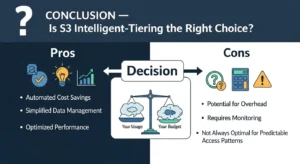
AWS S3 Intelligent-Tiering is the most hands-off, cost-intelligent storage class in the S3 portfolio for any workload where data access patterns are variable, unpredictable, or simply unknown. It eliminates the need to predict the future — instead of asking you to bet on how your data will be used and write lifecycle rules accordingly, it observes actual behavior and optimizes storage costs automatically, continuously, and without retrieval fees.
Enable S3 Intelligent-Tiering as your default storage class for new workloads, run S3 Storage Lens to validate savings after 60 to 90 days, and combine it with targeted lifecycle rules for housekeeping operations to build a complete, cost-optimized data lifecycle strategy.