


Containerization has fundamentally transformed how enterprises deploy, scale, and manage cloud applications. Unlike traditional virtual machines, containers provide lightweight, portable, and efficient application packaging that enables organizations to achieve faster deployment cycles, improved resource utilization, and seamless scaling across multi-cloud environments. This comprehensive guide explores containerization in cloud computing from foundational concepts through production-grade architecture patterns, providing CTOs, DevOps engineers, cloud architects, and developers with actionable strategies for implementing containerization at enterprise scale.
Understanding containerization is no longer optional for cloud-native organizations. The global market for container technologies is projected to exceed $15 billion by 2028, driven by adoption across banking, healthcare, e-commerce, and software development sectors. This guide provides the technical depth and practical frameworks necessary to implement containerization effectively, avoid common pitfalls, and maximize organizational benefits.
1. Containerization Architecture: From VMs to Lightweight Containers
The Evolution from Virtual Machines to Containerized Workloads
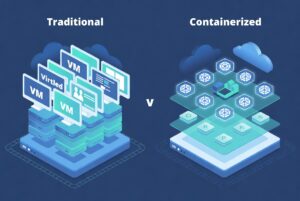
Traditional virtualization relied on hypervisors managing full operating systems for each workload. A single server might run 5-10 virtual machines, each consuming 1-4GB of memory for the OS alone. Containerization fundamentally changes this paradigm by sharing the host operating system kernel while isolating application processes, dependencies, and filesystem.
A container typically consumes only 50-100MB of memory, enabling a single host to run 50-100+ containers. This density improvement directly translates to cost savings, faster deployment, and improved resource efficiency. Docker, the containerization platform, introduced in 2013, standardized this approach and created the modern container ecosystem.
Container Architecture: Layers, Images, and Runtimes
Understanding containerization requires grasping three core concepts:
- Container Images: Immutable blueprints containing application code, runtime, libraries, and system tools. Images are versioned and reproducible, enabling identical deployments across development, staging, and production.
- Container Registries: Centralized repositories (Docker Hub, Amazon ECR, Azure Container Registry, Google Container Registry) storing images. Registries enable version control, access management, and rapid deployment.
- Container Runtimes: Execution engines (Docker, containerd, CRI-O) running containers on host systems. Runtimes manage resource isolation, networking, and process execution.
Container Layers: Optimization Through Immutability
Container images use layered filesystems where each layer represents a build step. A base layer (Ubuntu, Alpine, RHEL) provides the OS, followed by dependency layers, application code layer, and configuration layer. This layering enables efficient storage and distribution—similar layers are shared across images, reducing overall storage and bandwidth requirements.
Practical optimization: A 10-layer Dockerfile building a Node.js application might total 500MB. Optimized layer ordering (dependencies before code) and multi-stage builds reduce this to 150MB. This 3x reduction directly impacts deployment speed, registry costs, and resource utilization.
2. Strategic Benefits of Containerization in Cloud Computing
Portability Across Cloud Providers and On-Premises
Containerization enables true cloud-agnostic deployment. An application containerized on AWS runs identically on Azure, Google Cloud, or on-premises infrastructure. This portability eliminates vendor lock-in, enables multi-cloud strategies, and provides negotiating leverage with cloud providers.
Real-world impact: A healthcare organization containerized their application suite and successfully migrated 40% of workloads from AWS to Azure within 6 months, negotiating $1.2M in annual savings. Without containerization, this migration would have required complete architectural redesign and 12-18 months of engineering effort.
Scalability and Resource Efficiency
Containerization enables auto-scaling based on demand metrics. Kubernetes automatically scales from 2 to 200 container instances responding to traffic spikes, then scales down during off-peak periods. This dynamic scaling would be impossible with traditional VMs due to boot time (2-3 minutes) and memory overhead.
- Container startup time: 100-500ms vs. VM startup: 30-60 seconds
- Memory footprint: 50-100MB per container vs. 1-4GB per VM
- Density: 100+ containers per host vs. 5-10 VMs per host
Consistency Across Development, Staging, and Production
Container images guarantee ‘works on my machine’ problem elimination. The exact same image running in a developer’s laptop, CI/CD pipeline, staging environment, and production infrastructure ensures zero environment-related surprises. This consistency reduces debugging effort and accelerates deployments.
Organizations report 50-75% reduction in environment-related incidents after containerization, directly improving SLA compliance and reducing on-call burden for DevOps teams.
3. Container Orchestration: Managing Containerized Workloads at Scale
Why Container Orchestration Is Essential
Running a single container is straightforward. Managing 50-500 containers across multiple servers requires orchestration platforms that handle: scheduling, resource allocation, health monitoring, automatic failover, rolling updates, networking, and storage management. Kubernetes has emerged as the industry standard, adopted by 96% of organizations using container orchestration.
Kubernetes Fundamentals for Cloud Architecture
Kubernetes abstracts underlying infrastructure (AWS, Azure, Google Cloud, on-premises) and provides unified APIs for container management. Core concepts include:
- Pods: Smallest deployable Kubernetes unit, typically containing one container (can contain multiple tightly-coupled containers)
- Deployments: Manage replica sets, enabling auto-scaling and rolling updates
- Services: Expose containers via load-balanced endpoints, enabling service discovery
- Namespaces: Logical isolation enabling multi-tenancy on shared clusters
- ConfigMaps & Secrets: Manage configuration and sensitive data separately from container images
Multi-Cloud Kubernetes Strategy
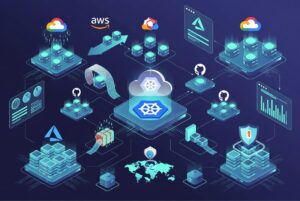
Organizations deploying Kubernetes across AWS (EKS), Azure (AKS), and Google Cloud (GKE) achieve true cloud portability. A containerized microservice can migrate between clouds with zero code changes. This strategy provides negotiating leverage, enables disaster recovery across cloud providers, and prevents vendor lock-in.
Implementation complexity increases with multi-cloud strategies—organizations must standardize on cluster networking, storage integration, monitoring, and CI/CD pipelines. Using managed Kubernetes services (EKS, AKS, GKE) rather than self-managed clusters significantly reduces operational burden.
4. Containerization Implementation Patterns: From Monolith to Microservices
Migration Strategy: Monolith to Containerized Microservices
Container adoption typically follows three patterns: Lift-and-shift containerization of existing applications, refactoring monoliths into microservices, or building cloud-native applications from scratch. Each approach involves different complexity, timeline, and resource requirements.
Pattern 1: Containerizing Existing Monolithic Applications
Fastest path to containerization—package existing applications into containers with minimal code changes. Benefits include improved deployment speed and resource efficiency. Challenges include large image sizes (500MB-2GB), slow startup times, and limited horizontal scaling potential.
Implementation: Create Dockerfile defining base image, dependencies, application code, and startup command. Use multi-stage builds separating build environment from runtime, reducing production image size by 50-75%. Typical timeline: 2-4 weeks for single monolithic application.
Pattern 2: Refactoring Monoliths Into Containerized Microservices
Extract logical components from monoliths into independent containerized services. Each microservice owns a specific business capability, maintains its own database, and communicates via APIs. Benefits include independent scaling, deployment agility, and team autonomy. Challenges include distributed systems complexity, network latency, and operational overhead.
Implementation timeline: 3-12 months depending on monolith complexity. Requires careful service boundary definition, data management strategy, and inter-service communication patterns. Organizations report 2-3x faster feature delivery post-refactoring, justifying the upfront investment.
Pattern 3: Greenfield Cloud-Native Development
Building new applications with containerization from inception. Applications designed as containerized microservices leverage cloud-native technologies (Kubernetes, serverless, managed databases). Delivers maximum scalability, cost efficiency, and development velocity.
Requires different architectural thinking—stateless services, event-driven communication, and cloud-native observability. Teams with cloud-native expertise execute 40-50% faster than teams building traditional monoliths.
5. Production-Grade Containerization: Security, Monitoring, and Operations
Container Security Architecture
Container security spans image, runtime, and orchestration layers. Common vulnerabilities include: outdated dependencies in base images, privileged container execution, insufficient resource limits, and excessive permissions. Production containerization requires:
- Image Scanning: Automated vulnerability scanning during build process (Trivy, Snyk) detecting CVEs before deployment
- Supply Chain Security: Signed images, immutable registries, and access control preventing unauthorized image deployment
- Runtime Security: Resource limits, read-only filesystems, and container security policies enforcing execution constraints
- Network Security: Network policies restricting container-to-container communication and external access
Observability for Containerized Workloads
Containerization increases operational complexity—tracking hundreds of short-lived containers requires sophisticated observability. Production systems require integrated logging, metrics, and distributed tracing:
- Centralized Logging: Aggregate container logs to ELK Stack, Splunk, or Datadog for searchability and analytics
- Metrics Collection: Prometheus scraping container metrics (CPU, memory, network) enabling performance monitoring and capacity planning
- Distributed Tracing: OpenTelemetry tracing requests across microservices enabling performance analysis and bottleneck identification
- Container-Native Monitoring: Kubernetes-aware monitoring understanding pod lifecycles, resource allocation, and cluster health
Cost Optimization for Containerized Infrastructure
While containerization improves resource efficiency, production Kubernetes clusters require careful cost management. Organizations report 20-40% cost increases post-containerization if optimization is neglected due to: over-provisioned clusters, unused container resources, and inefficient storage.
Optimization techniques include: right-sizing resource requests, implementing pod disruption budgets for cost-optimized instances, using spot/preemptible instances for stateless workloads, and regular reserved capacity analysis. FinOps practices applied to containerized infrastructure yield 30-50% additional cost savings.
6. Container-Driven DevOps: Continuous Integration and Continuous Deployment
CI/CD Pipeline Architecture for Containerized Applications
Containerization enables automated, efficient CI/CD pipelines. Modern CI/CD platforms (GitHub Actions, GitLab CI, Jenkins, CircleCI) build container images, push to registries, and deploy to Kubernetes with minimal manual intervention.
Pipeline stages typically include: code commit → unit tests → image build → vulnerability scan → registry push → automated deployment → integration tests → production rollout. Complete pipeline execution typically completes within 5-15 minutes, enabling rapid iteration.
GitOps: The Container-Native Deployment Model
GitOps treats Git repositories as source of truth for infrastructure and application configuration. Changes to Kubernetes manifests in Git automatically sync to running clusters. This approach provides version control, audit trails, and rollback capability for infrastructure changes.
Tools like ArgoCD and Flux CD implement GitOps patterns, enabling teams to manage deployments through pull requests rather than kubectl commands. Organizations adopting GitOps report 50% reduction in deployment-related incidents and 3x faster incident recovery.
7. Containerization Challenges: Realistic Assessment and Solutions
Networking Complexity
Challenge: Containers require service discovery, load balancing, and network policies. This complexity increases significantly in multi-cluster, multi-cloud deployments.
Solution: Use service meshes (Istio, Linkerd) abstracting networking complexity. Service meshes provide traffic management, security policies, and observability without application code changes.
Stateful Workloads in Containers
Challenge: Containers are designed for stateless workloads. Running stateful applications (databases, message queues) requires persistent storage and careful data management.
Solution: Use managed databases (AWS RDS, Azure SQL, Google Cloud SQL) rather than containerized databases. For containerized stateful workloads, use Kubernetes StatefulSets with persistent volumes, though this adds operational complexity.
Skills and Operational Burden
Challenge: Container expertise is specialized—organizations struggle finding engineers proficient in Docker, Kubernetes, and cloud-native architecture.
Solution: Invest in training programs, hire senior architects to establish patterns and standards, and consider managed Kubernetes services reducing operational burden. Internal platform teams create abstraction layers enabling developers to deploy without deep Kubernetes expertise.
Cost Visibility and Management
Challenge: Container resource consumption is dynamic, making cost prediction difficult. Organizations often over-provision to ensure availability, inflating costs.
Solution: Implement FinOps practices with CloudHealth or Kubecost providing real-time cost visibility. Set resource requests/limits accurately based on monitoring data, use auto-scaling to match demand, and commit to reserved capacity for stable workloads.
8. Containerization Across Cloud Providers: AWS, Azure, and Google Cloud
AWS Container Strategy: ECS vs. EKS
AWS offers two primary container orchestration options. ECS (Elastic Container Service) is AWS-native, tightly integrated with EC2 and Fargate. EKS (Elastic Kubernetes Service) provides managed Kubernetes, offering portability to other clouds.
ECS suits organizations standardizing on AWS without multi-cloud requirements. EKS suits organizations prioritizing cloud portability and leveraging existing Kubernetes expertise. ECS is generally 20-30% cheaper due to tighter AWS integration; EKS provides superior portability.
Azure Container Services: ACI and AKS
Azure Container Instances (ACI) provides serverless container execution without cluster management. Azure Kubernetes Service (AKS) offers managed Kubernetes with Azure integrations.
ACI suits burst workloads and one-off container execution. AKS suits production multi-tier applications requiring orchestration. Azure provides strong hybrid integration with Arc enabling Kubernetes management across on-premises and cloud resources.
Google Cloud Container Strategy: Cloud Run and GKE
Google Cloud offers Cloud Run (serverless containers) and GKE (managed Kubernetes). Cloud Run abstracts infrastructure completely—users deploy containers specifying only memory/CPU requirements; Google manages scaling, networking, and operations.
Cloud Run suits rapid deployment and cost-optimized workloads (charges per 100ms execution). GKE suits complex applications requiring fine-grained control and multi-container deployments. GKE benefits from Google’s infrastructure expertise and superior Kubernetes support.
9. Container Best Practices: Architecture Decisions That Scale
Designing Container Images for Production
Production images require different considerations than development containers. Best practices include:
- Minimal Base Images: Use Alpine (5MB) or distroless images (20MB) instead of full OS images (Ubuntu 500MB+), reducing attack surface and improving deployment speed
- Single Responsibility: One process per container enables independent scaling and replacement without affecting other services
- Immutable Infrastructure: Containers should be immutable after build—configuration applied via environment variables, ConfigMaps, and Secrets
- Vulnerability Scanning: Automated scanning during build pipeline prevents vulnerable images reaching production
Service Communication and API Design
Microservices require well-designed APIs for inter-service communication. REST APIs remain most common; organizations increasingly adopt gRPC for performance-critical services and event-driven architectures using message queues for async communication.
API versioning strategy critical for independent service evolution. Backwards-compatible changes reduce coordination overhead. Organizations typically support 2-3 API versions, deprecating oldest versions over 6-month periods.
Data Management in Containerized Systems
Each microservice should own its database—shared databases create tight coupling limiting scaling and deployment flexibility. This ‘database per service’ pattern requires careful data synchronization strategies:
- Eventual Consistency: Accept temporary data divergence for higher availability (suitable for most workloads)
- Event Sourcing: Maintain immutable event logs enabling state reconstruction across services
- Saga Patterns: Coordinate distributed transactions across multiple services via orchestration
10. Future of Containerization: Emerging Trends Shaping Cloud Architecture
Containerization continues evolving with emerging trends reshaping cloud infrastructure:
- Serverless Containers: Cloud Run and Lambda containers abstract orchestration further, enabling developers to focus purely on business logic without infrastructure concerns
- eBPF and Runtime Security: eBPF technology enabling kernel-level security policies and observability without performance overhead
- WebAssembly Containers: WASM containers offering faster startup times (50ms) and lower resource consumption than traditional containers
- Supply Chain Security: Emphasis on securing container image sources, signing verification, and SBOM (Software Bill of Materials) requirements
- AI/ML Container Optimization: GPU container support and specialized container runtimes optimizing machine learning workloads
Conclusion: Containerization as Strategic Cloud Foundation
Containerization in cloud computing represents a fundamental shift in application architecture and deployment methodology. From portability eliminating vendor lock-in to scalability enabling cost-efficient operations, containerization delivers measurable business value when implemented with architectural discipline.
Success requires moving beyond basic containerization organizations must establish container security practices, implement sophisticated observability, adopt cloud-native deployment patterns via GitOps and CI/CD automation, and invest in team capabilities. The organizations leading their industries share common characteristics: containerized architectures, automated deployment pipelines, and strong cloud-native engineering practices.
The future belongs to organizations mastering containerization and its evolution toward serverless abstractions, enhanced security models, and supply chain integrity. Implementation requires thoughtful planning, adequate investment in tooling and training, but the competitive advantages justify the commitment. Containerization is no longer a technical practice—it is a strategic imperative for cloud-native enterprises seeking market leadership.
