Lambda’s free tier — 1 million requests and 400,000 GB-seconds per month — sounds generous until you do the math. A single function configured with 1,024 MB memory running for 500ms consumes 0.5 GB-seconds per invocation. That free tier exhausts at 800,000 executions, not the 1 million requests the headline suggests. A moderately busy API serving authentication requests or processing webhooks can burn through this limit in 24 hours, leaving you wondering why your “serverless” bill jumped from $0 to $247 overnight.
AWS Lambda pricing appears simple on the surface — pay per request and per execution time — but the actual cost model operates on seven independent factors simultaneously. Memory allocation doesn’t just affect your bill; it controls CPU speed, meaning a 2,048 MB function runs twice as fast as 1,024 MB but costs four times more per second. Architecture choice between ARM Graviton2 and x86 creates a 20% price difference that most developers ignore. Cold start mitigation through Provisioned Concurrency can cost more than the actual function executions. Data transfer charges hide in other AWS services, not Lambda’s line item, making true cost attribution nearly impossible without detailed tagging.
How AWS Lambda Pricing Works — The Core Model
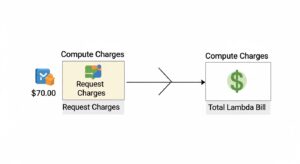
Lambda operates on a truly serverless billing model: AWS charges nothing when your code isn’t executing. No idle servers consuming budget overnight. No minimum monthly fees. Launch a function, run it three times for testing, and pay for exactly three executions plus the API calls that triggered them.
The billing model combines two primary components — requests and duration — plus five optional charges that apply only when you use specific features. Every function invocation generates one request charge regardless of success or failure. Duration charges accumulate based on allocated memory (in GB) multiplied by execution time (in seconds), creating a composite metric called GB-seconds that drives most of your Lambda costs.
Lambda’s permanent free tier never expires, unlike EC2’s 12-month limitation. Every AWS account receives 1 million requests monthly and 400,000 GB-seconds monthly, renewable each billing cycle. A function using 128 MB memory can execute 3.2 million times monthly within free tier limits (400,000 GB-seconds ÷ 0.125 GB = 3.2M seconds at 1-second duration). Most hobbyist projects, development environments, and low-traffic production APIs operate entirely within these limits indefinitely.
The fundamental Lambda billing formula combines both components:
Total Cost = (Total Requests × $0.20 per 1M requests) + (Total GB-seconds × Architecture Rate)
where GB-seconds = Invocations × (Memory in MB ÷ 1,024) × Duration in Seconds
Duration rounds up to the nearest millisecond, meaning a 1.2ms execution bills as 2ms. Memory allocates in 1 MB increments from 128 MB minimum to 10,240 MB maximum. Execution time starts when your handler begins processing and ends when it returns or terminates, including all initialization code within the handler function but excluding infrastructure provisioning time for on-demand functions.
Factor 1 — Request Charges
Request charges bill at $0.20 per million requests ($0.0000002 per individual request) after exhausting the 1 million monthly free tier. This rate applies uniformly regardless of function memory size, execution duration, success or failure status, or invocation source. A request that fails immediately due to a configuration error costs the same $0.0000002 as a request executing successfully for 14 minutes.
Every function invocation generates exactly one request charge. Triggers include direct Invoke API calls from SDKs or CLI, event notifications from S3 object uploads, messages arriving in SQS queues, EventBridge scheduled events, SNS topic publishes, API Gateway HTTP requests, Application Load Balancer target invocations, and manual test executions through the Lambda console. Retries count as separate requests — if a function fails and Lambda automatically retries twice, three request charges apply.
Example calculation: Your application processes 10 million webhook deliveries monthly. Request cost = (10,000,000 – 1,000,000 free) × ($0.20 ÷ 1,000,000) = $1.80 per month for request charges alone.
Request charges typically represent the smallest fraction of total Lambda costs — often 5-15% of your bill. Duration charges based on memory allocation and execution time dominate spending for most workloads. A function executing for 5 seconds at 2 GB memory accumulates $0.00033 in duration charges but only $0.0000002 in request charges — duration costs 1,650 times more than the request itself for this example.
The request component becomes significant only at extreme scale or for very short-duration functions where execution time approaches 1 millisecond. At 100 million monthly invocations, request charges alone reach $19.80, and at 1 billion invocations, $199.80 — non-trivial but still typically 20-40% of total cost when duration charges accumulate proportionally.
Factor 2 — Duration Charges (The Big Cost Driver)
Duration charges almost always represent the largest component of AWS Lambda cost — typically 60-85% of your total Lambda spending. AWS measures duration in GB-seconds, calculated as (allocated memory in GB) × (execution time in seconds), then multiplies by an architecture-specific rate that varies by CPU type and monthly volume tier.
Execution time starts when your handler code begins processing (after initialization for on-demand invocations, immediately for warmed instances) and stops when the handler returns a response, throws an unhandled error, or reaches the configured timeout limit. Lambda bills in 1-millisecond increments, so a function completing in 247ms bills for exactly 247ms, not rounded to the nearest second.
Memory allocation ranges from 128 MB to 10,240 MB in 1 MB increments. Higher memory allocation provides proportionally more CPU power and network bandwidth — a 2,048 MB function receives approximately twice the CPU performance of a 1,024 MB function, potentially cutting execution time in half while doubling the per-second rate. This creates an optimization opportunity where increasing memory can actually reduce total cost if the execution speed improvement exceeds the rate increase.
Duration Pricing — x86 Architecture
Standard Lambda functions run on x86_64 processors with the following rates for US East (Ohio) region:
| Memory (MB) | Memory (GB) | Price/1ms (x86) | Price/GB-sec (x86) |
| 128 | 0.125 | $0.0000000021 | $0.0000166667 |
| 256 | 0.25 | $0.0000000042 | $0.0000166667 |
| 512 | 0.5 | $0.0000000083 | $0.0000166667 |
| 1,024 | 1.0 | $0.0000000167 | $0.0000166667 |
| 1,536 | 1.5 | $0.0000000250 | $0.0000166667 |
| 2,048 | 2.0 | $0.0000000333 | $0.0000166667 |
| 3,072 | 3.0 | $0.0000000500 | $0.0000166667 |
| 4,096 | 4.0 | $0.0000000667 | $0.0000166667 |
| 6,144 | 6.0 | $0.0000001000 | $0.0000166667 |
| 8,192 | 8.0 | $0.0000001333 | $0.0000166667 |
| 10,240 | 10.0 | $0.0000001667 | $0.0000166667 |
Notice the price-per-GB-second remains constant at $0.0000166667 across all memory sizes for the base tier. The per-millisecond rate scales linearly with memory because you’re buying more GB-seconds per second of execution.
Duration Pricing — ARM Graviton2 Architecture

Lambda supports ARM-based Graviton2 processors for Python, Node.js, Java, .NET Core, Ruby, and custom runtimes. ARM functions cost approximately 20% less than equivalent x86 functions with identical or better performance for most workloads:
| Memory (MB) | Memory (GB) | Price/1ms (ARM) | Price/GB-sec (ARM) | Savings vs x86 |
| 128 | 0.125 | $0.0000000017 | $0.0000133334 | 20% |
| 256 | 0.25 | $0.0000000033 | $0.0000133334 | 20% |
| 512 | 0.5 | $0.0000000067 | $0.0000133334 | 20% |
| 1,024 | 1.0 | $0.0000000133 | $0.0000133334 | 20% |
| 1,536 | 1.5 | $0.0000000200 | $0.0000133334 | 20% |
| 2,048 | 2.0 | $0.0000000267 | $0.0000133334 | 20% |
| 3,072 | 3.0 | $0.0000000400 | $0.0000133334 | 20% |
| 4,096 | 4.0 | $0.0000000533 | $0.0000133334 | 20% |
| 6,144 | 6.0 | $0.0000000800 | $0.0000133334 | 20% |
| 8,192 | 8.0 | $0.0000001067 | $0.0000133334 | 20% |
| 10,240 | 10.0 | $0.0000001333 | $0.0000133334 | 20% |
ARM Graviton2 reduces the per-GB-second rate to $0.0000133334 — a 20% discount that applies automatically when you select ARM64 architecture. Most modern Lambda runtimes support ARM with zero code changes; simply select “arm64” when creating or updating your function configuration.
Tiered Volume Discounts on Duration
AWS applies volume-based tiered pricing to duration charges, calculated monthly across all Lambda functions in your account within each region and architecture separately. As your monthly GB-second consumption increases, subsequent usage falls into cheaper tiers automatically.
x86 tiered pricing structure:
- First 6 billion GB-seconds/month: $0.0000166667 per GB-second
- Next 9 billion GB-seconds/month: $0.0000150000 per GB-second (10% discount)
- Over 15 billion GB-seconds/month: $0.0000133340 per GB-second (20% discount)
ARM Graviton2 tiered pricing structure:
- First 7.5 billion GB-seconds/month: $0.0000133334 per GB-second
- Next 11.25 billion GB-seconds/month: $0.0000120001 per GB-second (10% discount)
- Over 18.75 billion GB-seconds/month: $0.0000106667 per GB-second (20% discount)
Volume tiers aggregate consumption across all Lambda functions in an AWS account within a single region for each processor architecture independently. Ten different functions each consuming 600 million GB-seconds on x86 combine to reach 6 billion GB-seconds, triggering tier 2 pricing for subsequent executions. However, x86 and ARM usage track separately — 6 billion GB-seconds on x86 and 6 billion on ARM don’t combine; each architecture maintains independent tier progression.
Most organizations never reach tier 2 thresholds. Six billion GB-seconds on x86 translates to approximately 97,000 hours of a 1,024 MB function running continuously, or 200,000 invocations of a 5-second function at 6 GB memory daily. Enterprises operating hundreds of Lambda functions at substantial scale benefit from tier 2 and tier 3 pricing, while small-to-medium workloads pay tier 1 rates exclusively.
Factor 3 — Memory Allocation & the CPU Relationship
Lambda’s memory setting controls more than RAM allocation — it proportionally determines CPU power, network bandwidth, and disk I/O performance. A function configured with 1,792 MB receives approximately twice the CPU performance of a 896 MB function, similar to how EC2 instance types with more memory typically include more vCPUs. This creates a counterintuitive optimization opportunity where increasing memory allocation can reduce total cost despite higher per-second rates.
AWS doesn’t publish exact CPU core counts or clock speeds for Lambda execution environments, but the relationship is consistent and linear: doubling memory doubles CPU capacity. Functions performing CPU-intensive operations (JSON parsing, image processing, cryptographic operations, data transformation) complete faster with more memory, potentially reducing total GB-seconds consumed despite the higher memory allocation.
Example demonstrating the memory-cost trade-off:
A Python function processes CSV files uploaded to S3. At 512 MB memory, the function completes in 800ms per file:
- GB-seconds per execution: 0.5 GB × 0.8s = 0.4 GB-seconds
- Cost per execution (x86): 0.4 × $0.0000166667 = $0.0000067
Increasing memory to 1,024 MB doubles CPU power, reducing execution time to 420ms (not 400ms — diminishing returns often apply):
- GB-seconds per execution: 1.0 GB × 0.42s = 0.42 GB-seconds
- Cost per execution (x86): 0.42 × $0.0000166667 = $0.0000070
The higher memory allocation actually increased cost slightly because execution time didn’t improve proportionally to the rate increase. However, switching to ARM at 1,024 MB with the same 420ms execution:
- GB-seconds per execution: 1.0 GB × 0.42s = 0.42 GB-seconds
- Cost per execution (ARM): 0.42 × $0.0000133334 = $0.0000056
ARM at 1,024 MB costs 16% less than x86 at 512 MB while completing 47% faster — a win on both performance and cost dimensions.
The optimal memory setting varies by function and workload. CPU-bound operations benefit from higher memory allocations; I/O-bound operations (waiting for database queries, external API calls, S3 downloads) see minimal speed improvements from additional CPU and waste money on unused resources. Finding the optimal configuration requires testing actual workloads at different memory settings.
Lambda Power Tuning — the open-source tool by Alex Casalboni at github.com/alexcasalboni/aws-lambda-power-tuning — automates this testing. The tool invokes your function at every memory configuration from 128 MB to 10,240 MB, measures execution time and cost for each, and generates visualization showing the cost-optimal and performance-optimal memory settings. Deploy the tool as a Step Functions state machine, run it against your production functions with representative payloads, and apply the recommended memory settings to capture immediate cost reductions of 20-40% for many workloads.
Factor 4 — Ephemeral Storage (/tmp Directory)
Lambda provides each execution environment with a local filesystem mounted at /tmp for temporary file storage during function execution. The default allocation of 512 MB is free for all Lambda functions. You can increase ephemeral storage up to 10,240 MB in 1 MB increments, with additional storage beyond 512 MB billed at $0.0000000309 per GB-second.
Ephemeral storage persists across invocations within the same execution environment when Lambda reuses warm containers, but data disappears when the environment shuts down (typically after 5-7 minutes of inactivity). Don’t use /tmp for persistent data storage; treat it as a scratch space for processing large files or caching data that accelerates subsequent invocations within the same execution context.
Cost calculation example: A function processes video files requiring 3 GB temporary storage (2,560 MB beyond the free 512 MB = 2.5 GB additional). Each invocation runs for 8 seconds:
- Additional storage: 2.5 GB
- Duration: 8 seconds
- GB-seconds charged: 2.5 GB × 8s = 20 GB-seconds
- Cost per invocation: 20 × $0.0000000309 = $0.000000618
At 100,000 monthly invocations, ephemeral storage adds $0.0618 — negligible compared to duration charges for a large-memory, long-running function. At 10 million invocations, ephemeral storage reaches $6.18 monthly — still small but increasingly noticeable.
Common use cases for expanded ephemeral storage:
- Machine learning model loading — Large neural network models (500 MB to 2 GB) download from S3 into /tmp, load into memory, then process inference requests using the cached model for hundreds of invocations before the execution environment terminates.
- Large file processing — Functions processing PDF documents, video files, or data archives download source files to /tmp, perform transformations (compression, format conversion, thumbnail generation), write output to /tmp, then upload results to S3. Local disk I/O performs faster than streaming processing for many operations.
- Dependency caching — Node.js functions with 200+ MB node_modules or Python functions with large ML libraries (TensorFlow, PyTorch) can extract compressed dependencies to /tmp on first invocation, reusing cached files across subsequent invocations in the same execution environment instead of extracting from deployment package repeatedly.
- Compilation artifacts — Functions that compile code at runtime (LaTeX document generation, user-submitted code execution, dynamic report rendering) use /tmp for compiler output and intermediate build artifacts.
The /tmp storage limit applies per execution environment, not per invocation. A function configured with 5 GB ephemeral storage might have three concurrent execution environments, each with its own independent 5 GB /tmp filesystem. Concurrent invocations in the same environment share the same /tmp directory and can theoretically conflict (though AWS generally isolates invocations), so write to unique filenames incorporating request IDs or timestamps.
Factor 5 — Provisioned Concurrency vs Lambda SnapStart
Cold starts — the initialization latency when Lambda creates a new execution environment — represent the most common performance complaint about serverless functions. Java and .NET functions regularly exhibit 2-5 second cold starts due to JVM initialization and dependency loading. Python and Node.js typically cold start in 200-500ms for simple functions, but complex dependencies (pandas, TensorFlow, large node_modules) extend cold starts beyond 2 seconds. AWS offers two solutions with dramatically different cost structures.
Provisioned Concurrency (All Runtimes)
Provisioned Concurrency keeps a specified number of execution environments initialized and warm 24/7, eliminating cold starts entirely for requests served by provisioned instances. You configure a target concurrency level (e.g., 10 concurrent executions), and AWS maintains that many initialized environments continuously whether your function receives zero requests or ten thousand.
Provisioned Concurrency bills for three components separately:
- Provisioned capacity charge: $0.0000041667 per GB-second (x86) for maintaining warm execution environments, charged continuously 24/7 based on allocated memory and provisioned concurrency count, independent of actual invocations
- Duration charge (when executing): $0.0000097222 per GB-second (x86) for actual execution time when provisioned instances handle requests
- Request charge: Standard $0.20 per million requests
ARM Graviton2 Provisioned Concurrency pricing: $0.0000033334 per GB-second (provisioned capacity) and $0.0000077778 per GB-second (execution duration) — approximately 20% cheaper than x86.
Critical cost consideration: The free tier does NOT apply to functions with Provisioned Concurrency enabled. Every GB-second of provisioned capacity and every execution bills at full rates from the first invocation.
Example cost calculation for Provisioned Concurrency:
An API function configured with 10 concurrent instances at 1,024 MB memory running in us-east-1 (x86 architecture):
- Monthly provisioned capacity: 10 instances × 1.0 GB × 730 hours × 3,600 seconds/hour = 26,280,000 GB-seconds
- Provisioned capacity cost: 26,280,000 × $0.0000041667 = $109.50/month (billed regardless of invocations)
Assume the function handles 5 million requests monthly with 150ms average execution using the provisioned instances:
- Execution GB-seconds: 5,000,000 × 1.0 GB × 0.15s = 750,000 GB-seconds
- Execution duration cost: 750,000 × $0.0000097222 = $7.29
- Request cost: 5,000,000 × $0.20 ÷ 1,000,000 = $1.00
Total monthly Provisioned Concurrency cost: $109.50 + $7.29 + $1.00 = $117.79
Compare to on-demand pricing for the same workload: (5M × 1.0 × 0.15 = 750K GB-sec – 400K free tier) × $0.0000166667 + (5M – 1M free) × $0.0000002 = $5.83 + $0.80 = $6.63 total on-demand.
Provisioned Concurrency costs 17.7× more than on-demand for this workload. It makes economic sense only when cold start latency creates unacceptable user experience or business impact, and revenue loss from slow responses exceeds the infrastructure premium. Most consumer applications tolerate 200-500ms cold starts without noticeable churn; financial trading platforms, real-time bidding systems, and healthcare applications often cannot.
Lambda SnapStart (Java Only — FREE)
Lambda SnapStart, introduced in late 2022 and available exclusively for Java runtimes (Corretto 11, Corretto 17, Corretto 21), eliminates cold starts without ongoing capacity charges. SnapStart works by initializing a function execution environment, taking a memory and disk snapshot after initialization completes but before the first request, then restoring from that snapshot when creating new execution environments instead of initializing from scratch.
How SnapStart works:
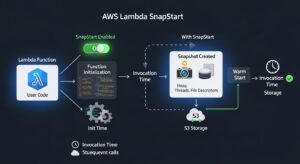
- Deploy or update a Java Lambda function with SnapStart enabled
- Lambda initializes the function, loads classes, runs static initializers, executes init code
- Lambda creates a snapshot of the initialized state (memory, disk, network connections closed)
- When new execution environments are needed, Lambda restores from the snapshot instead of re-initializing
- Subsequent invocations start in <100ms instead of 2-5 seconds for typical Java cold starts
Cost structure: SnapStart adds zero additional charges. Functions with SnapStart enabled bill at standard on-demand rates — duration charges based on actual execution time, request charges at $0.20 per million, and full eligibility for the free tier. No provisioned capacity fees. No snapshot storage charges. Completely free.
Trade-offs and limitations:
- Java runtimes only — Python, Node.js, Go, .NET, Ruby, and custom runtimes cannot use SnapStart
- Stateless initialization required — Don’t generate random seeds, establish network connections, capture timestamps, or read environment state during initialization; these values get “frozen” in the snapshot and reused across all restored instances
- Temporary credentials rotate — AWS automatically refreshes IAM role credentials after restoration, but application code caching credentials during initialization must handle rotation
- Uniqueness considerations — If initialization generates unique IDs, cache keys, or session tokens, multiple restored environments will share those values unless code explicitly regenerates on first invocation post-restore
Cost comparison table:
| Solution | Monthly Cost (10 instances, 1GB) | Cold Start Latency | Runtime Support |
| No mitigation | $0 (on-demand only) | 100ms – 5,000ms | All runtimes |
| Lambda SnapStart | $0 (on-demand only) | <100ms | Java 11, 17, 21 only |
| Provisioned Concurrency | ~$109.50 + execution costs | <10ms (no cold start) | All runtimes |
Recommendation: If you operate Java Lambda functions with Provisioned Concurrency configured purely to mitigate cold start latency, disable Provisioned Concurrency, enable SnapStart, and eliminate the capacity charges entirely. SnapStart delivers sub-100ms initialization suitable for most API and event-driven workloads. Reserve Provisioned Concurrency for scenarios requiring single-digit millisecond response times or when running non-Java runtimes with unavoidable long initialization phases.
For detailed implementation guidance, see the Lambda SnapStart documentation.
Factor 6 — Compute Savings Plans for Lambda
AWS Compute Savings Plans apply to Lambda duration charges and Provisioned Concurrency charges, offering up to 17% discount in exchange for a 1-year or 3-year hourly compute spend commitment. Unlike EC2-specific Reserved Instances, Compute Savings Plans provide flexibility across Lambda, EC2, and AWS Fargate simultaneously — your commitment covers aggregate compute spend across all three services within the plan’s scope.
How Compute Savings Plans work:
You commit to spending a specific dollar amount per hour on compute (e.g., $5.00/hour) for one or three years. AWS applies the Savings Plan discount rate to eligible Lambda usage (duration and Provisioned Concurrency charges, not request charges) up to your committed spend, then bills any excess usage at standard on-demand rates. The hourly commitment applies continuously — if you commit to $5/hour and use $3/hour one day and $8/hour the next, you pay the committed $5/hour regardless of actual usage, capturing discounts on the $3 (at reduced effective rate) and paying on-demand for the $3 excess.
Discount rates for Lambda:
- 1-year No-Upfront: Approximately 12-13% discount
- 1-year Partial-Upfront: Approximately 14-15% discount
- 1-year All-Upfront: Approximately 16-17% discount
- 3-year No-Upfront: Approximately 20-22% discount
- 3-year All-Upfront: Up to 24-25% discount (varies by usage patterns)
Savings Plans apply automatically to lowest-cost eligible usage first within your account, requiring no manual reservation assignment. Lambda duration charges on both x86 and ARM architectures qualify for Compute Savings Plans, making them compatible with the 20% ARM discount — effectively stacking 20% ARM savings + 17% Savings Plan discount = ~34% total discount compared to x86 on-demand pricing.
When Compute Savings Plans make sense:
- Organizations with consistent Lambda baseline usage exceeding 4-5 million GB-seconds monthly (approximately $70-80/month in duration charges)
- Workloads running predictably 24/7 or with known minimum traffic levels
- Accounts using Lambda alongside EC2 and Fargate where cross-service flexibility provides insurance against architecture changes
- Teams confident in serverless architecture commitment for 1-3 years
When to avoid Savings Plans:
- Highly variable workloads with unpredictable usage patterns (commit conservatively to 60-70% of minimum monthly usage if proceeding)
- Early-stage startups expecting rapid growth or potential pivots to different architectures
- Development and experimentation environments where usage fluctuates dramatically month-to-month
- Organizations already operating within Lambda free tier or close to it (small usage levels don’t justify commitment overhead)
Purchase Savings Plans through the AWS Cost Management console, selecting Compute Savings Plans (not EC2 Instance Savings Plans, which don’t cover Lambda). Start with conservative commitments at 60-70% of your lowest monthly Lambda spend over the past 6 months, evaluate savings after 2-3 months, and increase commitment during the next purchase opportunity if consistent usage patterns emerge.
Cost comparison table:
| Feature | CloudFront Functions | Lambda@Edge |
| Price per 1M invocations | $0.10 | $0.60 |
| Duration charge | None | $0.00005001/GB-sec |
| Network access | No | Yes |
| Runtime | JavaScript only | Node.js, Python |
| Execution time limit | 1ms | 5s (viewer), 30s (origin) |
| Package size limit | 10 KB | 50 MB |
| Free tier | 2M invocations/month | None |
| Cost at 60M invocations (10ms, 128MB) | (60M – 2M free) × $0.10/1M = $5.80 | (60M × $0.60/1M) + (60M × 0.125 × 0.01 × $0.00005001) = $36.00 + $3.75 = $39.75 |
At 60 million monthly invocations, CloudFront Functions cost 85% less than Lambda@Edge. At 1 billion invocations, CloudFront Functions cost approximately $99.80 while Lambda@Edge exceeds $600 for the same workload.
When to use CloudFront Functions:
- URL rewrites and redirects (normalize trailing slashes, redirect HTTP to HTTPS)
- Header manipulation (add security headers, modify cache keys)
- Cookie processing (parse cookies, set session cookies)
- Simple A/B testing based on geography or headers
- Basic request validation (check required headers exist)
- Access control checks against in-memory lists
When to use Lambda@Edge:
- Authentication against external OAuth providers or databases
- Complex request/response transformations requiring full programming capabilities
- Personalization requiring user profile lookups from DynamoDB
- Image resizing or format conversion
- Origin selection based on complex business logic
- Any use case requiring network calls or execution beyond 1ms
Choose CloudFront Functions by default for simple edge logic to minimize costs. Escalate to Lambda@Edge only when CloudFront Functions’ limitations prevent implementation. For detailed feature comparisons, see the Lambda features documentation.
Additional Lambda Charges
HTTP Response Streaming
Lambda supports HTTP response streaming through the InvokeWithResponseStream API or Function URLs configured in ResponseStream mode, allowing functions to send response data incrementally as it becomes available rather than buffering the entire response in memory before returning. This feature benefits large responses (multi-megabyte JSON payloads, server-side rendered HTML, chunked file downloads) and streaming use cases like LLM chat completions.
Response streaming pricing:
- First 6 MB per request: Free
- Additional data beyond 6 MB: $0.008 per GB
Most API responses fall well below 6 MB, making response streaming essentially free for typical web services. The charge applies only to extremely large payloads exceeding the generous free allowance.
Example cost calculation:
An API generates PDF reports averaging 12 MB per response, streaming directly to clients. The function handles 500,000 requests monthly:
- Data per request exceeding free tier: 12 MB – 6 MB free = 6 MB charged
- Total chargeable data: 500,000 × 6 MB = 3,000,000 MB = ~2,930 GB
- Streaming cost: 2,930 GB × $0.008 = $23.44/month
Compare to duration savings: Streaming allows the Lambda function to terminate as soon as it begins sending the response, rather than waiting for the entire 12 MB payload to buffer and return. If streaming reduces execution time from 4 seconds to 1.5 seconds (2.5 seconds saved) at 2,048 MB memory, duration cost decreases by 500,000 × 2.0 GB × 2.5s × $0.0000166667 = $41.67 saved, offsetting the $23.44 streaming charge with net savings of $18.23 monthly.
Lambda Function URLs (FREE — No API Gateway!)
Every Lambda function can receive a dedicated HTTPS endpoint called a Function URL at zero additional cost. Function URLs provide built-in HTTPS access without deploying API Gateway, eliminating the $1.00-$3.50 per million requests API Gateway charges for simple endpoints. Function URLs support CORS configuration, IAM authentication, and public (unauthenticated) access.
Function URL capabilities:
- Free HTTPS endpoint: https://<unique-id>.lambda-url.<region>.on.aws/
- Supports GET, POST, PUT, DELETE, PATCH, HEAD, OPTIONS methods
- Payload size limits: 6 MB synchronous, 256 KB asynchronous
- Response streaming support (ResponseStream mode)
- IAM authentication or public access (no built-in API key management)
- No throttling controls beyond function-level concurrency limits
Function URLs do NOT provide:
- API key or usage plan management (use API Gateway REST/HTTP APIs instead)
- Request/response transformation or data mapping
- Response caching (use CloudFront in front of Function URL for caching)
- WAF integration for DDoS protection (attach WAF to CloudFront or use API Gateway)
- Custom domain names with SSL certificates (use CloudFront distribution with custom domain)
When to use Function URLs:
- Simple webhook receivers (GitHub, Stripe, Slack webhook callbacks)
- Internal tools and admin APIs accessed by known IAM principals
- Prototyping and development endpoints before adding API Gateway features
- Direct service-to-service Lambda invocations requiring HTTP interface
- Public APIs where API key management isn’t required
Cost comparison: Function URL vs API Gateway
For a function handling 10 million requests monthly:
- Function URL cost: $0 (no endpoint charges; standard Lambda request/duration charges apply)
- API Gateway HTTP API cost: 10M × $1.00 ÷ 1M = $10.00 (plus Lambda charges)
- API Gateway REST API cost: 10M × $3.50 ÷ 1M = $35.00 (plus Lambda charges)
Function URLs eliminate the API Gateway layer entirely for simple use cases, saving $10-35 monthly at this scale and $120-420 annually. For applications requiring API Gateway features (caching, throttling, API keys, custom domains), the managed service justifies the cost; for straightforward HTTP endpoints, Function URLs deliver equivalent HTTP access for free.
Data Transfer
Lambda data transfer charges follow standard EC2 data transfer pricing models, though they appear under EC2 line items in Cost Explorer rather than Lambda-specific categories, making cost attribution challenging without detailed resource tagging.
Data transfer pricing patterns:
- Inbound data transfer to Lambda: Free from all sources (internet, AWS services, other regions)
- Lambda to AWS services in same region: Free (S3, DynamoDB, SQS, SNS, EventBridge, etc.)
- Lambda to internet (outbound): First 100 GB free monthly (aggregated across all AWS services), then $0.09 per GB up to 10 TB, $0.085 per GB up to 50 TB, $0.07 per GB up to 150 TB, $0.05 per GB beyond 150 TB
- Lambda to AWS services cross-region: $0.02 per GB for inter-region data transfer
- Lambda in VPC with NAT Gateway: $0.045 per hour for NAT Gateway availability plus $0.045 per GB processed through NAT
VPC networking cost trap: Lambda functions in VPCs requiring internet access or access to AWS services without VPC endpoints must route traffic through NAT Gateways, incurring $32.40 monthly in NAT Gateway availability charges per AZ plus data processing fees. A function downloading 1 TB monthly from S3 without a VPC endpoint pays $45 in NAT data processing charges that a VPC endpoint eliminates entirely. Deploy VPC endpoints for S3, DynamoDB, and other supported services to bypass NAT Gateway costs for Lambda functions requiring VPC networking. Learn more about optimizing S3 pricing.
Most Lambda functions operate without VPC attachment (accessing AWS services via public endpoints), incurring zero networking costs for in-region service communication. Monitor “EC2-Other” line items in Cost Explorer for data transfer charges; high costs suggest either egress to internet (consider CloudFront caching) or NAT Gateway usage (consider VPC endpoints).
AWS Lambda Pricing FAQs
Is AWS Lambda free?
Lambda has a permanent free tier: 1M requests and 400,000 GB-seconds per month, ideal for small apps or dev environments.
How is Lambda duration calculated?
Duration counts from code start to finish in milliseconds, including cold starts for on-demand functions.
Does Lambda charge for cold starts?
Yes, initialization time is billed for on-demand functions; warm invocations skip this cost.
Provisioned Concurrency costs?
Initialization charges run continuously, execution billed per request; SnapStart can remove cold start costs.
Is Lambda cheaper than EC2?
For short or infrequent workloads, yes; for always-on, continuous workloads, EC2 is usually cheaper.
Conclusion
AWS Lambda offers a flexible, pay-per-use compute model that can dramatically reduce costs for short, event-driven workloads, especially when leveraging the free tier, ARM architecture, or SnapStart for Java functions. However, understanding duration charges, cold starts, ephemeral storage, and data transfer costs is crucial to avoid unexpected bills. For predictable savings and optimized serverless deployments, combining Compute Savings Plans with proper configuration can make a significant difference.
For teams managing multiple workloads or comparing serverless with traditional instances, exploring EC2 Pricing strategies can provide additional insights and help optimize your overall cloud spend.
At GoCloud, we help organizations navigate Lambda pricing, implement cost-efficient strategies, and ensure every workload runs optimally without surprises.