The promise of Generative AI is transformative—until you see the bill. Organizations launching chatbots, AI agents, and intelligent automation on AWS frequently experience Profit First GenAI FinOps challenges that traditional cloud cost management frameworks weren’t designed to handle. A simple proof-of-concept that costs $200 monthly during testing suddenly consumes $15,000 in production when scaled to real users, with costs distributed unpredictably across token consumption, embeddings generation, and inference compute.
Unlike traditional cloud workloads where you pay for allocated capacity (instances, storage, bandwidth), Generative AI charges per token processed—a variable cost model where even a “Hello” prompt can consume 10,000 tokens when system instructions and context are included. This comprehensive guide introduces a Profit First GenAI FinOps framework for generative AI, specifically designed for AWS-based AI workloads, covering cost attribution through tagging strategies, observability with distributed tracing, architectural patterns for token optimization, and guardrails that prevent bill shock while enabling innovation.
Why GenAI Costs Are Uniquely Hard to Manage
GenAI cost optimization AWS presents challenges fundamentally different from traditional infrastructure cost management. The token-based pricing model, hidden context consumption, and non-linear scaling characteristics require new approaches to financial governance.
How Token-Based Pricing Breaks Traditional FinOps Models
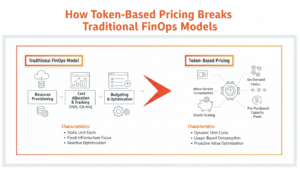
Traditional cloud FinOps operates on capacity-based pricing: you provision an EC2 instance (2 vCPU, 8 GB RAM) and pay a fixed hourly rate regardless of utilization. You can monitor CPU percentage, predict costs linearly, and optimize by right-sizing instances or using Savings Plans.
Generative AI operates on consumption-based pricing tied to tokens processed:
- Input tokens: Text sent to the model (prompts, context, system instructions)
- Output tokens: Text generated by the model (responses, completions)
- Embeddings: Vector representations of text for semantic search and RAG
Amazon Bedrock pricing example (Claude 3 Sonnet):
- Input tokens: $0.003 per 1,000 tokens
- Output tokens: $0.015 per 1,000 tokens (5× more expensive)
- Embeddings: $0.0001 per 1,000 tokens
Why this breaks traditional models:
Variable cost per transaction: Two identical API calls with different prompts consume different token counts and costs. A brief “Summarize this” might cost $0.01, while “Analyze this document and provide recommendations” on the same content costs $0.08 due to more detailed output.
Hidden context multipliers: System prompts, conversation history, and RAG context are transmitted as input tokens on every request but invisible to end users. Your 10-word user query becomes a 5,000-token API call when combined with instructions and context.
Non-linear scaling: Traditional infrastructure scales predictably—10× users = 10× compute cost. GenAI scales unpredictably—10× users might mean 5× cost (mostly brief queries) or 50× cost (users discovering complex features that generate lengthy responses).
Output token uncertainty: You control input (prompt length) but not output. A model might generate 50 tokens or 5,000 tokens depending on the request, making cost prediction difficult.
This unpredictability means traditional FinOps tools showing “EC2 spend by account” provide insufficient visibility for AI workload cost management. You need token-level observability, request tracing, and cost attribution at the feature level, not just the service level.
Why a Simple “Hello” Prompt Can Consume 10,000 Tokens
The sticker shock moment for many teams comes when analyzing their first month’s GenAI bill: “We only sent simple prompts—how did we consume millions of tokens?”
The hidden token multipliers:
System prompts (1,000-5,000 tokens): Instructions defining the AI’s behavior, tone, constraints, and expertise. Example: “You are a helpful customer service assistant for an e-commerce platform. Always be polite, concise, and professional. Never discuss pricing without checking the database. If you don’t know an answer, direct users to human support. Use the following knowledge base…”
Conversation history (500-10,000 tokens): Previous exchanges maintained for context in multi-turn conversations. A 10-message conversation history consumes 3,000-8,000 tokens per new request to maintain coherence.
RAG context (1,000-20,000 tokens): Retrieved documents from your knowledge base injected as context. Semantic search retrieves 5-10 relevant document chunks (200-400 tokens each), prepended to every user query.
Example token breakdown for “Hello”:
- User input: “Hello” = 1 token
- System prompt: 3,500 tokens
- Conversation history (previous 5 turns): 2,000 tokens
- RAG context (3 relevant knowledge base chunks): 1,200 tokens
- Model output: “Hello! How can I assist you today?” = 8 tokens
- Total consumption: 6,709 tokens for a 1-token user input
At Claude 3 Sonnet pricing:
- Input: 6,708 tokens × $0.003 / 1,000 = $0.020
- Output: 8 tokens × $0.015 / 1,000 = $0.0001
- Cost per “Hello”: $0.0201
For 100,000 greetings/month: $2,010 in token costs for what feels like trivial interactions.
This is why Amazon Bedrock cost control requires understanding the entire prompt architecture, not just user-visible text. Optimizing system prompts and implementing prompt caching (discussed later) can reduce this example from $0.0201 to $0.002—a 90% reduction.
The POC-to-Production Cost Spiral: A Real Risk
The most dangerous moment in GenAI adoption is the transition from proof-of-concept to production—where costs can explode 10-100× beyond projections.
Typical POC assumptions:
- 100 test users generating 1,000 requests/month
- Average 500 tokens per request (input + output)
- Monthly token consumption: 500,000 tokens
- POC cost: ~$50-150/month
Production reality:
- 10,000 real users generating 1 million requests/month (100× POC)
- Average 8,000 tokens per request (system prompts + RAG + conversation history)
- Monthly token consumption: 8 billion tokens
- Production cost: $24,000-72,000/month
The cost spiral drivers:
Context expansion: POCs use minimal system prompts and no conversation history. Production systems add detailed instructions, multi-turn conversations, and extensive RAG context, multiplying tokens per request by 5-15×.
Feature creep: POC demonstrates basic Q&A. Production adds document analysis, multi-step reasoning, code generation, and image understanding—each consuming 10-100× more tokens.
Retry and error handling: POC assumes successful responses. Production implements retries for errors (3× token consumption), validation passes (additional inference calls), and fallback models.
Agent architectures: POC uses single-model inference. Production deploys AI agents making multiple sequential model calls, tool invocations, and self-reflection loops—10-30 model invocations per user request.
Real-world example: A customer support chatbot POC cost $180/month with 50 test users. Production launch to 5,000 customers generated $18,400 in the first month—102× increase. Investigation revealed:
- System prompt expanded from 200 to 4,800 tokens (company knowledge + brand guidelines)
- RAG context averaged 6,000 tokens per request (product documentation retrieval)
- Average conversation length: 8 turns (56,000 tokens of maintained history)
- No prompt caching implemented (redundant system prompt transmitted 150,000 times)
Implementing profit-first GenAI FinOps controls—prompt caching, model selection, and observability—reduced production costs by 64% ($18,400 → $6,624) within two weeks.
Foundational FinOps Controls for GenAI Workloads
Before implementing advanced optimization, establish foundational visibility and attribution controls that enable all subsequent cost management activities.
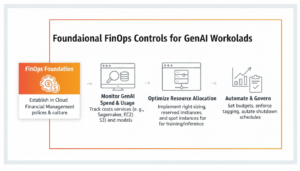
Tagging Strategy for GenAI Resources on AWS
AWS resource tags are key-value pairs attached to resources, enabling cost allocation, filtering, and attribution. For GenAI workloads, tagging must extend beyond infrastructure to application-level metadata.
Essential GenAI tags:
| Tag Key | Example Values | Purpose |
| Environment | production, staging, development | Separate POC from production costs |
| Application | customer-chatbot, doc-analyzer, code-assistant | Attribute costs to specific AI products |
| Feature | document-qa, summarization, sentiment-analysis | Track cost per feature |
| Team | ai-research, product-eng, support | Chargeback to responsible teams |
| CostCenter | r-and-d, operations, revenue | Financial reporting alignment |
| ModelProvider | anthropic, meta, amazon | Compare costs across model providers |
| Model | claude-3-sonnet, claude-3-haiku, llama-2-70b | Model-specific cost analysis |
| InferenceType | realtime, batch, async | Cost by processing pattern |
| Customer | customer-123, internal, demo | Multi-tenant cost isolation |
Cost-Optimized GenAI Architecture Patterns
Architectural decisions made during system design have 10-100× greater cost impact than post-deployment optimization. These patterns enable cost-efficient generative AI architecture from day one.
Model Selection as a Cost Lever
Model selection is the single highest-impact cost decision in GenAI architecture. The pricing spread between fastest/cheapest models and most capable/expensive models is 60-200×.
Amazon Bedrock model pricing comparison (input tokens per 1,000):
| Model | Input Token Cost | Use Case | Relative Cost |
| Claude 3 Haiku | $0.00025 | Simple tasks, high volume | 1× (baseline) |
| Claude 3.5 Sonnet | $0.003 | Balanced capability | 12× |
| Claude 3 Opus | $0.015 | Complex reasoning | 60× |
| Amazon Titan Text Express | $0.0002 | Basic text generation | 0.8× |
| Meta Llama 3 70B | $0.00195 | Open-source alternative | 7.8× |
Cost impact example (1 billion tokens/month):
- All traffic to Claude Haiku: $250/month
- All traffic to Claude Opus: $15,000/month
- 60× cost difference for same volume
When to Use Smaller / Cheaper Models
Claude Haiku and Titan Express use cases:
Simple classification: Sentiment analysis, spam detection, intent classification, language detection—tasks with clear criteria and binary/limited outputs.
FAQ responses: Straightforward factual questions with known answers in your knowledge base. No complex reasoning required.
Content moderation: Detecting policy violations, inappropriate content, PII leakage—pattern matching rather than creative generation.
Data extraction: Parsing structured information from text (dates, prices, addresses)—deterministic extraction rather than analysis.
High-volume, low-complexity: Any scenario where you process millions of requests with simple, repetitive patterns.
Cost-quality tradeoff analysis: Test smaller models on your specific use case. If quality meets requirements (>95% accuracy, acceptable user satisfaction), deploy the cheaper model. Many teams discover Claude Haiku performs comparably to Opus on 60-70% of their tasks, enabling hybrid routing.
When to Reserve Large Models for Complex Tasks
Claude Opus and GPT-4 use cases:
Complex reasoning: Multi-step logical inference, mathematical problem-solving, code debugging, strategic analysis requiring chain-of-thought reasoning.
Creative generation: Long-form content creation, creative writing, marketing copy, storytelling—tasks requiring nuance, originality, and style.
Ambiguous interpretation: Understanding context-dependent meaning, sarcasm, cultural references, implicit information.
Domain expertise: Legal document analysis, medical diagnosis support, financial forecasting—tasks requiring deep domain knowledge and careful reasoning.
Low-volume, high-value: Scenarios where cost per request is justified by outcome value (each analysis saves $1,000 in consultant fees, cost of $5 AI analysis is negligible).
Hybrid routing strategy (reference architecture):
User request → Classifier (Haiku – $0.0001)
↓ Simple (70% of traffic) → Haiku ($0.00025/1K)
↓ Medium (25% of traffic) → Sonnet ($0.003/1K)
↓ Complex (5% of traffic) → Opus ($0.015/1K)
Cost comparison:
- All Opus: 1B tokens × $0.015 = $15,000
- Hybrid routing: (700M × $0.00025) + (250M × $0.003) + (50M × $0.015) = $175 + $750 + $750 = $1,675
- Savings: 89% cost reduction with minimal quality impact
Reducing Token Consumption with Prompt Caching
Prompt caching is the highest-ROI GenAI cost optimization technique, typically reducing costs by 40-70% with no quality degradation.
Amazon Bedrock Prompt Caching Explained
Amazon Bedrock prompt caching stores frequently repeated prompt prefixes (system instructions, knowledge base context) and reuses them across requests, charging reduced rates for cached tokens.
Bedrock prompt caching pricing (Claude 3.5 Sonnet example):
- Cache write (first time): $0.00375 per 1,000 tokens (1.25× regular input tokens)
- Cache read (subsequent uses): $0.0003 per 1,000 tokens (0.1× regular input tokens)
- Regular input tokens: $0.003 per 1,000 tokens
ROI calculation:
Scenario: System prompt of 4,000 tokens, used 10,000 times/day
Without caching:
- 10,000 requests × 4,000 tokens × $0.003/1K = $120/day
With caching:
- Cache write (once): 4,000 tokens × $0.00375/1K = $0.015
- Cache reads: 10,000 requests × 4,000 tokens × $0.0003/1K = $12/day
- Total: $12.015/day
Savings: $107.985/day (90% reduction on system prompt tokens)
What to cache:
System prompts: Instructions defining AI behavior, constraints, and expertise (typically 1,000-10,000 tokens).
Knowledge base context: Frequently referenced documentation, company policies, product catalogs prepended to queries (5,000-20,000 tokens).
Few-shot examples: Demonstration examples showing desired output format, repeated across requests (500-3,000 tokens).
Conversation history patterns: In chat applications, common conversation flows that repeat across users.
Implementation best practices:
Structure prompts for caching: Place cacheable content (system prompt, knowledge base) at the beginning of prompts, user-specific content (query) at the end.
Cache duration alignment: Bedrock caches persist for 5 minutes of inactivity. Ensure request frequency keeps caches warm (>1 request per 5 minutes) or accept cache write costs on first request after expiration.
Monitor cache hit rates: Track percentage of requests using cached content. Target >90% hit rate for maximum savings.
Caching Embeddings and System Prompts
Beyond Bedrock’s native prompt caching, implement application-level caching for embeddings and complete responses.
Embedding caching strategy:
Problem: Generating embeddings for the same document multiple times (user queries about frequently accessed content).
Solution: Store embeddings in Amazon DynamoDB or Amazon ElastiCache with document hash as key.
Logic:
Query arrives → Generate embedding of query text → Check if query embedding exists in cache
→ Cache hit: Return cached embedding ($0 cost)
→ Cache miss: Call Bedrock embeddings API ($0.0001/1K tokens), store in cache
Savings: For frequently accessed documents (product pages, FAQs), cache hit rates of 80-95% reduce embedding costs by 80-95%.
Response caching strategy:
Problem: Identical user queries generate redundant model invocations.
Solution: Hash the complete prompt (system + context + query), check cache before invoking model.
Cache key: SHA-256 hash of full prompt Cache value: Model response + metadata (tokens consumed, model used, timestamp) TTL: 1-24 hours depending on content freshness requirements
Savings example:
- 1M requests/month, 30% are duplicates
- Average cost per request: $0.02
- Without caching: $20,000/month
- With caching (30% hit rate): $14,000/month
- Savings: $6,000/month (30% reduction)
Cache invalidation: Implement strategies to refresh cached responses when underlying knowledge base updates to prevent stale responses.
Serverless and Event-Driven Inference
Serverless inference eliminates costs for idle capacity, charging only for actual token consumption and request handling.
Amazon Bedrock vs SageMaker for Cost Efficiency
Amazon Bedrock (serverless):
- Pricing model: Pay-per-token with no baseline infrastructure cost
- Best for: Variable workloads, unpredictable traffic, multiple models, rapid experimentation
- Cost structure: Zero cost when idle, scales linearly with usage
- Break-even: Cost-effective for workloads with <80% sustained utilization
Amazon SageMaker (managed endpoints):
- Pricing model: Pay-per-hour for instance hosting model, plus token costs for some models
- Best for: High-volume, predictable workloads, custom/fine-tuned models, <100ms latency requirements
- Cost structure: Continuous instance charges even when idle, batch inference discounts
- Break-even: Cost-effective for workloads with >80% sustained utilization or requiring GPU instances continuously
Cost comparison (example workload):
Scenario: 100M tokens/month, 100K requests/month, traffic varies 10× between peak and off-peak
Bedrock (serverless):
- Token cost: 100M × $0.003/1K = $300/month
- Total: $300/month (no idle costs)
SageMaker (ml.g5.xlarge instance, 24/7):
- Instance cost: $1.41/hour × 730 hours = $1,029/month
- Token cost: 100M × $0.003/1K = $300/month
- Total: $1,329/month
SageMaker savings: None for this variable workload. Bedrock is 77% cheaper.
High-utilization scenario: 10 billion tokens/month (100× higher volume)
Bedrock: $30,000/month SageMaker: $1,029 (instance) + $30,000 (tokens) = $31,029/month
At extreme scale, dedicated SageMaker infrastructure becomes competitive, but Bedrock remains simpler operationally.
For most GenAI applications with variable traffic patterns, Amazon Bedrock offers superior cost efficiency. Use SageMaker only for:
- Custom fine-tuned models not available on Bedrock
- Extreme scale (billions of tokens daily) where dedicated infrastructure ROI justifies complexity
- Latency-critical applications requiring <100ms p99 response times
Lambda-Triggered GenAI Workflows
AWS Lambda enables event-driven GenAI workflows that invoke models only when triggered by events, eliminating idle costs.
Event-driven GenAI patterns:
Document processing pipeline:
- S3 upload event → Lambda function → Bedrock document analysis → Results to DynamoDB
- Cost: Only when documents uploaded (vs. always-on processing server)
Scheduled batch analysis:
- CloudWatch Events (daily 2 AM) → Lambda → Bedrock batch inference on day’s data → Results to S3
- Cost: ~5 minutes daily execution vs. 24/7 instance
API-triggered generation:
- API Gateway request → Lambda → Bedrock inference → Return response
- Cost: Per-request Lambda invocation ($0.20 per million requests) + Bedrock tokens
Cost optimization tips:
Lambda memory sizing: GenAI workflows are I/O-bound (waiting for Bedrock API), not CPU-bound. Use minimum Lambda memory (128-256 MB) to minimize Lambda costs.
Connection pooling: Reuse HTTP connections to Bedrock across Lambda invocations using global connection pools to reduce latency and Lambda execution time.
Asynchronous invocation: For non-interactive workloads, use Lambda async invocation to avoid paying for wait time during Bedrock inference (Lambda bills only for your code execution time, not downstream API waits).
Guardrails That Prevent Bill Shock
Technical guardrails prevent cost overruns from bugs, abuse, or unexpected usage patterns.
Rate Limiting and Prompt Size Constraints
Application-level rate limits:
Per-user limits: 100 requests/hour, 10,000 tokens/hour per user
- Prevents single user consuming excessive resources
- Mitigates abuse (automated scraping, prompt injection attacks)
Per-feature limits: Document analysis limited to 50,000 tokens/document
- Prevents accidentally processing 1M-token documents costing $30 each
- Enforces reasonable use patterns
Per-customer limits (multi-tenant SaaS): Enterprise tier 1M tokens/month, Startup tier 100K tokens/month
- Aligns AI costs with customer pricing tiers
- Prevents free-tier abuse
Implementation: API Gateway throttling, application logic (Redis counters), AWS WAF rate-based rules
Prompt size validation:
Maximum input length: Reject prompts exceeding 50,000 tokens before sending to model
- Prevents costly errors from file upload mistakes (user uploads 500-page PDF as prompt)
- Enforces reasonable context windows
Output length limits: Configure max_tokens parameter on all model invocations
- Prevents model generating 10,000-token responses when 500 suffices
- Reduces output token costs (5× more expensive than input)
Content-length alerts: CloudWatch alarm when individual requests exceed 20,000 tokens
- Investigates outliers causing cost spikes
- Identifies bugs (infinite loop appending context)
Budget Alerts Scoped to GenAI Services
AWS Budgets provides proactive cost management through alerts when spending exceeds thresholds.
GenAI-specific budget configuration:
Budget 1: Production GenAI Total
- Scope: Production account, services: Bedrock, SageMaker Inference
- Amount: $50,000/month
- Alerts: 80% ($40K), 100% ($50K), Forecasted to exceed
Budget 2: Development GenAI
- Scope: Development account, services: Bedrock
- Amount: $2,000/month
- Alerts: 50% ($1K), 80% ($1.6K), 100% ($2K)
Budget 3: Per-Feature Budgets (requires custom tagging and CUR analysis)
- Feature A (chatbot): $15K/month
- Feature B (document analysis): $25K/month
- Feature C (code assistant): $10K/month
Alert response workflow:
- Budget alert received: “Production GenAI at 80% of $50K budget”
- Review CloudWatch dashboard: Identify cost spike source
- Drill into Cost Explorer: Filter by feature, model, customer
- Investigate: Is spike expected (legitimate growth) or anomaly (bug, abuse)?
- Action: Scale back if anomaly, expand budget if legitimate, optimize architecture
- Document: Update runbook with findings for future reference
Automated actions: Use AWS Budgets Actions to automatically trigger Lambda functions when budgets exceed, implementing:
- Email notifications to engineering team
- Slack/Teams alerts with cost trend charts
- Temporary rate limit increases on high-cost features
- Emergency circuit breakers pausing non-critical features
For comprehensive AWS cost management strategies foundational to GenAI FinOps, see our guide on S3 cost optimization for storing embeddings and knowledge bases efficiently.
GenAI Cost Optimization Tool Comparison
Selecting the right tools for LLM cost optimization AWS depends on your maturity level, budget, and technical capabilities.
AWS Native Tools (Cost Explorer, Budgets, CloudWatch)
AWS Cost Explorer
- Purpose: Visualize and analyze GenAI costs by service, account, tag
- Key metrics: Monthly spend trends, cost forecasting, savings opportunities
- Limitations: No token-level detail, 24-hour data lag, limited custom filtering
- Cost: Free (included with AWS account)
AWS Cost and Usage Reports (CUR)
- Purpose: Detailed line-item billing data for custom analysis
- Key metrics: Every charge with resource ID, tags, usage type
- Integration: Query with Athena, visualize with QuickSight, export to data lake
- Cost: Free report generation, pay for S3 storage and Athena queries (~$5-50/month)
AWS Budgets
- Purpose: Proactive cost management through alerts and automated actions
- Key metrics: Spend vs. budget, forecasted spend, anomaly detection
- Limitations: Account/service level only, no feature-level budgets without custom CUR analysis
- Cost: First 2 budgets free, $0.02/day per additional budget
Amazon CloudWatch
- Purpose: Real-time monitoring and custom metrics
- Key metrics: Custom token metrics, request count, latency, error rates
- Requirements: Application must emit custom metrics (not automatically captured)
- Cost: $0.30 per metric per month, $0.10 per GB logs ingested
When to use AWS native tools:
- Starting GenAI FinOps journey (Level 1-2 maturity)
- Budget-conscious; need free or low-cost solutions
- Already using AWS for infrastructure; prefer native integration
- Technical team comfortable with custom instrumentation and dashboards
Third-Party FinOps Platforms for AI Workloads
nOps
- Focus: Automated cloud cost optimization, AI/ML workload support
- GenAI features: SageMaker cost visibility, GPU utilization tracking, commitment recommendations
- Pricing: Percentage of savings generated
- Best for: Organizations with significant SageMaker usage, need automated optimization
CloudZero
- Focus: Real-time cost intelligence and unit economics
- GenAI features: Cost per feature/customer, Kubernetes cost allocation (if running self-hosted models)
- Pricing: Subscription-based
- Best for: SaaS companies needing customer-level cost attribution for pricing
Vantage
- Focus: Cloud cost visibility across multi-cloud environments
- GenAI features: Custom dashboards, cost per tag, report sharing
- Pricing: Free tier available, paid plans for advanced features
- Best for: Multi-cloud GenAI deployments (AWS + GCP + Azure)
Datadog
- Focus: Observability platform with cost monitoring features
- GenAI features: APM integration showing latency + cost correlation, distributed tracing
- Pricing: Per-host pricing
- Best for: Teams already using Datadog for infrastructure monitoring
When to use third-party platforms:
- Advanced GenAI FinOps maturity (Level 3-4)
- Need turnkey solutions without custom instrumentation
- Require advanced features (cost anomaly detection, predictive analytics)
- Multi-cloud GenAI deployments requiring unified visibility
Comparison Table: GenAI Cost Management Tools
| Tool Category | Tool | Purpose | Key GenAI Metric | Cost | Best For |
| AWS Native | Cost Explorer | Service-level cost analysis | Monthly spend by service | Free | Basic visibility |
| AWS Native | CUR + Athena | Detailed billing analysis | Line-item charges with tags | ~$5-50/month | Custom analytics |
| AWS Native | CloudWatch | Real-time monitoring | Custom token metrics | $0.30/metric/month | Operational monitoring |
| AWS Native | AWS Budgets | Proactive cost alerts | Spend vs. budget | First 2 free | Cost guardrails |
| Third-Party | nOps | Automated optimization | SageMaker cost & utilization | % of savings | SageMaker-heavy workloads |
| Third-Party | CloudZero | Unit economics | Cost per customer/feature | Subscription | SaaS pricing alignment |
| Third-Party | Vantage | Multi-cloud visibility | Cross-cloud cost aggregation | Free tier + paid | Multi-cloud GenAI |
| Third-Party | Datadog | Full-stack observability | Latency-cost correlation | Per-host pricing | Unified observability |
Recommended tool stack by maturity:
Level 1 (Crawl): Cost Explorer + AWS Budgets Level 2 (Walk): + CloudWatch custom metrics + CUR Level 3 (Run): + OpenTelemetry + third-party analytics platform Level 4 (Fly): + Real-time cost streaming + automated optimization
Frequently Asked Questions (FAQ)
1. What is FinOps for generative AI?
FinOps for GenAI applies cloud financial management to AI workloads, tracking token-level costs, attributing expenses to features or teams, and optimizing prompts, models, and infrastructure to align AI spending with business value.
2. How can I reduce AWS Bedrock costs?
Key strategies include prompt caching, multi-model routing (cheap model for simple tasks, expensive model for complex tasks), response caching, concise prompt engineering, and limiting output tokens. Combined, these approaches can cut costs 50–70%.
3. What’s the difference between input tokens and output tokens?
Input tokens are what you send to the model; output tokens are what the model generates. Output tokens usually cost 5–10× more than input tokens, so concise prompts and controlled outputs dramatically reduce expenses.
4. How do I attribute GenAI costs to teams or features?
Use tags, distributed tracing (OpenTelemetry), and Cost and Usage Reports (CUR) to connect API calls, token usage, and costs to specific features, users, or teams—enabling precise cost accountability.
5. How can I prevent unexpected GenAI cost spikes?
Set budgets and alerts, implement rate limits, validate prompt size, restrict output tokens, monitor anomalies in token consumption, and enforce retry limits. These guardrails prevent runaway usage and surprise bills.
Conclusion
Profit-first GenAI FinOps transforms Generative AI from a cost center with unpredictable expenses into a strategic asset with measurable ROI. The token-based pricing model that initially seems opaque becomes manageable through comprehensive observability, connecting every dollar spent to specific user actions, features, and business outcomes. By implementing the three pillars—visibility through tagging and tracing, optimization through architectural patterns like prompt caching and multi-model routing, and continuous operation through guardrails and monitoring—organizations achieve 40–70% cost reduction while enabling sustainable scaling. At GoCloud, we guide organizations through these strategies to maximize AI efficiency and ROI.
The frameworks outlined here—from foundational tagging strategies and CloudWatch dashboards to advanced distributed tracing with OpenTelemetry and multi-model routing architectures—provide a roadmap from GenAI FinOps maturity Level 1 (basic billing awareness) to Level 4 (real-time cost optimization with automated controls). The self-assessment tool enables you to benchmark your current state and prioritize next steps based on highest-ROI improvements, all with practical guidance and insights from GoCloud.