


Why the Right AWS Cost Optimization Tools Matter
AWS bills can grow 40–60% year-over-year without the right cost optimization tools in place — and for most engineering teams, that growth feels invisible until it hits the finance team’s inbox. Cloud infrastructure sprawl, idle resources, over-provisioned databases, and unchecked data transfer charges accumulate silently, turning a manageable AWS bill into a budget crisis.
The good news: the aws cost optimization tools ecosystem in 2026 is richer and more capable than ever. From free native AWS services to AI-powered third-party FinOps platforms, there is a tool for every team size, spend level, and optimisation maturity. According to the FinOps Foundation, organisations with structured cloud financial management practices reduce cloud waste by 20–30% annually — and the right tooling is what makes that structure possible.
This guide evaluates 6 native AWS cost optimization tools (all free) and 6 best third-party tools, giving you a complete picture of the 2026 landscape. Whether you are a startup founder in the USA setting up your first AWS environment, a DevOps team in the UK managing a multi-account estate, or a FinOps practitioner in the UAE building an enterprise cost governance programme, this guide will help you build the right aws cost management tools stack.
Category 1 — Native AWS Cost Optimization Tools (Free)
AWS provides a comprehensive suite of free native aws cost optimization tools embedded directly in the AWS Management Console. These tools form the essential foundation of any cost management programme and should be configured before evaluating any third-party platform.
AWS Cost Explorer
NATIVE AWS
What it does: AWS Cost Explorer is the primary cost visualisation and analysis tool within AWS. It provides interactive dashboards showing historical spend, usage trends, and service-level breakdowns — and as of November 2025, delivers 18-month AI-powered cost forecasts with explainable insights.
Key Features:
- Interactive dashboards with 13 months of historical cost/usage data
- 18-month forecasting with AI-powered trend analysis (launched November 2025)
- Right-sizing recommendations for EC2 instances
- Savings Plans and Reserved Instance purchase recommendations
- Cost filtering by service, tag, account, region, instance type, and usage type
Best Suited For: All AWS customers — this is the starting point for every optimisation journey.
Pricing: Free to use. Hourly granularity API calls incur a small charge ($0.01 per paginated API request).
PRO TIP:
Use Cost Explorer’s Savings Plans Recommendations tab — it analyses your last 7, 30, or 60 days of On-Demand usage and calculates exactly which Savings Plans purchase would maximise your savings rate. Review this before making any commitment-based purchase.
LIMITATION:
Cost Explorer is excellent for visibility and recommendations but cannot automate actions. It shows you what to do; you still have to do it manually or via a third-party tool.
AWS Trusted Advisor
NATIVE AWS
What it does: AWS Trusted Advisor inspects your AWS environment across five categories — Cost Optimization, Performance, Security, Fault Tolerance, and Service Limits — and provides automated, actionable recommendations. In 2025, AWS added 16 new cost optimization checks sourced from the Cost Optimization Hub.
Key Features:
- Idle EC2 instance detection (instances with <10% CPU utilisation over 14 days)
- Underutilised EBS volume identification
- Unassociated Elastic IP address flagging
- Discount-aware cost optimization checks (updated 2025)
- Integration with AWS Organizations for multi-account visibility
Best Suited For: Teams with AWS Business or Enterprise Support plans (required for full cost checks access).
Pricing: Core checks are free. Full cost optimization checks require AWS Business Support ($100/month minimum).
PRO TIP:
Enable the Trusted Advisor Notification feature to receive weekly email digests summarising all flagged cost issues. Assign these emails directly to your FinOps team or engineering leads.
AWS Budgets
NATIVE AWS
What it does: AWS Budgets allows you to set custom cost, usage, Savings Plans, and Reserved Instance coverage budgets with automated email or SNS alerts when defined thresholds are reached.
Key Features:
- Cost budgets: alert when actual or forecasted spend exceeds threshold
- Usage budgets: track service-specific consumption
- RI and Savings Plans utilisation/coverage budgets
- Forecasted spend alerts — alert before you overspend
- Budget Actions: automatically apply IAM policies or SCP restrictions
Best Suited For: All AWS customers from day one.
Pricing: First 2 budgets free. $0.02 per budget per day beyond 2 budgets.
EXPERT RECOMMENDATION:
Create a Budget Action that automatically attaches a restrictive IAM policy to development accounts when they exceed 120% of budget. This creates a hard governance guardrail.
AWS Compute Optimizer
NATIVE AWS
What it does: AWS Compute Optimizer uses machine learning to analyse resource utilisation metrics from CloudWatch and provides recommendations for right-sizing resources. In November 2025, AWS launched Compute Optimizer Automation Rules to enable automatic application of recommendations.
Key Features:
- ML-powered right-sizing recommendations for EC2, EBS, Lambda, ECS, and RDS
- Automation rules (launched November 2025): automatically apply rightsizing
- Graviton/ARM migration recommendations
- Amazon EBS volume optimisation (including unattached volume cleanup)
Best Suited For: Teams with significant EC2, RDS, or Lambda spend looking to automate rightsizing at scale.
Pricing: Free for standard recommendations.
AWS Cost and Usage Report (CUR)
NATIVE AWS
What it does: The AWS Cost and Usage Report (CUR) is the most comprehensive billing dataset AWS produces. Delivered to an S3 bucket, it provides hourly, resource-level cost and usage data — the raw material for every serious cost analysis.
Key Features:
- Hourly or daily granularity per resource
- Includes Savings Plans amortised cost and RI effective rates
- Supports AWS Cost Categories
- Integrates with Amazon Athena for SQL-based analysis
Best Suited For: Teams with $50K+/month AWS spend doing serious cost attribution or unit economics analysis.
Pricing: Free to generate. S3 storage and Athena query costs apply.
Cost Anomaly Detection
NATIVE AWS
What it does: AWS Cost Anomaly Detection uses machine learning models to continuously monitor your AWS spending and alert you when it detects unusual cost patterns, catching cost spikes before they appear on your monthly invoice.
Key Features:
- ML-based anomaly detection adaptable to seasonal patterns
- Runs approximately 3 times per day
- Root cause analysis: identifies service, region, and usage type
- Configurable alert thresholds (absolute dollar amount or percentage)
Best Suited For: All AWS customers, especially teams with variable workloads.
Pricing: Completely free.
PRO TIP:
Create separate anomaly detection monitors for your top 5 cost drivers (EC2, RDS, Data Transfer, Lambda, S3) rather than a single account-level monitor for faster root cause identification.
Category 2 — Best Third-Party AWS Cost Optimization Tools
While native AWS tools provide essential visibility, third-party aws cost optimization tools unlock the next level: automated commitment management, engineering-level cost attribution, and AI-driven waste elimination.
nOps
THIRD-PARTY
What it does: nOps is an all-in-one FinOps automation platform for AWS, listed on the AWS Marketplace as helping organisations reduce their monthly cloud spend by an average of 47%. It specialises in automated Savings Plans purchasing and Spot Instance orchestration.
Key Features:
- Automated Savings Plans management
- Spot Instance automation for EC2, EKS, and ECS
- ShareSave — managed shared savings model
- Resource scheduling automation for non-production environments
Best Suited For: AWS-first teams ($50K+/month) that want automation-first FinOps.
Pricing: Performance-based / percentage-of-savings model.
ProsperOps
THIRD-PARTY
What it does: ProsperOps focuses exclusively on autonomous management of AWS Reserved Instances and Savings Plans. It uses a dedicated algorithm to continuously optimise your commitment portfolio to maximise your Effective Savings Rate (ESR).
Key Features:
- Fully autonomous RI and Savings Plans lifecycle management
- Proprietary Effective Savings Rate (ESR) metric
- Continuous rebalancing as your workloads change
- Aligned incentives: performance-based pricing
Best Suited For: Teams with $100K+/month EC2/RDS spend wanting “set it and forget it” commitment optimisation.
Pricing: Performance-based — percentage of savings generated.
Flexera One
THIRD-PARTY
What it does: Flexera One is an enterprise IT asset management and multi-cloud cost governance platform. It provides a unified view of cloud spend across AWS, Azure, GCP, and on-premises infrastructure.
Key Features:
- Multi-cloud cost management across AWS, Azure, and GCP
- Advanced cost allocation for complex enterprise structures
- Carbon forecasting for cloud sustainability tracking (Dec 2025)
- Governance policy engine for compliance enforcement
Best Suited For: Large enterprises ($1M+/month cloud spend) with multi-cloud environments.
Pricing: Enterprise contract pricing.
Spot by NetApp
THIRD-PARTY
What it does: Spot by NetApp is an AI-driven cloud infrastructure optimisation platform specialising in maximising the use of Spot Instances while maintaining availability and SLA compliance.
Key Features:
- Elastigroup — intelligent Spot Instance management for EC2
- Ocean — Spot-powered Kubernetes autoscaling
- Real-time rebalancing to maintain availability
- Up to 90% cost savings vs. On-Demand
Best Suited For: Engineering teams running containerised workloads (Kubernetes, ECS).
Pricing: Percentage of savings generated.
CloudHealth by VMware
THIRD-PARTY
What it does: CloudHealth (now under Broadcom) is an established enterprise multi-cloud cost management platform providing deep cost governance, policy automation, and FinOps reporting.
Key Features:
- Multi-cloud cost management across AWS, Azure, and GCP
- Smart Summary — AI-generated explanations of cost changes
- Advanced policy engine for automated governance
- Integration with ITSM tools
Best Suited For: Large enterprises ($500K+/month) with complex multi-team governance needs.
Pricing: Custom enterprise pricing.
LIMITATION:
Following Broadcom’s acquisition of VMware, evaluate current contract terms carefully and compare against newer alternatives.
AWS Cost Optimization Tools Comparison Table
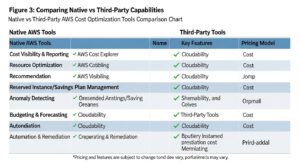
| Tool | Type | Best For | Pricing | Key Feature |
|---|---|---|---|---|
| AWS Cost Explorer | Native (Free) | All teams — baseline visibility | Free | 18-month AI forecasting |
| AWS Trusted Advisor | Native (Free*) | Quick win detection | Free / Business Support | 16+ cost checks |
| AWS Budgets | Native (Free) | Spend governance | Free (2 budgets) | Forecasted spend alerts |
| AWS Compute Optimizer | Native (Free) | Rightsizing | Free | Automation rules |
| Cost Anomaly Detection | Native (Free) | Unexpected spend detection | Free | ML-based anomaly detection |
| AWS CUR | Native (Free) | Deep billing analysis | Free | Hourly resource-level data |
| nOps | Third-Party | AWS-first teams ($50K+) | % of savings / fee | Automated SP/RI purchasing |
| CloudZero | Third-Party | SaaS / Product teams | Per $1K AWS spend | Unit cost intelligence |
| ProsperOps | Third-Party | RI/SP mgmt ($100K+) | % of savings | Autonomous RI management |
| Flexera One | Third-Party | Enterprise multi-cloud | Custom | Carbon forecasting |
| Spot by NetApp | Third-Party | Kubernetes workloads | % of savings | Automated Spot optimisation |
| CloudHealth | Third-Party | Large enterprise | Custom | Smart Summary |
AWS Cost Optimization Tips to Use Alongside These Tools
1. Set Up Cost Allocation Tags First
Before any tool can attribute costs accurately, your resources must be tagged. Define a mandatory tagging taxonomy (e.g., Environment, Team, CostCentre) and enforce it.
Action: Enable Cost Allocation Tags in the AWS Billing Console for every tag key you want to appear in reports.
2. Use CUR + Athena for Deep Analysis
The AWS Cost and Usage Report, queried via Amazon Athena, unlocks analyses impossible in the AWS Console, such as cost by resource ID and data transfer costs by destination.
Action: Configure CUR delivery to S3 and run the AWS Cloud Intelligence Dashboard CloudFormation template.
3. Automate Reserved Instance Purchases
Manual RI purchasing is error-prone. Use tools like ProsperOps or nOps to continuously rebalance your commitment portfolio as workloads evolve.
Action: Run a 60-day On-Demand usage analysis in Cost Explorer before your first automated RI purchase.
4. Schedule Non-Production Resources
Scheduling dev/test environments to stop outside business hours eliminates ~70% of their compute cost.
Action: Tag non-production resources with Schedule=BusinessHours and configure AWS Instance Scheduler.
5. Enable Anomaly Detection Alerts
It is arguably the highest-ROI action available: a single detected anomaly can easily save thousands of dollars.
Action: Enable Cost Anomaly Detection at the account level AND create service-level monitors for top services.
How to Choose the Right AWS Cost Optimization Tool
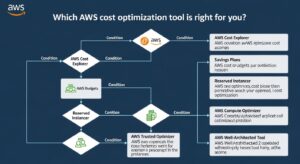
SPEND: UNDER $50K/MO — For Startups
Native tools provide everything you need.
- Enable AWS Cost Explorer
- Configure AWS Budgets
- Enable Cost Anomaly Detection
- Activate AWS Trusted Advisor
SPEND: $50K–$500K/MO — For Mid-Size Companies
Manual optimisation becomes a bottleneck.
- Add nOps or ProsperOps for automated commitments
- Implement CUR + Athena
- Consider CloudZero for SaaS unit economics
SPEND: $500K+/MO — For Enterprise
Requires dedicated governance tooling.
- Deploy Flexera One or CloudHealth
- Implement AWS Organizations
- Establish a Cloud Centre of Excellence (CCoE)
Common Mistakes When Using AWS Cost Optimization Tools
- Using Cost Explorer as your only tool: It gives visibility but cannot automate action.
- Enabling tools without assigning ownership: Assign every output to a named owner.
- Ignoring the Cost and Usage Report: You miss 20–30% of opportunities visible only in CUR.
- Manual RI purchasing without analytics: Leads to over-commitment in shrinking services.
- Treating third-party tools as a replacement for tagging: No tool works well without tags.
- Not enabling Cost Anomaly Detection: The most costly mistake; enable it immediately.
Frequently Asked Questions (FAQ)
Q: What are the best free AWS cost optimization tools?
The best free native AWS tools are AWS Cost Explorer, AWS Budgets, AWS Compute Optimizer, Cost Anomaly Detection, and the AWS Cost and Usage Report (CUR). Together, they provide enterprise-grade visibility at zero cost.
Q: How does AWS Cost Explorer differ from AWS Budgets?
Cost Explorer is a historical analysis and forecasting tool (telling you what happened), while AWS Budgets is a proactive alerting tool (telling you when thresholds are breached). They are complementary and should both be used.
Q: What is AWS Compute Optimizer and how does it save money?
It uses ML to analyse resource utilisation and recommends right-sized alternatives. As of 2025, its Automation Rules can automatically apply these recommendations, eliminating manual effort.
Q: Are third-party AWS cost management tools worth the investment?
Yes, for spend over $50K/month. The ROI is typically 5–15x. For example, nOps reports reducing monthly AWS spend by an average of 47%.
Q: What is the best AWS cost optimization tool for startups?
A stack of free native tools: AWS Cost Explorer + AWS Budgets + Cost Anomaly Detection + Trusted Advisor. Add open-source Infracost for Terraform users.
Q: How do I use AWS Trusted Advisor for cost optimization?
Review the Cost Optimization category for idle resources and underutilized volumes. Enable Notifications for weekly digests. Full checks require Business Support.
Q: What is the difference between nOps, CloudZero, and ProsperOps?
nOps focuses on automated savings/FinOps; CloudZero focuses on engineering-level unit economics; ProsperOps focuses purely on autonomous RI/Savings Plans management.
Q: How do AWS cost optimization tools help with Reserved Instance management?
Tools like ProsperOps and nOps autonomously manage RI portfolios—buying and selling to maintain maximum savings rates without manual analysis.
Q: Can AWS cost optimization tools work across multiple accounts?
Yes. Native tools support this via AWS Organizations. Third-party tools like Flexera and CloudHealth are specifically designed for multi-account governance.
Q: What is Cost Anomaly Detection in AWS?
A free ML-based service that learns your spending patterns and alerts you to deviations (spikes), helping catch misconfigurations or runaway workloads instantly.
Conclusion — Build Your AWS Cost Optimization Stack
The landscape of AWS cost optimization tools in 2026 offers something powerful for every team: a complete set of free native tools that provide excellent visibility, and a mature ecosystem of third-party platforms that automate the actions those tools recommend.
At GoCloud, we emphasize combining these tools with a disciplined cost management approach. For teams looking to take a broader view of cloud savings, see our guide on How to Save Money on AWS to implement cleanup strategies, Savings Plans, and long-term architectural optimizations that complement your toolset and maximize your AWS cost efficiency.
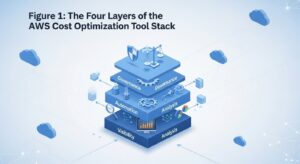
The right approach is layered:
- Foundation (all teams): AWS Cost Explorer + Budgets + Anomaly Detection.
- Automation layer ($100K+/month): Add nOps or ProsperOps for commitment automation.
- Governance layer (Enterprise): Flexera One or CloudHealth for policy enforcement.
Start with the free native AWS tools today. AI-powered cost optimisation is advancing fast — tools like Compute Optimizer and Cost Explorer are getting smarter with every AWS release in 2026.
