


Here’s a situation most AWS engineers have found themselves in: the team is containerizing a service, the conversation turns to orchestration, and someone drops the question — “Are we using Docker or Kubernetes?” Suddenly the room divides.
One camp says Kubernetes is overkill. The other says Docker alone won’t cut it at scale. Both camps are right, depending on the context — and that’s exactly the problem. Docker vs Kubernetes isn’t a true either/or debate. They solve different problems at different layers of the container lifecycle, and conflating the two is one of the most common misunderstandings in modern DevOps.
This guide breaks down what each tool actually does, where they overlap, where they diverge, and — most importantly — which one your stack needs right now. If you’re running workloads on AWS and making architectural decisions that will matter a year from now, this is the comparison worth reading carefully.
The Core Distinction: Container Runtime vs Orchestration Engine
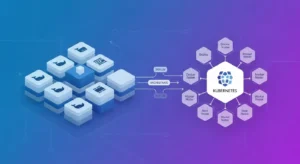
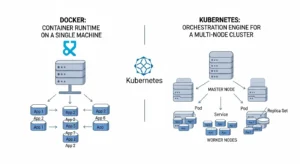
Docker is, at its foundation, a container runtime and development toolchain. It packages your application and its dependencies into a portable, self-contained unit called a container. You build the image, ship it, and run it. Docker handles the packaging, the local execution, and the image registry workflow beautifully.
Kubernetes often shortened to k8s — is a container orchestration platform. It doesn’t build containers. It manages them: scheduling them across nodes, restarting failed instances, scaling replicas up or down, routing traffic, and maintaining the declared state of your application across a cluster.
The relationship is additive, not competitive. Docker creates the containers. Kubernetes coordinates them at scale. The confusion arises because Docker also shipped Docker Swarm, its own native orchestration tool, which competes more directly with Kubernetes. But in the wider industry — especially in AWS environments — Kubernetes has won that contest convincingly.
What Docker Actually Does Well ?
Docker’s value is clearest at the development and build stage. It gives developers a consistent environment that works the same way on a MacBook, a CI runner, and a production server. That “works on my machine” problem that plagued software teams for decades? Docker largely solved it.
The Docker Engine and Image Layer System :
The Docker engine manages the container lifecycle on a single host. It pulls images from registries like Amazon ECR or Docker Hub, creates container instances, manages networking between containers on the same host, and handles storage volumes. The image layer system means repeated builds are fast — only changed layers are rebuilt or transferred.
For local development, Docker Compose extends this with multi-container orchestration on a single machine. You can spin up a web server, a database, a cache, and a message queue with a single command — all configured in one YAML file. For individual developers and small teams, this workflow is hard to beat.
Where Docker Hits Its Ceiling :
The moment you need to run containers across multiple hosts, ensure high availability, auto-scale based on load, or perform zero-downtime rolling deployments across a distributed cluster — Docker alone doesn’t have the built-in tooling to manage that cleanly. Docker Swarm attempted to address this, but it lacks the ecosystem depth, the community momentum, and the AWS-native integration that Kubernetes offers.
What Kubernetes Actually Does Well :
Kubernetes operates at a different level of abstraction. It doesn’t care which container runtime you’re using underneath (Docker, containerd, CRI-O) it manages the desired state of your application across a fleet of machines.
The Kubernetes Architecture at a Glance :
A Kubernetes cluster consists of a control plane and worker nodes. The control plane including the API server, scheduler, and controller manager is the brain. It watches the current state of the cluster and works continuously to match it to the desired state you’ve declared in your manifests.
Worker nodes run your actual workloads. Each node runs a kubelet (the agent that talks to the control plane), a container runtime, and kube-proxy for networking. Pods are the smallest deployable unit — a pod typically contains one container, though sidecar patterns are common.
Kubernetes Strengths in Production :
Where Kubernetes earns its complexity cost:
- Self-healing: Failed pods are automatically restarted or rescheduled on healthy nodes.
- Horizontal scaling: The Horizontal Pod Autoscaler can scale your deployment based on CPU, memory, or custom metrics.
- Rolling deployments: Deploy new versions with zero downtime; roll back instantly if something breaks.
- Service discovery and load balancing: Built-in DNS and load balancing across pod replicas.
- Config and secret management: ConfigMaps and Secrets decouple configuration from container images.
- Multi-tenant workloads: Namespaces and RBAC enable fine-grained access control across teams.
Docker Swarm vs Kubernetes: A Straight Comparison
Docker Swarm is still used in some organizations, so it’s worth being direct about where the comparison stands in 2024.
| Feature | Docker Swarm | Kubernetes |
| Setup Complexity | Simple — native Docker CLI | Steep — requires dedicated tooling |
| Learning Curve | Low | High, but well-documented |
| Auto-scaling | Manual or basic | Horizontal Pod Autoscaler built-in |
| Rolling Updates | Supported | Supported with fine-grained control |
| Self-healing | Basic restart policy | Full rescheduling across nodes |
| Ecosystem / Tooling | Limited | Massive (Helm, Istio, ArgoCD, etc.) |
| AWS Integration | Minimal | EKS, Fargate, ALB Controller, IRSA |
| Production Adoption | Declining | Industry standard |
Docker Swarm is simpler to set up, and if you’re running a small internal service that doesn’t need complex orchestration, it can work. But for anything production-grade on AWS — especially if you’re already in the AWS ecosystem — Kubernetes through EKS is the more defensible choice. Swarm’s development has slowed considerably, and its ecosystem simply doesn’t match.
Docker and Kubernetes in the AWS Ecosystem :
For AWS-focused teams, the question of Docker vs Kubernetes has a very specific shape. AWS offers managed services for both container runtimes and orchestration, and understanding the options changes the architecture conversation significantly.
Amazon ECS: Docker-First Orchestration Without Kubernetes
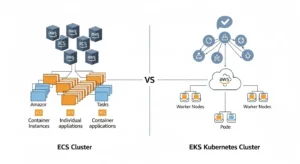
Amazon Elastic Container Service (ECS) is AWS’s proprietary container orchestration service. It runs Docker containers natively and is significantly simpler to operate than Kubernetes. ECS integrates deeply with IAM, ALB, CloudWatch, and ECR — you don’t need to manage a control plane, and the operational overhead is much lower.
For teams that don’t need the full Kubernetes feature set, ECS — especially with Fargate for serverless container execution — is often the right call. You get managed orchestration, AWS-native integrations, and container lifecycle management without the operational weight of running a Kubernetes cluster.
Amazon EKS: Managed Kubernetes at AWS Scale
Amazon Elastic Kubernetes Service (EKS) runs upstream Kubernetes and handles the control plane for you. AWS manages the API server, etcd, and the cluster upgrades. You manage the worker nodes (or use Fargate for fully serverless pods).
EKS makes sense when:
- You’re running complex, multi-service architectures that need Kubernetes-native tooling
- Your team is already Kubernetes-literate or investing in that direction
- You need portability across cloud providers or hybrid environments
- You want access to the Helm chart ecosystem, GitOps workflows with ArgoCD, or service mesh tooling like Istio
- You’re operating at a scale where Kubernetes’ autoscaling, self-healing, and scheduling sophistication pays off
Amazon ECR: The Container Registry Bridge
Whether you’re using ECS or EKS, Amazon ECR is typically where your Docker images live. ECR stores, scans, and distributes images with IAM-based access control. It’s the natural registry companion for both orchestration paths on AWS.
Container Lifecycle Management: Where Each Tool Fits
A useful way to think about Docker and Kubernetes is to map them to stages of the container lifecycle:
Build Stage Docker Owns This
Writing Dockerfiles, building images, running multi-container local environments with Docker Compose — this is where Docker’s tooling shines. Kubernetes has no role here. Your CI/CD pipeline builds a Docker image, pushes it to ECR or another registry, and that image becomes the artifact that Kubernetes eventually pulls and runs.
Deploy and Run Stage Kubernetes Takes Over
Once the image exists in a registry, Kubernetes takes the handoff. You declare how many replicas you want, what resources they get, how health checks work, which secrets they need, and how traffic routes to them. Kubernetes then continuously reconciles the actual state of the cluster against that declaration.
Observe and Scale Stage — Kubernetes Again
Monitoring, log aggregation, horizontal scaling based on metrics, alerting on pod failures — all of this happens at the Kubernetes layer, integrated with tools like Prometheus, Grafana, Datadog, or AWS CloudWatch Container Insights.
DevOps Containerization Workflow: Putting It Together
A typical containerized application workflow on AWS looks like this:
- Develop locally using Docker and Docker Compose. Your Dockerfile defines the runtime environment. Your Compose file wires up the dependencies.
- Build and push the Docker image in CI (GitHub Actions, CodePipeline, Jenkins) to Amazon ECR.
- Define Kubernetes manifests (or Helm charts) that describe your deployment, service, ingress, HPA, and config.
- Apply to EKS via kubectl or a GitOps tool like ArgoCD or Flux.
- Kubernetes pulls the image from ECR, schedules pods across nodes, enforces your declared state, and handles scaling and failures automatically.
This is the workflow most production AWS teams are running. Docker is the starting point. Kubernetes is the runtime environment for production. The two are not in competition here — they’re in sequence.
When to Use Docker Without Kubernetes :
Not every deployment needs Kubernetes. There’s genuine value in knowing when it’s overkill.
Docker alone (or Docker with ECS) is often the right answer when:
- You have a small team (under 5-10 engineers) without dedicated platform or infrastructure engineers
- Your application is a monolith or a handful of services, not a complex microservices architecture
- You need fast time-to-market and don’t have the bandwidth to learn Kubernetes
- Traffic is predictable and scaling requirements are modest
- You’re running internal tooling, staging environments, or development infrastructure
Kubernetes brings real operational weight. YAML complexity, cluster upgrades, networking nuances, RBAC management, node group tuning — all of this requires time, knowledge, and often a dedicated platform engineering function. If you don’t need what Kubernetes provides, you shouldn’t pay its cost.
When Kubernetes Is Clearly the Right Choice :
Kubernetes stops being overkill and starts being a requirement when your architecture or operating requirements cross certain thresholds.
Kubernetes becomes the right answer when:
- You’re running dozens of microservices that need independent deployment, scaling, and lifecycle management
- You need sophisticated traffic management, canary deployments, or A/B testing infrastructure
- Your workloads have spiky or unpredictable traffic patterns that require autoscaling
- You need multi-region or multi-cluster deployments
- You’re building a platform used by multiple internal teams who need namespace isolation
- Compliance, security, or audit requirements benefit from Kubernetes’ RBAC and policy framework
- You want to leverage the Helm chart ecosystem for off-the-shelf tooling
k8s vs Docker Swarm Performance: The Real Tradeoffs
When comparing raw performance, both Kubernetes and Docker Swarm add overhead relative to running containers directly on a host. The difference at the cluster management layer is not primarily about execution performance — containers run the same way regardless — but about scheduling efficiency, network overhead, and control plane latency.
Docker Swarm generally has lower control plane overhead and faster service startup in simple scenarios. Kubernetes has more sophisticated scheduling algorithms that, in complex multi-service environments, can produce better overall resource utilization — meaning you get more workload out of the same underlying instances.
On AWS, this conversation is also shaped by how you’re running nodes. EC2-backed node groups give you full control and predictable performance. Fargate removes the node management entirely but introduces a per-pod overhead model. For most production workloads, the network and IO characteristics of your application matter far more than the orchestration layer’s scheduling overhead.
Managed Kubernetes Services: Why EKS Changes the Calculus
One of the historic arguments against Kubernetes was the operational burden of running and maintaining a control plane. That argument has weakened significantly with managed Kubernetes services like EKS.
With EKS, AWS manages the Kubernetes control plane — high availability, version upgrades, etcd backups, and API server scaling. You pay $0.10 per hour per cluster for the managed control plane, and your primary operational concerns shift to:
- Node group management (EC2 instances or Fargate profiles)
- Kubernetes version upgrades on worker nodes
- Add-on management (CoreDNS, kube-proxy, VPC CNI)
- Cluster autoscaler or Karpenter configuration for node provisioning
EKS Blueprints and CDK/Terraform modules have also matured to the point where you can get an opinionated, production-ready EKS cluster up in a day rather than a week. The complexity gap between ECS and EKS has narrowed meaningfully, which is worth factoring into new architecture decisions.
Containerized Application Architecture: Common Patterns
The way you architect containerized applications will influence which tool fits. A few common patterns:
Single-Service, Stateless API
Docker + ECS (or even App Runner) is often sufficient. You’re not getting meaningfully more from EKS at this level of complexity, and the simpler operational model pays off.
Microservices Platform (5–20 Services)
This is where the ECS-vs-EKS decision becomes interesting. ECS with service discovery can handle many microservices scenarios well. But if your team is growing and you anticipate needing Kubernetes capabilities within 12–18 months, starting on EKS avoids a painful migration later.
Large-Scale Microservices (20+ Services, Multi-Team)
Kubernetes is the right foundation here. Namespace-based isolation for teams, Helm for standardized deployment patterns, GitOps for auditability, and Kubernetes-native autoscaling the operational value justifies the investment at this scale.
Making the Decision That Fits Your Stack :
Docker vs Kubernetes is ultimately a question of scope, not superiority. Docker solves the packaging and portability problem brilliantly. Kubernetes solves the “how do I run hundreds of containers reliably across a cluster” problem. They operate at different layers, and in most production environments, you’ll use both.
If you’re a small team deploying a handful of services on AWS, ECS with Docker is the pragmatic choice. If you’re building a platform that will support multiple teams, complex microservices, and sophisticated deployment patterns, EKS is worth the investment especially now that managed services have removed much of the historical operational burden.
The most expensive mistake isn’t choosing Kubernetes too early or too late. It’s choosing without a clear picture of what your architecture actually needs. Define your requirements, map them to what each tool delivers, and let the workload dictate the tool not the other way around.
Frequently Asked Questions
Can you use Docker without Kubernetes?
Yes. Docker runs containers on a single host or across multiple hosts with Docker Compose or Docker Swarm. Kubernetes is only necessary when you need advanced orchestration across a cluster. Many AWS teams use Docker with ECS and never touch Kubernetes.
Does Kubernetes still use Docker as its container runtime?
Not by default. Kubernetes deprecated direct Docker support (dockershim) in v1.20 and removed it in v1.24. Most Kubernetes distributions, including EKS, now use containerd as the default runtime. You still write Dockerfiles and build Docker images — the images are compatible. It’s the runtime layer that changed, not the image format.
Is Kubernetes overkill for a startup?
Often, yes — but it depends. If your team is small and your architecture is simple, the operational overhead of Kubernetes will slow you down more than the features will help. ECS or App Runner on AWS gets you container management with far less complexity. If you’re growing fast and expect Kubernetes-level complexity within a year, starting with EKS avoids a future migration pain.
What is the difference between Docker Swarm and Kubernetes?
Both are container orchestration tools, but Kubernetes is significantly more feature-rich, better supported, and more widely adopted. Docker Swarm is simpler to operate but lacks Kubernetes’ autoscaling capabilities, ecosystem depth, and AWS-native integrations. For new production deployments, Kubernetes (via EKS) is the more durable choice.
What does EKS cost compared to ECS?
EKS charges $0.10/hour per cluster for the managed control plane (~$72/month), on top of EC2 or Fargate costs for worker nodes. ECS has no control plane fee you pay only for the compute. For cost-sensitive workloads, ECS often has a lower total cost of ownership. EKS makes sense when the feature set justifies the premium.
Conclusion :
In the end, Docker vs Kubernetes isn’t a battle it’s a layering decision. Docker gives you consistency, portability, and a clean way to package applications. Kubernetes gives you control, scalability, and resilience once those applications need to run reliably at scale. Most modern AWS architectures don’t choose one over the other they use Docker to build and Kubernetes (or ECS) to run.
The right choice comes down to your current complexity, your team’s capabilities, and where your architecture is headed. Start simple if your needs are simple. Embrace Kubernetes when your scale and operational demands justify it. What matters most is aligning the tool with the problem not following trends.
If you’re navigating that decision and want to avoid costly missteps, GoCloud can help you evaluate, design, and implement the right container strategy for your AWS environment with clarity, not guesswork.
