


Standard Kubernetes is powerful. It’s also heavy. Run it on a cloud-hosted cluster with managed worker nodes and that weight rarely matters. Try to run it on a Raspberry Pi, a remote edge node, a CI runner, or a resource-constrained VM, and you’ll feel it immediately.
K3s was built to solve that exact problem. Released by Rancher Labs and now a CNCF project, K3s is a lightweight, fully compliant Kubernetes distribution packaged as a single binary under 100MB. It runs on hardware that standard Kubernetes (K8s) would choke on, deploys in seconds rather than minutes, and still speaks the same Kubernetes API your team already knows.
But “lightweight” doesn’t automatically mean “better for your use case.” If you’re running production workloads on AWS at any meaningful scale, the tradeoffs K3s makes to achieve that footprint start to matter. This guide breaks down the K3s vs K8s comparison honestly — what each gives you, what each costs you, and how to decide which one belongs in your infrastructure.
What K3s Actually Is (And What It Isn’t)
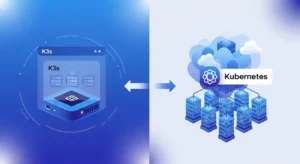
K3s is not a stripped-down or experimental version of Kubernetes. It’s a fully conformant Kubernetes distribution — it passes the CNCF conformance tests, runs the same workloads, and exposes the same API. The difference is in what’s been removed, replaced, or simplified to hit a dramatically smaller footprint.
What K3s Removes From Standard Kubernetes
To get the binary under 100MB, K3s strips several components that are optional or legacy in most deployments:
- Legacy and alpha API versions
- In-tree cloud provider integrations (replaced by external cloud controller managers)
- In-tree storage plugins
- etcd (replaced by SQLite by default, with etcd available as an option)
- Docker runtime dependency (uses containerd natively)
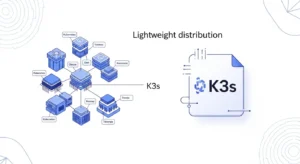
The result is a single binary that packages the Kubernetes API server, controller manager, scheduler, kubelet, and kube-proxy into one executable. Server setup that takes 30+ minutes with kubeadm takes under two minutes with K3s.
What K3s Adds
K3s ships with Flannel as the default CNI, CoreDNS, Traefik as an ingress controller, and a local-path storage provisioner out of the box.
Architecture Differences: Where K3s and K8s Diverge
The Control Plane
Standard Kubernetes runs each control plane component — API server, controller manager, scheduler, etcd — as separate processes. This separation enables fine-grained resource allocation, independent scaling, and component-level fault isolation. It’s the right architecture when the control plane itself is a production concern.
K3s combines those components into a single server process. Less overhead, less inter-process communication, simpler process management — but also less component-level isolation. On a resource-constrained node, this is a meaningful advantage. On a managed cluster where the control plane is someone else’s problem, it matters less.
SQLite vs etcd: The Datastore Decision
This is one of the most significant architectural differences between K3s and K8s, and it’s worth understanding clearly.
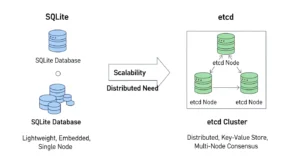
Standard Kubernetes uses etcd as its backing datastore. etcd is a distributed key-value store designed for high availability and strong consistency. It can run as a multi-node cluster with leader election, making it suitable for production HA setups. It also consumes meaningful memory and CPU, particularly as cluster size grows.
K3s defaults to SQLite for single-node deployments. SQLite is embedded, has near-zero overhead, and requires no external process. For a single-server cluster, this is elegant. For HA setups, K3s supports embedded etcd (stable since K3s v1.19) or an external datastore like MySQL or PostgreSQL via Kine — K3s’s datastore translation layer.
The practical implication: if you’re running K3s in HA mode on AWS, you’re not necessarily locked into SQLite. But you need to be deliberate about datastore selection during cluster design, not after the fact.
Master Node Resource Requirements
This is where the difference is most tangible for anyone who’s tried to run Kubernetes on modest hardware. Standard Kubernetes control plane components typically require a minimum of 2 CPU cores and 2GB RAM for the master node, and that’s genuinely a floor rather than a comfortable operating point.
K3s can run a single-node cluster on 512MB RAM and a single CPU core. On a Raspberry Pi 4, on a small EC2 t3.micro, on an edge device — K3s operates where standard Kubernetes simply won’t.
K3s vs K8s: Side-by-Side Comparison
| Category | K3s | Standard K8s (K8s) |
| Binary Size | ~100MB single binary | Multiple binaries & components |
| Default Datastore | SQLite (single node) | etcd |
| HA Datastore | Embedded etcd or external DB | etcd cluster (3+ nodes) |
| Min. RAM (control plane) | ~512MB | ~2GB+ |
| Min. CPU (control plane) | 1 core | 2 cores |
| Container Runtime | containerd (built-in) | containerd / CRI-O / Docker |
| Default CNI | Flannel | None (install separately) |
| Default Ingress | Traefik (included) | None (install separately) |
| Setup Time | ~2 minutes | 30–60+ minutes (kubeadm) |
| Upstream Compatibility | Fully conformant | Fully conformant |
| AWS EKS Available | No (self-managed only) | Yes (EKS managed) |
| Best For | Edge, IoT, dev, small clusters | Production, large-scale, enterprise |
K3s vs K8s Performance: What the Numbers Actually Mean
Performance comparisons between K3s and standard Kubernetes can be misleading if you don’t account for context. Both run the same container workloads using the same container runtime (containerd). Application performance — how fast your pods execute their work — is essentially identical.
Where performance differences appear is at the control plane layer: how fast the cluster responds to API requests, how quickly it schedules new pods, how efficiently it handles large numbers of concurrent objects.
Control Plane Latency :
K3s’s single-process control plane has lower inter-component communication overhead at small cluster sizes. But SQLite doesn’t scale the way etcd does. As cluster object counts grow — more pods, more services, more config maps — SQLite becomes the bottleneck. For clusters beyond a few dozen nodes or a few hundred pods, embedded etcd or an external datastore is recommended.
Startup and Recovery Time :
K3s starts significantly faster than a standard Kubernetes cluster. Cold start time for a K3s server is under 30 seconds on modest hardware. This makes it well-suited for environments where cluster instances are ephemeral or where fast recovery from a node failure is critical without a pre-staged spare control plane.
Resource Efficiency Under Load :
On the same hardware, K3s leaves more resources available for workloads because its control plane consumes less. On a t3.small EC2 instance (2 vCPU, 2GB RAM), running a K3s control plane leaves meaningful headroom for application pods. Running standard Kubernetes on the same instance would be uncomfortable and not recommended for production.
Where K3s Belongs — And Where It Doesn’t
K3s Is the Right Tool For:
- Edge computing and IoT deployments. Running Kubernetes on remote nodes, factory floors, retail locations, or connected devices where compute is limited and network connectivity to a central control plane may be intermittent.
- Development and local environments. Spinning up a K3s cluster on a laptop or a small VM gives developers a production-like Kubernetes environment without the overhead of running full K8s locally.
- CI/CD pipeline environments. Fast startup, low resource footprint, and full Kubernetes API compatibility make K3s excellent for running integration tests in containers during builds.
- Small-scale production clusters. Running a handful of services in a small business or startup context where a full Kubernetes control plane is disproportionate to the workload.
- Hybrid and disconnected environments. Clusters that need to operate with limited or no connectivity to cloud infrastructure.
Standard K8s Is the Right Tool For:
- Large-scale production on AWS. EKS handles the control plane for you. The cost is manageable, the integration with AWS services is deep, and you get a production-hardened control plane without the operational burden.
- Multi-team platform engineering. Kubernetes’ RBAC, namespace model, and network policy capabilities scale well to complex organizations running dozens of services across multiple teams.
- Stateful workloads requiring etcd resilience. When cluster state consistency under failure is non-negotiable, the etcd backing in standard Kubernetes gives you the HA model to match.
- Ecosystem depth requirements. Helm, Istio, ArgoCD, Karpenter, KEDA, Velero — the entire Kubernetes tooling ecosystem is built and tested against standard Kubernetes first. Some tools have K3s support, many don’t assume it.
K3s and K8s in the AWS Context :
This is where the comparison gets most practical for AWS-focused teams. The question isn’t just “K3s or K8s” — it’s “K3s, EKS, or ECS?” Because AWS has its own managed orchestration options, the decision tree is wider than in a bare-metal or self-managed cloud context.
EKS: AWS’s Managed Kubernetes
Amazon Elastic Kubernetes Service (EKS) runs upstream Kubernetes and manages the control plane for you. You don’t run etcd, you don’t manage the API server, you don’t handle control plane upgrades manually. AWS does. EKS is deeply integrated with IAM, ALB, VPC networking, ECR, CloudWatch, and AWS Secrets Manager.
For teams that want standard Kubernetes on AWS without the operational burden of self-managing the control plane, EKS is the default answer. K3s is not available as a managed EKS option — if you run K3s on AWS, you’re running it self-managed on EC2 instances.
When K3s on AWS EC2 Makes Sense
There are legitimate scenarios where K3s on EC2 is the right call, even when EKS exists:
- You need a Kubernetes cluster for a development or staging environment and want minimal cost — a single t3.small running K3s costs a fraction of an EKS cluster
- You’re running distributed edge nodes in the field and using AWS as the central hub, with K3s running at the edge locations
- You need a throwaway cluster for CI/CD test runs where cluster spin-up time matters
- Cost optimization for non-critical workloads where EKS control plane fees add up across many small clusters
The ECS Alternative
It’s worth naming ECS explicitly in this comparison. If your workloads don’t require Kubernetes-specific APIs or tooling — and you’re primarily running containers on AWS — ECS with Fargate is often a cleaner path than either K3s or EKS. No control plane to manage, deep AWS-native integrations, and a significantly simpler operational model. For teams that don’t have a strong reason to be on Kubernetes, ECS can be the right answer.
Single Binary Deployment: Why It Matters More Than It Sounds
K3s’s single binary deployment is not just a packaging convenience. It changes the operational model in ways that compound over time.
With standard Kubernetes, installing a cluster means managing multiple component versions, multiple binaries, and their interdependencies. Upgrades involve coordinating changes across those components. With K3s, a cluster upgrade is replacing one binary.
For teams managing many small clusters — an edge computing fleet, for instance, with dozens or hundreds of remote nodes each running a small K3s cluster — this simplicity scales well. Automation is easier. Configuration drift is less likely. Recovery from a failed node is faster.
For a single EKS cluster managed by AWS, this advantage disappears. AWS handles the component complexity. But for self-managed deployments, especially at the edge or in resource-constrained environments, single binary deployment is a meaningful operational win.
Upstream Kubernetes Compatibility: Is K3s Really ‘Real’ Kubernetes?
Yes. K3s passes the CNCF Kubernetes conformance tests. Workloads that run on standard Kubernetes run on K3s without modification. The same kubectl commands work. The same Kubernetes manifests work. Helm charts work.
The caveats are at the integration layer, not the core API:
- Some cloud-native tools assume etcd and don’t behave correctly with SQLite or Kine
- K3s releases track upstream Kubernetes but with a slight lag — you’re not always on the absolute latest version
- Some storage and networking add-ons have K3s-specific installation notes or compatibility considerations
- AWS-specific integrations like the ALB Ingress Controller or EBS CSI Driver require more configuration on self-managed K3s than on EKS, where they’re first-class add-ons
None of these are blockers for the use cases where K3s shines. They are relevant considerations if you’re evaluating K3s as an EKS replacement for production AWS workloads.
Migrating from K3s to K8s: What’s Involved
If you start on K3s and later need to move to standard Kubernetes (or EKS), the migration is more contained than moving between fundamentally different container platforms — but it’s not trivial.
Your application manifests will work without modification. The work is in the infrastructure layer:
- Ingress: K3s defaults to Traefik. EKS typically uses the AWS Load Balancer Controller with ALB. You’ll need to migrate ingress configuration.
- Networking: Flannel (K3s default) vs VPC CNI (EKS default). CNI differences can affect pod networking, IP address management, and security group configuration.
- Storage: K3s local-path provisioner vs EBS CSI Driver. Persistent volume claims will need to be migrated.
- Datastore: Cluster state doesn’t migrate between SQLite and etcd. A migration involves standing up a new cluster and redeploying workloads.
The practical advice: if you anticipate graduating to EKS within 12–18 months, design your K3s setup with that migration in mind. Use Helm for all deployments, avoid relying on K3s-specific defaults, and store all cluster configuration in version control.
Rancher Labs and the K3s Ecosystem :
K3s was created by Rancher Labs and is now a CNCF sandbox project. Rancher (now part of SUSE) also makes K3s a first-class citizen in its Rancher multi-cluster management platform — if your organization is already running Rancher, K3s clusters integrate directly into that management layer.
The CNCF status is important for longevity considerations. K3s is not a Rancher-proprietary distribution. It has active community development, regular upstream sync, and a public governance model. For teams evaluating the long-term viability of K3s as a platform dependency, that matters.
RKE2 (Rancher Kubernetes Engine 2) is worth mentioning here as a middle-ground option. It’s Rancher’s production-hardened Kubernetes distribution with stronger security defaults (FIPS compliance, SELinux support), full upstream Kubernetes with etcd, and more of the operational tooling K3s omits. For teams that want Rancher support without K3s’s resource optimizations, RKE2 is worth evaluating.
The Decision Framework: K3s or K8s for Your Next Project
Rather than a binary recommendation, here’s a framework based on the factors that actually determine which distribution fits:
Choose K3s if:
- You’re deploying to resource-constrained hardware (edge nodes, IoT devices, small VMs)
- You need fast cluster startup for ephemeral or CI environments
- You’re managing many small clusters and want simpler operational tooling
- Cost is a meaningful constraint and you don’t need the EKS managed control plane
- You need a local development cluster without heavy tooling like minikube or kind
Choose Standard K8s (EKS on AWS) if:
- You’re running production workloads on AWS that need managed infrastructure
- You need deep AWS-native integrations (ALB, IAM roles for service accounts, EBS/EFS storage)
- You’re building a platform used by multiple teams that needs RBAC, namespace isolation, and policy enforcement at scale
- Your cluster will grow to dozens of nodes or hundreds of services
- You want the full Kubernetes tooling ecosystem without compatibility caveats
The Bottom Line on K3s vs K8s :
K3s and standard Kubernetes are solving the same problem at different points on the scale and resource spectrum. K3s wins on simplicity, footprint, and startup speed. Standard Kubernetes wins on ecosystem depth, HA maturity, and AWS-native integration through EKS.
The critical mistake is treating this as a prestige decision. K3s is not a “beginner” option — it’s the right tool for edge computing, IoT orchestration, cost-sensitive dev environments, and small-scale production clusters. Standard Kubernetes is not overkill if your workloads genuinely need what it delivers.
On AWS, most serious production workloads belong on EKS. K3s belongs in the edge, the edge case, and the environment where every megabyte and every dollar matters. If your architecture spans both contexts — a central EKS cluster managing applications, K3s clusters running at distributed edge locations — that’s not a contradiction. That’s thoughtful infrastructure design.
Frequently Asked Questions
Is K3s production-ready?
Yes, for appropriate use cases. K3s is used in production for edge computing, IoT platforms, and small-scale cluster deployments. It’s fully Kubernetes-conformant and maintained as a CNCF project. For large-scale, HA production clusters on AWS, standard Kubernetes via EKS is the more robust path.
Can K3s replace EKS for AWS production workloads?
For most AWS production workloads, no. You lose managed control plane infrastructure, native AWS integrations (ALB Controller, IRSA, EBS CSI), and the operational support that EKS provides. Running K3s self-managed on EC2 is viable for specific scenarios — cost-sensitive dev/staging, edge deployments — but it’s not a straightforward EKS replacement for production.
Does K3s support high availability?
Yes. K3s supports HA through embedded etcd (stable since v1.19) or an external datastore like MySQL, PostgreSQL, or Amazon RDS. An HA K3s cluster requires three or more server nodes with an odd number for etcd quorum. It’s more operationally involved than a single-node K3s deployment, but fully achievable.
Is K3s maintained and safe to depend on long-term?
K3s is a CNCF sandbox project with active development and regular upstream Kubernetes version syncs. Its origin with Rancher Labs (now SUSE) gives it commercial backing, and its open governance model reduces single-vendor lock-in risk. For teams concerned about long-term viability, the CNCF status and active community are positive signals.
What’s the difference between K3s, RKE2, and minikube?
K3s is a lightweight production-grade Kubernetes distribution optimized for resource-constrained environments. RKE2 is Rancher’s production-hardened full Kubernetes distribution with stronger security defaults and full etcd backing. minikube is a local development tool only — not designed for production. K3s can serve both development and small-scale production purposes; the other two serve different needs.
Conclusion :
K3s and standard Kubernetes aren’t competing solutions — they’re built for different realities. K3s excels where resources are limited, speed matters, and simplicity is a priority. Standard Kubernetes, especially through EKS, dominates when you need scale, deep AWS integrations, and production-grade reliability across complex systems.
The right choice comes down to context. If you’re operating at the edge, running lightweight clusters, or optimizing for cost and speed, K3s is a smart and efficient option. If you’re building or scaling production workloads on AWS, standard Kubernetes provides the stability and ecosystem depth you’ll eventually rely on.
The key is not choosing what’s more powerful — it’s choosing what fits your architecture today while keeping tomorrow in mind. And if you’re weighing those tradeoffs, GoCloud can help you design the right Kubernetes strategy, ensuring your infrastructure is both efficient now and ready to scale when you need it.
